mirror of
https://github.com/microsoft/PowerToys.git
synced 2026-08-29 10:09:43 +02:00
 558e633c59
## Summary - Publish scheduled `main` builds as GitHub prereleases while keeping manual `main` runs as preview validation builds. - Add an opt-in Settings switch for prerelease update checks; stable updates remain the default. - Use one MSI-safe version across bundles, MSI packages, binaries, symbols, and package manifests. - Prevent preview releases from triggering Microsoft Store, WinGet, or public-symbol publication. - Label preview builds explicitly in Settings, update notifications, and What's New. ## Build intent | Source | Trigger | Intent | | --- | --- | --- | | `main` | Scheduled | Publish a preview release | | `main` | Manual | Validate a preview build without publishing | | `stable` | Manual | Produce a stable release | | Other branches | Any supported trigger | Produce a private validation build | ## MSI-safe release versioning Windows Installer compares only `major.minor.build` and ignores the fourth version component. Preview and stable release builds therefore use: ```text major.minor.YDDDB.0 ``` - `Y`: zero-based number of calendar years since `ReleaseTrainEpoch`. - `DDD`: three-position calendar day of year. - `B`: daily release sequence `1-9`. - The fourth component is always `0`. With `ReleaseTrainVersion=0.100` and `ReleaseTrainEpoch=2026-01-01`: ```text 0.100.2111.0 = July 30, 2026, release build 1 0.100.3659.0 = December 31, 2026, release build 9 0.100.10011.0 = January 1, 2027, release build 1 ``` The allocator formats `DDD` as exactly three digits before converting the MSI component to its numeric representation. Leading zeros may not be displayed because Windows version components are numeric; decoding remains positional: ```text B = component % 10 DDD = (component / 10) % 1000 Y = component / 10000 ``` `ReleaseTrainVersion` and `ReleaseTrainEpoch` are checked in under `src/Version.props`. The epoch remains January 1 of the active epoch year and advances on the first release-train minor change in a new year. ## Daily release counter Azure DevOps persists the daily sequence server-side using a counter keyed as `release-YYYYMMDD`. - `main` and `stable` share the same daily counter. - Other branches do not evaluate or consume the release counter. - Failed or canceled `main`/`stable` runs may leave gaps. - The build fails when the daily sequence exceeds `9`. - The counter date and encoded `YDDD` date both use `pipeline.startTime`. Private branches retain independent `0.0.<extended-day><NN>.0` validation versions. ## Update behavior - Stable users continue to query GitHub's stable latest-release path. - Users who explicitly enable preview updates can select newer GitHub prereleases. - Preview releases and notifications are labeled as PowerToys Preview. - What's New separates preview entries from stable release history and hides previews by default. ## Validation - 17 Pester tests cover `main`, `stable`, private branches, year rollover, epoch reset, monotonicity, override validation, sequence limits, and date alignment. - Version propagation verified `0.100.2111.0` in `Version.props` and all affected AppX/MSIX manifests. - Azure DevOps pipeline dry-runs succeeded for both `refs/heads/main` and `refs/heads/stable`. - The affected native version project builds successfully. - PR CI is green for x64, ARM64, Command Palette SDK, dependency review, telemetry detection, and CLA. ## Remaining end-to-end checks - Install two locally or officially produced installers with consecutive MSI-visible `YDDDB` versions and verify the upgrade preserves binaries, package registrations, hardlinks, and shell integrations. - On the first natural post-merge `main` or `stable` run, verify the production counter value and resolved version in the release logs. ## Local GPO verification Validated locally with the signed `v0.100.2171` build from Azure DevOps build [153961073](https://microsoft.visualstudio.com/Dart/_build/results?buildId=153961073). These checks cover the administrative-template integration and Settings behavior. ### Policy enabled: preview updates are disabled With `PreviewUpdatesDisabled=1`, **Include prerelease updates** is forced off and locked, and Settings displays the managed-by-your-organization notice. 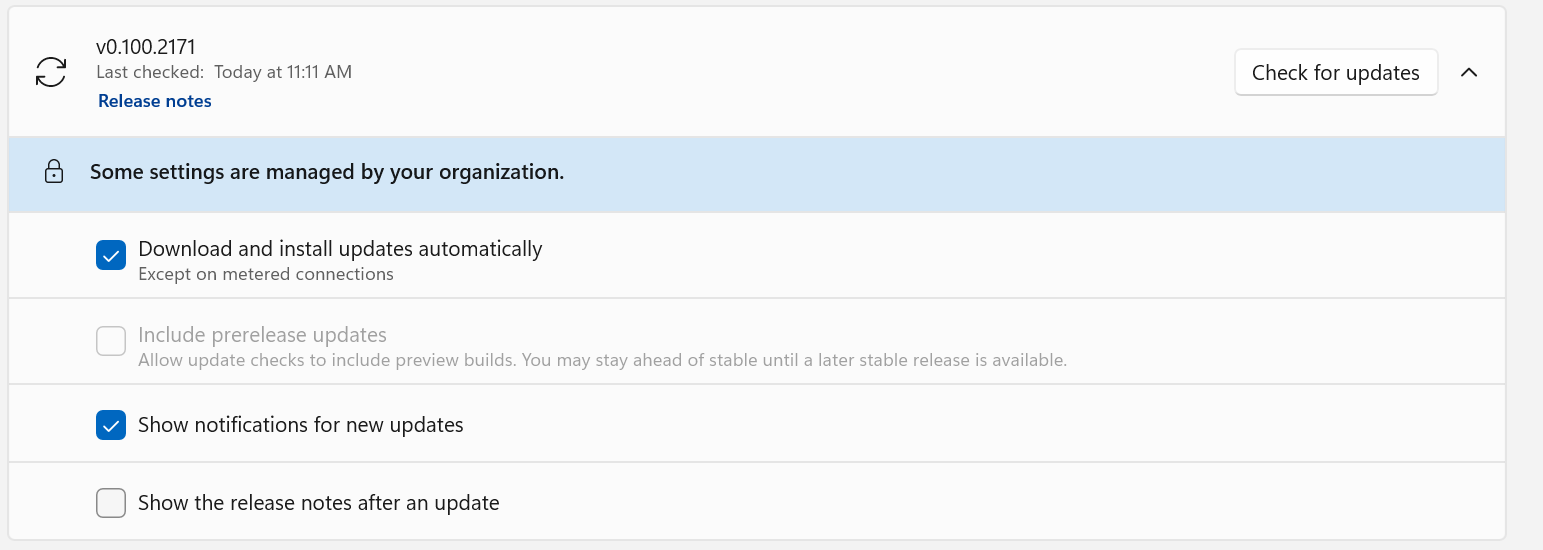 ### Policy removed: the user preference is preserved After removing `PreviewUpdatesDisabled` and restarting PowerToys, the previously selected preview-update preference is restored and editable. The policy suppresses the preference without overwriting it. 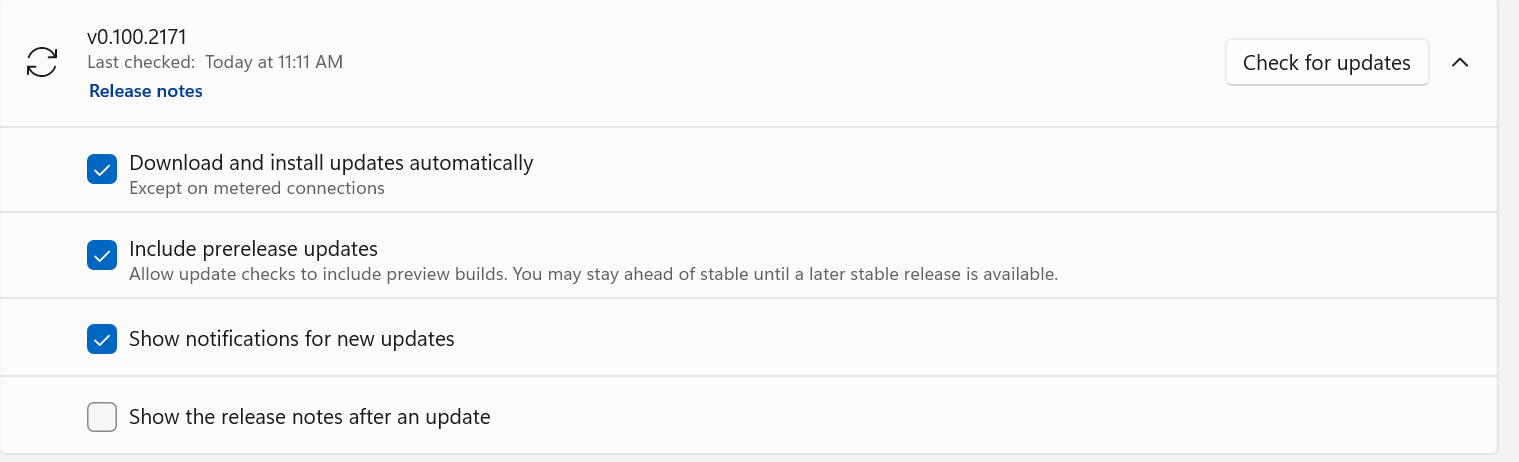 ### Group Policy Editor After importing the updated ADMX/ADML templates, **Disable preview build updates** appears under **Microsoft PowerToys > Installer and Updates**. The policy dialog documents that **Enabled** blocks preview updates, while **Disabled** or **Not Configured** leaves the choice available to the user. 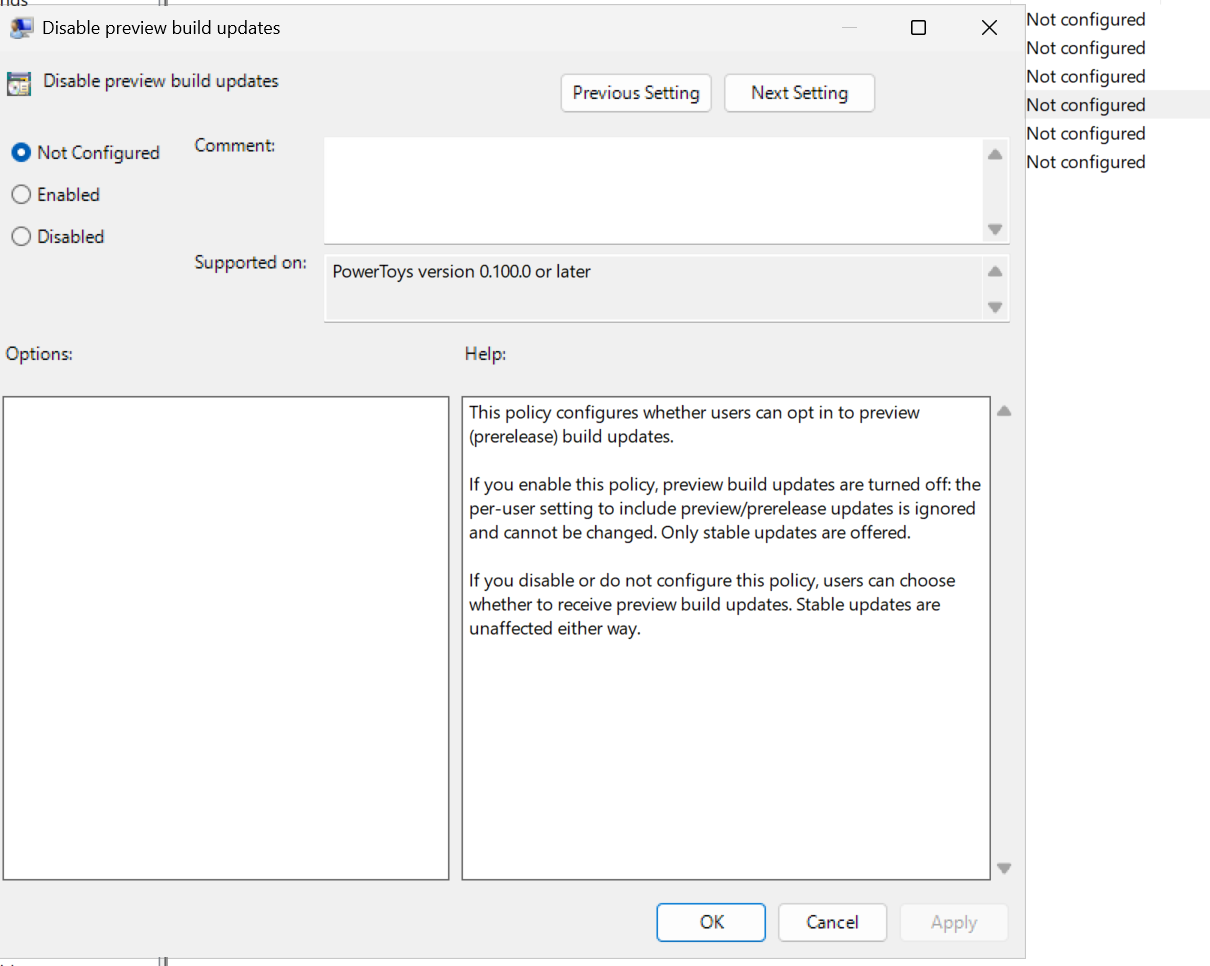 --------- Co-authored-by: Copilot <223556219+Copilot@users.noreply.github.com> Copilot-Session: ad8b7909-0472-4464-bdee-deaeca726f94 Copilot-Session: 8e04a72e-3b0f-4ac4-8156-d04ea9b8bb85



139 lines
6.2 KiB
PowerShell
139 lines
6.2 KiB
PowerShell
[CmdletBinding()]
|
|
Param(
|
|
[Parameter(Mandatory=$True,Position=1)]
|
|
[string]$versionNumber = "0.0.1",
|
|
|
|
[Parameter(Mandatory=$True,Position=2)]
|
|
[AllowEmptyString()]
|
|
[string]$DevEnvironment = "Local",
|
|
|
|
[ValidateSet("stable", "preview", "private")]
|
|
[string]$Channel = "stable",
|
|
|
|
[string]$SourceCommit = $env:BUILD_SOURCEVERSION,
|
|
|
|
[string]$BuildNumber = $env:BUILD_BUILDNUMBER,
|
|
|
|
[string]$BuildDate = $env:VERSIONDATE,
|
|
|
|
[string]$DailyVersionSequence = $env:DAILYVERSIONSEQUENCE
|
|
)
|
|
|
|
Write-Host $PSScriptRoot
|
|
|
|
function Get-NormalizedVersion {
|
|
param(
|
|
[Parameter(Mandatory = $true)]
|
|
[string]$InputVersion,
|
|
[Parameter(Mandatory = $true)]
|
|
[string]$ReleaseChannel,
|
|
[string]$PipelineBuildNumber,
|
|
[string]$PipelineBuildDate,
|
|
[string]$PipelineDailyVersionSequence
|
|
)
|
|
|
|
if ($InputVersion -match "^(?<numeric>\d+\.\d+(?:\.\d+){0,2})-(?<suffix>preview)$") {
|
|
if ($ReleaseChannel -ne "preview") {
|
|
throw "Version suffix '-preview' can only be used with the preview release channel"
|
|
}
|
|
|
|
$InputVersion = $matches["numeric"]
|
|
}
|
|
|
|
if ($ReleaseChannel -eq "preview" -and $InputVersion -match "^(\d+)\.(\d+)$") {
|
|
$metadata = & (Join-Path $PSScriptRoot "resolveBuildMetadata.ps1") `
|
|
-VersionOverride $InputVersion `
|
|
-SourceBranch "refs/heads/main" `
|
|
-BuildReason "Manual" `
|
|
-BuildNumber $PipelineBuildNumber `
|
|
-BuildDate $PipelineBuildDate `
|
|
-DailyVersionSequence $PipelineDailyVersionSequence
|
|
return $metadata.Version
|
|
}
|
|
|
|
if ($InputVersion -match "^(\d+)\.(\d+)\.(\d+)(?:\.(\d+))?$") {
|
|
$versionParts = @([int]::Parse($matches[1]), [int]::Parse($matches[2]), [int]::Parse($matches[3]))
|
|
if ($matches[4]) {
|
|
$versionParts += [int]::Parse($matches[4])
|
|
}
|
|
|
|
return $versionParts -join "."
|
|
}
|
|
|
|
throw "Build format does not match the expected pattern (w.x, w.x.y, w.x.y.z, or w.x.y.z-preview for preview channel)"
|
|
}
|
|
|
|
$versionNumber = Get-NormalizedVersion `
|
|
-InputVersion $versionNumber `
|
|
-ReleaseChannel $Channel `
|
|
-PipelineBuildNumber $BuildNumber `
|
|
-PipelineBuildDate $BuildDate `
|
|
-PipelineDailyVersionSequence $DailyVersionSequence
|
|
foreach ($part in ($versionNumber -split '\.')) {
|
|
$value = [int]::Parse($part)
|
|
if ($value -lt 0 -or $value -gt [UInt16]::MaxValue) {
|
|
throw "Version component '$value' is outside the supported Windows version range 0-65535"
|
|
}
|
|
}
|
|
Write-Host "Version Number" $versionNumber
|
|
|
|
$verPropWriteFileLocation = $PSScriptRoot + '/../src/Version.props';
|
|
$verPropReadFileLocation = $verPropWriteFileLocation;
|
|
|
|
[XML]$verProps = Get-Content $verPropReadFileLocation
|
|
$verProps.Project.PropertyGroup.Version = $versionNumber;
|
|
$verProps.Project.PropertyGroup.VersionChannel = $Channel;
|
|
$verProps.Project.PropertyGroup.SourceCommit = if ([string]::IsNullOrWhiteSpace($SourceCommit)) { "" } else { $SourceCommit };
|
|
$verProps.Project.PropertyGroup.DevEnvironment = $DevEnvironment;
|
|
|
|
Write-Host "xml" $verProps.Project.PropertyGroup.Version
|
|
$verProps.Save($verPropWriteFileLocation);
|
|
|
|
|
|
#### The same thing as above, but for the CmdPal version
|
|
$verPropWriteFileLocation = $PSScriptRoot + '/../src/CmdPalVersion.props';
|
|
$verPropReadFileLocation = $verPropWriteFileLocation;
|
|
[XML]$verProps = Get-Content $verPropReadFileLocation
|
|
$verProps.Project.PropertyGroup.DevEnvironment = $DevEnvironment;
|
|
Write-Host "xml" $verProps.Project.PropertyGroup.Version
|
|
$verProps.Save($verPropWriteFileLocation);
|
|
#######
|
|
|
|
$manifestVersionNumber = if (($versionNumber.ToCharArray() | Where-Object { $_ -eq '.' }).Count -eq 2) { $versionNumber + '.0' } else { $versionNumber }
|
|
|
|
# Set PowerRenameContextMenu package version in AppManifest.xml
|
|
$powerRenameContextMenuAppManifestWriteFileLocation = $PSScriptRoot + '/../src/modules/powerrename/PowerRenameContextMenu/AppxManifest.xml';
|
|
$powerRenameContextMenuAppManifestReadFileLocation = $powerRenameContextMenuAppManifestWriteFileLocation;
|
|
|
|
[XML]$powerRenameContextMenuAppManifest = Get-Content $powerRenameContextMenuAppManifestReadFileLocation
|
|
$powerRenameContextMenuAppManifest.Package.Identity.Version = $manifestVersionNumber
|
|
Write-Host "PowerRenameContextMenu version" $powerRenameContextMenuAppManifest.Package.Identity.Version
|
|
$powerRenameContextMenuAppManifest.Save($powerRenameContextMenuAppManifestWriteFileLocation);
|
|
|
|
# Set ImageResizerContextMenu package version in AppManifest.xml
|
|
$imageResizerContextMenuAppManifestWriteFileLocation = $PSScriptRoot + '/../src/modules/imageresizer/ImageResizerContextMenu/AppxManifest.xml';
|
|
$imageResizerContextMenuAppManifestReadFileLocation = $imageResizerContextMenuAppManifestWriteFileLocation;
|
|
|
|
[XML]$imageResizerContextMenuAppManifest = Get-Content $imageResizerContextMenuAppManifestReadFileLocation
|
|
$imageResizerContextMenuAppManifest.Package.Identity.Version = $manifestVersionNumber
|
|
Write-Host "ImageResizerContextMenu version" $imageResizerContextMenuAppManifest.Package.Identity.Version
|
|
$imageResizerContextMenuAppManifest.Save($imageResizerContextMenuAppManifestWriteFileLocation);
|
|
|
|
# Set FileLocksmithContextMenu package version in AppManifest.xml
|
|
$fileLocksmithContextMenuAppManifestWriteFileLocation = $PSScriptRoot + '/../src/modules/FileLocksmith/FileLocksmithContextMenu/AppxManifest.xml';
|
|
$fileLocksmithContextMenuAppManifestReadFileLocation = $fileLocksmithContextMenuAppManifestWriteFileLocation;
|
|
|
|
[XML]$fileLocksmithContextMenuAppManifest = Get-Content $fileLocksmithContextMenuAppManifestReadFileLocation
|
|
$fileLocksmithContextMenuAppManifest.Package.Identity.Version = $manifestVersionNumber
|
|
Write-Host "FileLocksmithContextMenu version" $fileLocksmithContextMenuAppManifest.Package.Identity.Version
|
|
$fileLocksmithContextMenuAppManifest.Save($fileLocksmithContextMenuAppManifestWriteFileLocation);
|
|
|
|
# Set NewPlusContextMenu package version in AppManifest.xml
|
|
$newPlusContextMenuAppManifestWriteFileLocation = $PSScriptRoot + '/../src/modules/NewPlus/NewShellExtensionContextMenu/AppxManifest.xml';
|
|
$newPlusContextMenuAppManifestReadFileLocation = $newPlusContextMenuAppManifestWriteFileLocation;
|
|
|
|
[XML]$newPlusContextMenuAppManifest = Get-Content $newPlusContextMenuAppManifestReadFileLocation
|
|
$newPlusContextMenuAppManifest.Package.Identity.Version = $manifestVersionNumber
|
|
Write-Host "NewPlusContextMenu version" $newPlusContextMenuAppManifest.Package.Identity.Version
|
|
$newPlusContextMenuAppManifest.Save($newPlusContextMenuAppManifestWriteFileLocation);
|