2021-12-17 18:15:31 -08:00
|
|
|
[CmdletBinding()]
|
|
|
|
|
Param(
|
|
|
|
|
[Parameter(Mandatory=$True,Position=1)]
|
|
|
|
|
[string]$versionNumber = "0.0.1",
|
|
|
|
|
|
|
|
|
|
[Parameter(Mandatory=$True,Position=2)]
|
|
|
|
|
[AllowEmptyString()]
|

Add preview release versioning and update channel support (#49414)
## Summary
- Publish scheduled `main` builds as GitHub prereleases while keeping
manual `main` runs as preview validation builds.
- Add an opt-in Settings switch for prerelease update checks; stable
updates remain the default.
- Use one MSI-safe version across bundles, MSI packages, binaries,
symbols, and package manifests.
- Prevent preview releases from triggering Microsoft Store, WinGet, or
public-symbol publication.
- Label preview builds explicitly in Settings, update notifications, and
What's New.
## Build intent
| Source | Trigger | Intent |
| --- | --- | --- |
| `main` | Scheduled | Publish a preview release |
| `main` | Manual | Validate a preview build without publishing |
| `stable` | Manual | Produce a stable release |
| Other branches | Any supported trigger | Produce a private validation
build |
## MSI-safe release versioning
Windows Installer compares only `major.minor.build` and ignores the
fourth version component. Preview and stable release builds therefore
use:
```text
major.minor.YDDDB.0
```
- `Y`: zero-based number of calendar years since `ReleaseTrainEpoch`.
- `DDD`: three-position calendar day of year.
- `B`: daily release sequence `1-9`.
- The fourth component is always `0`.
With `ReleaseTrainVersion=0.100` and `ReleaseTrainEpoch=2026-01-01`:
```text
0.100.2111.0 = July 30, 2026, release build 1
0.100.3659.0 = December 31, 2026, release build 9
0.100.10011.0 = January 1, 2027, release build 1
```
The allocator formats `DDD` as exactly three digits before converting
the MSI component to its numeric representation. Leading zeros may not
be displayed because Windows version components are numeric; decoding
remains positional:
```text
B = component % 10
DDD = (component / 10) % 1000
Y = component / 10000
```
`ReleaseTrainVersion` and `ReleaseTrainEpoch` are checked in under
`src/Version.props`. The epoch remains January 1 of the active epoch
year and advances on the first release-train minor change in a new year.
## Daily release counter
Azure DevOps persists the daily sequence server-side using a counter
keyed as `release-YYYYMMDD`.
- `main` and `stable` share the same daily counter.
- Other branches do not evaluate or consume the release counter.
- Failed or canceled `main`/`stable` runs may leave gaps.
- The build fails when the daily sequence exceeds `9`.
- The counter date and encoded `YDDD` date both use
`pipeline.startTime`.
Private branches retain independent `0.0.<extended-day><NN>.0`
validation versions.
## Update behavior
- Stable users continue to query GitHub's stable latest-release path.
- Users who explicitly enable preview updates can select newer GitHub
prereleases.
- Preview releases and notifications are labeled as PowerToys Preview.
- What's New separates preview entries from stable release history and
hides previews by default.
## Validation
- 17 Pester tests cover `main`, `stable`, private branches, year
rollover, epoch reset, monotonicity, override validation, sequence
limits, and date alignment.
- Version propagation verified `0.100.2111.0` in `Version.props` and all
affected AppX/MSIX manifests.
- Azure DevOps pipeline dry-runs succeeded for both `refs/heads/main`
and `refs/heads/stable`.
- The affected native version project builds successfully.
- PR CI is green for x64, ARM64, Command Palette SDK, dependency review,
telemetry detection, and CLA.
## Remaining end-to-end checks
- Install two locally or officially produced installers with consecutive
MSI-visible `YDDDB` versions and verify the upgrade preserves binaries,
package registrations, hardlinks, and shell integrations.
- On the first natural post-merge `main` or `stable` run, verify the
production counter value and resolved version in the release logs.
## Local GPO verification
Validated locally with the signed `v0.100.2171` build from Azure DevOps
build
[153961073](https://microsoft.visualstudio.com/Dart/_build/results?buildId=153961073).
These checks cover the administrative-template integration and Settings
behavior.
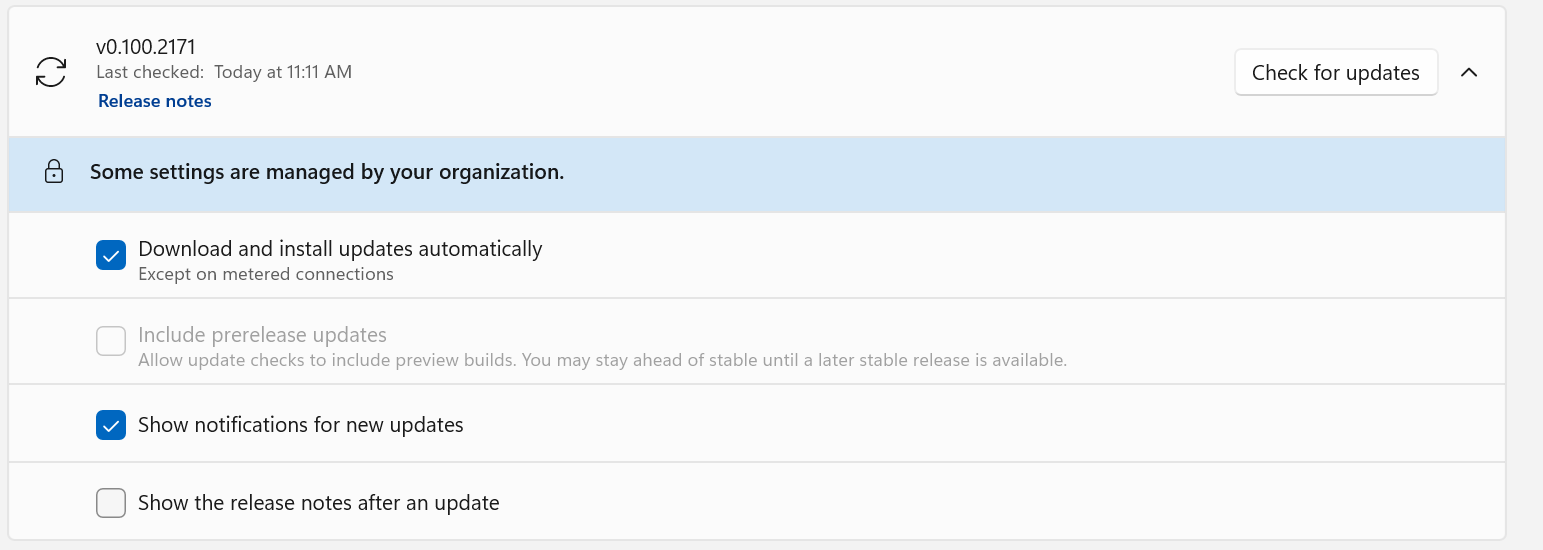
### Policy enabled: preview updates are disabled
With `PreviewUpdatesDisabled=1`, **Include prerelease updates** is
forced off and locked, and Settings displays the
managed-by-your-organization notice.
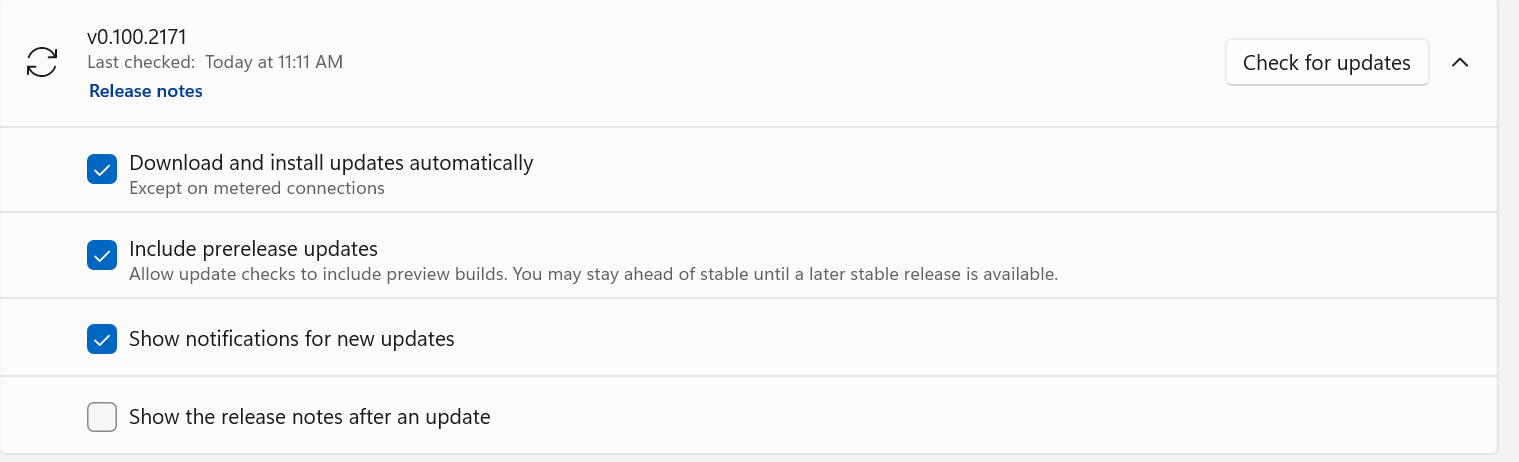
### Policy removed: the user preference is preserved
After removing `PreviewUpdatesDisabled` and restarting PowerToys, the
previously selected preview-update preference is restored and editable.
The policy suppresses the preference without overwriting it.
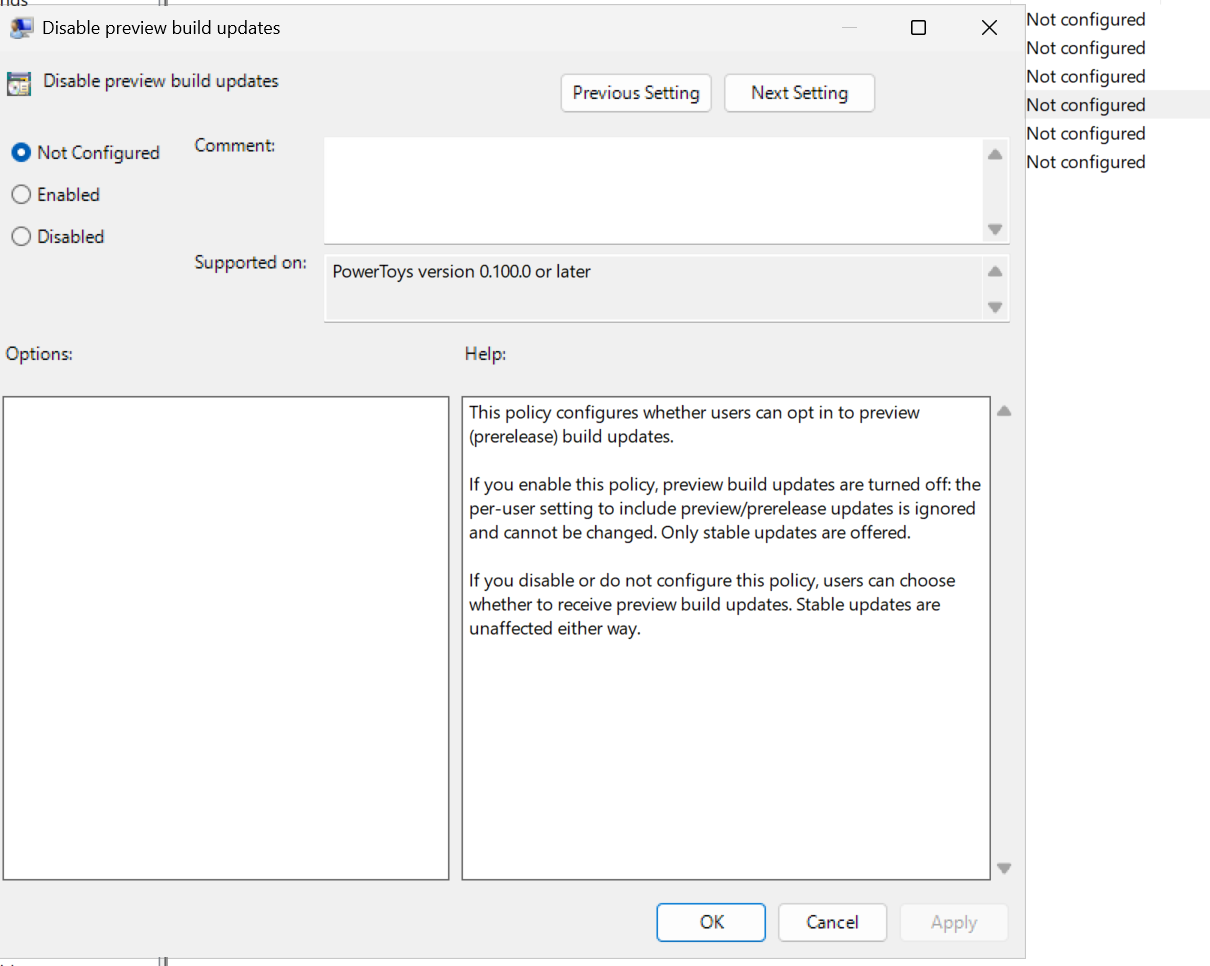
### Group Policy Editor
After importing the updated ADMX/ADML templates, **Disable preview build
updates** appears under **Microsoft PowerToys > Installer and Updates**.
The policy dialog documents that **Enabled** blocks preview updates,
while **Disabled** or **Not Configured** leaves the choice available to
the user.
---------
Co-authored-by: Copilot <223556219+Copilot@users.noreply.github.com>
Copilot-Session: ad8b7909-0472-4464-bdee-deaeca726f94
Copilot-Session: 8e04a72e-3b0f-4ac4-8156-d04ea9b8bb85
2026-08-06 23:45:11 +08:00
|
|
|
[string]$DevEnvironment = "Local",
|
|
|
|
|
|
|
|
|
|
[ValidateSet("stable", "preview", "private")]
|
|
|
|
|
[string]$Channel = "stable",
|
|
|
|
|
|
|
|
|
|
[string]$SourceCommit = $env:BUILD_SOURCEVERSION,
|
|
|
|
|
|
|
|
|
|
[string]$BuildNumber = $env:BUILD_BUILDNUMBER,
|
|
|
|
|
|
|
|
|
|
[string]$BuildDate = $env:VERSIONDATE,
|
|
|
|
|
|
|
|
|
|
[string]$DailyVersionSequence = $env:DAILYVERSIONSEQUENCE
|
2021-12-17 18:15:31 -08:00
|
|
|
)
|
|
|
|
|
|
|
|
|
|
Write-Host $PSScriptRoot
|
Add preview release versioning and update channel support (#49414)
## Summary
- Publish scheduled `main` builds as GitHub prereleases while keeping
manual `main` runs as preview validation builds.
- Add an opt-in Settings switch for prerelease update checks; stable
updates remain the default.
- Use one MSI-safe version across bundles, MSI packages, binaries,
symbols, and package manifests.
- Prevent preview releases from triggering Microsoft Store, WinGet, or
public-symbol publication.
- Label preview builds explicitly in Settings, update notifications, and
What's New.
## Build intent
| Source | Trigger | Intent |
| --- | --- | --- |
| `main` | Scheduled | Publish a preview release |
| `main` | Manual | Validate a preview build without publishing |
| `stable` | Manual | Produce a stable release |
| Other branches | Any supported trigger | Produce a private validation
build |
## MSI-safe release versioning
Windows Installer compares only `major.minor.build` and ignores the
fourth version component. Preview and stable release builds therefore
use:
```text
major.minor.YDDDB.0
```
- `Y`: zero-based number of calendar years since `ReleaseTrainEpoch`.
- `DDD`: three-position calendar day of year.
- `B`: daily release sequence `1-9`.
- The fourth component is always `0`.
With `ReleaseTrainVersion=0.100` and `ReleaseTrainEpoch=2026-01-01`:
```text
0.100.2111.0 = July 30, 2026, release build 1
0.100.3659.0 = December 31, 2026, release build 9
0.100.10011.0 = January 1, 2027, release build 1
```
The allocator formats `DDD` as exactly three digits before converting
the MSI component to its numeric representation. Leading zeros may not
be displayed because Windows version components are numeric; decoding
remains positional:
```text
B = component % 10
DDD = (component / 10) % 1000
Y = component / 10000
```
`ReleaseTrainVersion` and `ReleaseTrainEpoch` are checked in under
`src/Version.props`. The epoch remains January 1 of the active epoch
year and advances on the first release-train minor change in a new year.
## Daily release counter
Azure DevOps persists the daily sequence server-side using a counter
keyed as `release-YYYYMMDD`.
- `main` and `stable` share the same daily counter.
- Other branches do not evaluate or consume the release counter.
- Failed or canceled `main`/`stable` runs may leave gaps.
- The build fails when the daily sequence exceeds `9`.
- The counter date and encoded `YDDD` date both use
`pipeline.startTime`.
Private branches retain independent `0.0.<extended-day><NN>.0`
validation versions.
## Update behavior
- Stable users continue to query GitHub's stable latest-release path.
- Users who explicitly enable preview updates can select newer GitHub
prereleases.
- Preview releases and notifications are labeled as PowerToys Preview.
- What's New separates preview entries from stable release history and
hides previews by default.
## Validation
- 17 Pester tests cover `main`, `stable`, private branches, year
rollover, epoch reset, monotonicity, override validation, sequence
limits, and date alignment.
- Version propagation verified `0.100.2111.0` in `Version.props` and all
affected AppX/MSIX manifests.
- Azure DevOps pipeline dry-runs succeeded for both `refs/heads/main`
and `refs/heads/stable`.
- The affected native version project builds successfully.
- PR CI is green for x64, ARM64, Command Palette SDK, dependency review,
telemetry detection, and CLA.
## Remaining end-to-end checks
- Install two locally or officially produced installers with consecutive
MSI-visible `YDDDB` versions and verify the upgrade preserves binaries,
package registrations, hardlinks, and shell integrations.
- On the first natural post-merge `main` or `stable` run, verify the
production counter value and resolved version in the release logs.
## Local GPO verification
Validated locally with the signed `v0.100.2171` build from Azure DevOps
build
[153961073](https://microsoft.visualstudio.com/Dart/_build/results?buildId=153961073).
These checks cover the administrative-template integration and Settings
behavior.
### Policy enabled: preview updates are disabled
With `PreviewUpdatesDisabled=1`, **Include prerelease updates** is
forced off and locked, and Settings displays the
managed-by-your-organization notice.

### Policy removed: the user preference is preserved
After removing `PreviewUpdatesDisabled` and restarting PowerToys, the
previously selected preview-update preference is restored and editable.
The policy suppresses the preference without overwriting it.

### Group Policy Editor
After importing the updated ADMX/ADML templates, **Disable preview build
updates** appears under **Microsoft PowerToys > Installer and Updates**.
The policy dialog documents that **Enabled** blocks preview updates,
while **Disabled** or **Not Configured** leaves the choice available to
the user.

---------
Co-authored-by: Copilot <223556219+Copilot@users.noreply.github.com>
Copilot-Session: ad8b7909-0472-4464-bdee-deaeca726f94
Copilot-Session: 8e04a72e-3b0f-4ac4-8156-d04ea9b8bb85
2026-08-06 23:45:11 +08:00
|
|
|
|
|
|
|
|
function Get-NormalizedVersion {
|
|
|
|
|
param(
|
|
|
|
|
[Parameter(Mandatory = $true)]
|
|
|
|
|
[string]$InputVersion,
|
|
|
|
|
[Parameter(Mandatory = $true)]
|
|
|
|
|
[string]$ReleaseChannel,
|
|
|
|
|
[string]$PipelineBuildNumber,
|
|
|
|
|
[string]$PipelineBuildDate,
|
|
|
|
|
[string]$PipelineDailyVersionSequence
|
|
|
|
|
)
|
|
|
|
|
|
|
|
|
|
if ($InputVersion -match "^(?<numeric>\d+\.\d+(?:\.\d+){0,2})-(?<suffix>preview)$") {
|
|
|
|
|
if ($ReleaseChannel -ne "preview") {
|
|
|
|
|
throw "Version suffix '-preview' can only be used with the preview release channel"
|
|
|
|
|
}
|
|
|
|
|
|
|
|
|
|
$InputVersion = $matches["numeric"]
|
|
|
|
|
}
|
|
|
|
|
|
|
|
|
|
if ($ReleaseChannel -eq "preview" -and $InputVersion -match "^(\d+)\.(\d+)$") {
|
|
|
|
|
$metadata = & (Join-Path $PSScriptRoot "resolveBuildMetadata.ps1") `
|
|
|
|
|
-VersionOverride $InputVersion `
|
|
|
|
|
-SourceBranch "refs/heads/main" `
|
|
|
|
|
-BuildReason "Manual" `
|
|
|
|
|
-BuildNumber $PipelineBuildNumber `
|
|
|
|
|
-BuildDate $PipelineBuildDate `
|
|
|
|
|
-DailyVersionSequence $PipelineDailyVersionSequence
|
|
|
|
|
return $metadata.Version
|
|
|
|
|
}
|
|
|
|
|
|
|
|
|
|
if ($InputVersion -match "^(\d+)\.(\d+)\.(\d+)(?:\.(\d+))?$") {
|
|
|
|
|
$versionParts = @([int]::Parse($matches[1]), [int]::Parse($matches[2]), [int]::Parse($matches[3]))
|
|
|
|
|
if ($matches[4]) {
|
|
|
|
|
$versionParts += [int]::Parse($matches[4])
|
|
|
|
|
}
|
|
|
|
|
|
|
|
|
|
return $versionParts -join "."
|
|
|
|
|
}
|
|
|
|
|
|
|
|
|
|
throw "Build format does not match the expected pattern (w.x, w.x.y, w.x.y.z, or w.x.y.z-preview for preview channel)"
|
2021-12-17 18:15:31 -08:00
|
|
|
}
|
Add preview release versioning and update channel support (#49414)
## Summary
- Publish scheduled `main` builds as GitHub prereleases while keeping
manual `main` runs as preview validation builds.
- Add an opt-in Settings switch for prerelease update checks; stable
updates remain the default.
- Use one MSI-safe version across bundles, MSI packages, binaries,
symbols, and package manifests.
- Prevent preview releases from triggering Microsoft Store, WinGet, or
public-symbol publication.
- Label preview builds explicitly in Settings, update notifications, and
What's New.
## Build intent
| Source | Trigger | Intent |
| --- | --- | --- |
| `main` | Scheduled | Publish a preview release |
| `main` | Manual | Validate a preview build without publishing |
| `stable` | Manual | Produce a stable release |
| Other branches | Any supported trigger | Produce a private validation
build |
## MSI-safe release versioning
Windows Installer compares only `major.minor.build` and ignores the
fourth version component. Preview and stable release builds therefore
use:
```text
major.minor.YDDDB.0
```
- `Y`: zero-based number of calendar years since `ReleaseTrainEpoch`.
- `DDD`: three-position calendar day of year.
- `B`: daily release sequence `1-9`.
- The fourth component is always `0`.
With `ReleaseTrainVersion=0.100` and `ReleaseTrainEpoch=2026-01-01`:
```text
0.100.2111.0 = July 30, 2026, release build 1
0.100.3659.0 = December 31, 2026, release build 9
0.100.10011.0 = January 1, 2027, release build 1
```
The allocator formats `DDD` as exactly three digits before converting
the MSI component to its numeric representation. Leading zeros may not
be displayed because Windows version components are numeric; decoding
remains positional:
```text
B = component % 10
DDD = (component / 10) % 1000
Y = component / 10000
```
`ReleaseTrainVersion` and `ReleaseTrainEpoch` are checked in under
`src/Version.props`. The epoch remains January 1 of the active epoch
year and advances on the first release-train minor change in a new year.
## Daily release counter
Azure DevOps persists the daily sequence server-side using a counter
keyed as `release-YYYYMMDD`.
- `main` and `stable` share the same daily counter.
- Other branches do not evaluate or consume the release counter.
- Failed or canceled `main`/`stable` runs may leave gaps.
- The build fails when the daily sequence exceeds `9`.
- The counter date and encoded `YDDD` date both use
`pipeline.startTime`.
Private branches retain independent `0.0.<extended-day><NN>.0`
validation versions.
## Update behavior
- Stable users continue to query GitHub's stable latest-release path.
- Users who explicitly enable preview updates can select newer GitHub
prereleases.
- Preview releases and notifications are labeled as PowerToys Preview.
- What's New separates preview entries from stable release history and
hides previews by default.
## Validation
- 17 Pester tests cover `main`, `stable`, private branches, year
rollover, epoch reset, monotonicity, override validation, sequence
limits, and date alignment.
- Version propagation verified `0.100.2111.0` in `Version.props` and all
affected AppX/MSIX manifests.
- Azure DevOps pipeline dry-runs succeeded for both `refs/heads/main`
and `refs/heads/stable`.
- The affected native version project builds successfully.
- PR CI is green for x64, ARM64, Command Palette SDK, dependency review,
telemetry detection, and CLA.
## Remaining end-to-end checks
- Install two locally or officially produced installers with consecutive
MSI-visible `YDDDB` versions and verify the upgrade preserves binaries,
package registrations, hardlinks, and shell integrations.
- On the first natural post-merge `main` or `stable` run, verify the
production counter value and resolved version in the release logs.
## Local GPO verification
Validated locally with the signed `v0.100.2171` build from Azure DevOps
build
[153961073](https://microsoft.visualstudio.com/Dart/_build/results?buildId=153961073).
These checks cover the administrative-template integration and Settings
behavior.
### Policy enabled: preview updates are disabled
With `PreviewUpdatesDisabled=1`, **Include prerelease updates** is
forced off and locked, and Settings displays the
managed-by-your-organization notice.

### Policy removed: the user preference is preserved
After removing `PreviewUpdatesDisabled` and restarting PowerToys, the
previously selected preview-update preference is restored and editable.
The policy suppresses the preference without overwriting it.

### Group Policy Editor
After importing the updated ADMX/ADML templates, **Disable preview build
updates** appears under **Microsoft PowerToys > Installer and Updates**.
The policy dialog documents that **Enabled** blocks preview updates,
while **Disabled** or **Not Configured** leaves the choice available to
the user.

---------
Co-authored-by: Copilot <223556219+Copilot@users.noreply.github.com>
Copilot-Session: ad8b7909-0472-4464-bdee-deaeca726f94
Copilot-Session: 8e04a72e-3b0f-4ac4-8156-d04ea9b8bb85
2026-08-06 23:45:11 +08:00
|
|
|
|
|
|
|
|
$versionNumber = Get-NormalizedVersion `
|
|
|
|
|
-InputVersion $versionNumber `
|
|
|
|
|
-ReleaseChannel $Channel `
|
|
|
|
|
-PipelineBuildNumber $BuildNumber `
|
|
|
|
|
-PipelineBuildDate $BuildDate `
|
|
|
|
|
-PipelineDailyVersionSequence $DailyVersionSequence
|
|
|
|
|
foreach ($part in ($versionNumber -split '\.')) {
|
|
|
|
|
$value = [int]::Parse($part)
|
|
|
|
|
if ($value -lt 0 -or $value -gt [UInt16]::MaxValue) {
|
|
|
|
|
throw "Version component '$value' is outside the supported Windows version range 0-65535"
|
|
|
|
|
}
|
2021-12-17 18:15:31 -08:00
|
|
|
}
|
Add preview release versioning and update channel support (#49414)
## Summary
- Publish scheduled `main` builds as GitHub prereleases while keeping
manual `main` runs as preview validation builds.
- Add an opt-in Settings switch for prerelease update checks; stable
updates remain the default.
- Use one MSI-safe version across bundles, MSI packages, binaries,
symbols, and package manifests.
- Prevent preview releases from triggering Microsoft Store, WinGet, or
public-symbol publication.
- Label preview builds explicitly in Settings, update notifications, and
What's New.
## Build intent
| Source | Trigger | Intent |
| --- | --- | --- |
| `main` | Scheduled | Publish a preview release |
| `main` | Manual | Validate a preview build without publishing |
| `stable` | Manual | Produce a stable release |
| Other branches | Any supported trigger | Produce a private validation
build |
## MSI-safe release versioning
Windows Installer compares only `major.minor.build` and ignores the
fourth version component. Preview and stable release builds therefore
use:
```text
major.minor.YDDDB.0
```
- `Y`: zero-based number of calendar years since `ReleaseTrainEpoch`.
- `DDD`: three-position calendar day of year.
- `B`: daily release sequence `1-9`.
- The fourth component is always `0`.
With `ReleaseTrainVersion=0.100` and `ReleaseTrainEpoch=2026-01-01`:
```text
0.100.2111.0 = July 30, 2026, release build 1
0.100.3659.0 = December 31, 2026, release build 9
0.100.10011.0 = January 1, 2027, release build 1
```
The allocator formats `DDD` as exactly three digits before converting
the MSI component to its numeric representation. Leading zeros may not
be displayed because Windows version components are numeric; decoding
remains positional:
```text
B = component % 10
DDD = (component / 10) % 1000
Y = component / 10000
```
`ReleaseTrainVersion` and `ReleaseTrainEpoch` are checked in under
`src/Version.props`. The epoch remains January 1 of the active epoch
year and advances on the first release-train minor change in a new year.
## Daily release counter
Azure DevOps persists the daily sequence server-side using a counter
keyed as `release-YYYYMMDD`.
- `main` and `stable` share the same daily counter.
- Other branches do not evaluate or consume the release counter.
- Failed or canceled `main`/`stable` runs may leave gaps.
- The build fails when the daily sequence exceeds `9`.
- The counter date and encoded `YDDD` date both use
`pipeline.startTime`.
Private branches retain independent `0.0.<extended-day><NN>.0`
validation versions.
## Update behavior
- Stable users continue to query GitHub's stable latest-release path.
- Users who explicitly enable preview updates can select newer GitHub
prereleases.
- Preview releases and notifications are labeled as PowerToys Preview.
- What's New separates preview entries from stable release history and
hides previews by default.
## Validation
- 17 Pester tests cover `main`, `stable`, private branches, year
rollover, epoch reset, monotonicity, override validation, sequence
limits, and date alignment.
- Version propagation verified `0.100.2111.0` in `Version.props` and all
affected AppX/MSIX manifests.
- Azure DevOps pipeline dry-runs succeeded for both `refs/heads/main`
and `refs/heads/stable`.
- The affected native version project builds successfully.
- PR CI is green for x64, ARM64, Command Palette SDK, dependency review,
telemetry detection, and CLA.
## Remaining end-to-end checks
- Install two locally or officially produced installers with consecutive
MSI-visible `YDDDB` versions and verify the upgrade preserves binaries,
package registrations, hardlinks, and shell integrations.
- On the first natural post-merge `main` or `stable` run, verify the
production counter value and resolved version in the release logs.
## Local GPO verification
Validated locally with the signed `v0.100.2171` build from Azure DevOps
build
[153961073](https://microsoft.visualstudio.com/Dart/_build/results?buildId=153961073).
These checks cover the administrative-template integration and Settings
behavior.
### Policy enabled: preview updates are disabled
With `PreviewUpdatesDisabled=1`, **Include prerelease updates** is
forced off and locked, and Settings displays the
managed-by-your-organization notice.

### Policy removed: the user preference is preserved
After removing `PreviewUpdatesDisabled` and restarting PowerToys, the
previously selected preview-update preference is restored and editable.
The policy suppresses the preference without overwriting it.

### Group Policy Editor
After importing the updated ADMX/ADML templates, **Disable preview build
updates** appears under **Microsoft PowerToys > Installer and Updates**.
The policy dialog documents that **Enabled** blocks preview updates,
while **Disabled** or **Not Configured** leaves the choice available to
the user.

---------
Co-authored-by: Copilot <223556219+Copilot@users.noreply.github.com>
Copilot-Session: ad8b7909-0472-4464-bdee-deaeca726f94
Copilot-Session: 8e04a72e-3b0f-4ac4-8156-d04ea9b8bb85
2026-08-06 23:45:11 +08:00
|
|
|
Write-Host "Version Number" $versionNumber
|
2021-12-17 18:15:31 -08:00
|
|
|
|
|
|
|
|
$verPropWriteFileLocation = $PSScriptRoot + '/../src/Version.props';
|
|
|
|
|
$verPropReadFileLocation = $verPropWriteFileLocation;
|
|
|
|
|
|
|
|
|
|
[XML]$verProps = Get-Content $verPropReadFileLocation
|
|
|
|
|
$verProps.Project.PropertyGroup.Version = $versionNumber;
|
Add preview release versioning and update channel support (#49414)
## Summary
- Publish scheduled `main` builds as GitHub prereleases while keeping
manual `main` runs as preview validation builds.
- Add an opt-in Settings switch for prerelease update checks; stable
updates remain the default.
- Use one MSI-safe version across bundles, MSI packages, binaries,
symbols, and package manifests.
- Prevent preview releases from triggering Microsoft Store, WinGet, or
public-symbol publication.
- Label preview builds explicitly in Settings, update notifications, and
What's New.
## Build intent
| Source | Trigger | Intent |
| --- | --- | --- |
| `main` | Scheduled | Publish a preview release |
| `main` | Manual | Validate a preview build without publishing |
| `stable` | Manual | Produce a stable release |
| Other branches | Any supported trigger | Produce a private validation
build |
## MSI-safe release versioning
Windows Installer compares only `major.minor.build` and ignores the
fourth version component. Preview and stable release builds therefore
use:
```text
major.minor.YDDDB.0
```
- `Y`: zero-based number of calendar years since `ReleaseTrainEpoch`.
- `DDD`: three-position calendar day of year.
- `B`: daily release sequence `1-9`.
- The fourth component is always `0`.
With `ReleaseTrainVersion=0.100` and `ReleaseTrainEpoch=2026-01-01`:
```text
0.100.2111.0 = July 30, 2026, release build 1
0.100.3659.0 = December 31, 2026, release build 9
0.100.10011.0 = January 1, 2027, release build 1
```
The allocator formats `DDD` as exactly three digits before converting
the MSI component to its numeric representation. Leading zeros may not
be displayed because Windows version components are numeric; decoding
remains positional:
```text
B = component % 10
DDD = (component / 10) % 1000
Y = component / 10000
```
`ReleaseTrainVersion` and `ReleaseTrainEpoch` are checked in under
`src/Version.props`. The epoch remains January 1 of the active epoch
year and advances on the first release-train minor change in a new year.
## Daily release counter
Azure DevOps persists the daily sequence server-side using a counter
keyed as `release-YYYYMMDD`.
- `main` and `stable` share the same daily counter.
- Other branches do not evaluate or consume the release counter.
- Failed or canceled `main`/`stable` runs may leave gaps.
- The build fails when the daily sequence exceeds `9`.
- The counter date and encoded `YDDD` date both use
`pipeline.startTime`.
Private branches retain independent `0.0.<extended-day><NN>.0`
validation versions.
## Update behavior
- Stable users continue to query GitHub's stable latest-release path.
- Users who explicitly enable preview updates can select newer GitHub
prereleases.
- Preview releases and notifications are labeled as PowerToys Preview.
- What's New separates preview entries from stable release history and
hides previews by default.
## Validation
- 17 Pester tests cover `main`, `stable`, private branches, year
rollover, epoch reset, monotonicity, override validation, sequence
limits, and date alignment.
- Version propagation verified `0.100.2111.0` in `Version.props` and all
affected AppX/MSIX manifests.
- Azure DevOps pipeline dry-runs succeeded for both `refs/heads/main`
and `refs/heads/stable`.
- The affected native version project builds successfully.
- PR CI is green for x64, ARM64, Command Palette SDK, dependency review,
telemetry detection, and CLA.
## Remaining end-to-end checks
- Install two locally or officially produced installers with consecutive
MSI-visible `YDDDB` versions and verify the upgrade preserves binaries,
package registrations, hardlinks, and shell integrations.
- On the first natural post-merge `main` or `stable` run, verify the
production counter value and resolved version in the release logs.
## Local GPO verification
Validated locally with the signed `v0.100.2171` build from Azure DevOps
build
[153961073](https://microsoft.visualstudio.com/Dart/_build/results?buildId=153961073).
These checks cover the administrative-template integration and Settings
behavior.
### Policy enabled: preview updates are disabled
With `PreviewUpdatesDisabled=1`, **Include prerelease updates** is
forced off and locked, and Settings displays the
managed-by-your-organization notice.

### Policy removed: the user preference is preserved
After removing `PreviewUpdatesDisabled` and restarting PowerToys, the
previously selected preview-update preference is restored and editable.
The policy suppresses the preference without overwriting it.

### Group Policy Editor
After importing the updated ADMX/ADML templates, **Disable preview build
updates** appears under **Microsoft PowerToys > Installer and Updates**.
The policy dialog documents that **Enabled** blocks preview updates,
while **Disabled** or **Not Configured** leaves the choice available to
the user.

---------
Co-authored-by: Copilot <223556219+Copilot@users.noreply.github.com>
Copilot-Session: ad8b7909-0472-4464-bdee-deaeca726f94
Copilot-Session: 8e04a72e-3b0f-4ac4-8156-d04ea9b8bb85
2026-08-06 23:45:11 +08:00
|
|
|
$verProps.Project.PropertyGroup.VersionChannel = $Channel;
|
|
|
|
|
$verProps.Project.PropertyGroup.SourceCommit = if ([string]::IsNullOrWhiteSpace($SourceCommit)) { "" } else { $SourceCommit };
|
2021-12-17 18:15:31 -08:00
|
|
|
$verProps.Project.PropertyGroup.DevEnvironment = $DevEnvironment;
|
|
|
|
|
|
Add the Command Palette module (#37908)
Windows Command Palette ("CmdPal") is the next iteration of PowerToys Run. With extensibility at its core, the Command Palette is your one-stop launcher to start _anything_.
By default, CmdPal is bound to <kbd>Win+Alt+Space</kbd>.


----
This brings the current preview version of CmdPal into the upstream PowerToys repo. There are still lots of bugs to work out, but it's reached the state we're ready to start sharing it with the world. From here, we can further collaborate with the community on the features that are important, and ensuring that we've got a most robust API to enable developers to build whatever extensions they want.
Most of the built-in PT Run modules have already been ported to CmdPal's extension API. Those include:
* Installed apps
* Shell commands
* File search (powered by the indexer)
* Windows Registry search
* Web search
* Windows Terminal Profiles
* Windows Services
* Windows settings
There are a couple new extensions built-in
* You can now search for packages on `winget` and install them right from the palette. This also powers searching for extensions for the palette
* The calculator has an entirely new implementation. This is currently less feature complete than the original PT Run one - we're looking forward to updating it to be more complete for future ingestion in Windows
* "Bookmarks" allow you to save shortcuts to files, folders, and webpages as top-level commands in the palette.
We've got a bunch of other samples too, in this repo and elsewhere
### PowerToys specific notes
CmdPal will eventually graduate out of PowerToys to live as its own application, which is why it's implemented just a little differently than most other modules. Enabling CmdPal will install its `msix` package.
The CI was minorly changed to support CmdPal version numbers independent of PowerToys itself. It doesn't make sense for us to start CmdPal at v0.90, and in the future, we want to be able to rev CmdPal independently of PT itself.
Closes #3200, closes #3600, closes #7770, closes #34273, closes #36471, closes #20976, closes #14495
-----
TODOs et al
**Blocking:**
- [ ] Images and descriptions in Settings and OOBE need to be properly defined, as mentioned before
- [ ] Niels is on it
- [x] Doesn't start properly from PowerToys unless the fix PR is merged.
- https://github.com/zadjii-msft/PowerToys/pull/556 merged
- [x] I seem to lose focus a lot when I press on some limits, like between the search bar and the results.
- This is https://github.com/zadjii-msft/PowerToys/issues/427
- [x] Turned off an extension like Calculator and it was still working.
- Need to get rid of that toggle, it doesn't do anything currently
- [x] `ListViewModel.<FetchItems>` crash
- Pretty confident that was fixed in https://github.com/zadjii-msft/PowerToys/pull/553
**Not blocking / improvements:**
- Show the shortcut through settings, as mentioned before, or create a button that would open CmdPalette settings.
- When PowerToys starts, CmdPalette is always shown if enabled. That's weird when just starting PowerToys/ logging in to the computer with PowerToys auto-start activated. I think this should at least be a setting.
- Needing to double press a result for it to do the default action seems quirky. If one is already selected, I think just pressing should be enough for it to do the action.
- This is currently a setting, though we're thinking of changing the setting even more: https://github.com/zadjii-msft/PowerToys/issues/392
- There's no URI extension. Was surprised when typing a URL that it only proposed a web search.
- [x] There's no System commands extension. Was expecting to be able to quickly restart the computer by typing restart but it wasn't there.
- This is in PR https://github.com/zadjii-msft/PowerToys/pull/452
---------
Co-authored-by: joadoumie <98557455+joadoumie@users.noreply.github.com>
Co-authored-by: Jordi Adoumie <jordiadoumie@microsoft.com>
Co-authored-by: Mike Griese <zadjii@gmail.com>
Co-authored-by: Niels Laute <niels.laute@live.nl>
Co-authored-by: Michael Hawker <24302614+michael-hawker@users.noreply.github.com>
Co-authored-by: Stefan Markovic <57057282+stefansjfw@users.noreply.github.com>
Co-authored-by: Seraphima <zykovas91@gmail.com>
Co-authored-by: Jaime Bernardo <jaime@janeasystems.com>
Co-authored-by: Kristen Schau <47155823+krschau@users.noreply.github.com>
Co-authored-by: Eric Johnson <ericjohnson327@gmail.com>
Co-authored-by: Ethan Fang <ethanfang@microsoft.com>
Co-authored-by: Yu Leng (from Dev Box) <yuleng@microsoft.com>
Co-authored-by: Clint Rutkas <clint@rutkas.com>
2025-03-19 03:39:57 -05:00
|
|
|
Write-Host "xml" $verProps.Project.PropertyGroup.Version
|
2022-09-28 12:40:11 +02:00
|
|
|
$verProps.Save($verPropWriteFileLocation);
|
|
|
|
|
|
Add the Command Palette module (#37908)
Windows Command Palette ("CmdPal") is the next iteration of PowerToys Run. With extensibility at its core, the Command Palette is your one-stop launcher to start _anything_.
By default, CmdPal is bound to <kbd>Win+Alt+Space</kbd>.


----
This brings the current preview version of CmdPal into the upstream PowerToys repo. There are still lots of bugs to work out, but it's reached the state we're ready to start sharing it with the world. From here, we can further collaborate with the community on the features that are important, and ensuring that we've got a most robust API to enable developers to build whatever extensions they want.
Most of the built-in PT Run modules have already been ported to CmdPal's extension API. Those include:
* Installed apps
* Shell commands
* File search (powered by the indexer)
* Windows Registry search
* Web search
* Windows Terminal Profiles
* Windows Services
* Windows settings
There are a couple new extensions built-in
* You can now search for packages on `winget` and install them right from the palette. This also powers searching for extensions for the palette
* The calculator has an entirely new implementation. This is currently less feature complete than the original PT Run one - we're looking forward to updating it to be more complete for future ingestion in Windows
* "Bookmarks" allow you to save shortcuts to files, folders, and webpages as top-level commands in the palette.
We've got a bunch of other samples too, in this repo and elsewhere
### PowerToys specific notes
CmdPal will eventually graduate out of PowerToys to live as its own application, which is why it's implemented just a little differently than most other modules. Enabling CmdPal will install its `msix` package.
The CI was minorly changed to support CmdPal version numbers independent of PowerToys itself. It doesn't make sense for us to start CmdPal at v0.90, and in the future, we want to be able to rev CmdPal independently of PT itself.
Closes #3200, closes #3600, closes #7770, closes #34273, closes #36471, closes #20976, closes #14495
-----
TODOs et al
**Blocking:**
- [ ] Images and descriptions in Settings and OOBE need to be properly defined, as mentioned before
- [ ] Niels is on it
- [x] Doesn't start properly from PowerToys unless the fix PR is merged.
- https://github.com/zadjii-msft/PowerToys/pull/556 merged
- [x] I seem to lose focus a lot when I press on some limits, like between the search bar and the results.
- This is https://github.com/zadjii-msft/PowerToys/issues/427
- [x] Turned off an extension like Calculator and it was still working.
- Need to get rid of that toggle, it doesn't do anything currently
- [x] `ListViewModel.<FetchItems>` crash
- Pretty confident that was fixed in https://github.com/zadjii-msft/PowerToys/pull/553
**Not blocking / improvements:**
- Show the shortcut through settings, as mentioned before, or create a button that would open CmdPalette settings.
- When PowerToys starts, CmdPalette is always shown if enabled. That's weird when just starting PowerToys/ logging in to the computer with PowerToys auto-start activated. I think this should at least be a setting.
- Needing to double press a result for it to do the default action seems quirky. If one is already selected, I think just pressing should be enough for it to do the action.
- This is currently a setting, though we're thinking of changing the setting even more: https://github.com/zadjii-msft/PowerToys/issues/392
- There's no URI extension. Was surprised when typing a URL that it only proposed a web search.
- [x] There's no System commands extension. Was expecting to be able to quickly restart the computer by typing restart but it wasn't there.
- This is in PR https://github.com/zadjii-msft/PowerToys/pull/452
---------
Co-authored-by: joadoumie <98557455+joadoumie@users.noreply.github.com>
Co-authored-by: Jordi Adoumie <jordiadoumie@microsoft.com>
Co-authored-by: Mike Griese <zadjii@gmail.com>
Co-authored-by: Niels Laute <niels.laute@live.nl>
Co-authored-by: Michael Hawker <24302614+michael-hawker@users.noreply.github.com>
Co-authored-by: Stefan Markovic <57057282+stefansjfw@users.noreply.github.com>
Co-authored-by: Seraphima <zykovas91@gmail.com>
Co-authored-by: Jaime Bernardo <jaime@janeasystems.com>
Co-authored-by: Kristen Schau <47155823+krschau@users.noreply.github.com>
Co-authored-by: Eric Johnson <ericjohnson327@gmail.com>
Co-authored-by: Ethan Fang <ethanfang@microsoft.com>
Co-authored-by: Yu Leng (from Dev Box) <yuleng@microsoft.com>
Co-authored-by: Clint Rutkas <clint@rutkas.com>
2025-03-19 03:39:57 -05:00
|
|
|
|
|
|
|
|
#### The same thing as above, but for the CmdPal version
|
|
|
|
|
$verPropWriteFileLocation = $PSScriptRoot + '/../src/CmdPalVersion.props';
|
|
|
|
|
$verPropReadFileLocation = $verPropWriteFileLocation;
|
|
|
|
|
[XML]$verProps = Get-Content $verPropReadFileLocation
|
|
|
|
|
$verProps.Project.PropertyGroup.DevEnvironment = $DevEnvironment;
|
|
|
|
|
Write-Host "xml" $verProps.Project.PropertyGroup.Version
|
|
|
|
|
$verProps.Save($verPropWriteFileLocation);
|
|
|
|
|
#######
|
|
|
|
|
|
Add preview release versioning and update channel support (#49414)
## Summary
- Publish scheduled `main` builds as GitHub prereleases while keeping
manual `main` runs as preview validation builds.
- Add an opt-in Settings switch for prerelease update checks; stable
updates remain the default.
- Use one MSI-safe version across bundles, MSI packages, binaries,
symbols, and package manifests.
- Prevent preview releases from triggering Microsoft Store, WinGet, or
public-symbol publication.
- Label preview builds explicitly in Settings, update notifications, and
What's New.
## Build intent
| Source | Trigger | Intent |
| --- | --- | --- |
| `main` | Scheduled | Publish a preview release |
| `main` | Manual | Validate a preview build without publishing |
| `stable` | Manual | Produce a stable release |
| Other branches | Any supported trigger | Produce a private validation
build |
## MSI-safe release versioning
Windows Installer compares only `major.minor.build` and ignores the
fourth version component. Preview and stable release builds therefore
use:
```text
major.minor.YDDDB.0
```
- `Y`: zero-based number of calendar years since `ReleaseTrainEpoch`.
- `DDD`: three-position calendar day of year.
- `B`: daily release sequence `1-9`.
- The fourth component is always `0`.
With `ReleaseTrainVersion=0.100` and `ReleaseTrainEpoch=2026-01-01`:
```text
0.100.2111.0 = July 30, 2026, release build 1
0.100.3659.0 = December 31, 2026, release build 9
0.100.10011.0 = January 1, 2027, release build 1
```
The allocator formats `DDD` as exactly three digits before converting
the MSI component to its numeric representation. Leading zeros may not
be displayed because Windows version components are numeric; decoding
remains positional:
```text
B = component % 10
DDD = (component / 10) % 1000
Y = component / 10000
```
`ReleaseTrainVersion` and `ReleaseTrainEpoch` are checked in under
`src/Version.props`. The epoch remains January 1 of the active epoch
year and advances on the first release-train minor change in a new year.
## Daily release counter
Azure DevOps persists the daily sequence server-side using a counter
keyed as `release-YYYYMMDD`.
- `main` and `stable` share the same daily counter.
- Other branches do not evaluate or consume the release counter.
- Failed or canceled `main`/`stable` runs may leave gaps.
- The build fails when the daily sequence exceeds `9`.
- The counter date and encoded `YDDD` date both use
`pipeline.startTime`.
Private branches retain independent `0.0.<extended-day><NN>.0`
validation versions.
## Update behavior
- Stable users continue to query GitHub's stable latest-release path.
- Users who explicitly enable preview updates can select newer GitHub
prereleases.
- Preview releases and notifications are labeled as PowerToys Preview.
- What's New separates preview entries from stable release history and
hides previews by default.
## Validation
- 17 Pester tests cover `main`, `stable`, private branches, year
rollover, epoch reset, monotonicity, override validation, sequence
limits, and date alignment.
- Version propagation verified `0.100.2111.0` in `Version.props` and all
affected AppX/MSIX manifests.
- Azure DevOps pipeline dry-runs succeeded for both `refs/heads/main`
and `refs/heads/stable`.
- The affected native version project builds successfully.
- PR CI is green for x64, ARM64, Command Palette SDK, dependency review,
telemetry detection, and CLA.
## Remaining end-to-end checks
- Install two locally or officially produced installers with consecutive
MSI-visible `YDDDB` versions and verify the upgrade preserves binaries,
package registrations, hardlinks, and shell integrations.
- On the first natural post-merge `main` or `stable` run, verify the
production counter value and resolved version in the release logs.
## Local GPO verification
Validated locally with the signed `v0.100.2171` build from Azure DevOps
build
[153961073](https://microsoft.visualstudio.com/Dart/_build/results?buildId=153961073).
These checks cover the administrative-template integration and Settings
behavior.
### Policy enabled: preview updates are disabled
With `PreviewUpdatesDisabled=1`, **Include prerelease updates** is
forced off and locked, and Settings displays the
managed-by-your-organization notice.

### Policy removed: the user preference is preserved
After removing `PreviewUpdatesDisabled` and restarting PowerToys, the
previously selected preview-update preference is restored and editable.
The policy suppresses the preference without overwriting it.

### Group Policy Editor
After importing the updated ADMX/ADML templates, **Disable preview build
updates** appears under **Microsoft PowerToys > Installer and Updates**.
The policy dialog documents that **Enabled** blocks preview updates,
while **Disabled** or **Not Configured** leaves the choice available to
the user.

---------
Co-authored-by: Copilot <223556219+Copilot@users.noreply.github.com>
Copilot-Session: ad8b7909-0472-4464-bdee-deaeca726f94
Copilot-Session: 8e04a72e-3b0f-4ac4-8156-d04ea9b8bb85
2026-08-06 23:45:11 +08:00
|
|
|
$manifestVersionNumber = if (($versionNumber.ToCharArray() | Where-Object { $_ -eq '.' }).Count -eq 2) { $versionNumber + '.0' } else { $versionNumber }
|
|
|
|
|
|
2022-09-28 12:40:11 +02:00
|
|
|
# Set PowerRenameContextMenu package version in AppManifest.xml
|
|
|
|
|
$powerRenameContextMenuAppManifestWriteFileLocation = $PSScriptRoot + '/../src/modules/powerrename/PowerRenameContextMenu/AppxManifest.xml';
|
|
|
|
|
$powerRenameContextMenuAppManifestReadFileLocation = $powerRenameContextMenuAppManifestWriteFileLocation;
|
|
|
|
|
|
|
|
|
|
[XML]$powerRenameContextMenuAppManifest = Get-Content $powerRenameContextMenuAppManifestReadFileLocation
|
Add preview release versioning and update channel support (#49414)
## Summary
- Publish scheduled `main` builds as GitHub prereleases while keeping
manual `main` runs as preview validation builds.
- Add an opt-in Settings switch for prerelease update checks; stable
updates remain the default.
- Use one MSI-safe version across bundles, MSI packages, binaries,
symbols, and package manifests.
- Prevent preview releases from triggering Microsoft Store, WinGet, or
public-symbol publication.
- Label preview builds explicitly in Settings, update notifications, and
What's New.
## Build intent
| Source | Trigger | Intent |
| --- | --- | --- |
| `main` | Scheduled | Publish a preview release |
| `main` | Manual | Validate a preview build without publishing |
| `stable` | Manual | Produce a stable release |
| Other branches | Any supported trigger | Produce a private validation
build |
## MSI-safe release versioning
Windows Installer compares only `major.minor.build` and ignores the
fourth version component. Preview and stable release builds therefore
use:
```text
major.minor.YDDDB.0
```
- `Y`: zero-based number of calendar years since `ReleaseTrainEpoch`.
- `DDD`: three-position calendar day of year.
- `B`: daily release sequence `1-9`.
- The fourth component is always `0`.
With `ReleaseTrainVersion=0.100` and `ReleaseTrainEpoch=2026-01-01`:
```text
0.100.2111.0 = July 30, 2026, release build 1
0.100.3659.0 = December 31, 2026, release build 9
0.100.10011.0 = January 1, 2027, release build 1
```
The allocator formats `DDD` as exactly three digits before converting
the MSI component to its numeric representation. Leading zeros may not
be displayed because Windows version components are numeric; decoding
remains positional:
```text
B = component % 10
DDD = (component / 10) % 1000
Y = component / 10000
```
`ReleaseTrainVersion` and `ReleaseTrainEpoch` are checked in under
`src/Version.props`. The epoch remains January 1 of the active epoch
year and advances on the first release-train minor change in a new year.
## Daily release counter
Azure DevOps persists the daily sequence server-side using a counter
keyed as `release-YYYYMMDD`.
- `main` and `stable` share the same daily counter.
- Other branches do not evaluate or consume the release counter.
- Failed or canceled `main`/`stable` runs may leave gaps.
- The build fails when the daily sequence exceeds `9`.
- The counter date and encoded `YDDD` date both use
`pipeline.startTime`.
Private branches retain independent `0.0.<extended-day><NN>.0`
validation versions.
## Update behavior
- Stable users continue to query GitHub's stable latest-release path.
- Users who explicitly enable preview updates can select newer GitHub
prereleases.
- Preview releases and notifications are labeled as PowerToys Preview.
- What's New separates preview entries from stable release history and
hides previews by default.
## Validation
- 17 Pester tests cover `main`, `stable`, private branches, year
rollover, epoch reset, monotonicity, override validation, sequence
limits, and date alignment.
- Version propagation verified `0.100.2111.0` in `Version.props` and all
affected AppX/MSIX manifests.
- Azure DevOps pipeline dry-runs succeeded for both `refs/heads/main`
and `refs/heads/stable`.
- The affected native version project builds successfully.
- PR CI is green for x64, ARM64, Command Palette SDK, dependency review,
telemetry detection, and CLA.
## Remaining end-to-end checks
- Install two locally or officially produced installers with consecutive
MSI-visible `YDDDB` versions and verify the upgrade preserves binaries,
package registrations, hardlinks, and shell integrations.
- On the first natural post-merge `main` or `stable` run, verify the
production counter value and resolved version in the release logs.
## Local GPO verification
Validated locally with the signed `v0.100.2171` build from Azure DevOps
build
[153961073](https://microsoft.visualstudio.com/Dart/_build/results?buildId=153961073).
These checks cover the administrative-template integration and Settings
behavior.
### Policy enabled: preview updates are disabled
With `PreviewUpdatesDisabled=1`, **Include prerelease updates** is
forced off and locked, and Settings displays the
managed-by-your-organization notice.

### Policy removed: the user preference is preserved
After removing `PreviewUpdatesDisabled` and restarting PowerToys, the
previously selected preview-update preference is restored and editable.
The policy suppresses the preference without overwriting it.

### Group Policy Editor
After importing the updated ADMX/ADML templates, **Disable preview build
updates** appears under **Microsoft PowerToys > Installer and Updates**.
The policy dialog documents that **Enabled** blocks preview updates,
while **Disabled** or **Not Configured** leaves the choice available to
the user.

---------
Co-authored-by: Copilot <223556219+Copilot@users.noreply.github.com>
Copilot-Session: ad8b7909-0472-4464-bdee-deaeca726f94
Copilot-Session: 8e04a72e-3b0f-4ac4-8156-d04ea9b8bb85
2026-08-06 23:45:11 +08:00
|
|
|
$powerRenameContextMenuAppManifest.Package.Identity.Version = $manifestVersionNumber
|
2022-09-28 12:40:11 +02:00
|
|
|
Write-Host "PowerRenameContextMenu version" $powerRenameContextMenuAppManifest.Package.Identity.Version
|
|
|
|
|
$powerRenameContextMenuAppManifest.Save($powerRenameContextMenuAppManifestWriteFileLocation);
|
|
|
|
|
|
|
|
|
|
# Set ImageResizerContextMenu package version in AppManifest.xml
|
|
|
|
|
$imageResizerContextMenuAppManifestWriteFileLocation = $PSScriptRoot + '/../src/modules/imageresizer/ImageResizerContextMenu/AppxManifest.xml';
|
|
|
|
|
$imageResizerContextMenuAppManifestReadFileLocation = $imageResizerContextMenuAppManifestWriteFileLocation;
|
|
|
|
|
|
|
|
|
|
[XML]$imageResizerContextMenuAppManifest = Get-Content $imageResizerContextMenuAppManifestReadFileLocation
|
Add preview release versioning and update channel support (#49414)
## Summary
- Publish scheduled `main` builds as GitHub prereleases while keeping
manual `main` runs as preview validation builds.
- Add an opt-in Settings switch for prerelease update checks; stable
updates remain the default.
- Use one MSI-safe version across bundles, MSI packages, binaries,
symbols, and package manifests.
- Prevent preview releases from triggering Microsoft Store, WinGet, or
public-symbol publication.
- Label preview builds explicitly in Settings, update notifications, and
What's New.
## Build intent
| Source | Trigger | Intent |
| --- | --- | --- |
| `main` | Scheduled | Publish a preview release |
| `main` | Manual | Validate a preview build without publishing |
| `stable` | Manual | Produce a stable release |
| Other branches | Any supported trigger | Produce a private validation
build |
## MSI-safe release versioning
Windows Installer compares only `major.minor.build` and ignores the
fourth version component. Preview and stable release builds therefore
use:
```text
major.minor.YDDDB.0
```
- `Y`: zero-based number of calendar years since `ReleaseTrainEpoch`.
- `DDD`: three-position calendar day of year.
- `B`: daily release sequence `1-9`.
- The fourth component is always `0`.
With `ReleaseTrainVersion=0.100` and `ReleaseTrainEpoch=2026-01-01`:
```text
0.100.2111.0 = July 30, 2026, release build 1
0.100.3659.0 = December 31, 2026, release build 9
0.100.10011.0 = January 1, 2027, release build 1
```
The allocator formats `DDD` as exactly three digits before converting
the MSI component to its numeric representation. Leading zeros may not
be displayed because Windows version components are numeric; decoding
remains positional:
```text
B = component % 10
DDD = (component / 10) % 1000
Y = component / 10000
```
`ReleaseTrainVersion` and `ReleaseTrainEpoch` are checked in under
`src/Version.props`. The epoch remains January 1 of the active epoch
year and advances on the first release-train minor change in a new year.
## Daily release counter
Azure DevOps persists the daily sequence server-side using a counter
keyed as `release-YYYYMMDD`.
- `main` and `stable` share the same daily counter.
- Other branches do not evaluate or consume the release counter.
- Failed or canceled `main`/`stable` runs may leave gaps.
- The build fails when the daily sequence exceeds `9`.
- The counter date and encoded `YDDD` date both use
`pipeline.startTime`.
Private branches retain independent `0.0.<extended-day><NN>.0`
validation versions.
## Update behavior
- Stable users continue to query GitHub's stable latest-release path.
- Users who explicitly enable preview updates can select newer GitHub
prereleases.
- Preview releases and notifications are labeled as PowerToys Preview.
- What's New separates preview entries from stable release history and
hides previews by default.
## Validation
- 17 Pester tests cover `main`, `stable`, private branches, year
rollover, epoch reset, monotonicity, override validation, sequence
limits, and date alignment.
- Version propagation verified `0.100.2111.0` in `Version.props` and all
affected AppX/MSIX manifests.
- Azure DevOps pipeline dry-runs succeeded for both `refs/heads/main`
and `refs/heads/stable`.
- The affected native version project builds successfully.
- PR CI is green for x64, ARM64, Command Palette SDK, dependency review,
telemetry detection, and CLA.
## Remaining end-to-end checks
- Install two locally or officially produced installers with consecutive
MSI-visible `YDDDB` versions and verify the upgrade preserves binaries,
package registrations, hardlinks, and shell integrations.
- On the first natural post-merge `main` or `stable` run, verify the
production counter value and resolved version in the release logs.
## Local GPO verification
Validated locally with the signed `v0.100.2171` build from Azure DevOps
build
[153961073](https://microsoft.visualstudio.com/Dart/_build/results?buildId=153961073).
These checks cover the administrative-template integration and Settings
behavior.
### Policy enabled: preview updates are disabled
With `PreviewUpdatesDisabled=1`, **Include prerelease updates** is
forced off and locked, and Settings displays the
managed-by-your-organization notice.

### Policy removed: the user preference is preserved
After removing `PreviewUpdatesDisabled` and restarting PowerToys, the
previously selected preview-update preference is restored and editable.
The policy suppresses the preference without overwriting it.

### Group Policy Editor
After importing the updated ADMX/ADML templates, **Disable preview build
updates** appears under **Microsoft PowerToys > Installer and Updates**.
The policy dialog documents that **Enabled** blocks preview updates,
while **Disabled** or **Not Configured** leaves the choice available to
the user.

---------
Co-authored-by: Copilot <223556219+Copilot@users.noreply.github.com>
Copilot-Session: ad8b7909-0472-4464-bdee-deaeca726f94
Copilot-Session: 8e04a72e-3b0f-4ac4-8156-d04ea9b8bb85
2026-08-06 23:45:11 +08:00
|
|
|
$imageResizerContextMenuAppManifest.Package.Identity.Version = $manifestVersionNumber
|
2022-09-28 12:40:11 +02:00
|
|
|
Write-Host "ImageResizerContextMenu version" $imageResizerContextMenuAppManifest.Package.Identity.Version
|
|
|
|
|
$imageResizerContextMenuAppManifest.Save($imageResizerContextMenuAppManifestWriteFileLocation);
|
2024-09-25 22:20:15 +02:00
|
|
|
|
|
|
|
|
# Set FileLocksmithContextMenu package version in AppManifest.xml
|
|
|
|
|
$fileLocksmithContextMenuAppManifestWriteFileLocation = $PSScriptRoot + '/../src/modules/FileLocksmith/FileLocksmithContextMenu/AppxManifest.xml';
|
|
|
|
|
$fileLocksmithContextMenuAppManifestReadFileLocation = $fileLocksmithContextMenuAppManifestWriteFileLocation;
|
|
|
|
|
|
|
|
|
|
[XML]$fileLocksmithContextMenuAppManifest = Get-Content $fileLocksmithContextMenuAppManifestReadFileLocation
|
Add preview release versioning and update channel support (#49414)
## Summary
- Publish scheduled `main` builds as GitHub prereleases while keeping
manual `main` runs as preview validation builds.
- Add an opt-in Settings switch for prerelease update checks; stable
updates remain the default.
- Use one MSI-safe version across bundles, MSI packages, binaries,
symbols, and package manifests.
- Prevent preview releases from triggering Microsoft Store, WinGet, or
public-symbol publication.
- Label preview builds explicitly in Settings, update notifications, and
What's New.
## Build intent
| Source | Trigger | Intent |
| --- | --- | --- |
| `main` | Scheduled | Publish a preview release |
| `main` | Manual | Validate a preview build without publishing |
| `stable` | Manual | Produce a stable release |
| Other branches | Any supported trigger | Produce a private validation
build |
## MSI-safe release versioning
Windows Installer compares only `major.minor.build` and ignores the
fourth version component. Preview and stable release builds therefore
use:
```text
major.minor.YDDDB.0
```
- `Y`: zero-based number of calendar years since `ReleaseTrainEpoch`.
- `DDD`: three-position calendar day of year.
- `B`: daily release sequence `1-9`.
- The fourth component is always `0`.
With `ReleaseTrainVersion=0.100` and `ReleaseTrainEpoch=2026-01-01`:
```text
0.100.2111.0 = July 30, 2026, release build 1
0.100.3659.0 = December 31, 2026, release build 9
0.100.10011.0 = January 1, 2027, release build 1
```
The allocator formats `DDD` as exactly three digits before converting
the MSI component to its numeric representation. Leading zeros may not
be displayed because Windows version components are numeric; decoding
remains positional:
```text
B = component % 10
DDD = (component / 10) % 1000
Y = component / 10000
```
`ReleaseTrainVersion` and `ReleaseTrainEpoch` are checked in under
`src/Version.props`. The epoch remains January 1 of the active epoch
year and advances on the first release-train minor change in a new year.
## Daily release counter
Azure DevOps persists the daily sequence server-side using a counter
keyed as `release-YYYYMMDD`.
- `main` and `stable` share the same daily counter.
- Other branches do not evaluate or consume the release counter.
- Failed or canceled `main`/`stable` runs may leave gaps.
- The build fails when the daily sequence exceeds `9`.
- The counter date and encoded `YDDD` date both use
`pipeline.startTime`.
Private branches retain independent `0.0.<extended-day><NN>.0`
validation versions.
## Update behavior
- Stable users continue to query GitHub's stable latest-release path.
- Users who explicitly enable preview updates can select newer GitHub
prereleases.
- Preview releases and notifications are labeled as PowerToys Preview.
- What's New separates preview entries from stable release history and
hides previews by default.
## Validation
- 17 Pester tests cover `main`, `stable`, private branches, year
rollover, epoch reset, monotonicity, override validation, sequence
limits, and date alignment.
- Version propagation verified `0.100.2111.0` in `Version.props` and all
affected AppX/MSIX manifests.
- Azure DevOps pipeline dry-runs succeeded for both `refs/heads/main`
and `refs/heads/stable`.
- The affected native version project builds successfully.
- PR CI is green for x64, ARM64, Command Palette SDK, dependency review,
telemetry detection, and CLA.
## Remaining end-to-end checks
- Install two locally or officially produced installers with consecutive
MSI-visible `YDDDB` versions and verify the upgrade preserves binaries,
package registrations, hardlinks, and shell integrations.
- On the first natural post-merge `main` or `stable` run, verify the
production counter value and resolved version in the release logs.
## Local GPO verification
Validated locally with the signed `v0.100.2171` build from Azure DevOps
build
[153961073](https://microsoft.visualstudio.com/Dart/_build/results?buildId=153961073).
These checks cover the administrative-template integration and Settings
behavior.
### Policy enabled: preview updates are disabled
With `PreviewUpdatesDisabled=1`, **Include prerelease updates** is
forced off and locked, and Settings displays the
managed-by-your-organization notice.

### Policy removed: the user preference is preserved
After removing `PreviewUpdatesDisabled` and restarting PowerToys, the
previously selected preview-update preference is restored and editable.
The policy suppresses the preference without overwriting it.

### Group Policy Editor
After importing the updated ADMX/ADML templates, **Disable preview build
updates** appears under **Microsoft PowerToys > Installer and Updates**.
The policy dialog documents that **Enabled** blocks preview updates,
while **Disabled** or **Not Configured** leaves the choice available to
the user.

---------
Co-authored-by: Copilot <223556219+Copilot@users.noreply.github.com>
Copilot-Session: ad8b7909-0472-4464-bdee-deaeca726f94
Copilot-Session: 8e04a72e-3b0f-4ac4-8156-d04ea9b8bb85
2026-08-06 23:45:11 +08:00
|
|
|
$fileLocksmithContextMenuAppManifest.Package.Identity.Version = $manifestVersionNumber
|
2024-09-25 22:20:15 +02:00
|
|
|
Write-Host "FileLocksmithContextMenu version" $fileLocksmithContextMenuAppManifest.Package.Identity.Version
|
|
|
|
|
$fileLocksmithContextMenuAppManifest.Save($fileLocksmithContextMenuAppManifestWriteFileLocation);
|
2024-09-26 15:48:47 +02:00
|
|
|
|
|
|
|
|
# Set NewPlusContextMenu package version in AppManifest.xml
|
|
|
|
|
$newPlusContextMenuAppManifestWriteFileLocation = $PSScriptRoot + '/../src/modules/NewPlus/NewShellExtensionContextMenu/AppxManifest.xml';
|
|
|
|
|
$newPlusContextMenuAppManifestReadFileLocation = $newPlusContextMenuAppManifestWriteFileLocation;
|
|
|
|
|
|
|
|
|
|
[XML]$newPlusContextMenuAppManifest = Get-Content $newPlusContextMenuAppManifestReadFileLocation
|
Add preview release versioning and update channel support (#49414)
## Summary
- Publish scheduled `main` builds as GitHub prereleases while keeping
manual `main` runs as preview validation builds.
- Add an opt-in Settings switch for prerelease update checks; stable
updates remain the default.
- Use one MSI-safe version across bundles, MSI packages, binaries,
symbols, and package manifests.
- Prevent preview releases from triggering Microsoft Store, WinGet, or
public-symbol publication.
- Label preview builds explicitly in Settings, update notifications, and
What's New.
## Build intent
| Source | Trigger | Intent |
| --- | --- | --- |
| `main` | Scheduled | Publish a preview release |
| `main` | Manual | Validate a preview build without publishing |
| `stable` | Manual | Produce a stable release |
| Other branches | Any supported trigger | Produce a private validation
build |
## MSI-safe release versioning
Windows Installer compares only `major.minor.build` and ignores the
fourth version component. Preview and stable release builds therefore
use:
```text
major.minor.YDDDB.0
```
- `Y`: zero-based number of calendar years since `ReleaseTrainEpoch`.
- `DDD`: three-position calendar day of year.
- `B`: daily release sequence `1-9`.
- The fourth component is always `0`.
With `ReleaseTrainVersion=0.100` and `ReleaseTrainEpoch=2026-01-01`:
```text
0.100.2111.0 = July 30, 2026, release build 1
0.100.3659.0 = December 31, 2026, release build 9
0.100.10011.0 = January 1, 2027, release build 1
```
The allocator formats `DDD` as exactly three digits before converting
the MSI component to its numeric representation. Leading zeros may not
be displayed because Windows version components are numeric; decoding
remains positional:
```text
B = component % 10
DDD = (component / 10) % 1000
Y = component / 10000
```
`ReleaseTrainVersion` and `ReleaseTrainEpoch` are checked in under
`src/Version.props`. The epoch remains January 1 of the active epoch
year and advances on the first release-train minor change in a new year.
## Daily release counter
Azure DevOps persists the daily sequence server-side using a counter
keyed as `release-YYYYMMDD`.
- `main` and `stable` share the same daily counter.
- Other branches do not evaluate or consume the release counter.
- Failed or canceled `main`/`stable` runs may leave gaps.
- The build fails when the daily sequence exceeds `9`.
- The counter date and encoded `YDDD` date both use
`pipeline.startTime`.
Private branches retain independent `0.0.<extended-day><NN>.0`
validation versions.
## Update behavior
- Stable users continue to query GitHub's stable latest-release path.
- Users who explicitly enable preview updates can select newer GitHub
prereleases.
- Preview releases and notifications are labeled as PowerToys Preview.
- What's New separates preview entries from stable release history and
hides previews by default.
## Validation
- 17 Pester tests cover `main`, `stable`, private branches, year
rollover, epoch reset, monotonicity, override validation, sequence
limits, and date alignment.
- Version propagation verified `0.100.2111.0` in `Version.props` and all
affected AppX/MSIX manifests.
- Azure DevOps pipeline dry-runs succeeded for both `refs/heads/main`
and `refs/heads/stable`.
- The affected native version project builds successfully.
- PR CI is green for x64, ARM64, Command Palette SDK, dependency review,
telemetry detection, and CLA.
## Remaining end-to-end checks
- Install two locally or officially produced installers with consecutive
MSI-visible `YDDDB` versions and verify the upgrade preserves binaries,
package registrations, hardlinks, and shell integrations.
- On the first natural post-merge `main` or `stable` run, verify the
production counter value and resolved version in the release logs.
## Local GPO verification
Validated locally with the signed `v0.100.2171` build from Azure DevOps
build
[153961073](https://microsoft.visualstudio.com/Dart/_build/results?buildId=153961073).
These checks cover the administrative-template integration and Settings
behavior.
### Policy enabled: preview updates are disabled
With `PreviewUpdatesDisabled=1`, **Include prerelease updates** is
forced off and locked, and Settings displays the
managed-by-your-organization notice.

### Policy removed: the user preference is preserved
After removing `PreviewUpdatesDisabled` and restarting PowerToys, the
previously selected preview-update preference is restored and editable.
The policy suppresses the preference without overwriting it.

### Group Policy Editor
After importing the updated ADMX/ADML templates, **Disable preview build
updates** appears under **Microsoft PowerToys > Installer and Updates**.
The policy dialog documents that **Enabled** blocks preview updates,
while **Disabled** or **Not Configured** leaves the choice available to
the user.

---------
Co-authored-by: Copilot <223556219+Copilot@users.noreply.github.com>
Copilot-Session: ad8b7909-0472-4464-bdee-deaeca726f94
Copilot-Session: 8e04a72e-3b0f-4ac4-8156-d04ea9b8bb85
2026-08-06 23:45:11 +08:00
|
|
|
$newPlusContextMenuAppManifest.Package.Identity.Version = $manifestVersionNumber
|
2024-09-26 15:48:47 +02:00
|
|
|
Write-Host "NewPlusContextMenu version" $newPlusContextMenuAppManifest.Package.Identity.Version
|
|
|
|
|
$newPlusContextMenuAppManifest.Save($newPlusContextMenuAppManifestWriteFileLocation);
|