mirror of
https://github.com/microsoft/PowerToys.git
synced 2026-08-29 10:09:43 +02:00
 446bb9f241
## Summary of the Pull Request

Adds an accessible search box to the Shortcut Guide title bar that
filters shortcuts on the currently selected application page.

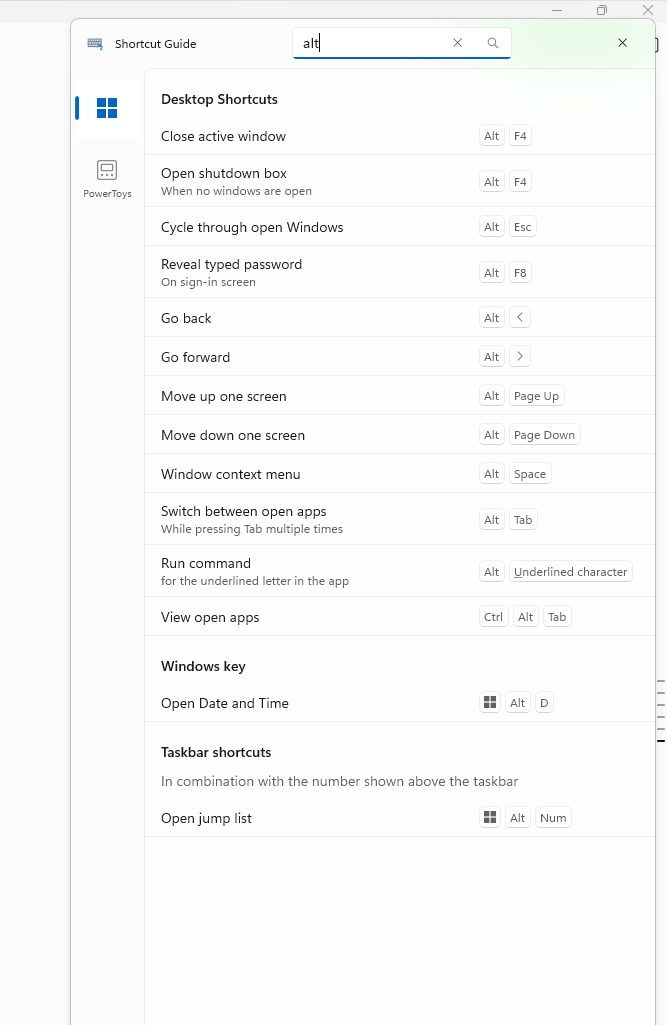
The query matches shortcut names, descriptions, modifier names, and
displayed key labels while preserving the existing pinned, recommended,
category, and taskbar grouping.

## PR Checklist

- [x] Closes: #48791
- [x] **Communication:** The UX and behavior were discussed before
implementation
- [x] **Tests:** Added/updated and all pass
- [x] **Localization:** All end-user-facing strings can be localized
- [x] **Dev docs:** Added/updated
- [ ] **New binaries:** Not applicable
- [ ] **Documentation updated:** Not applicable

## Detailed Description of the Pull Request / Additional comments

- Adds a localized title-bar `AutoSuggestBox` with a find icon and UI
Automation identity.
- Filters only the selected app page using case-insensitive matching
across names, descriptions, modifiers, virtual-key display names, and
rendered special-key aliases.
- Keeps only sections containing matches and shows a polite live-region
no-results state with correct pane spacing.
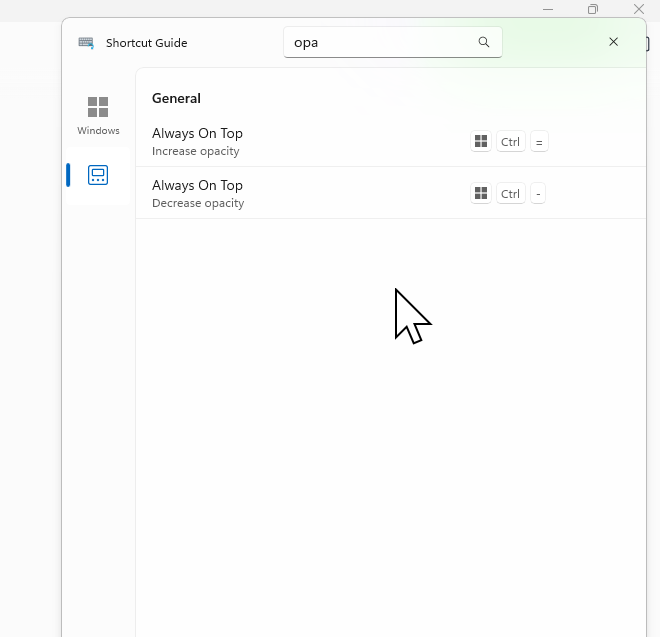
- Preserves the query when switching app pages, but clears it when
Shortcut Guide closes.
- Adds `Ctrl+F` to focus search; the first `Escape` clears a query and
the next closes the overlay.
- Keeps query text local to the UI with no logging or telemetry.

Related issues: #48860 requests several broader navigation/readability
changes; #49459 requests direct physical-key interception rather than
text search.

## Screenshots

### Filter Windows shortcuts by displayed key label

<img
src="https://raw.githubusercontent.com/niels9001/PowerToys/pr-assets-shortcut-guide-search/.github/pr-assets/shortcut-guide-search/windows-alt-filter.png"
width="667" alt="Shortcut Guide Windows page filtered by Alt" />

### Keep the query while switching to the PowerToys page

<img
src="https://raw.githubusercontent.com/niels9001/PowerToys/pr-assets-shortcut-guide-search/.github/pr-assets/shortcut-guide-search/powertoys-opa-filter.png"
width="660" alt="Shortcut Guide PowerToys page filtered by opa" />

## Validation Steps Performed

- Built `ShortcutGuide.Ui` for ARM64 Debug with the repository build
scripts.
- Built `ShortcutGuide.UnitTests` for ARM64 Debug and passed all 23
tests (16 search cases plus 7 existing tests) with `vstest.console.exe`.
- Verified via UIA and guarded keyboard input that name/key-label
filtering updates immediately, empty sections disappear, and no matches
show the localized live-region state.
- Verified the query persists when switching Windows to PowerToys,
`Ctrl+F` focuses search, first `Escape` clears, second `Escape` closes,
and reopening starts with an empty query.
- Rebuilt after the final no-results accessibility and 16px top-margin
adjustment.

---------

Co-authored-by: Copilot App <223556219+Copilot@users.noreply.github.com>
Copilot-Session: b8ffa76b-3cf0-4a67-9adb-a13c5dd9f125
Copilot-Session: 4a96c2c2-6954-4784-8257-e0de0fac15a7
Copilot-Session: 1f00def4-e790-4071-96c6-a81c9c2adba5
Copilot-Session: 76e284a6-9a03-4105-bae6-4ed7fc92042d
PowerToys Modules
This section contains documentation for individual PowerToys modules, including their architecture, implementation details, and debugging tools.
Available Modules
| Module | Description |
|---|---|
| Advanced Paste | Tool for enhanced clipboard pasting with formatting options |
| Always on Top | Tool for pinning windows to stay on top of other windows |
| Awake | Tool to keep your computer awake without modifying power settings |
| Color Picker | Tool for selecting and managing colors from the screen |
| Command Not Found | Tool suggesting package installations for missing commands |
| Crop and Lock | Tool for cropping application windows into smaller windows or thumbnails |
| Environment Variables | Tool for managing user and system environment variables |
| FancyZones (debugging tools) | Window manager utility for custom window layouts |
| File Explorer add-ons | Extensions for enhancing Windows File Explorer functionality |
| File Locksmith | Tool for finding processes that lock files |
| Hosts File Editor | Tool for managing the system hosts file |
| Image Resizer | Tool for quickly resizing images within File Explorer |
| Keyboard Manager | Tool for remapping keys and keyboard shortcuts |
| Mouse Utilities | Collection of tools to enhance mouse and cursor functionality |
| Mouse Without Borders | Tool for controlling multiple computers with a single mouse and keyboard |
| NewPlus | Context menu extension for creating new files in File Explorer |
| Peek | File preview utility for quick file content viewing |
| Power Rename | Bulk file renaming tool with search and replace functionality |
| PowerToys Run (deprecation soon) | Quick application launcher and search utility |
| Quick Accent | Tool for quickly inserting accented characters and special symbols |
| Registry Preview | Tool for visualizing and editing Registry files |
| Screen Ruler | Tool for measuring pixel distances and color boundaries on screen |
| Shortcut Guide | Tool for displaying Windows keyboard shortcuts when holding the Windows key |
| Text Extractor | Tool for extracting text from images and screenshots |
| Workspaces | Tool for saving and restoring window layouts for different projects |
| ZoomIt | Screen zoom and annotation tool |
Adding New Module Documentation
When adding documentation for a new module:
- Create a dedicated markdown file for the module (e.g.,
modulename.md) - If the module has specialized debugging tools, consider creating a separate tools document (e.g.,
modulename-tools.md) - Update this index with links to the new documentation
- Follow the existing documentation structure for consistency