mirror of
https://github.com/microsoft/PowerToys.git
synced 2026-09-01 19:51:34 +02:00
8516625c4da62ad4e90f3ec021fade5084cd1dc6
122 Commits
| Author | SHA1 | Message | Date | |
|---|---|---|---|---|
 Niels Laute
|
446bb9f241 |
[Shortcut Guide] Add page-local search (#49639)
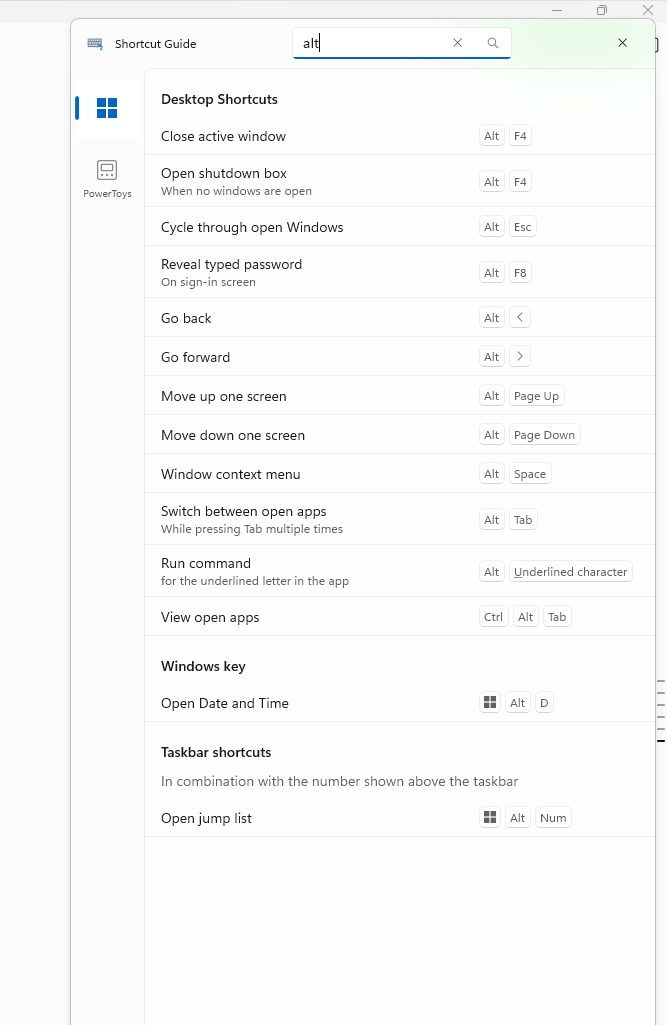
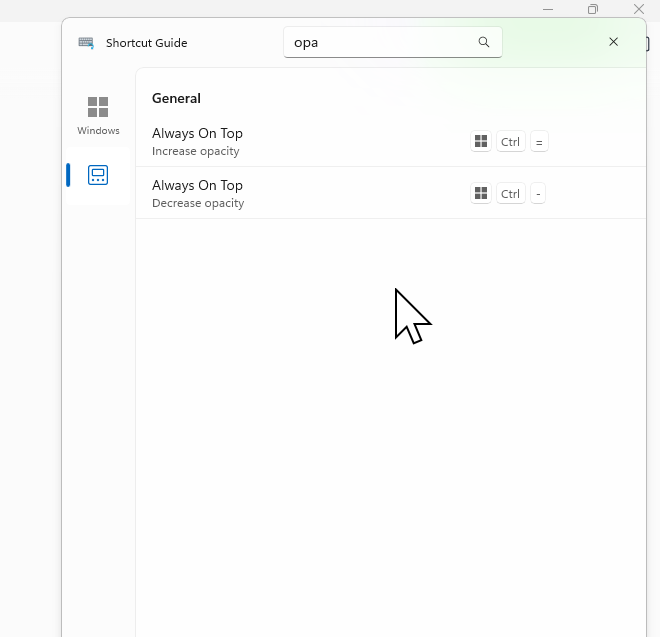
## Summary of the Pull Request Adds an accessible search box to the Shortcut Guide title bar that filters shortcuts on the currently selected application page. The query matches shortcut names, descriptions, modifier names, and displayed key labels while preserving the existing pinned, recommended, category, and taskbar grouping. ## PR Checklist - [x] Closes: #48791 - [x] **Communication:** The UX and behavior were discussed before implementation - [x] **Tests:** Added/updated and all pass - [x] **Localization:** All end-user-facing strings can be localized - [x] **Dev docs:** Added/updated - [ ] **New binaries:** Not applicable - [ ] **Documentation updated:** Not applicable ## Detailed Description of the Pull Request / Additional comments - Adds a localized title-bar `AutoSuggestBox` with a find icon and UI Automation identity. - Filters only the selected app page using case-insensitive matching across names, descriptions, modifiers, virtual-key display names, and rendered special-key aliases. - Keeps only sections containing matches and shows a polite live-region no-results state with correct pane spacing. - Preserves the query when switching app pages, but clears it when Shortcut Guide closes. - Adds `Ctrl+F` to focus search; the first `Escape` clears a query and the next closes the overlay. - Keeps query text local to the UI with no logging or telemetry. Related issues: #48860 requests several broader navigation/readability changes; #49459 requests direct physical-key interception rather than text search. ## Screenshots ### Filter Windows shortcuts by displayed key label <img src="https://raw.githubusercontent.com/niels9001/PowerToys/pr-assets-shortcut-guide-search/.github/pr-assets/shortcut-guide-search/windows-alt-filter.png" width="667" alt="Shortcut Guide Windows page filtered by Alt" /> ### Keep the query while switching to the PowerToys page <img src="https://raw.githubusercontent.com/niels9001/PowerToys/pr-assets-shortcut-guide-search/.github/pr-assets/shortcut-guide-search/powertoys-opa-filter.png" width="660" alt="Shortcut Guide PowerToys page filtered by opa" /> ## Validation Steps Performed - Built `ShortcutGuide.Ui` for ARM64 Debug with the repository build scripts. - Built `ShortcutGuide.UnitTests` for ARM64 Debug and passed all 23 tests (16 search cases plus 7 existing tests) with `vstest.console.exe`. - Verified via UIA and guarded keyboard input that name/key-label filtering updates immediately, empty sections disappear, and no matches show the localized live-region state. - Verified the query persists when switching Windows to PowerToys, `Ctrl+F` focuses search, first `Escape` clears, second `Escape` closes, and reopening starts with an empty query. - Rebuilt after the final no-results accessibility and 16px top-margin adjustment. --------- Co-authored-by: Copilot App <223556219+Copilot@users.noreply.github.com> Copilot-Session: b8ffa76b-3cf0-4a67-9adb-a13c5dd9f125 Copilot-Session: 4a96c2c2-6954-4784-8257-e0de0fac15a7 Copilot-Session: 1f00def4-e790-4071-96c6-a81c9c2adba5 Copilot-Session: 76e284a6-9a03-4105-bae6-4ed7fc92042d |
||
|
Noraa Junker
|
6c9fb8ce52 |
[Shortcut Guide] Add Windows key hold activation options (#49661)
## Summary of the Pull Request Adds configurable Windows-key hold activation to Shortcut Guide while keeping the regular activation shortcut independent. Users can choose to disable Windows-key activation, show taskbar indicators, or open the full Shortcut Guide. Full-guide mode also supports a configurable hold duration and optional close-on-release behavior. <img width="1099" height="611" alt="image" src="https://github.com/user-attachments/assets/e0fe4c0f-3bef-43f8-a526-d22caf9e484e" /> ## PR Checklist - [ ] Closes: N/A - [x] **Communication:** The UX and behavior were discussed before implementation - [x] **Tests:** Added/updated and all pass - [x] **Localization:** All end-user-facing strings can be localized - [x] **Dev docs:** Added/updated - [ ] **New binaries:** Not applicable - [ ] **Documentation updated:** Not applicable ## Detailed Description of the Pull Request / Additional comments - Adds Off, taskbar-indicator, and full-guide Windows-key actions to Settings. - Adds a 100–5,000 ms hold-duration setting and a full-guide close-on-release option. - Handles left and right Windows keys and suppresses Start after an activated hold. - Routes Windows-key holds through a dedicated event so custom activation shortcuts remain independent. - Clears previous pressed-key registrations before refreshing them to prevent duplicate long-press callbacks. - Preserves compatibility with the existing `press_time` setting and documents the new options. ## Validation Steps Performed - Built the affected ARM64 Debug Settings, Runner, Shortcut Guide module-interface, and Shortcut Guide UI projects. - `ShortcutGuide.UnitTests`: 7/7 passed. - Targeted Settings tests: 12/12 passed. - Manually verified Off, taskbar-indicator, full-guide close-on-release, and full-guide persistent modes. - Verified configured hold thresholds, both Windows keys, Start suppression, and regular-shortcut independence. - Validated the final Settings XAML layout in the running Settings app. --------- Co-authored-by: Copilot Autofix powered by AI <175728472+Copilot@users.noreply.github.com> Co-authored-by: copilot-swe-agent[bot] <198982749+Copilot@users.noreply.github.com> Co-authored-by: Muyuan Li (from Dev Box) <muyuanli@microsoft.com> Co-authored-by: Copilot <223556219+Copilot@users.noreply.github.com> Copilot-Session: 2b3acca3-e49b-4936-8fb9-6f669bd449db |
||
|
Gleb Khmyznikov
|
a87f5b07a9 |
Advanced Paste additional customizations and PhiSilica provider (#46727)
## Summary Adds an on-device **Phi Silica (Windows AI) paste provider** to Advanced Paste and richer per-action customization, plus the **package-identity plumbing** that lets the unpackaged Advanced Paste app use Windows AI APIs. > Note: this supersedes the earlier "self-contained MSIX package installed/registered by the > WiX installer" approach. Advanced Paste is **not** packaged or installed as a standalone > MSIX. It keeps shipping as the existing unpackaged, self-contained WinUI 3 executable in > `WinUI3Apps/` and acquires **package identity at runtime from the existing PowerToys sparse > package** — there are no installer or ESRP MSIX repack changes. ## Advanced Paste features - **New Phi Silica paste provider** (`CustomActions/PhiSilicaPasteProvider.cs`): an on-device AI provider backed by the Windows AI Phi Silica language model — no cloud endpoint or API key required. Registered as a new `AIServiceType` via `PasteAIProviderFactory` / `AIServiceTypeRegistry`. - **Additional custom actions** (`AdvancedPasteAdditionalAction`): user-defined actions with their own prompt, system prompt, AI provider, and shortcut — plus an optional "coaching" prompt/system-prompt/provider/shortcut and shortcut-conflict detection. - **Built-in default prompts** (`AdvancedPasteDefaultPrompts`) and updates to `AdvancedPasteCustomAction`, `PasteFormat(s)`, `OptionsViewModel`, and `PasteFormatExecutor` to support per-action provider selection and system prompts. - **Settings UI** (`AdvancedPastePage.xaml`/`.xaml.cs`, `Resources.resw`): configure the Phi Silica provider, choose a provider per action, edit system/coaching prompts, and a Phi Silica availability/readiness experience — Settings queries the Advanced Paste executable via `--check-phi-silica`, and a **"Download model"** action triggers `--prepare-phi-silica` to fetch the model and then re-probes. ## Package identity for Windows AI (replaces the MSIX-install approach) - Phi Silica is a **Limited Access Feature (LAF)** that can only be unlocked by a process with a registered **package identity**. Advanced Paste runs unpackaged, so it obtains identity from the existing **`Microsoft.PowerToys.SparseApp`** sparse package (`src/PackageIdentity/`): a new `<Application Id="PowerToys.AdvancedPasteUI">` entry in `AppxManifest.xml` maps it to `PowerToys.AdvancedPaste.exe`, with matching updates to `BuildSparsePackage.ps1`. - **LAF unlock** at runtime via `PhiSilicaLafHelper.cs`. The token/attestation are baked at build time by the `GeneratePhiSilicaLafCredentials` MSBuild target into `PhiSilicaLafCredentials.g.cs` — local **dev defaults** live in `src/PhiSilicaLaf.props` (imported from `Directory.Build.props`) and the **production secret** is injected via `/p:` in the release pipeline. - New **`AdvancedPaste.dev.manifest` / `AdvancedPaste.prod.manifest`** application manifests (selected by `CIBuild`) declaring full-trust and the system AI models capability. ## Build & pipeline - **Windows App SDK** moved to the coherent **stable `2.2.0`** line and **added `Microsoft.WindowsAppSDK.AI` `2.2.3`** (the Phi Silica APIs). Foundation `2.1.0` carries the sparse-identity PRI fix, and the stable AI build matches the OS Windows AI runtime. - **Independent versioning** for Advanced Paste (`src/modules/AdvancedPaste/custom.props`, XES one-store versioning, `AdvancedPasteVersion`). A `steps-setup-versioning.yml` step is added for Advanced Paste in `job-build-project.yml`, ordered **before** CmdPal to avoid a version-collision installer failure (WIX0103). - `release.yml` passes `PhiSilicaLafToken`/`PhiSilicaLafAttestation` into the main build; spell-check allow-list/patterns updated. - Removed now-unneeded dependencies: the `Microsoft.Windows.Compatibility` reference and the `Common.UI` "force matching DLL versions" hack. <img width="1073" height="716" alt="image" src="https://github.com/user-attachments/assets/9364d86a-c0d1-4a08-a669-d98cbcb4b140" /> <img width="1038" height="308" alt="image" src="https://github.com/user-attachments/assets/00eef1dd-b407-4841-bd64-f54f8a145c46" /> <img width="194" height="405" alt="image" src="https://github.com/user-attachments/assets/d2f9c5bb-2507-4112-b3e0-56da681f88ea" /> <img width="489" height="453" alt="image" src="https://github.com/user-attachments/assets/811d1afd-9993-48be-824e-82bb56c5ceca" /> [Video clip internal](https://onedrive.cloud.microsoft/✌️/a@9n6nl3fp/S/cQpvAHrL5M9ZR6eUawztyfyBEgUCwCF-aKg9TbKyyGWP4c0KMA) [Build internal](https://microsoft.visualstudio.com/Dart/_build/results?buildId=149920754&view=artifacts&pathAsName=false&type=publishedArtifacts) --------- Co-authored-by: Niels Laute <niels.laute@live.nl> Co-authored-by: Copilot App <223556219+Copilot@users.noreply.github.com> |
||
|
moooyo
|
8f63402400 |
PowerDisplay: Adjust brightness by scrolling over the tray icon (#49446)
## Summary of the Pull Request Scrolling the mouse wheel over the Power Display tray icon adjusts brightness, without opening the flyout. - New **Tray icon mouse wheel** setting: `Off` / `Primary display` / `All displays`, defaulting to **`Off`**. It is scoped to the tray icon — the flyout sliders accept wheel input regardless, as they always have. The existing **Mouse wheel increment** setting supplies the per-notch step. - **Off by default.** The gesture consumes a wheel notch that would otherwise reach the window under the pointer, and acting on it installs a system-wide `WH_MOUSE_LL` hook. Neither is something an existing installation should acquire silently on upgrade. With the setting `Off` no hook is ever installed and no notch is ever consumed, so this PR changes no existing behaviour until the user opts in: 1958 insertions, 2 deletions, and both deletions are refactors of lines this feature reuses. - **No feedback UI.** Brightness is self-evidencing — you scroll and the screen changes — so the display itself is the feedback. The notification icon is untouched: same tooltip, same text, same legacy notification-icon protocol. ## PR Checklist - [x] Closes: #49410 - [ ] **Communication:** I've discussed this with core contributors already. If the work hasn't been agreed, this work might be rejected - [x] **Tests:** Added/updated and all pass - [x] **Localization:** All end-user-facing strings can be localized - [x] **Dev docs:** Added/updated - [ ] **New binaries:** Added on the required places - [ ] [JSON for signing](https://github.com/microsoft/PowerToys/blob/main/.pipelines/ESRPSigning_core.json) for new binaries - [ ] [WXS for installer](https://github.com/microsoft/PowerToys/blob/main/installer/PowerToysSetup/Product.wxs) for new binaries and localization folder - [ ] [YML for CI pipeline](https://github.com/microsoft/PowerToys/blob/main/.pipelines/ci/templates/build-powertoys-steps.yml) for new test projects - [ ] [YML for signed pipeline](https://github.com/microsoft/PowerToys/blob/main/.pipelines/release.yml) - [ ] **Documentation updated:** If checked, please file a pull request on [our docs repo](https://github.com/MicrosoftDocs/windows-uwp/tree/docs/hub/powertoys) and link it here: #xxx No new binaries or projects — everything lands in existing assemblies. Communication is unchecked because #49410 is still Needs-Triage. ## Detailed Description of the Pull Request / Additional comments ### Why a low-level hook The Shell does not forward `WM_MOUSEWHEEL` to a notification icon's callback window under any `NOTIFYICON_VERSION`, and a click-through overlay placed over the icon cannot receive wheel input either. `TrayIconMouseWheelListener` therefore installs a `WH_MOUSE_LL` hook — but only transiently, and only when it will act on the result: - Nothing is installed at all while the setting is `Off`, which is the default. - Installed in `EnsureHook()` when the UI thread confirms the pointer is inside the rectangle from `Shell_NotifyIconGetRect` **and** `CanAdjustBrightnessFromTrayWheel` says some monitor can accept a brightness write. - Removed in `DisarmCore()` as soon as either condition stops holding, the pointer leaves the rectangle, or the mode changes. - A notch is consumed (the hook proc returns non-zero) only while armed and only for points inside the armed rectangle, so a wheel event Power Display will not act on still reaches the window under the cursor. The hook runs on a dedicated background thread with its own message loop; the proc itself only enqueues a sample and posts a drain request. Deltas are marshalled to the UI thread in batches, and `WheelDeltaAccumulator` folds high-resolution deltas (precision wheels, touchpads) into whole notches. Each sample carries the hover generation it was captured under, so samples from a hover the UI thread has already retired are discarded rather than applied late. ### Hover detection The Shell sends `WM_MOUSEMOVE` to the icon's callback window while the pointer is over it. `TrayIconService.HandleTrayMouseMove` resolves the rectangle with `Shell_NotifyIconGetRect` and caches it for a second, because that message repeats for every pixel of travel. `TrayIconService` gains nothing else: no protocol change, no new hover UI, no polling. The rest of the file — and `MainWindow.xaml` — is untouched. ### Linked brightness While linked brightness is on, a notch has to move the whole group, so it goes through `MainViewModel.LinkedBrightness` rather than the individual monitor setters. The new master value is taken from the planner's value for the monitor the wheel named, **not** from the current master. The master is positional only — `SeedInitialLinkedBrightness` takes it from the lowest-numbered linked monitor and never writes hardware, and every monitor-list rebuild re-seeds it — so it can sit arbitrarily far from the monitor the wheel is aimed at. Stepping it relative to itself would apply a wrong-sized or wrong-signed change, and a master already clamped at 0/100 would swallow the notch while writing nothing at all. The setting description calls out that linked brightness widens the scope, so `Primary display` is not literally a single display while it is on. ### What is deliberately not here An earlier revision of this PR showed the target and percentage in a custom overlay as you scrolled. Doing that meant the standard Shell tooltip would not do (it cannot be shown on demand), which meant an own window, which meant suppressing the Shell tooltip so the two did not collide, which meant `NOTIFYICON_VERSION_4`, which changed the callback packing and made the app responsible for all hover text — including for keyboard and touch users, who never reach a cursor-anchored overlay and would have been left with no visible tooltip at all. That chain was about half the diff, for a readout that adds little on top of watching the screen change. It is gone. If a readout is wanted later it can be argued on its own merits, separately from this feature. The same revision also gated the flyout sliders on this setting. That bundled two unrelated things behind one switch — turning off tray scrolling would also have stopped the contrast and volume sliders responding to the wheel — so the setting is now scoped to the tray icon and named accordingly. An earlier revision also routed the tray **Exit** action through `Shutdown()`. That fixes a pre-existing teardown leak which has nothing to do with this feature, so it now lives in #49580 and is out of scope here. This branch does not depend on it: the hook thread is a background thread and the process is ending either way. ## Validation Steps Performed - Unit tests: `PowerDisplay.Lib.UnitTests` 215 passed, `Settings.UI.UnitTests` 165 passed. - Builds: `PowerDisplay` and Settings UI, x64 Debug, no warnings. - Automated coverage is in `PowerDisplay.Lib.UnitTests`: target selection per mode, wheel accumulation including negative deltas, partial notches and direction reversal, half-open rectangle containment, and settings serialization and round-trip for the new mode, including that a settings file predating the feature loads as `Off`. `Settings.UI.UnitTests` covers the view-model index mapping and pins the enum values to the ComboBox item order. - The Win32 glue in `TrayIconService` and `TrayIconMouseWheelListener` is not unit tested. Manual passes performed: scrolling over the icon in both modes, the icon parked in the notification overflow, high-resolution wheel input, brightness boundaries, live monitor refresh while hovering, tray icon hidden and re-enabled, Explorer restart, the context menu and left-click, `Off` stopping tray scrolling while the flyout sliders keep working, and confirming a notch that Power Display will not act on still reaches the window under the cursor. Not verified, needing hardware this branch has not been run on: - Multiple taskbars, where the tray icon is on a secondary display and `Primary display` mode adjusts a monitor the user may not be looking at. - Mixed-DPI setups, for the `Shell_NotifyIconGetRect` rectangle and the hook's physical-pixel hit test. --------- Co-authored-by: Yu Leng <yuleng@microsoft.com> Co-authored-by: Copilot <223556219+Copilot@users.noreply.github.com> Co-authored-by: Claude Opus 5 (1M context) <noreply@anthropic.com> Copilot-Session: 5d7f36fe-d175-4aa9-a3c7-b370d952d1d3 |
||
|
Moli
|
85d0c890de |
Docs: Fix broken links and incorrect source file references (#49294)
## Description Fixes #49285 This PR fixes three documentation files with broken links or incorrect source file references: ### 1. `doc/devdocs/modules/fileexploreraddons.md` — broken source code link The "Source code folder" link pointed to `src/modules/fileexplorerpreview`, which does not exist in the repository. Changed to `src/modules/previewpane` (the actual directory). ### 2. `doc/devdocs/modules/launcher/plugins/calculator.md` — broken unit test links (10 occurrences) All 10 links in the "Unit Tests" section pointed to `Microsoft.PowerToys.Run.Plugin.Calculator.UnitTests` (plural), but the actual test project directory is `Microsoft.PowerToys.Run.Plugin.Calculator.UnitTest` (singular). All link references have been corrected. ### 3. `doc/devdocs/core/runner.md` — incorrect file reference The "Centralized Keyboard Hook" section referenced `centralized_keyboard_hook.cpp`, but the actual file is `centralized_kb_hook.cpp` (at `src/runner/centralized_kb_hook.cpp`). ## Validation Each fix was verified against the actual repository structure: | Fix | Verified path exists | |-----|---------------------| | `fileexploreraddons.md` | `src/modules/previewpane/` (contains `powerpreview/` subproject) | | `calculator.md` | `src/modules/launcher/Plugins/Microsoft.PowerToys.Run.Plugin.Calculator.UnitTest/` (contains `BracketHelperTests.cs`, `ExtendedCalculatorParserTests.cs`, `NumberTranslatorTests.cs`, `QueryTests.cs`) | | `runner.md` | `src/runner/centralized_kb_hook.cpp` | ## PR Checklist - [x] Docs-only change — no code or tests affected - [x] Links verified against actual repository structure |
||
|
moooyo
|
2b8e6247fc |
[PowerDisplay] Add stable profile IDs (#49175)
## Summary of the Pull Request Gives every saved PowerDisplay profile a stable, auto-incrementing integer ID and makes the app address profiles by that ID instead of by name. Duplicate profile names are allowed, renames preserve identity, and LightSwitch stores stable profile references. > Split out of the PowerDisplay CLI branch (#48632). CLI-specific contracts and commands remain in that stacked PR. ## PR Checklist - [x] **Closes:** N/A - split from #48632. - [x] **Communication:** Discussed with core contributors. - [x] **Tests:** Added and passing in `PowerDisplay.Lib.UnitTests`. - [x] **Localization:** The composed profile label uses a shared localized format resource. - [x] **New binaries:** None. - [x] **Documentation updated:** `doc/devdocs/modules/powerdisplay/design.md`. ## Implementation ### Profile model and persistence - `PowerDisplayProfile.Id` is the stable JSON `id`; `0` means unassigned. - `PowerDisplayProfiles.NextId` is monotonic and IDs are never reused. - `SetProfile` assigns IDs to new profiles and replaces existing profiles by ID. - Duplicate names are supported; name lookup remains only for migration of legacy references. - `ProfileStore` serializes cross-process load/modify/save operations with a named mutex and atomically replaces `profiles.json`. - Production callers use asynchronous `ProfileHelper` APIs. ### Migration and application - Initial PowerDisplay discovery assigns missing profile IDs and migrates legacy monitor IDs. - LightSwitch legacy name references are reconciled to IDs and written back to the current typed settings schema. - Native LightSwitch publishes pure light/dark theme events; PowerDisplay exclusively validates profile enablement and stable IDs. - Settings UI and Named Pipe ApplyProfile actions send invariant positive profile IDs. - PowerDisplay validates the ID, loads the current profile, and applies its monitor settings. ### Settings UI - Create, edit, apply, and delete operations use stable IDs. - LightSwitch selectors store profile IDs and keep legacy name fields only for migration. - Profile lists use a localized name-and-ID label so duplicate names remain distinguishable. ## Accepted Trade-offs - Profile ID migration remains dependent on the initial monitor discovery; a failed or delayed discovery can temporarily hide legacy ID-less profiles. - The one-time PowerDisplay LightSwitch migration rewrites the complete current typed settings object and does not add a new cross-process settings transaction. ## Validation - Built the affected x64 Debug projects with the repository build scripts. - `PowerDisplay.Lib.UnitTests`: 186 passed, 0 failed. --------- Co-authored-by: Yu Leng (from Dev Box) <yuleng@microsoft.com> Co-authored-by: Copilot <223556219+Copilot@users.noreply.github.com> |
||
|
moooyo
|
9039451e2f |
[Quick Accent] Migrate UI to WinUI 3 (#48891)
## Summary of the Pull Request Migrates the **Quick Accent (PowerAccent)** module's UI from WPF (`System.Windows.*`) to **WinUI 3 (Windows App SDK)**, following the pattern used by other migrated modules (ImageResizer, PowerDisplay). The accent selector is now a self-contained WinUI 3 app (`PowerToys.PowerAccent.exe`) shipped under `WinUI3Apps`, and `PowerAccent.Core` is UI-framework-agnostic. demo: https://github.com/user-attachments/assets/400c33ee-0fc0-491e-841b-a546438edf91 ## PR Checklist - [x] Closes: #48889 - [x] **Communication:** Tracked task (#48889) agreed with core contributors - [x] **Tests:** Added/updated and all pass — new `PowerAccent.Core.UnitTests` (21 tests for the positioning / DPI math); existing `PowerAccent.Common.UnitTests` unaffected - [x] **Localization:** No new localizable end-user strings — new accessibility metadata uses non-localized `AutomationProperties.AutomationId`, and the window title is the brand name `"Quick Accent"` (literal, matching ColorPicker) - [x] **Dev docs:** Updated `doc/devdocs/modules/quickaccent.md` - [x] **New binaries:** Added on the required places - [x] [JSON for signing](https://github.com/microsoft/PowerToys/blob/main/.pipelines/ESRPSigning_core.json): the `WinUI3Apps\` PowerAccent payloads are listed in `ESRPSigning_core.json` - [x] [WXS for installer](https://github.com/microsoft/PowerToys/blob/main/installer/PowerToysSetup/Product.wxs): no manual `Product.wxs` entry — the self-contained `WinUI3Apps` output (exe + `.pri` + Windows App SDK runtime) is harvested by the `WinUI3ApplicationsFiles` glob (same as ImageResizer) - [x] [YML for CI pipeline](https://github.com/microsoft/PowerToys/blob/main/.pipelines/ci/templates/build-powertoys-steps.yml): no change needed — `PowerAccent.Core.UnitTests` is discovered by the existing `**\*UnitTest*.dll` VSTest glob - [x] [YML for signed pipeline](https://github.com/microsoft/PowerToys/blob/main/.pipelines/release.yml): covered by `ESRPSigning_core.json`; no `release.yml` change needed - [ ] **Documentation updated:** N/A — internal UI-framework migration with no user-facing behavior change ## Detailed Description of the Pull Request / Additional comments The migration spans three areas (tracked in #48889): **UI (WPF → WinUI 3)** - `PowerAccent.UI` is now a WinUI 3 app shell (custom `Program.Main`, `WindowsPackageType=None`, `WindowsAppSDKSelfContained=true`). - The accent selector is a non-activating `TransparentWindow` overlay shown with `SW_SHOWNA` (never steals focus). It is made always-on-top only while shown — the WinUIEx `WindowEx.IsAlwaysOnTop` property is toggled `true` on show / `false` on hide in `OnChangeDisplay` (matching the WPF original's `Topmost = isActive`), so the dormant, never-destroyed overlay does not pin a discrete GPU awake on hybrid-graphics laptops (issue #34849 / PR #41044). - The accent "pill" selection visual is reproduced with `VisualStateManager` (WinUI 3 has no `Style.Triggers`). - **WinUI 3 gotcha:** x:Bind on a Window-rooted XAML initializes only on `Window.Activated`, which never fires for this `SW_SHOWNA` overlay — so the selector calls `Bindings.Update()` after `InitializeComponent()`; without it the `ListView` renders empty. - **Theme:** the long-lived, never-activated process follows the system app theme automatically — `App.xaml` leaves `Application.RequestedTheme` unset, so WinUI re-resolves the `{ThemeResource}` brushes (and retints the acrylic) on a live light/dark switch with no manual `ThemeListener` needed. - **Layout parity with the WPF original:** the bar width hugs its content (`itemCount × 48`, clamped to the monitor width — computed, not measured, to avoid a racy `ListView` measure), and each cell pins `MinWidth=48` (WinUI's `ListViewItem` defaults to 88, which would otherwise leave wide gaps). - **Accessibility:** UIA window name + `AutomationId`s on the character list and description. **Dependency** - `PowerAccent.Core` no longer depends on WPF — it raises events and takes an injected UI-thread marshaller. - WinForms `SendKeys` → `SendInput` (CsWin32 P/Invoke); WPF-UI (Lepo) removed; language data moved to the UI-/WinRT-agnostic `PowerAccent.Common`. - MVVM via CommunityToolkit.Mvvm with `[ObservableProperty]` **partial properties** (WinRT-correct, clears MVVMTK0045). **CI / Build / Installer** - Signing config, WinUI3Apps glob harvest, and the new unit-test project — see the checklist above. ## Validation Steps Performed - **Build:** `x64 Debug` builds with **0 warnings / 0 errors**. - **Unit tests:** `PowerAccent.Core.UnitTests` — **21/21 pass** (9 anchor positions × DPI 1.0/1.5/2.0, the offset and negative-origin monitors, caret centering + edge clamping + flip-below). - **XamlStyler:** `PowerAccentXAML/MainWindow.xaml` passes the passive format check (CI mode). - **Manual (single monitor, Top-center, light theme):** - Accent popup appears with the full accent list rendered. - Bar hugs the characters and is centered; cell spacing matches the WPF original. - Switching the system theme (light/dark) is followed live by the popup. - With `show_description` enabled, the description row is wide (≥600px) and readable, with the accent bar centered above it. - **Remaining manual validation** (tracked in #48889): multi-monitor, per-monitor DPI, all 9 `toolbar_position` values, and high-contrast theme. --------- Co-authored-by: Yu Leng <yuleng@microsoft.com> Co-authored-by: Claude Opus 4.8 (1M context) <noreply@anthropic.com> Co-authored-by: Niels Laute <niels.laute@live.nl> Co-authored-by: Copilot <223556219+Copilot@users.noreply.github.com> |
||
|
Clint Rutkas
|
af45c3ec7c |
Add press-and-hold activation mode to Quick Accent (#48937)
## Summary of the Pull Request Adds an opt-in **press-and-hold** activation mode to Quick Accent, like iOS / macOS: hold an accent-capable letter (e.g. `a`) and after a short, configurable delay the accent picker opens automatically — no separate trigger key (Space/arrows) required. This is purely additive. The existing trigger-key modes (`Left/Right arrow`, `Space`, `Both`) and all serialized settings values are unchanged. https://github.com/user-attachments/assets/faec298c-e42c-4fd1-84bd-6e74d1b481a0 ### What it does - Holding a letter types the base letter immediately, then arms the picker. After the **Hold duration** (default **500 ms**) the toolbar appears. - Navigate the options with the arrow keys / Space, then **release the letter** to insert the selected accent (it replaces the base letter). - A quick tap types just the letter. Holding and releasing without selecting leaves the base letter as-is. - `Ctrl` / `Alt` / `AltGr` / `Win` + letter combinations are left untouched, so shortcuts like `Ctrl+A` still work. ## PR Checklist - [ ] **Closes:** N/A — feature enhancement (happy to link a tracking issue if one is preferred) - [x] **Communication:** Discussed direction with maintainers; coordinated with #48891 (see below) - [ ] **Tests:** No automated tests added — the activation decision lives in the C++ low-level keyboard hook and isn't reachable from the existing managed unit-test project. Validated manually (steps below). Open to guidance on the preferred test surface. - [x] **Localization:** All new end-user strings are in `Settings.UI/Strings/en-us/Resources.resw` with translator comments. - [x] **Dev docs:** `doc/devdocs/modules/quickaccent.md` updated with the new mode. - [x] **New binaries:** None. - [x] **Documentation updated:** Dev docs updated; public Learn docs can follow once shipped. ## Detailed Description of the Pull Request / Additional comments - **`PowerAccentKeyboardService` (C++ hook):** - Append `PressAndHold` to the internal `PowerAccentActivationKey` enum (value `3`, appended to preserve serialized `0/1/2`). - Add a `holdDuration` setting and `UpdateHoldDuration(Int32)` to the WinRT projection (`.idl`). - In `OnKeyDown`, arm the picker on the held letter itself; the base letter still types on first press and auto-repeat is swallowed (reuses the existing `m_toolbarVisible` repeat guard from #36853). - In `OnKeyUp`, use the hold duration as the minimum-hold release threshold for this mode (trigger modes keep using `inputTime`). - Modifier guard: Ctrl/Alt/AltGr/Win do not arm the mode. - **Settings model (`Settings.UI.Library`):** append `PressAndHold` to `PowerAccentActivationKey`; add `hold_duration_ms` (`IntProperty`, default 500). Existing `settings.json` without the field falls back to the 500 ms default. - **`PowerAccent.Core`:** read and forward the hold duration to the hook, and use it as the popup delay when `PressAndHold` is active. - **Settings UI:** add the **"Press and hold the letter"** activation option and a **"Hold duration (ms)"** control that is shown only when that mode is selected. ### Enum sync note `PowerAccentActivationKey` exists in both the C++ hook and the managed settings library and is kept in sync by integer value. `PressAndHold` was **appended** (never reordered) so existing serialized settings (`0/1/2`) keep their meaning. ### Coordination with #48891 (Quick Accent WinUI migration) This lands as its own atomic change on `main`. The overlap with the in-progress WinUI migration (#48891) is tiny: only `PowerAccent.cs`'s mode-aware popup delay (a single `Task.Delay` line). The C++ hook, settings enum/model, and Settings UI are not touched by #48891, so it can rebase onto this with minimal effort. ## Validation Steps Performed - Built the full chain in `Debug|x64`: - `PowerAccent.UI.csproj` → rebuilds the C++ `PowerAccentKeyboardService` projection (incl. `UpdateHoldDuration`) + `PowerAccent.Core` + `Settings.UI.Library`. **0 errors.** - `PowerToys.Settings.csproj` → Settings UI XAML / ViewModel / `.resw` (XamlIndexBuilder search index regenerated). **0 errors.** - Manual trial of the running module (`PowerToys.PowerAccent.exe`) with `activation_key = 3`: - Hold `a` → base letter types immediately; picker opens after ~500 ms; arrows/Space navigate; releasing inserts the accent (replacing the base letter). - Quick tap → base letter only. Hold + release without selecting → base letter remains. - `Ctrl+A` / `Alt`+letter unaffected. --------- Co-authored-by: Copilot <223556219+Copilot@users.noreply.github.com> |
||
|
Anton Kesy
|
f87b14d5b9 |
Fix grammar and typos (#47539)
<!-- Enter a brief description/summary of your PR here. What does it fix/what does it change/how was it tested (even manually, if necessary)? --> ## Summary of the Pull Request Fixes some typos and grammar mistakes inside docs, strings, and comments. <!-- Please review the items on the PR checklist before submitting--> ## PR Checklist - [ ] Closes: #xxx <!-- - [ ] Closes: #yyy (add separate lines for additional resolved issues) --> - [ ] **Communication:** I've discussed this with core contributors already. If the work hasn't been agreed, this work might be rejected - [ ] **Tests:** Added/updated and all pass - [ ] **Localization:** All end-user-facing strings can be localized - [ ] **Dev docs:** Added/updated - [ ] **New binaries:** Added on the required places - [ ] [JSON for signing](https://github.com/microsoft/PowerToys/blob/main/.pipelines/ESRPSigning_core.json) for new binaries - [ ] [WXS for installer](https://github.com/microsoft/PowerToys/blob/main/installer/PowerToysSetup/Product.wxs) for new binaries and localization folder - [ ] [YML for CI pipeline](https://github.com/microsoft/PowerToys/blob/main/.pipelines/ci/templates/build-powertoys-steps.yml) for new test projects - [ ] [YML for signed pipeline](https://github.com/microsoft/PowerToys/blob/main/.pipelines/release.yml) - [ ] **Documentation updated:** If checked, please file a pull request on [our docs repo](https://github.com/MicrosoftDocs/windows-uwp/tree/docs/hub/powertoys) and link it here: #xxx <!-- Provide a more detailed description of the PR, other things fixed, or any additional comments/features here --> ## Detailed Description of the Pull Request / Additional comments <!-- Describe how you validated the behavior. Add automated tests wherever possible, but list manual validation steps taken as well --> ## Validation Steps Performed None --------- Co-authored-by: Niels Laute <niels.laute@live.nl> Co-authored-by: Copilot <175728472+Copilot@users.noreply.github.com> |
||
|
Mike Griese
|
65112a7b05 |
Move CmdPal API spec back to cmdpal/ directory (#48160)
Reverts
|
||
|
Noraa Junker
|
9699d8a802 |
Shortcut Guide V2 (#40834)
## Summary of the Pull Request https://github.com/user-attachments/assets/f4afdaf8-2830-4993-82ea-1ee9a6978e4c <!-- Please review the items on the PR checklist before submitting--> ## PR Checklist - [x] Closes: Status: #890 #15405 #179 #129 #22419 #31289 #47297 #47464 #44816 - [x] **Communication:** I've discussed this with core contributors already. If the work hasn't been agreed, this work might be rejected - [ ] **Tests:** Added/updated and all pass - [x] **Localization:** All end-user-facing strings can be localized - [x] **Dev docs:** Added/updated - [x] **New binaries:** Added on the required places - [x] [JSON for signing](https://github.com/microsoft/PowerToys/blob/main/.pipelines/ESRPSigning_core.json) for new binaries - [x] [WXS for installer](https://github.com/microsoft/PowerToys/blob/main/installer/PowerToysSetup/Product.wxs) for new binaries and localization folder - [ ] [YML for CI pipeline](https://github.com/microsoft/PowerToys/blob/main/.pipelines/ci/templates/build-powertoys-steps.yml) for new test projects - [ ] [YML for signed pipeline](https://github.com/microsoft/PowerToys/blob/main/.pipelines/release.yml) - [x] **Documentation updated:** If checked, please file a pull request on [our docs repo](https://github.com/MicrosoftDocs/windows-uwp/tree/docs/hub/powertoys) and link it here: https://github.com/MicrosoftDocs/windows-dev-docs/pull/5717 <!-- Provide a more detailed description of the PR, other things fixed, or any additional comments/features here --> ## Detailed Description of the Pull Request / Additional comments Work for future PRs: - [ ] Localization of built-in shortcut files - [ ] Further customization (we can wait on user feedback for that) - [ ] Reimplement holding windows key - [ ] Search bar <details> <summary>Images</summary> https://github.com/user-attachments/assets/f923daa4-d713-463b-ba33-ede72b986c12 <img width="726" height="1388" alt="image" src="https://github.com/user-attachments/assets/781eff9a-2863-44be-bbe2-25371ef8838e" /> <img width="624" height="351" alt="image" src="https://github.com/user-attachments/assets/ec8a44db-afbc-4e28-8285-ba2a9e345fb9" /> <img width="712" height="1086" alt="image" src="https://github.com/user-attachments/assets/5a3775fc-36e9-4971-8d3f-491e8f8da45a" /> <img width="726" height="134" alt="image" src="https://github.com/user-attachments/assets/7d0a8b1f-d10e-4466-820c-b3efdc5f3c84" /> </details> <!-- Describe how you validated the behavior. Add automated tests wherever possible, but list manual validation steps taken as well --> ## Validation Steps Performed --------- Co-authored-by: Gordon Lam (SH) <yeelam@microsoft.com> Co-authored-by: Niels Laute <niels.laute@live.nl> Co-authored-by: copilot-swe-agent[bot] <198982749+Copilot@users.noreply.github.com> Co-authored-by: Copilot <223556219+Copilot@users.noreply.github.com> Co-authored-by: Muyuan Li <116717757+MuyuanMS@users.noreply.github.com> Co-authored-by: Muyuan Li (from Dev Box) <muyuanli@microsoft.com> |
||
|
Mike Griese
|
42902eeba5 |
CmdPal: Add support for pages with parameters (redux) (#47826)
(this PR is an updated version of #43784) This PR adds a new type of page to Command Palette: The `ParametersPage`. This allows extensions to create commands that require a set of parameters before invoking the command. Previously, extensions could create commands with a form page to use an adaptive card for parameter input, but that was a relatively heavyweight UX. Instead, the `ParametersPage` allows extensions to define a set of lightweight inputs, which allows for a more streamlined experience. The parameters page is made up of a set of "runs". Each run represents a single element in the search box. Runs can be either: * A label run: a static piece of text * An value run: some input for the user to provide a value. These fall into several categories: * String input * Command Input * `IInvokableCommand`s become buttons in the search box * `IListPage`s become a list input to pick from (**these will be added in a follow-up PR**) There are a ton of samples included. I also added all my draft notes in the drafts folder, to see how we got here. I'd skip reviewing those. Furthermore, I added the "dumb" token support, where an extension can opt in to having tokens in the search box, delimited by ZWSP characters. The XAML styling was fixed by Niels a few months back Closes #40948 --------- Co-authored-by: Niels Laute <niels.laute@live.nl> |
||
|
Jiří Polášek
|
c4ff073d01 |
CmdPal: Extension Gallery (#46636)
## Summary of the Pull Request Adds the **Extension Gallery** to Command Palette — a built-in page where users can discover, browse, and install community extensions without leaving the app. https://github.com/user-attachments/assets/e4565333-b970-4085-9e40-5cfd207e533b ## How it works ### 1. The extension author's side Extensions are listed in the external repo **[`microsoft/CmdPal-Extensions`](https://github.com/microsoft/CmdPal-Extensions)**. To get an extension into the in-app gallery, an author opens a PR there that adds a single entry to `extensions.json`. Nothing in PowerToys itself needs to change. A typical entry looks like: ```json { "id": "contoso.sample", "title": "Sample Extension", "description": "Short blurb shown in the list and detail view.", "author": { "name": "Contoso", "url": "https://github.com/contoso" }, "homepage": "https://github.com/contoso/sample", "iconUrl": "https://.../icon.png", "screenshotUrls": ["https://.../screenshot-1.png"], "tags": ["sample"], "installSources": [ { "type": "winget", "id": "Contoso.SampleExtension" }, { "type": "msstore", "id": "9P..." }, { "type": "url", "uri": "https://github.com/contoso/sample/releases/latest" } ], "detection": { "packageFamilyName": "Contoso.SampleExtension_8wekyb..." } } ``` - `id`, `title`, `description`, `author.name`, and at least one `installSources` entry are required; everything else is optional. - `installSources` can mix and match `winget` / `msstore` / `url`. The gallery shows an install button for the first source it can handle (WinGet preferred) and exposes any remaining sources as links. - `detection.packageFamilyName` lets CmdPal recognise an already-installed packaged extension before any WinGet lookup resolves, so the "Installed" badge appears instantly. Once the PR is merged into `CmdPal-Extensions`, every running copy of CmdPal picks the new entry up the next time its feed cache expires (within 4 hours) or when the user clicks **Refresh**. ### 2. What CmdPal does with it `ExtensionGalleryService` (in `Microsoft.CmdPal.Common`) owns the whole pipeline: 1. **Resolve the feed URL.** Default is `https://raw.githubusercontent.com/microsoft/CmdPal-Extensions/refs/heads/main/extensions.json`. A hidden setting (`GalleryFeedUrl`) lets developers point at a custom URL or a `file://` path for local testing. 2. **Fetch** the feed through `ExtensionGalleryHttpClient`, which wraps `HttpCachingClient` — a conditional-GET + on-disk cache layer built on `HttpClient` (ETag / `If-None-Match`, 30 s timeout, UA `PowerToys-CmdPal/1.0`). 3. **Parse** with the source-generated `GallerySerializationContext` into a strongly-typed `GalleryRemoteIndex` (`{ "extensions": [ ... ] }`). Entries without an `id` are dropped. 4. **Normalize** relative `iconUrl` / `screenshotUrls` against the feed URL (useful for local `file://` feeds). 5. **Localize icons.** Each HTTP icon URL is pulled through the same cache and rewritten to a local `file://` URI before the view model binds to it, so the list renders instantly on subsequent loads and works offline. 6. **Prune** cached resources that are no longer referenced, but only after a successful forced refresh. The gallery page itself is built on top of `ExtensionGalleryViewModel`, with `ExtensionGalleryItemViewModel` handling per-entry concerns — install/update/uninstall (via the shared WinGet service), installed-state detection, and joining in-flight install progress so the global `WinGetOperationsButton` in the top bar stays in sync. ### 3. Caching + offline behaviour The cache lives under `ApplicationData.Current.LocalCacheFolder\GalleryCache\` when CmdPal runs packaged, or `%LOCALAPPDATA%\Microsoft\PowerToys\Microsoft.CmdPal\Cache\GalleryCache\` when unpackaged. | Resource | TTL | |-----------------|----------| | `extensions.json` feed | 4 hours | | Icons (per URL) | 24 hours | Each fetch returns a `GalleryFetchResult` whose flags drive the UI: - `FromCache` — cache was still fresh, no network call was made. - `UsedFallbackCache` — network failed; the last-known-good cached copy was served instead. The page shows a "showing cached data" info bar. - `RateLimited` — origin returned `429` and no fallback was available. The page shows a rate-limit error. `RefreshAsync` (wired up to the gallery's refresh button) forces a fresh conditional GET, then prunes any cached files that the new feed no longer references. ### 4. WinGet install flow - `installSources[type=winget].id` is handed to the shared WinGet service for install/update/uninstall. - In-flight operations are surfaced by `WinGetOperationsButton` in the top bar with per-operation progress. - `detection.packageFamilyName` is consulted first so that the gallery can show "Installed" / "Update available" without waiting on WinGet metadata. ### Top-level command cleanup - Removed the separate "Find extensions from WinGet" and "Find extensions from the Store" top-level commands — the gallery replaces both. - Renamed the gallery command to **"Find and install Command Palette extensions"** and gave it the extensions puzzle-piece icon. ## PR Checklist - [ ] **Communication:** I've discussed this with core contributors already. If the work hasn't been agreed, this work might be rejected - [ ] **Tests:** Added/updated and all pass - [ ] **Localization:** All end-user-facing strings can be localized - [ ] **Dev docs:** Added/updated - [ ] **New binaries:** Added on the required places - [ ] [JSON for signing](https://github.com/microsoft/PowerToys/blob/main/.pipelines/ESRPSigning_core.json) for new binaries - [ ] [WXS for installer](https://github.com/microsoft/PowerToys/blob/main/installer/PowerToysSetup/Product.wxs) for new binaries and localization folder - [ ] [YML for CI pipeline](https://github.com/microsoft/PowerToys/blob/main/.pipelines/ci/templates/build-powertoys-steps.yml) for new test projects - [ ] [YML for signed pipeline](https://github.com/microsoft/PowerToys/blob/main/.pipelines/release.yml) - [ ] **Documentation updated:** If checked, please file a pull request on [our docs repo](https://github.com/MicrosoftDocs/windows-uwp/tree/docs/hub/powertoys) and link it here: #xxx ## New projects / areas | Area | What | |------|------| | Microsoft.CmdPal.Common | Gallery models, `ExtensionGalleryService` (fetch + cache), HTTP caching layer (`HttpCachingClient`, `FileSystemHttpResourceCacheStore`), WinGet service abstractions and implementations | | Microsoft.CmdPal.UI.ViewModels | `ExtensionGalleryViewModel`, `ExtensionGalleryItemViewModel`, WinGet operation view models, gallery sort options | | Microsoft.CmdPal.UI | `ExtensionGalleryPage.xaml`, `ExtensionGalleryItemPage.xaml`, `IconCarouselControl`, `WinGetOperationsButton`, service registrations | | Microsoft.CmdPal.Ext.WinGet | Streamlined — removed the two redundant "find extensions" top-level commands, kept the general WinGet search page | | Tests | Unit tests for gallery service, gallery view models, WinGet services | | Docs | [`doc/devdocs/modules/cmdpal/extension-gallery/extension-gallery.md`](https://github.com/microsoft/PowerToys/blob/dev/jpolasek/f/46628-cmdpal-extension-gallery/doc/devdocs/modules/cmdpal/extension-gallery/extension-gallery.md) — dev reference for the runtime, caching, and feed shape | ## Validation Steps Performed - Gallery loads and displays extensions from the remote index - Search, sort, and filtering work as expected - WinGet install/update/uninstall flow works end-to-end with progress tracking - Loading state correctly hides all content until data is fetched - Offline / cache-fallback path surfaces the info bar as expected - Spell-check CI workflow passes --------- Co-authored-by: Niels Laute <niels.laute@live.nl> Co-authored-by: niels9001 <9866362+niels9001@users.noreply.github.com> |
||
|
Jeremy Sinclair
|
05cd66c9bc |
[Dev][Build] .NET 10 Upgrade (#41280)
## Summary of the Pull Request .NET 10 Upgrade. Requires Visual Studio 2026. ## PR Checklist - [x] **Communication:** I've discussed this with core contributors already. If the work hasn't been agreed, this work might be rejected - [ ] **Tests:** Added/updated and all pass - [ ] **Localization:** All end-user-facing strings can be localized - [ ] **Dev docs:** Added/updated - [ ] **New binaries:** Added on the required places - [ ] [JSON for signing](https://github.com/microsoft/PowerToys/blob/main/.pipelines/ESRPSigning_core.json) for new binaries - [ ] [WXS for installer](https://github.com/microsoft/PowerToys/blob/main/installer/PowerToysSetup/Product.wxs) for new binaries and localization folder - [ ] [YML for CI pipeline](https://github.com/microsoft/PowerToys/blob/main/.pipelines/ci/templates/build-powertoys-steps.yml) for new test projects - [ ] [YML for signed pipeline](https://github.com/microsoft/PowerToys/blob/main/.pipelines/release.yml) - [ ] **Documentation updated:** If checked, please file a pull request on [our docs repo](https://github.com/MicrosoftDocs/windows-uwp/tree/docs/hub/powertoys) and link it here: #xxx ## Detailed Description of the Pull Request / Additional comments - Upgraded target framework from `net9.0` to `net10.0` across all projects - Removed redundant package references now included by default in .NET 10 - Updated package versions to .NET 10 releases - Modernized regex usage with source generators for better performance - Added `vbcscompiler` to the spell-check allowlist (`.github/actions/spell-check/expect.txt`) ## Validation Steps Performed <!-- START COPILOT CODING AGENT TIPS --> --- 🔒 GitHub Advanced Security automatically protects Copilot coding agent pull requests. You can protect all pull requests by enabling Advanced Security for your repositories. [Learn more about Advanced Security.](https://gh.io/cca-advanced-security) --------- Co-authored-by: Jeroen van Warmerdam <jeronevw@hotmail.com> Co-authored-by: Copilot <copilot@github.com> Co-authored-by: copilot-swe-agent[bot] <198982749+Copilot@users.noreply.github.com> |
||
|
Boliang Zhang
|
8536d7b1cd |
Fix MSIX sparse package DACL contamination breaking File Explorer preview handlers (#47177)
## Summary Moves the MSIX sparse package's `ExternalLocation` from the PowerToys root install folder to the `WinUI3Apps\` subfolder, isolating DACL contamination from preview handler DLLs. ## Problem On Windows 23H2/24H2/25H2, MSIX sparse package registration adds AppContainer SIDs (`S-1-15-2-*` / `S-1-15-3-*`) to the DACL of the `ExternalLocation` folder. Since `ExternalLocation` pointed to the PowerToys root install folder, this broke File Explorer preview handlers — `prevhost.exe` (running at LOW integrity) could no longer load preview handler DLLs (`.txt`, `.md`, `.pdf`, `.svg`, etc.). ## Fix - **`CustomAction.cpp`**: Changed `ExternalLocation` from `installFolderPath` → `installFolderPath + L"WinUI3Apps\\"` - **`AppxManifest.xml`**: Removed unused PowerOCR `<Application>` entry; stripped `WinUI3Apps\` prefix from `Executable` paths (now relative to new ExternalLocation) - **`CmdPal.Ext.PowerToys.csproj`**: Moved `OutputPath` to `WinUI3Apps\` so the AOT-compiled extension EXE resolves correctly under the new ExternalLocation - **WiX installer files**: Updated source/install paths for KBM assets, CmdPal satellite assemblies, and `CommandPalette.Extensions.winmd` that moved with the CmdPal output - **ESRP signing**: Updated CmdPal dll/exe paths to include `WinUI3Apps\` prefix ## Validation | Test | 25H2 | 23H2 | |------|------|------| | DACL isolation (no S-1-15-* on root) | ✅ | ✅ | | Preview handlers (.txt, .md, .pdf, .svg) | ✅ | ✅ | | Peek | ✅ | ✅ | | Context menus (PowerRename, FileLocksmith, ImageResizer, New+) | ✅ | ✅ | | Upgrade path (old → new) | ✅ | ✅ | ## Files changed (12) - `installer/PowerToysSetupCustomActionsVNext/CustomAction.cpp` — core fix - `src/PackageIdentity/AppxManifest.xml` — manifest cleanup - `src/modules/cmdpal/ext/Microsoft.CmdPal.Ext.PowerToys/Microsoft.CmdPal.Ext.PowerToys.csproj` — output path - `src/modules/cmdpal/ext/Microsoft.CmdPal.Ext.PowerToys/Helpers/PowerToysResourcesHelper.cs` — icon path - `installer/PowerToysSetupVNext/BaseApplications.wxs` — winmd source path - `installer/PowerToysSetupVNext/KeyboardManager.wxs` — KBM assets path - `installer/PowerToysSetupVNext/Resources.wxs` — CmdPal satellite paths - `installer/PowerToysSetupVNext/generateAllFileComponents.ps1` — scan path - `.pipelines/ESRPSigning_core.json` — signing paths - `src/PackageIdentity/BuildSparsePackage.ps1` — dev script hint - `src/PackageIdentity/readme.md` — docs - `doc/devdocs/modules/cmdpal/powertoys-extension-local-development.md` — docs --------- Co-authored-by: Copilot <223556219+Copilot@users.noreply.github.com> |
||
|
Josh Soref
|
2e5c7d2ee6 |
Refresh check-spelling 0.0.26 (#47119)
This is a refresh based on
|
||
|
Niels Laute
|
0819a6268b |
[CmdPal] Move dev docs to doc/devdocs/modules/cmdpal (#46926)
## Summary Move Command Palette developer documentation from \src/modules/cmdpal/doc\ to \doc/devdocs/modules/cmdpal\, consistent with the location of other module dev docs. Also updates the spell-check exclude path for the moved \.pdn\ file. Points 2 and 3 from the issue (extension settings how-to and details pane markdown documentation) are addressed in the windows-dev-docs-pr repo. Closes #38107 Co-authored-by: Copilot <223556219+Copilot@users.noreply.github.com> |
||
|
Christian Gaarden Gaardmark
|
90e81cbfd5 |
[New+] Hide existing new - remake (#44979)
## Summary of the Pull Request - Add the ability for users and admins (GPO) to control whether to display built in New on the context menu. - Changes to the setting are immediately reflected in the experience. - Built-in New is restored on uninstall. ## PR Checklist Note: Supersedes https://github.com/microsoft/PowerToys/pull/39843 - [x] **Closes**: [New+] Replace default New entry #37545 and Replace "New" with New+ option #37946 - [x] **Communication:** Discussed with @niels9001 - 1/22/2025 - [x] **Tests:** Completed manual test pass see highlight below - [x] **Localization:** All end-user-facing strings can be localized - [x] **Dev docs:** Updated "doc\devdocs\modules\newplus.md" - [n/a] **New binaries:** Added on the required places - [n/a] [JSON for signing](https://github.com/microsoft/PowerToys/blob/main/.pipelines/ESRPSigning_core.json) for new binaries - [x] [WXS for installer] Updated installer (uninstall custom action) - [n/a] [YML for CI pipeline](https://github.com/microsoft/PowerToys/blob/main/.pipelines/ci/templates/build-powertoys-steps.yml) for new test projects - [n/a] [YML for signed pipeline](https://github.com/microsoft/PowerToys/blob/main/.pipelines/release.yml) - [No] **Documentation updated:** Pending, coming soon. (original PR https://github.com/MicrosoftDocs/windows-dev-docs/pull/5473) ## Detailed Description of the Pull Request / Additional comments Added the ability for users' admins' to display Windows built-in New or not I'm NOT aware of an official supported way to do this, so I'm achieving this by adding an invalid context menu handler in place of New in the Computer\HKEY_CURRENT_USER\Software\Classes\Directory\background\ShellEx\ContextMenuHandlers\New Changes are immediate, after applying the change, built-in New is shown/hidden accordingly Updates to New+ Settings UI New setting introduced to track user' preference (saved to newplus/settings.json) GPO setting introduced for control New visibility via GPO (GPO wins over user preference) Updates to New+ power_module.cpp When runner is running new plus will also apply built-in New admin GPO and user preference (GPO wins over user preference) to ensure correct behavior on setting restore and GPO application. Updates to installer Uninstall always reenable built-in "New" context menu Updated DevDoc Added a note on how to manually restore built-in New ## Validation Steps Performed Windows 11 x64 Settings UI New+ enabled New+ disabled GPO setting enabled GPO settings disabled Manually updating newplus/settings.json Windows 11 ARM64 I tested the reg hack manually, but didn't go through a full pass. Windows 10 x64 NOT tested. Windows 11, Settings, New+ Disabled and no GPO <img width="1040" height="1002" alt="image" src="https://github.com/user-attachments/assets/1b827b10-f009-4b0b-954f-d9311d40d201" /> Windows 11, Settings, New+ Enabled and no GPO <img width="1015" height="781" alt="image" src="https://github.com/user-attachments/assets/a5fa09d3-7fd3-4830-99a4-5f2ac9ce1a38" /> Hide built-in New: Off (the default) <img width="321" height="417" alt="image" src="https://github.com/user-attachments/assets/355fea60-bbb8-4f11-b648-291aaf0c4a6d" /> Hide built-in New: On <img width="1015" height="87" alt="image" src="https://github.com/user-attachments/assets/e83e45c4-6b67-443b-b045-26e7dda2cf46" /> Modern <img width="308" height="360" alt="image" src="https://github.com/user-attachments/assets/b164b240-6e67-410c-8481-7db3ee3225b7" /> Classic <img width="308" height="289" alt="image" src="https://github.com/user-attachments/assets/e2b6c262-a311-454c-9c76-40cb11ff2970" /> Disabling New+ also unhide New <img width="1031" height="569" alt="image" src="https://github.com/user-attachments/assets/29b8dae7-8190-4e64-b106-c6861e472a3d" /> <img width="308" height="353" alt="image" src="https://github.com/user-attachments/assets/e1977d6b-dc85-4db4-b9ab-c7bb2b27dde2" /> Windows 11, Settings, New+ Enabled and with GPO Hide built-in New: GPO enabled <img width="1020" height="691" alt="image" src="https://github.com/user-attachments/assets/75053ab8-92c6-4d38-b1b8-9b0d8293c207" /> Hide built-in New: GPO disabled <img width="1050" height="161" alt="image" src="https://github.com/user-attachments/assets/1a50b841-ff01-4662-a923-aee63717c834" /> |
||
|
Niels Laute
|
2440f8fc23 |
Improve dev docs (#45534)
- Making the contributor-setup doc a bit easier to digest. - Removing duplicated information - Upgrade VS instructions/config files/scripts to VS2026 --------- Co-authored-by: Noraa Junker <noraa.junker@outlook.com> Co-authored-by: Jeremy Sinclair <4016293+snickler@users.noreply.github.com> |
||
|
moooyo
|
18efa0559c |
Introduce new utility PowerDisplay to control your monitor settings (#42642)
<!-- Enter a brief description/summary of your PR here. What does it fix/what does it change/how was it tested (even manually, if necessary)? --> ## Summary of the Pull Request Introduce a new PowerToys' module PowerDisplay to let user can control their monitor settings without touching monitor's button. Support feature list: Common: 1. Profiles support 2. Integration with LightSwitch (auto switch profile when theme change) 3. TrayIcon 4. Save and restore settings when startup 5. Shortcut 6. Rotation 7. GPO support 8. Auto re-discovery monitor when plugging and unplugging monitors. 9. Identify Monitors 10. Quick profile switch Especially for DDC/CI monitor: 1. Brightness 2. Contrast 3. Volume 4. Color temperature (preset profile) 5. Input source 6. Power State (poweroff) Design doc: https://github.com/microsoft/PowerToys/blob/yuleng/display/pr/3/doc/devdocs/modules/powerdisplay/design.md AOT compatibility: I designed this module for AOT from the start, so I'm pretty sure at least 95% of it is AOT compatible. But unfortunately, PowerToys still have a AOT blocker to block this module publish with AOT. Currently PowerToys will check the .net file version (file version not lib version) to avoid crash. So, all modules should reference Common.UI or add UseWPF to avoid overwrite the .net file with different version (which may cause crash). Todo: - [ ] BugBash - [ ] Icon - [ ] IdentifyWindow UI improvement Demo Main UI: <img width="546" height="671" alt="image" src="https://github.com/user-attachments/assets/b0ad9ac5-8000-4365-a192-ab8c2d66d4f1" /> Input Source: <img width="536" height="674" alt="image" src="https://github.com/user-attachments/assets/80f9ccd7-4f8c-4201-b177-cc86c5bcc9e3" /> Settings UI: <img width="1581" height="1191" alt="image" src="https://github.com/user-attachments/assets/6a82e4bb-8f96-4f28-abf9-d7c45e1c8ef7" /> <img width="1525" height="1146" alt="image" src="https://github.com/user-attachments/assets/aae81e65-08fd-453a-bf52-02a74f2fdea0" /> Closes: #42942 #42678 #41117 #38109 #35564 #34932 #28500 #1052 #18149 <!-- Please review the items on the PR checklist before submitting--> ## PR Checklist - [x] Closes: #1052 - [x] **Communication:** I've discussed this with core contributors already. If the work hasn't been agreed, this work might be rejected - [x] **Tests:** Added/updated and all pass - [x] **Localization:** All end-user-facing strings can be localized - [x] **Dev docs:** Added/updated - [ ] **New binaries:** Added on the required places - [ ] [JSON for signing](https://github.com/microsoft/PowerToys/blob/main/.pipelines/ESRPSigning_core.json) for new binaries - [ ] [WXS for installer](https://github.com/microsoft/PowerToys/blob/main/installer/PowerToysSetup/Product.wxs) for new binaries and localization folder - [ ] [YML for CI pipeline](https://github.com/microsoft/PowerToys/blob/main/.pipelines/ci/templates/build-powertoys-steps.yml) for new test projects - [ ] [YML for signed pipeline](https://github.com/microsoft/PowerToys/blob/main/.pipelines/release.yml) - [ ] **Documentation updated:** If checked, please file a pull request on [our docs repo](https://github.com/MicrosoftDocs/windows-uwp/tree/docs/hub/powertoys) and link it here: #xxx <!-- Provide a more detailed description of the PR, other things fixed, or any additional comments/features here --> ## Detailed Description of the Pull Request / Additional comments <!-- Describe how you validated the behavior. Add automated tests wherever possible, but list manual validation steps taken as well --> ## Validation Steps Performed --------- Co-authored-by: Yu Leng <yuleng@microsoft.com> Co-authored-by: Niels Laute <niels.laute@live.nl> Co-authored-by: moooyo <lengyuchn@gmail.com> Co-authored-by: Copilot <198982749+Copilot@users.noreply.github.com> Co-authored-by: Copilot <175728472+Copilot@users.noreply.github.com> Co-authored-by: Claude Opus 4.5 <noreply@anthropic.com> |
||
|
Gordon Lam
|
87c65f9eec |
docs(paste): add AI preview credit documentation (#45236)
docs(paste): add AI preview credit documentation ```markdown ## Summary of the Pull Request Adds documentation clarifying that the "Show preview" setting for Paste with AI does not consume additional AI credits. The preview displays the same AI response that was already generated from a single API call, cached locally. ## PR Checklist - [x] Closes: #32950 - [x] **Communication:** I've discussed this with core contributors already. If the work hasn't been agreed, this work might be rejected - [ ] **Tests:** Added/updated and all pass - N/A (documentation only) - [ ] **Localization:** All end-user-facing strings can be localized - N/A (dev docs only) - [x] **Dev docs:** Added/updated - [ ] **Documentation updated:** If checked, please file a pull request on [our docs repo](https://github.com/MicrosoftDocs/windows-uwp/tree/docs/hub/powertoys) and link it here: #xxx ## Detailed Description of the Pull Request / Additional comments This PR addresses the question raised in issue #32950 about whether enabling preview for Paste with AI costs extra AI quota. Changes to `doc/devdocs/modules/advancedpaste.md`: - Added new "Paste with AI Preview" section explaining: - The `ShowCustomPreview` setting behavior - Confirmation that preview does **not** consume additional AI credits - The implementation flow showing a single API call with local caching - Reference to `OptionsViewModel.cs` lines 702-717 - Added settings documentation table for `ShowCustomPreview` Fixes #32950 ## Validation Steps Performed - Verified documentation renders correctly in Markdown preview - Confirmed technical accuracy by referencing `OptionsViewModel.cs` implementation ``` --------- Co-authored-by: yeelam-gordon <yeelam-gordon@users.noreply.github.com> |
||
|
Jeremy Sinclair
|
f82afdf384 |
[Dev][Build] VS 2026 Support (#44304)
<!-- Enter a brief description/summary of your PR here. What does it fix/what does it change/how was it tested (even manually, if necessary)? --> ## Summary of the Pull Request This PR updates the PowerToys solution to support **Visual Studio 2026 (PlatformToolset v145)**. It centralizes the build configuration, updates the C++ language standards, and fixes an issue with a MouseJump unit test that appears while using the VS 2026 supported build agent. <!-- Please review the items on the PR checklist before submitting--> ## PR Checklist - [ ] Closes: #xxx - [x] **Communication:** I've discussed this with core contributors already. If the work hasn't been agreed, this work might be rejected - [x] **Tests:** Added/updated and all pass - [ ] **Localization:** All end-user-facing strings can be localized - [x] **Dev docs:** Added/updated - [ ] **New binaries:** Added on the required places - [ ] [JSON for signing](https://github.com/microsoft/PowerToys/blob/main/.pipelines/ESRPSigning_core.json) for new binaries - [ ] [WXS for installer](https://github.com/microsoft/PowerToys/blob/main/installer/PowerToysSetup/Product.wxs) for new binaries and localization folder - [ ] [YML for CI pipeline](https://github.com/microsoft/PowerToys/blob/main/.pipelines/ci/templates/build-powertoys-steps.yml) for new test projects - [ ] [YML for signed pipeline](https://github.com/microsoft/PowerToys/blob/main/.pipelines/release.yml) - [ ] **Documentation updated:** If checked, please file a pull request on [our docs repo](https://github.com/MicrosoftDocs/windows-uwp/tree/docs/hub/powertoys) and link it here: #xxx <!-- Provide a more detailed description of the PR, other things fixed, or any additional comments/features here --> ## Detailed Description of the Pull Request / Additional comments **Build System & Configuration:** - Updated `Cpp.Build.props` to use `v145` (VS 2026) as the default `PlatformToolset`, with fall back to `v143` for VS 2022. - Configured C++ Language Standard: - `stdcpplatest` for production projects. - Removed explicit `<PlatformToolset>` definitions from individual project files (approx. 37 modules) to inherit correctly from the central `Cpp.Build.props`. **Code Refactoring & Fixes:** - Updated `DrawingHelperTests.cs` in MouseJump Unit Test to ease the pixel difference tolerance. This became an issue after switching to the new VS2026 build agent. <!-- Describe how you validated the behavior. Add automated tests wherever possible, but list manual validation steps taken as well --> ## Validation Steps Performed - Validated successful compilation of the entire solution. Similar updates have been made to the .NET 10 branch, but these are much cleaner and will be merged into that branch once fully confirmed working. --------- Co-authored-by: Kai Tao (from Dev Box) <kaitao@microsoft.com> Co-authored-by: Gordon Lam (SH) <yeelam@microsoft.com> |
||
|
fm-sys
|
d9709b2b91 |
Add non-updating mode for Crop-And-Lock (#40720)
<!-- Enter a brief description/summary of your PR here. What does it fix/what does it change/how was it tested (even manually, if necessary)? --> ## Summary of the Pull Request Adds a "screenshot" mode to Crop And Lock, which allows creating a window showing a freezed snapshot of the original window. <!-- Please review the items on the PR checklist before submitting--> ## PR Checklist - [x] **Closes:** #31799, #33071 (also requested in the already closed duplicate issues #28633, #33812, #37337, ) - [ ] **Communication:** I've discussed this with core contributors already. If the work hasn't been agreed, this work might be rejected - [x] **Tests:** Added/updated and all pass (crop-and-lock utility doesn't have any tests) - [x] **Localization:** All end-user-facing strings can be localized - [x] **Dev docs:** Added/updated - [x] **New binaries:** Added on the required places - [ ] [JSON for signing](https://github.com/microsoft/PowerToys/blob/main/.pipelines/ESRPSigning_core.json) for new binaries - [ ] [WXS for installer](https://github.com/microsoft/PowerToys/blob/main/installer/PowerToysSetup/Product.wxs) for new binaries and localization folder - [ ] [YML for CI pipeline](https://github.com/microsoft/PowerToys/blob/main/.pipelines/ci/templates/build-powertoys-steps.yml) for new test projects - [ ] [YML for signed pipeline](https://github.com/microsoft/PowerToys/blob/main/.pipelines/release.yml) - [x] **Documentation updated:** https://github.com/MicrosoftDocs/windows-dev-docs/pull/5528 <!-- Provide a more detailed description of the PR, other things fixed, or any additional comments/features here --> ## Detailed Description of the Pull Request / Additional comments It was asked why this feature is needed at all, because it could be done with snipping tool and just AoT that window as well. While this is true, PowerToys goal always was to improve and speed up workflows. Instead of capturing the screenshot, opening it, and then apply "Crop and Lock" or "Always on Top" on the screenshots window, this PR aims to provide this functionality in a single step. Example use cases: - _when I want to compare between two situations like previous output result and current output result._ (#31799) - _Allow cropping a section of a large code file (say top while working at the bottom) as reference while working elsewhere in the file._ (#33071) - _Can be useful for the work in the same document, like excel or word where you are actively checking the data from the same document._ (#28633) - _In lot's of older applications, if you need to get some information or data from one dialog do another, but because of dialog modality it's not possible to have both windows open at the same time._ (#33812) - _nowadays quite a lot is happening inside the browser. Quite often, I want to keep a small portion of the current website visible and switch to e.g. the writing tool also running in a different tab in the same browser window._ (#31799) I've used win+ctrl+shift+s as the default activation shortcut, as it's not yet used by other powertoys utilities, has similarity with the normal win+shift+s shortcut hotkey and is consistent with the other Crop and Lock shortcuts win+ctrl+shift+r (Reparent Mode) and win+ctrl+shift+t (Thumbnail Mode). <!-- Describe how you validated the behavior. Add automated tests wherever possible, but list manual validation steps taken as well --> ## Validation Steps Performed Compatibility tested manually with a large set of applications I have installed on my computer. However, automated tests don't really make sense as there is not much business logic which could be tested. --------- Co-authored-by: Niels Laute <niels.laute@live.nl> Co-authored-by: vanzue <vanzue@outlook.com> |
||
|
Dustin L. Howett
|
dc30f3fd8e |
build: move main and setup to SLNX (#43478)
Closes #37100 This does not migrate the rest of the solutions (why do we have so many?) Not migrated: - TemplateCmdPalExtension.sln - FancyZonesEditor.sln - BugReportTool.sln - CleanUp_tool.sln - FancyZones_DrawLayoutTest.sln - FancyZones_zonable_tester.sln - FancyZone_HitTest.sln - MonitorReportTool.sln - PowerToyTemplate.sln - StylesReportTool.sln --------- Co-authored-by: vanzue <vanzue@outlook.com> |
||
|
Jaylyn Barbee
|
28dba2633e |
[Light Switch][Dev Docs] Clarify LightSwitchService and LightSwitchStateManager roles (#43748)
Updated LightSwitch module documentation to clarify the role of LightSwitchService and LightSwitchStateManager. --------- Co-authored-by: Niels Laute <niels.laute@live.nl> |
||
|
Jaylyn Barbee
|
0d5220561d |
[New Module] Light Switch (#41987)
<!-- Enter a brief description/summary of your PR here. What does it fix/what does it change/how was it tested (even manually, if necessary)? --> ## Summary of the Pull Request This pull request introduces a new module called "Light Switch" which allows users to automatically switch between light and dark mode on a timer.  <!-- Please review the items on the PR checklist before submitting--> ## PR Checklist - [x] Closes: #1331 - [x] **Communication:** I've discussed this with core contributors already. If the work hasn't been agreed, this work might be rejected - [x] **Tests:** Added/updated and all pass - [x] **Localization:** All end-user-facing strings can be localized - [x] **Dev docs:** Added/updated - [x] **New binaries:** Added on the required places - [x] [JSON for signing](https://github.com/microsoft/PowerToys/blob/main/.pipelines/ESRPSigning_core.json) for new binaries - [x] [WXS for installer](https://github.com/microsoft/PowerToys/blob/main/installer/PowerToysSetup/Product.wxs) for new binaries and localization folder - [x] **Documentation updated:** If checked, please file a pull request on [our docs repo](https://github.com/MicrosoftDocs/windows-uwp/tree/docs/hub/powertoys) and link it here: [#5867](https://github.com/MicrosoftDocs/windows-dev-docs-pr/pull/5867) <!-- Provide a more detailed description of the PR, other things fixed, or any additional comments/features here --> ## Detailed Description of the Pull Request / Additional comments ### Known bugs: - Default settings not saving correctly when switching modes - Issue: Sometimes when you switch from one mode to another, they are supposed to update with new defaults but sometimes this fails for the second variable. Potentially has to do with accessing the settings file while another chunk of code is still updating. - Sometimes the system looks "glitched" when switching themes ### To do: - [x] OOBE page and assets - [x] Logic to disable the chart when no location has been selected - [x] Localization ### How to and what to test Grab the latest installer from the pipeline below for your architecture and install PowerToys from there. - Toggle theme shortcutSystem only, Apps only, Both system and apps selected - Does changing the values on the settings page update the settings file? %LOCALAPPDATA%/Microsoft/PowerToys/LightSwitch/settings.json - Manual mode: System only, Apps only, Both system and apps selected - Sunrise modes: Are the times accurate? - If you manage to let this run through sunset/rise does the theme change? - Set your theme to change within the next minute using manual mode and set your device to sleepOpen your device and login once the time you set has passed. --> Do your settings resync once the next minute ticks after logging back into your device? - Disable the service and ensure the tasks actually ends. - While the module is disabled: - Make sure the shortcut no longer works - Make sure the last time you set doesn't trigger a theme change - Bonus: Toggle GPO Configuration and make sure you are unable to enable the module --------- Co-authored-by: Niels Laute <niels.laute@live.nl> Co-authored-by: Gordon Lam (SH) <yeelam@microsoft.com> |
||
|
Josh Soref
|
bf16e10baf |
Updates for check-spelling v0.0.25 (#40386)
## Summary of the Pull Request - #39572 updated check-spelling but ignored: > 🐣 Breaking Changes [Code Scanning action requires a Code Scanning Ruleset](https://github.com/check-spelling/check-spelling/wiki/Breaking-Change:-Code-Scanning-action-requires-a-Code-Scanning-Ruleset) If you use SARIF reporting, then instead of the workflow yielding an ❌ when it fails, it will rely on [github-advanced-security 🤖](https://github.com/apps/github-advanced-security) to report the failure. You will need to adjust your checks for PRs. This means that check-spelling hasn't been properly doing its job 😦. I'm sorry, I should have pushed a thing to this repo earlier,... Anyway, as with most refreshes, this comes with a number of fixes, some are fixes for typos that snuck in before the 0.0.25 upgrade, some are for things that snuck in after, some are based on new rules in spell-check-this, and some are hand written patterns based on running through this repository a few times. About the 🐣 **breaking change**: someone needs to create a ruleset for this repository (see [Code Scanning action requires a Code Scanning Ruleset: Sample ruleset ](https://github.com/check-spelling/check-spelling/wiki/Breaking-Change:-Code-Scanning-action-requires-a-Code-Scanning-Ruleset#sample-ruleset)). The alternative to adding a ruleset is to change the condition to not use sarif for this repository. In general, I think the github integration from sarif is prettier/more helpful, so I think that it's the better choice. You can see an example of it working in: - https://github.com/check-spelling-sandbox/PowerToys/pull/23 --------- Signed-off-by: Josh Soref <2119212+jsoref@users.noreply.github.com> Co-authored-by: Mike Griese <migrie@microsoft.com> Co-authored-by: Dustin L. Howett <dustin@howett.net> |
||
|
Gleb Khmyznikov
|
725535b760 |
[DevDocs] More content and restructure (#40165)
## Summary of the Pull Request Accumulated information from internal transition about the modules development, and reworked it to be added in dev docs. Also the dev docs intself was restructured to be more organized. New pages was verified by transition team. ## PR Checklist - [x] **Dev docs:** Added/updated --------- Co-authored-by: Zhaopeng Wang (from Dev Box) <zhaopengwang@microsoft.com> Co-authored-by: Hao Liu <liuhao3418@gmail.com> Co-authored-by: Peiyao Zhao <105847726+zhaopy536@users.noreply.github.com> Co-authored-by: Mengyuan <162882040+chenmy77@users.noreply.github.com> Co-authored-by: zhaopeng wang <33367956+wang563681252@users.noreply.github.com> Co-authored-by: Jaylyn Barbee <51131738+Jaylyn-Barbee@users.noreply.github.com> |
||
|
Heiko
|
ce620e427f |
[PT Run > Time and Date plugin] Custom formats and other improvements (#37743)
* add settings definition * fix typos and improve settings * make spell checker happy * new icon type error * first code to handle custom formats * support parsing of new formats * spelling and typos * comment fix * spell check * start implement custom format results * last changes * finish implementation * spell checker * settings name * add missing format * reorder settings * dev docs * change ELF to EAB * update dev docs * last changes * test cases * fix typos * fix typo * port changes * fixes * changes * fixes * leap year support * days in month * tests * comment * fix comment |
||
|
Henrik Lau Eriksson
|
74214f611e |
[PTRun][Docs] Update new plugin checklist (#36789)
[Docs] Update new plugin checklist |
||
|
Kayla Cinnamon
|
f11c885184 |
Update Run docs README (#36857)
* Update Run docs README * Remove System dupe |
||
|
Heiko
|
a29ff07ec0 | [Settings][PTRun]Show plugin version and website (#36580) | ||
|
Josh Soref
|
74a1a6eca2 |
Upgrade to check-spelling v0.0.24 (#36235)
This upgrades to [v0.0.24](https://github.com/check-spelling/check-spelling/releases/tag/v0.0.24). A number of GitHub APIs are being turned off shortly, so you need to upgrade or various uncertain outcomes will occur. There's a new accessibility forbidden pattern: > Do not use `(click) here` links > For more information, see: > * https://www.w3.org/QA/Tips/noClickHere > * https://webaim.org/techniques/hypertext/link_text > * https://granicus.com/blog/why-click-here-links-are-bad/ > * https://heyoka.medium.com/dont-use-click-here-f32f445d1021 ```pl (?i)(?:>|\[)(?:(?:click |)here|link|(?:read |)more)(?:</|\]\() ``` There are some minor bugs that I'm aware of and which I've fixed since this release, but I don't expect to make another release this month. I've added a pair of patterns for includes and pragmas. My argument is that the **compiler** will _generally_ tell you if you've misspelled an include and the **linker** will _generally_ tell you if you misspell a lib. - There's a caveat here: If your include case-insensitively matches the referenced file (but doesn't properly match it), then unless you either use a case-sensitive file system (as opposed to case-preserving) or beg clang to warn, you won't notice when you make this specific mistake -- this matters in that a couple of Windows headers (e.g. Unknwn.h) have particular case and repositories don't tend to consistently/properly write them. |
||
|
Frederik Höft
|
fc29fc7426 |
[PTRun][ValueGenerator]Add support for UUIDv7 (#35757)
* add Run support for UUIDv7 generation * simplify comments and maybe satisfy spell check * fix endianess * prefer stack allocation for temporary fixed-size buffer * perhaps the async test caused the pipeline to hang * switch to .NET 9 BCL implementation of UUIDv7 * add UUIDv7 to input query suggestions + update exception messages to include v7 * simplify Guid description switch + update devdocs |
||
|
PesBandi
|
7c48f5ebd2 |
[PTRun][UnitConverter]Use capital letters in DegreePrefixer (#34845)
* [Run-UnitConverter] Use capital letters in DegreePrefixer * doc update * Update tests * Remove FeetToFt * trigger checks |
||
|
Clint Rutkas
|
12098cb17f |
Moving Version to Directory.Build.props (#34055)
<!-- Enter a brief description/summary of your PR here. What does it fix/what does it change/how was it tested (even manually, if necessary)? --> ## Summary of the Pull Request In prep for WinAppSdk, trying to consolidate items. Version.prop is one of the first items. <!-- Please review the items on the PR checklist before submitting--> ## PR Checklist - [ ] **Closes:** #xxx - [ ] **Communication:** I've discussed this with core contributors already. If work hasn't been agreed, this work might be rejected - [ ] **Tests:** Added/updated and all pass - [ ] **Localization:** All end user facing strings can be localized - [ ] **Dev docs:** Added/updated - [ ] **New binaries:** Added on the required places - [ ] [JSON for signing](https://github.com/microsoft/PowerToys/blob/main/.pipelines/ESRPSigning_core.json) for new binaries - [ ] [WXS for installer](https://github.com/microsoft/PowerToys/blob/main/installer/PowerToysSetup/Product.wxs) for new binaries and localization folder - [ ] [YML for CI pipeline](https://github.com/microsoft/PowerToys/blob/main/.pipelines/ci/templates/build-powertoys-steps.yml) for new test projects - [ ] [YML for signed pipeline](https://github.com/microsoft/PowerToys/blob/main/.pipelines/release.yml) - [ ] **Documentation updated:** If checked, please file a pull request on [our docs repo](https://github.com/MicrosoftDocs/windows-uwp/tree/docs/hub/powertoys) and link it here: #xxx <!-- Provide a more detailed description of the PR, other things fixed or any additional comments/features here --> ## Detailed Description of the Pull Request / Additional comments <!-- Describe how you validated the behavior. Add automated tests wherever possible, but list manual validation steps taken as well --> ## Validation Steps Performed --------- Co-authored-by: Jaime Bernardo <jaime@janeasystems.com> |
||
|
Heiko
|
7808033436 |
[PTRun][DateTime]Setting for First week of year and First day of week (#33406)
## Summary of the Pull Request This PR implements two new plugin settings: - **First week of year**  - **First day of week**  ## Detailed Description of the Pull Request / Additional comments For both settings the users can decide to be in sync with the system settings (default) or to use their own setting. The order of days for the `first day of week` setting is based on the current system culture. PT Run respects these settings for the relevant results: - calendar week - week of month - number of day in week |
||
|
Masaru Iritani
|
62c7b0a66d | [KBM][CQ]Replace LPINPUT with std::vector<INPUT> (#32052) | ||
|
Seraphima Zykova
|
f6e7635a4e |
[FancyZones]UI testing that works in CI (#29453)
* added test project * run fz test * rename proj * editor test project * check if FZ is running * rename * added assert messages * spelling * dev docs * spelling * update to latest stable * exclude ui tests deps * update packages list in notice.md * added sample tests * added file for tests run * removed unrecognized * removed run * fix test configuration * rename job * change dependance * run test template * removed condition * tabulation fix * removed arg * removed dependance * removed log * removed parameters * test * test * added parameters * pool * pool * vs test * dependance * download artifact * publish artifact * artifact publish conditions * artifact name, default download path * set folders * prepare dotnet and vstest platform * copy all * target dotnet8 * test build agents * set vs test version * spellcheck * set test platform version * package feed selector * hardcoded vstest location * are other tests running? * location * vstest.console * upd command * script path * search vstest.console * vs path * tools dir * check files * try full path * try vstest task * try full path in vstest task * change path, remove unnecessary * test with full vsconsole path * winappdriver task * changed args and condition * default address * added start operation type * task name * remove resolution * Update run-ui-tests-ci.yml * Update run-ui-tests-ci.yml * Update run-ui-tests-ci.yml * Update run-ui-tests-ci.yml * AgentResolution should be a string * Update run-ui-tests-ci.yml testing against what WinUI gallery has for agent * Update run-ui-tests-ci.yml * Update run-ui-tests-ci.yml * added WinAppDriver.exe * spellcheck * remove task * checkout * path * src dir variable * added init to the second project * set longer timeout * try waiting * rerun * log session info * exclude WinAppDriver files from spell-check * split io class: editor params * remove unnecessary * move data to the common project * io test helper * write retry * Moved constants * file utils * prepare editor files before launch * remove unused file * spellcheck * create directory * fixed cleaning up * remove WinAppDriver from deps * start WinAppDriver from the default installation path * installation script * Revert "spellcheck" This reverts commit |
||
|
Conor Kirby
|
c0a69d7d08 |
[Docs]Add file for MWB documentation (#30838)
* Added markdown file for mouse without borders documentation * Changed wording from codes to colors * Reformatted hex codes following comment * Added mousewithoutborders to github allow names |
||
|
Henrik Lau Eriksson
|
7e8459b963 |
[Docs]Clean up unneeded requirements from new PTRun plugin checklist (#30920)
- change target framework - remove x64 - clean |
||
|
Parvez Khan
|
1ebde89d1a |
[Docs]Update new-plugin-checklist.md to refer .NET 8 (#30927)
Co-authored-by: Parvez Khan <parvezkhan0802@gmail.com> |
||
|
Heiko
|
7c0f24df65 |
[PTRun][ValueGenerator]Add URI/URL features (#30648)
* move existing generator classes * add new generators * implement new generators * fixes * improvements * shorten query tags * make spellcheck happy * add tests * dev docs * fix typos * fix tests |
||
|
coreyH
|
c098cfb193 |
[PTRun] PowerToys Run - plugin dependency loading (#30513)
* Updated the Wox.Plugin to correctly load and resolve plugin dependecies * Included new plugin.props in all plugins to enable dynamic dependecy loading * Updated dev docs to include new plugin.props in plugins * Fixed double dependecy loading bug * - Updated to only use dynamic loading when explicitly set by the plugin. - Removed no longer required props from default plugins which do not need dynamic loading. - Updated dev-docs to align with latest changes * Removed line spacing changes in plugins csproj * fixed spelling * csproj cleanup * removed unnecessary null checking --------- Co-authored-by: Corey Hayward <coreyh@tigereyeconsulting.com> |
||
|
Aaron Junker-Wildi
|
a4260d7cbd |
Add information about how to add new languages to monaco (#24906)
* Add information about how to add new languages to monaco * Update expect.txt * Update doc/devdocs/modules/FileExplorer/monaco/readme.md Co-authored-by: Jay <65828559+Jay-o-Way@users.noreply.github.com> * Adress PR feedback * fix spelling errors * Update doc/devdocs/modules/FileExplorer/monaco/readme.md Co-authored-by: Heiko <61519853+htcfreek@users.noreply.github.com> * Update readme.md * Update readme.md * Address PR comments * Fix spelling * address PR comments * address PR comments and move files * Update expect.txt * Update doc/devdocs/common/readme.md Co-authored-by: Heiko <61519853+htcfreek@users.noreply.github.com> * Update doc/devdocs/common/FilePreviewCommon.md Co-authored-by: Heiko <61519853+htcfreek@users.noreply.github.com> * Update doc/devdocs/common/FilePreviewCommon.md Co-authored-by: Heiko <61519853+htcfreek@users.noreply.github.com> * Update doc/devdocs/common/FilePreviewCommon.md Co-authored-by: Heiko <61519853+htcfreek@users.noreply.github.com> * Update doc/devdocs/common/FilePreviewCommon.md Co-authored-by: Heiko <61519853+htcfreek@users.noreply.github.com> * Update doc/devdocs/common/FilePreviewCommon.md Co-authored-by: Stefan Markovic <57057282+stefansjfw@users.noreply.github.com> * Apply suggestions from code review Co-authored-by: Stefan Markovic <57057282+stefansjfw@users.noreply.github.com> * Adress PR comments * Fix spelling * Adress PR comments * Add peek stub documentation * Update doc/devdocs/common/FilePreviewCommon.md Co-authored-by: Stefan Markovic <57057282+stefansjfw@users.noreply.github.com> * Update doc/devdocs/common/FilePreviewCommon.md * Fix spelling --------- Co-authored-by: Jay <65828559+Jay-o-Way@users.noreply.github.com> Co-authored-by: Heiko <61519853+htcfreek@users.noreply.github.com> Co-authored-by: Stefan Markovic <57057282+stefansjfw@users.noreply.github.com> |
||
|
Jay
|
949b9a6185 |
[Spellcheck]Refactor/review entries into different files (#29832)
* remove files * add dictionaries * Create expect.txt * spelling corrections + move words * spelling updates * few more * import commit from bot * move names * undo FZ changed by VS |
||
|
Dylan Briedis
|
97a8aeb118 |
[KeyboardManager]Modernize the editor UI (#28473)
* Fix dark title bar for shortcuts window * Adjust editor sizes * Fetch accent button style from resources instead * Modernize the editor UI Reimplemented the XAML bridge to support Mica * Use fluent icons * Modernize the preview key visuals * Implement teaching tips for key drop-down messages * Fix spelling * Fix delete button alignment in keys editor * Remove trace log from bridge message handler * Add WinUI depends to installer script * Hide icon and caption from editor title bar * Update remap entries to look like cards * Use built-in content dialog buttons * Update add button * Fix spelling * Fix installer script for ARM64 * Fix spelling AGAIN * Update dev documentation * Prevent white flash on dark mode * Revert 3-key layout but make window wider * f: align webview versions * f: add pipeline exceptions for Microsoft DLLs that are not versioned * f: add vcruntime140_1_app.dll to the exception list * f: update webview versions |
||
|
Josh Soref
|
0a4d30ae22 |
[ci]check-spelling 0.0.22 (#29119)
* spelling: microsoft Signed-off-by: Josh Soref <2119212+jsoref@users.noreply.github.com> * spelling: the Signed-off-by: Josh Soref <2119212+jsoref@users.noreply.github.com> * [ci]Upgrade check-spelling to v0.0.22 --------- Signed-off-by: Josh Soref <2119212+jsoref@users.noreply.github.com> |
||
|
Heiko
|
50cb279d2a |
[PTRun][TimeDate]Unix Time in milliseconds, fix negative unix time input, error message improvement (#29149)
* add unix time in ms * update dev docs * unit tests * fix spell check * tool tip * fix negative unix time input, improve regex, update unit tests, improve error message * Update error handling and tests * add tests and fix spelling * small fixes |
||
|
Heiko
|
602a3ff090 |
[PTRun][Enterprise]GPO for plugin enabled state (#27468)
* try code for gpo with pluginID param * fix typo * fixes * update admx * Add second policy to admx * spelling fixes * admx clean up * add gpo code * small fixes * fixes * fix cast * update settings code * bug fixes * fix plugins disabled warning * Info bar in settings * settings ui fixes * code clean up * fix spelling * fix spelling * code optimization * changes * fix code * switch to char* * update comments * validate plugin ID * spell fixes * spell fixes * fix IPlugin interface * Update Directory.Packages.props hopefully fixes unit tests * revert change of nuget pkg * fixes * fix spell check * add todo comment * improve gpo.h * improve gpo.h * update gpo.h * clean up code in gpo.h * fix build * try to fix build * xaml fix * Fix getting string value from the registry * communicate policy state suing settings.json * various changes and gpo docs * spell fixes * PT Run: Policy handling * spell fix * fix logging * fix admx revision * revision fix 2 * review feedback 1 * review feedback 2 * dev docs update * fix typo |