[AUR-385, AUR-388] Declare BaseComponent and decide LLM call interface (#2)
- Use cases related to LLM call: https://cinnamon-ai.atlassian.net/browse/AUR-388?focusedCommentId=34873
- Sample usages: `test_llms_chat_models.py` and `test_llms_completion_models.py`:
```python
from kotaemon.llms.chats.openai import AzureChatOpenAI
model = AzureChatOpenAI(
openai_api_base="https://test.openai.azure.com/",
openai_api_key="some-key",
openai_api_version="2023-03-15-preview",
deployment_name="gpt35turbo",
temperature=0,
request_timeout=60,
)
output = model("hello world")
```
For the LLM-call component, I decide to wrap around Langchain's LLM models and Langchain's Chat models. And set the interface as follow:
- Completion LLM component:
```python
class CompletionLLM:
def run_raw(self, text: str) -> LLMInterface:
# Run text completion: str in -> LLMInterface out
def run_batch_raw(self, text: list[str]) -> list[LLMInterface]:
# Run text completion in batch: list[str] in -> list[LLMInterface] out
# run_document and run_batch_document just reuse run_raw and run_batch_raw, due to unclear use case
```
- Chat LLM component:
```python
class ChatLLM:
def run_raw(self, text: str) -> LLMInterface:
# Run chat completion (no chat history): str in -> LLMInterface out
def run_batch_raw(self, text: list[str]) -> list[LLMInterface]:
# Run chat completion in batch mode (no chat history): list[str] in -> list[LLMInterface] out
def run_document(self, text: list[BaseMessage]) -> LLMInterface:
# Run chat completion (with chat history): list[langchain's BaseMessage] in -> LLMInterface out
def run_batch_document(self, text: list[list[BaseMessage]]) -> list[LLMInterface]:
# Run chat completion in batch mode (with chat history): list[list[langchain's BaseMessage]] in -> list[LLMInterface] out
```
- The LLMInterface is as follow:
```python
@dataclass
class LLMInterface:
text: list[str]
completion_tokens: int = -1
total_tokens: int = -1
prompt_tokens: int = -1
logits: list[list[float]] = field(default_factory=list)
```
2023-08-29 15:47:12 +07:00
# kotaemon
2024-08-26 08:50:37 +07:00
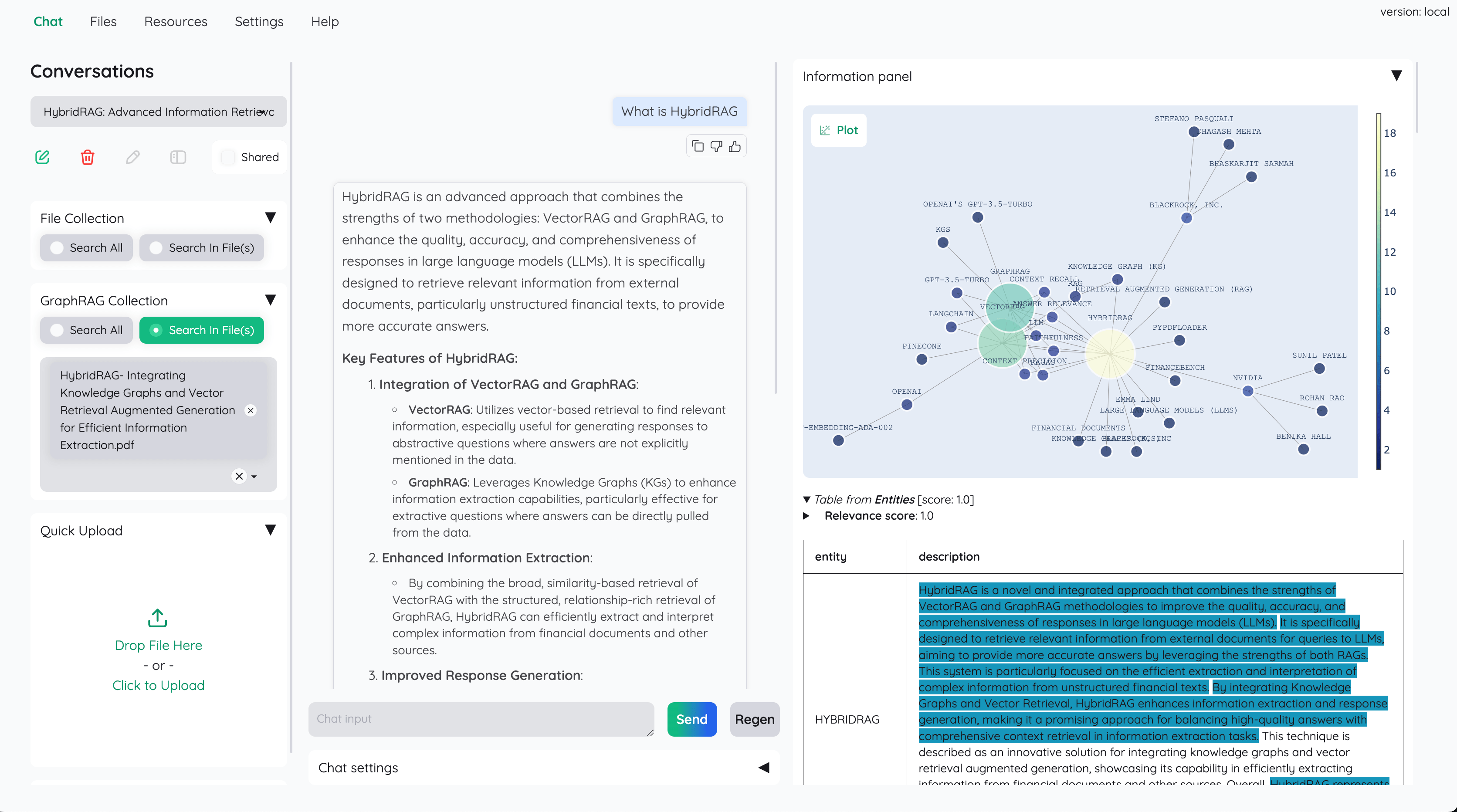
An open-source clean & customizable RAG UI for chatting with your documents. Built with both end users and
2024-05-15 16:34:50 +07:00
developers in mind.
2024-04-25 17:33:19 +07:00
2024-08-30 23:18:31 +07:00
2024-04-13 18:29:37 +07:00
2024-08-30 23:46:18 +07:00
[Live Demo ](https://huggingface.co/spaces/cin-model/kotaemon-demo ) |
2024-08-26 08:50:37 +07:00
[Source Code ](https://github.com/Cinnamon/kotaemon )
2024-04-13 23:26:06 +07:00
[User Guide ](https://cinnamon.github.io/kotaemon/ ) |
[Developer Guide ](https://cinnamon.github.io/kotaemon/development/ ) |
[Feedback ](https://github.com/Cinnamon/kotaemon/issues )
[AUR-385, AUR-388] Declare BaseComponent and decide LLM call interface (#2)
- Use cases related to LLM call: https://cinnamon-ai.atlassian.net/browse/AUR-388?focusedCommentId=34873
- Sample usages: `test_llms_chat_models.py` and `test_llms_completion_models.py`:
```python
from kotaemon.llms.chats.openai import AzureChatOpenAI
model = AzureChatOpenAI(
openai_api_base="https://test.openai.azure.com/",
openai_api_key="some-key",
openai_api_version="2023-03-15-preview",
deployment_name="gpt35turbo",
temperature=0,
request_timeout=60,
)
output = model("hello world")
```
For the LLM-call component, I decide to wrap around Langchain's LLM models and Langchain's Chat models. And set the interface as follow:
- Completion LLM component:
```python
class CompletionLLM:
def run_raw(self, text: str) -> LLMInterface:
# Run text completion: str in -> LLMInterface out
def run_batch_raw(self, text: list[str]) -> list[LLMInterface]:
# Run text completion in batch: list[str] in -> list[LLMInterface] out
# run_document and run_batch_document just reuse run_raw and run_batch_raw, due to unclear use case
```
- Chat LLM component:
```python
class ChatLLM:
def run_raw(self, text: str) -> LLMInterface:
# Run chat completion (no chat history): str in -> LLMInterface out
def run_batch_raw(self, text: list[str]) -> list[LLMInterface]:
# Run chat completion in batch mode (no chat history): list[str] in -> list[LLMInterface] out
def run_document(self, text: list[BaseMessage]) -> LLMInterface:
# Run chat completion (with chat history): list[langchain's BaseMessage] in -> LLMInterface out
def run_batch_document(self, text: list[list[BaseMessage]]) -> list[LLMInterface]:
# Run chat completion in batch mode (with chat history): list[list[langchain's BaseMessage]] in -> list[LLMInterface] out
```
- The LLMInterface is as follow:
```python
@dataclass
class LLMInterface:
text: list[str]
completion_tokens: int = -1
total_tokens: int = -1
prompt_tokens: int = -1
logits: list[list[float]] = field(default_factory=list)
```
2023-08-29 15:47:12 +07:00
2024-03-29 19:47:03 +07:00
[](https://www.python.org/downloads/release/python-31013/)
[](https://github.com/psf/black)
2024-08-26 08:50:37 +07:00
<a href="https://hub.docker.com/r/taprosoft/kotaemon" target="_blank">
<img src="https://img.shields.io/badge/docker_pull-kotaemon:v1.0-brightgreen" alt="docker pull taprosoft/kotaemon:v1.0"></a>
2024-03-29 19:47:03 +07:00
[](https://codeium.com)
2023-12-20 11:30:25 +07:00
2024-08-26 08:50:37 +07:00
## Introduction
This project serves as a functional RAG UI for both end users who want to do QA on their
documents and developers who want to build their own RAG pipeline.
[AUR-385, AUR-388] Declare BaseComponent and decide LLM call interface (#2)
- Use cases related to LLM call: https://cinnamon-ai.atlassian.net/browse/AUR-388?focusedCommentId=34873
- Sample usages: `test_llms_chat_models.py` and `test_llms_completion_models.py`:
```python
from kotaemon.llms.chats.openai import AzureChatOpenAI
model = AzureChatOpenAI(
openai_api_base="https://test.openai.azure.com/",
openai_api_key="some-key",
openai_api_version="2023-03-15-preview",
deployment_name="gpt35turbo",
temperature=0,
request_timeout=60,
)
output = model("hello world")
```
For the LLM-call component, I decide to wrap around Langchain's LLM models and Langchain's Chat models. And set the interface as follow:
- Completion LLM component:
```python
class CompletionLLM:
def run_raw(self, text: str) -> LLMInterface:
# Run text completion: str in -> LLMInterface out
def run_batch_raw(self, text: list[str]) -> list[LLMInterface]:
# Run text completion in batch: list[str] in -> list[LLMInterface] out
# run_document and run_batch_document just reuse run_raw and run_batch_raw, due to unclear use case
```
- Chat LLM component:
```python
class ChatLLM:
def run_raw(self, text: str) -> LLMInterface:
# Run chat completion (no chat history): str in -> LLMInterface out
def run_batch_raw(self, text: list[str]) -> list[LLMInterface]:
# Run chat completion in batch mode (no chat history): list[str] in -> list[LLMInterface] out
def run_document(self, text: list[BaseMessage]) -> LLMInterface:
# Run chat completion (with chat history): list[langchain's BaseMessage] in -> LLMInterface out
def run_batch_document(self, text: list[list[BaseMessage]]) -> list[LLMInterface]:
# Run chat completion in batch mode (with chat history): list[list[langchain's BaseMessage]] in -> list[LLMInterface] out
```
- The LLMInterface is as follow:
```python
@dataclass
class LLMInterface:
text: list[str]
completion_tokens: int = -1
total_tokens: int = -1
prompt_tokens: int = -1
logits: list[list[float]] = field(default_factory=list)
```
2023-08-29 15:47:12 +07:00
2024-03-29 19:47:03 +07:00
- For end users:
2024-08-26 08:50:37 +07:00
- A clean & minimalistic UI for RAG-based QA.
2024-03-29 19:47:03 +07:00
- Supports LLM API providers (OpenAI, AzureOpenAI, Cohere, etc) and local LLMs
2024-08-26 08:50:37 +07:00
(via `ollama` and `llama-cpp-python` ).
- Easy installation scripts.
2024-03-29 19:47:03 +07:00
- For developers:
2024-08-26 08:50:37 +07:00
- A framework for building your own RAG-based document QA pipeline.
- Customize and see your RAG pipeline in action with the provided UI (built with Gradio).
2024-03-06 10:59:30 +07:00
2024-05-15 16:34:50 +07:00
```yml
+----------------------------------------------------------------------------+
| End users: Those who use apps built with `kotaemon` . |
| (You use an app like the one in the demo above) |
| +----------------------------------------------------------------+ |
| | Developers: Those who built with `kotaemon` . | |
| | (You have `import kotaemon` somewhere in your project) | |
| | +----------------------------------------------------+ | |
| | | Contributors: Those who make `kotaemon` better. | | |
| | | (You make PR to this repo) | | |
| | +----------------------------------------------------+ | |
| +----------------------------------------------------------------+ |
+----------------------------------------------------------------------------+
```
2024-03-29 19:47:03 +07:00
This repository is under active development. Feedback, issues, and PRs are highly
2024-08-26 08:50:37 +07:00
appreciated.
## Key Features
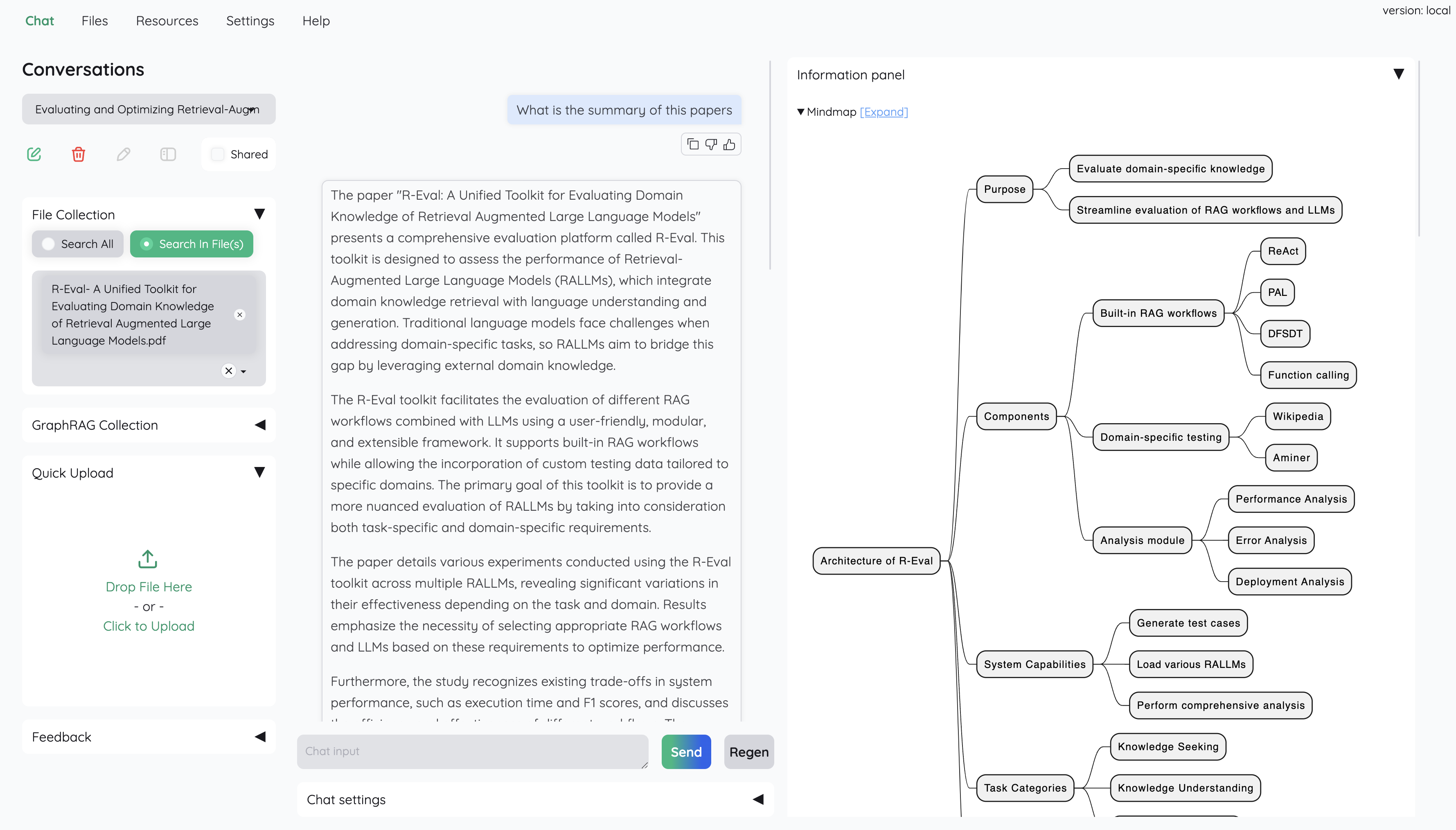
- **Host your own document QA (RAG) web-UI**. Support multi-user login, organize your files in private / public collections, collaborate and share your favorite chat with others.
- **Organize your LLM & Embedding models**. Support both local LLMs & popular API providers (OpenAI, Azure, Ollama, Groq).
- **Hybrid RAG pipeline**. Sane default RAG pipeline with hybrid (full-text & vector) retriever + re-ranking to ensure best retrieval quality.
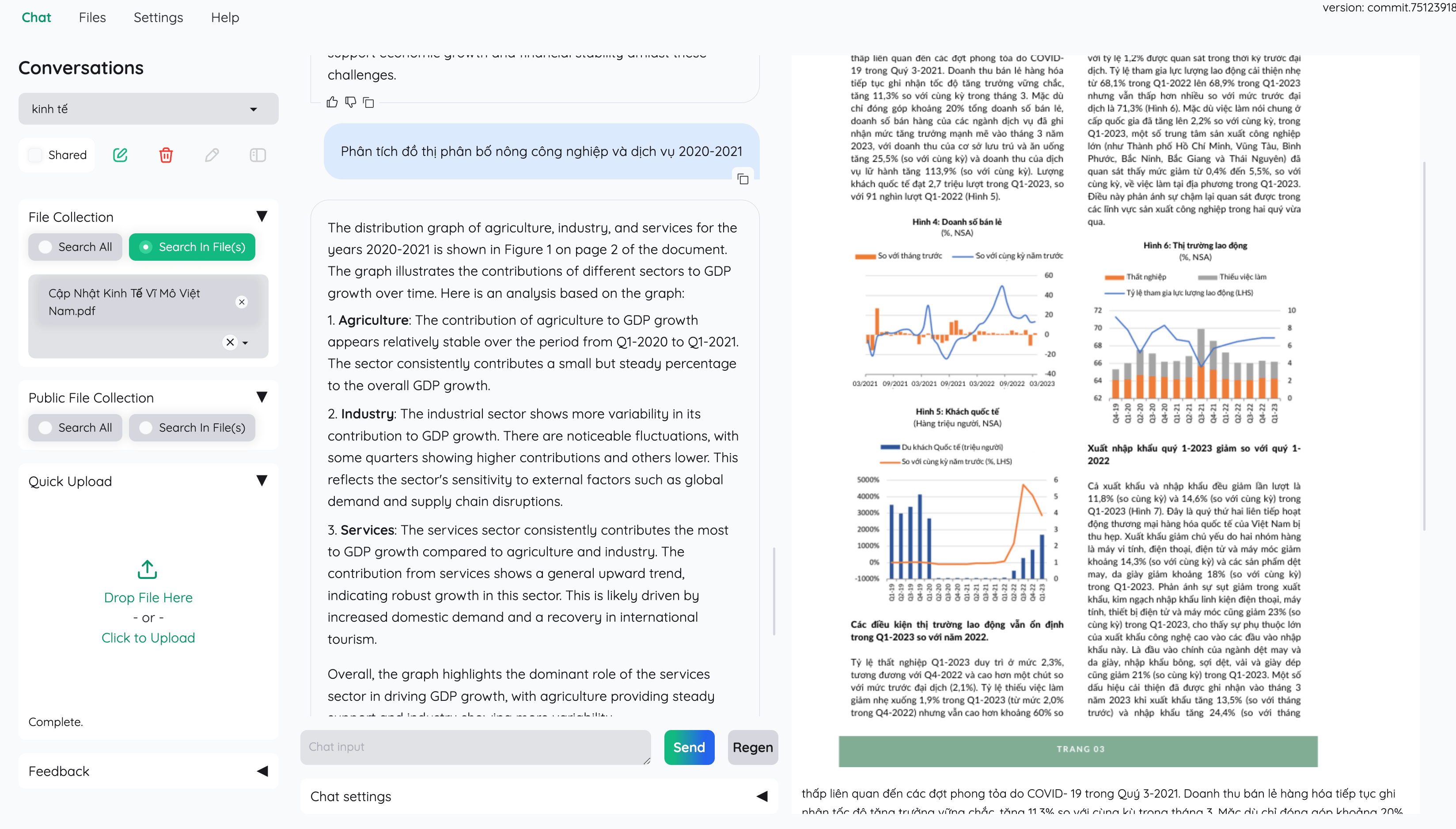
- **Multi-modal QA support**. Perform Question Answering on multiple documents with figures & tables support. Support multi-modal document parsing (selectable options on UI).
- **Advance citations with document preview**. By default the system will provide detailed citations to ensure the correctness of LLM answers. View your citations (incl. relevant score) directly in the _ in-browser PDF viewer _ with highlights. Warning when retrieval pipeline return low relevant articles.
- **Support complex reasoning methods**. Use question decomposition to answer your complex / multi-hop question. Support agent-based reasoning with ReAct, ReWOO and other agents.
- **Configurable settings UI**. You can adjust most important aspects of retrieval & generation process on the UI (incl. prompts).
- **Extensible**. Being built on Gradio, you are free to customize / add any UI elements as you like. Also, we aim to support multiple strategies for document indexing & retrieval. `GraphRAG` indexing pipeline is provided as an example.
2024-08-30 23:18:31 +07:00
[AUR-385, AUR-388] Declare BaseComponent and decide LLM call interface (#2)
- Use cases related to LLM call: https://cinnamon-ai.atlassian.net/browse/AUR-388?focusedCommentId=34873
- Sample usages: `test_llms_chat_models.py` and `test_llms_completion_models.py`:
```python
from kotaemon.llms.chats.openai import AzureChatOpenAI
model = AzureChatOpenAI(
openai_api_base="https://test.openai.azure.com/",
openai_api_key="some-key",
openai_api_version="2023-03-15-preview",
deployment_name="gpt35turbo",
temperature=0,
request_timeout=60,
)
output = model("hello world")
```
For the LLM-call component, I decide to wrap around Langchain's LLM models and Langchain's Chat models. And set the interface as follow:
- Completion LLM component:
```python
class CompletionLLM:
def run_raw(self, text: str) -> LLMInterface:
# Run text completion: str in -> LLMInterface out
def run_batch_raw(self, text: list[str]) -> list[LLMInterface]:
# Run text completion in batch: list[str] in -> list[LLMInterface] out
# run_document and run_batch_document just reuse run_raw and run_batch_raw, due to unclear use case
```
- Chat LLM component:
```python
class ChatLLM:
def run_raw(self, text: str) -> LLMInterface:
# Run chat completion (no chat history): str in -> LLMInterface out
def run_batch_raw(self, text: list[str]) -> list[LLMInterface]:
# Run chat completion in batch mode (no chat history): list[str] in -> list[LLMInterface] out
def run_document(self, text: list[BaseMessage]) -> LLMInterface:
# Run chat completion (with chat history): list[langchain's BaseMessage] in -> LLMInterface out
def run_batch_document(self, text: list[list[BaseMessage]]) -> list[LLMInterface]:
# Run chat completion in batch mode (with chat history): list[list[langchain's BaseMessage]] in -> list[LLMInterface] out
```
- The LLMInterface is as follow:
```python
@dataclass
class LLMInterface:
text: list[str]
completion_tokens: int = -1
total_tokens: int = -1
prompt_tokens: int = -1
logits: list[list[float]] = field(default_factory=list)
```
2023-08-29 15:47:12 +07:00
2024-04-25 17:33:19 +07:00
## Installation
### For end users
This document is intended for developers. If you just want to install and use the app as
2024-08-26 08:50:37 +07:00
it is, please follow the non-technical [User Guide ](https://cinnamon.github.io/kotaemon/ ) (WIP).
2024-04-25 17:33:19 +07:00
### For developers
2024-08-26 08:50:37 +07:00
#### With Docker (recommended)
2024-04-25 17:33:19 +07:00
2024-08-26 08:50:37 +07:00
- Use this command to launch the server
2024-04-25 17:33:19 +07:00
2024-08-26 08:50:37 +07:00
```
docker run \
-e GRADIO_SERVER_NAME=0.0.0.0 \
-e GRADIO_SERVER_PORT=7860 \
-p 7860:7860 -it --rm \
taprosoft/kotaemon:v1.0
2024-04-25 17:33:19 +07:00
```
2024-08-26 08:50:37 +07:00
Navigate to `http://localhost:7860/` to access the web UI.
2024-05-31 17:49:02 +07:00
2024-08-26 08:50:37 +07:00
#### Without Docker
- Clone and install required packages on a fresh python environment.
2024-05-31 17:49:02 +07:00
2024-08-26 08:50:37 +07:00
```shell
# optional (setup env)
conda create -n kotaemon python=3.10
conda activate kotaemon
2024-05-31 17:49:02 +07:00
2024-08-26 08:50:37 +07:00
# clone this repo
git clone https://github.com/Cinnamon/kotaemon
2024-05-31 17:49:02 +07:00
cd kotaemon
pip install -e "libs/kotaemon[all]"
pip install -e "libs/ktem"
2024-08-26 08:50:37 +07:00
```
- View and edit your environment variables (API keys, end-points) in `.env` .
- (Optional) To enable in-browser PDF_JS viewer, download [PDF_JS_DIST ](https://github.com/mozilla/pdf.js/releases/download/v4.0.379/pdfjs-4.0.379-dist.zip ) and extract it to `libs/ktem/ktem/assets/prebuilt`
2024-08-30 23:18:31 +07:00
<img src="https://raw.githubusercontent.com/Cinnamon/kotaemon/main/docs/images/pdf-viewer-setup.png" alt="pdf-setup" width="300">
2024-05-31 17:49:02 +07:00
2024-08-26 08:50:37 +07:00
- Start the web server:
```shell
python app.py
2024-05-31 17:49:02 +07:00
```
2024-08-26 08:50:37 +07:00
The app will be automatically launched in your browser.
Default username / password are: `admin` / `admin` . You can setup additional users directly on the UI.
2024-08-30 23:18:31 +07:00
## Setup local models (for local / private RAG)
See [Local model setup ](docs/local_model.md ).
2024-08-26 08:50:37 +07:00
## Customize your application
By default, all application data are stored in `./ktem_app_data` folder. You can backup or copy this folder to move your installation to a new machine.
2024-04-25 17:33:19 +07:00
2024-08-26 08:50:37 +07:00
For advance users or specific use-cases, you can customize those files:
2024-04-25 17:33:19 +07:00
- `flowsettings.py`
2024-08-26 08:50:37 +07:00
- `.env`
2024-04-25 17:33:19 +07:00
### `flowsettings.py`
This file contains the configuration of your application. You can use the example
2024-08-26 08:50:37 +07:00
[here ](flowsettings.py ) as the
2024-04-25 17:33:19 +07:00
starting point.
2024-08-26 08:50:37 +07:00
<details>
2024-04-25 17:33:19 +07:00
2024-08-26 08:50:37 +07:00
<summary>Notable settings</summary>
2024-04-25 17:33:19 +07:00
2024-08-26 08:50:37 +07:00
```
# setup your preferred document store (with full-text search capabilities)
KH_DOCSTORE=(Elasticsearch | LanceDB | SimpleFileDocumentStore)
# setup your preferred vectorstore (for vector-based search)
2024-08-30 23:29:31 +07:00
KH_VECTORSTORE=(ChromaDB | LanceDB | InMemory)
2024-08-26 08:50:37 +07:00
# Enable / disable multimodal QA
KH_REASONINGS_USE_MULTIMODAL=True
# Setup your new reasoning pipeline or modify existing one.
KH_REASONINGS = [
"ktem.reasoning.simple.FullQAPipeline",
"ktem.reasoning.simple.FullDecomposeQAPipeline",
"ktem.reasoning.react.ReactAgentPipeline",
"ktem.reasoning.rewoo.RewooAgentPipeline",
]
)
2024-04-25 17:33:19 +07:00
```
2024-08-26 08:50:37 +07:00
</details>
### `.env`
2024-04-25 17:33:19 +07:00
This file provides another way to configure your models and credentials.
<details markdown>
<summary>Configure model via the .env file</summary>
Alternatively, you can configure the models via the `.env` file with the information needed to connect to the LLMs. This file is located in
the folder of the application. If you don't see it, you can create one.
Currently, the following providers are supported:
#### OpenAI
In the `.env` file, set the `OPENAI_API_KEY` variable with your OpenAI API key in order
to enable access to OpenAI's models. There are other variables that can be modified,
please feel free to edit them to fit your case. Otherwise, the default parameter should
work for most people.
```shell
OPENAI_API_BASE=https://api.openai.com/v1
OPENAI_API_KEY=<your OpenAI API key here>
OPENAI_CHAT_MODEL=gpt-3.5-turbo
OPENAI_EMBEDDINGS_MODEL=text-embedding-ada-002
```
#### Azure OpenAI
For OpenAI models via Azure platform, you need to provide your Azure endpoint and API
key. Your might also need to provide your developments' name for the chat model and the
embedding model depending on how you set up Azure development.
```shell
AZURE_OPENAI_ENDPOINT=
AZURE_OPENAI_API_KEY=
OPENAI_API_VERSION=2024-02-15-preview
AZURE_OPENAI_CHAT_DEPLOYMENT=gpt-35-turbo
AZURE_OPENAI_EMBEDDINGS_DEPLOYMENT=text-embedding-ada-002
```
#### Local models
2024-08-26 08:50:37 +07:00
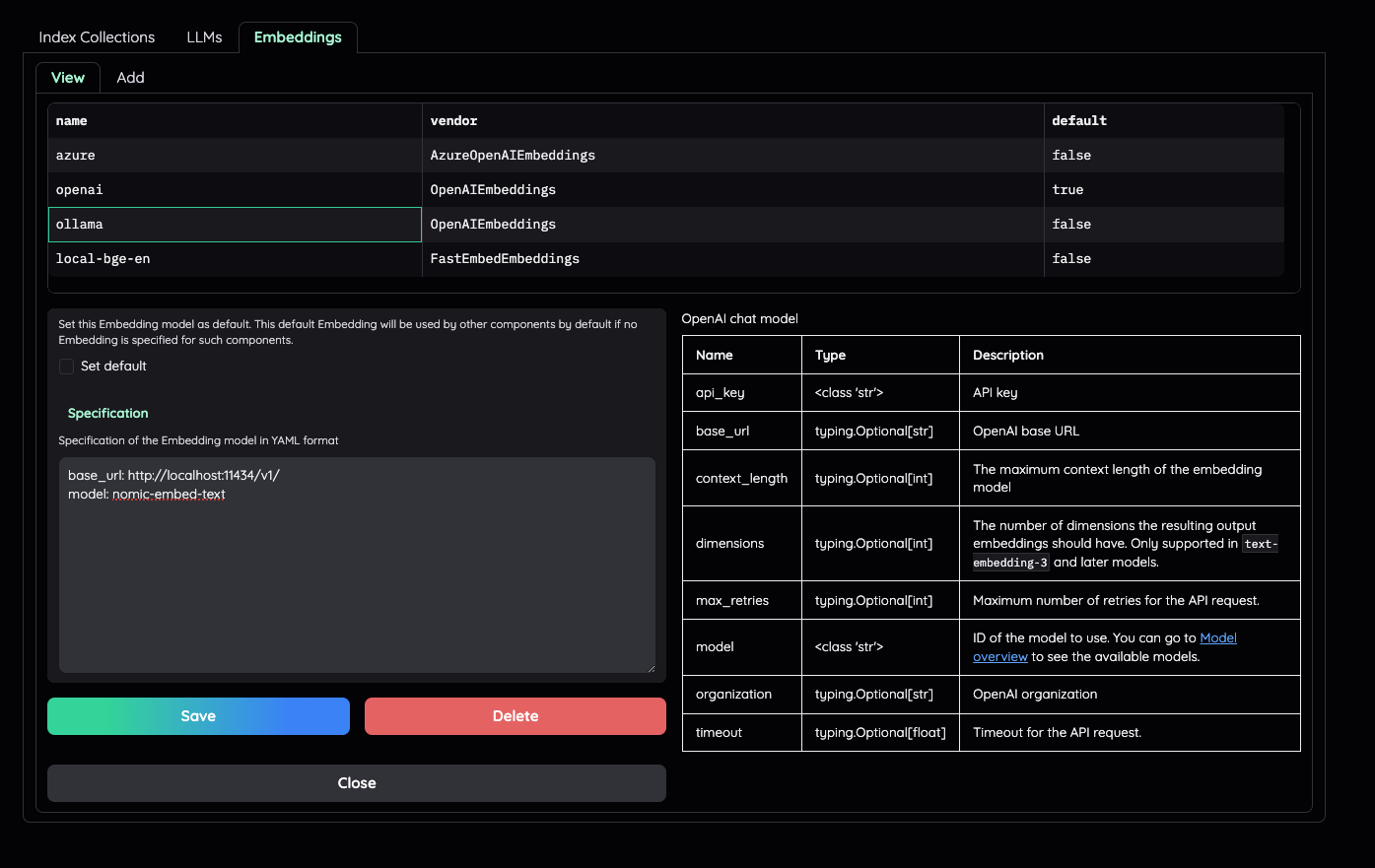
##### Using ollama OpenAI compatible server
Install [ollama ](https://github.com/ollama/ollama ) and start the application.
Pull your model (e.g):
```
ollama pull llama3.1:8b
ollama pull nomic-embed-text
```
Set the model names on web UI and make it as default.
2024-08-30 23:18:31 +07:00
2024-04-25 17:33:19 +07:00
2024-08-26 08:50:37 +07:00
##### Using GGUF with llama-cpp-python
2024-04-25 17:33:19 +07:00
You can search and download a LLM to be ran locally from the [Hugging Face
Hub](https://huggingface.co/models). Currently, these model formats are supported:
- GGUF
You should choose a model whose size is less than your device's memory and should leave
about 2 GB. For example, if you have 16 GB of RAM in total, of which 12 GB is available,
then you should choose a model that takes up at most 10 GB of RAM. Bigger models tend to
give better generation but also take more processing time.
Here are some recommendations and their size in memory:
2023-08-30 07:22:01 +07:00
2024-04-25 17:33:19 +07:00
- [Qwen1.5-1.8B-Chat-GGUF ](https://huggingface.co/Qwen/Qwen1.5-1.8B-Chat-GGUF/resolve/main/qwen1_5-1_8b-chat-q8_0.gguf?download=true ):
around 2 GB
2023-08-30 07:22:01 +07:00
2024-08-26 08:50:37 +07:00
Add a new LlamaCpp model with the provided model name on the web uI.
2023-08-30 07:22:01 +07:00
2024-08-26 08:50:37 +07:00
</details>
2023-08-30 07:22:01 +07:00
2024-08-26 08:50:37 +07:00
## Adding your own RAG pipeline
2023-09-06 17:19:22 +07:00
2024-08-26 08:50:37 +07:00
#### Custom reasoning pipeline
2023-08-30 07:22:01 +07:00
2024-08-26 08:50:37 +07:00
First, check the default pipeline implementation in
[here ](libs/ktem/ktem/reasoning/simple.py ). You can make quick adjustment to how the default QA pipeline work.
2023-08-30 07:22:01 +07:00
2024-08-26 08:50:37 +07:00
Next, if you feel comfortable adding new pipeline, add new `.py` implementation in `libs/ktem/ktem/reasoning/` and later include it in `flowssettings` to enable it on the UI.
2023-08-30 07:22:01 +07:00
2024-08-26 08:50:37 +07:00
#### Custom indexing pipeline
2023-08-30 07:22:01 +07:00
2024-08-26 08:50:37 +07:00
Check sample implementation in `libs/ktem/ktem/index/file/graph`
2023-08-30 07:22:01 +07:00
2024-08-26 08:50:37 +07:00
(more instruction WIP).
2023-08-30 07:22:01 +07:00
2024-08-26 08:50:37 +07:00
## Developer guide
2024-04-13 23:26:06 +07:00
Please refer to the [Developer Guide ](https://cinnamon.github.io/kotaemon/development/ )
for more details.
2024-08-28 17:19:20 +07:00
## Star History
<a href="https://star-history.com/#Cinnamon/kotaemon &Date">
<picture>
<source media="(prefers-color-scheme: dark)" srcset="https://api.star-history.com/svg?repos=Cinnamon/kotaemon&type=Date&theme=dark" />
<source media="(prefers-color-scheme: light)" srcset="https://api.star-history.com/svg?repos=Cinnamon/kotaemon&type=Date" />
<img alt="Star History Chart" src="https://api.star-history.com/svg?repos=Cinnamon/kotaemon&type=Date" />
</picture>
</a>
