mirror of
https://github.com/microsoft/PowerToys.git
synced 2026-08-29 10:09:43 +02:00
abf346a864fa2c412d50e4c460083bd99cb6505c
9656 Commits
| Author | SHA1 | Message | Date | |
|---|---|---|---|---|
 Jiří Polášek
|
3a84795531 |
CmdPal: Avoid redundant performance widget refreshes (#49735)
<!-- Enter a brief description/summary of your PR here. What does it fix/what does it change/how was it tested (even manually, if necessary)? --> ## Summary of the Pull Request This PR removes a redundant collection refresh from Performance Monitor's periodically invoked disk metrics callback. The callback already updates the existing list item titles in place, so raising `ItemsChanged` on every sample needlessly asks Command Palette to refresh an unchanged collection. - Stop raising `ItemsChanged` from the disk page's `Updated` handler. - Continue updating disk usage and read/write speed titles in place. - Avoid repeated collection refresh work during periodic performance sampling. |
||
|
Jiří Polášek
|
a5b1ec8124 |
CmdPal SDK: Fix weak command property subscriptions (#49731)
<!-- Enter a brief description/summary of your PR here. What does it fix/what does it change/how was it tested (even manually, if necessary)? --> ## Summary of the Pull Request This PR fixes a weak-event subscription in the CmdPal toolkit that still captured its owning `CommandItem` through an instance callback. That strong reference defeated the weak listener, while command replacement could also leave a stale handler attached to the outgoing command. - Make the command property-change callback static. - Resolve the owning `CommandItem` through the listener's weak reference. - Explicitly unsubscribe from the outgoing command during replacement. - Retain the detach callback that removes dead listeners from long-lived commands. |
||
|
Jiří Polášek
|
d70ab95355 |
CmdPal: Remove article from "Select a file" button text (#49752)
<!-- Enter a brief description/summary of your PR here. What does it fix/what does it change/how was it tested (even manually, if necessary)? --> ## Summary of the Pull Request This PR changes file picker parameter button text from "Select a file" to "Select file". ## Pictures? Pictures! <img width="1600" height="953" alt="image" src="https://github.com/user-attachments/assets/221eeceb-ac49-4469-8989-b8d01cb4dd2c" /> <!-- Please review the items on the PR checklist before submitting--> ## PR Checklist - [ ] Closes: #xxx <!-- - [ ] Closes: #yyy (add separate lines for additional resolved issues) --> - [ ] **Communication:** I've discussed this with core contributors already. If the work hasn't been agreed, this work might be rejected - [ ] **Tests:** Added/updated and all pass - [ ] **Localization:** All end-user-facing strings can be localized - [ ] **Dev docs:** Added/updated - [ ] **New binaries:** Added on the required places - [ ] [JSON for signing](https://github.com/microsoft/PowerToys/blob/main/.pipelines/ESRPSigning_core.json) for new binaries - [ ] [WXS for installer](https://github.com/microsoft/PowerToys/blob/main/installer/PowerToysSetup/Product.wxs) for new binaries and localization folder - [ ] [YML for CI pipeline](https://github.com/microsoft/PowerToys/blob/main/.pipelines/ci/templates/build-powertoys-steps.yml) for new test projects - [ ] [YML for signed pipeline](https://github.com/microsoft/PowerToys/blob/main/.pipelines/release.yml) - [ ] **Documentation updated:** If checked, please file a pull request on [our docs repo](https://github.com/MicrosoftDocs/windows-uwp/tree/docs/hub/powertoys) and link it here: #xxx <!-- Provide a more detailed description of the PR, other things fixed, or any additional comments/features here --> ## Detailed Description of the Pull Request / Additional comments <!-- Describe how you validated the behavior. Add automated tests wherever possible, but list manual validation steps taken as well --> ## Validation Steps Performed |
||
|
Niels Laute
|
57d32bcb6b |
Fix Keyboard Manager editor file picker not opening when elevated (#48876)
## Summary Fixes #48845. In the new WinUI 3 Keyboard Manager editor, clicking the **browse icon** to select a program path (or "start in" folder) for the *Run Program* action did nothing — no dialog appeared. ### Root cause The editor (`PowerToys.KeyboardManagerEditorUI.exe`) is launched by the Keyboard Manager module DLL via `ShellExecuteExW` from inside the PowerToys runner (`src/modules/keyboardmanager/dll/dllmain.cpp`). When PowerToys runs elevated, the editor **inherits that elevation**. The browse buttons used the legacy **`Windows.Storage.Pickers`** (`FileOpenPicker` / `FolderPicker` + `InitializeWithWindow`). Those pickers activate through the UWP runtime broker, which fails with `E_ACCESSDENIED` in an elevated process. The handlers were `async void` with no `try/catch`, so the exception was swallowed and no dialog ever opened. Typing/pasting a path into the field still worked — matching the bug report. ### Fix Switch both handlers to the Windows App SDK **`Microsoft.Windows.Storage.Pickers`** API, constructed with a `WindowId`. Those pickers are a thin wrapper over the in-process Win32 Common Item Dialog (`IFileOpenDialog`, `CLSCTX_INPROC_SERVER`) and work correctly in elevated processes — the same mechanism already used elsewhere in PowerToys (e.g. Settings UI `IFileDialog`/`GetOpenFileName`, and CmdPal which already uses this exact namespace). Also wrapped the handlers in `try/catch` with `Logger.LogError` so any future failure is logged instead of silently swallowed. ### Verification - Built `KeyboardManagerEditorUI.csproj` (Release / x64) with all native dependencies — exit code 0. - Confirmed against the Windows App SDK source that `Microsoft.Windows.Storage.Pickers.FileOpenPicker` uses `create_instance<IFileOpenDialog>(CLSID_FileOpenDialog, CLSCTX_INPROC_SERVER)` and `dialog->Show(hwnd)`, i.e. the elevation-safe in-process dialog. ### Notes / out of scope The report also mentions some apps (e.g. `visio.exe`) not launching while others (`winword.exe`) do. That's a separate issue in the launch path (`run_non_elevated` uses `CreateProcessW`, which ignores registry App Paths / shell activation, unlike `ShellExecute` used by the *Open URI* action) and is **not** addressed here. --------- Co-authored-by: Copilot <223556219+Copilot@users.noreply.github.com> Co-authored-by: copilot-swe-agent[bot] <198982749+Copilot@users.noreply.github.com> Copilot-Session: 1f00def4-e790-4071-96c6-a81c9c2adba5 |
||
|
Jiří Polášek
|
9f2ddf6e85 |
CmdPal: Set Settings window titlebar PreferredTheme to UseDefaultAppMode (#49750)
## Summary of the Pull Request This PR should fix the incorrect foreground color of title bar glyphs after a theme change by setting the Settings window's title bar `PreferredTheme` to [`TitleBarTheme.UseDefaultAppMode`](https://learn.microsoft.com/en-us/windows/windows-app-sdk/api/winrt/microsoft.ui.windowing.titlebartheme?view=windows-app-sdk-2.0). |
||
|
Jiří Polášek
|
81d3bb8e34 |
CmdPal: Initialize page icons after property changes in PageViewModel (#49672)
## Summary of the Pull Request This PR is a quick fix for pages that changes their icon at runtime, and then the icon is nowhere to be seen. <!-- Please review the items on the PR checklist before submitting--> ## PR Checklist - [ ] Closes: #xxx <!-- - [ ] Closes: #yyy (add separate lines for additional resolved issues) --> - [ ] **Communication:** I've discussed this with core contributors already. If the work hasn't been agreed, this work might be rejected - [ ] **Tests:** Added/updated and all pass - [ ] **Localization:** All end-user-facing strings can be localized - [ ] **Dev docs:** Added/updated - [ ] **New binaries:** Added on the required places - [ ] [JSON for signing](https://github.com/microsoft/PowerToys/blob/main/.pipelines/ESRPSigning_core.json) for new binaries - [ ] [WXS for installer](https://github.com/microsoft/PowerToys/blob/main/installer/PowerToysSetup/Product.wxs) for new binaries and localization folder - [ ] [YML for CI pipeline](https://github.com/microsoft/PowerToys/blob/main/.pipelines/ci/templates/build-powertoys-steps.yml) for new test projects - [ ] [YML for signed pipeline](https://github.com/microsoft/PowerToys/blob/main/.pipelines/release.yml) - [ ] **Documentation updated:** If checked, please file a pull request on [our docs repo](https://github.com/MicrosoftDocs/windows-uwp/tree/docs/hub/powertoys) and link it here: #xxx <!-- Provide a more detailed description of the PR, other things fixed, or any additional comments/features here --> ## Detailed Description of the Pull Request / Additional comments <!-- Describe how you validated the behavior. Add automated tests wherever possible, but list manual validation steps taken as well --> ## Validation Steps Performed |
||
|
Niels Laute
|
363226587b |
feat(settings-ui): add update channel selector (#49722)
Supersedes #49719, which cannot be reopened because its original base branch was deleted after #49414 merged. ## Summary of the Pull Request Improves the update settings introduced by #49414 by replacing the prerelease checkbox with a dedicated **Update channel** expander. Users can choose between Stable and Insider channels, see the current selection while the expander is collapsed, and access the PowerToys Insider documentation. The new expander preserves the existing `IncludePrereleaseUpdates` setting and displays its own managed-by-organization state when the preview update policy is configured. <img width="1576" height="526" alt="image" src="https://github.com/user-attachments/assets/35863d4b-5ca1-4662-9d84-f184c98dbbc6" /> ## PR Checklist - [x] **Communication:** This builds on the update channel work merged in #49414 - [ ] **Tests:** No automated tests added; this is a Settings UI presentation change over the existing setting - [x] **Localization:** All end-user-facing strings can be localized - [ ] **Documentation updated:** Documentation changes are maintained separately ## Detailed Description of the Pull Request / Additional comments - Moves `IncludePrereleaseUpdates` out of the general update settings list into a dedicated SettingsExpander in `src/settings-ui/Settings.UI/SettingsXAML/Views/GeneralPage.xaml`. - Adds Stable and Insider radio-button choices, descriptions, collapsed status text, and an Insider learn-more link. - Adds localized strings in `src/settings-ui/Settings.UI/Strings/en-us/Resources.resw`. - Separates the preview update policy warning from the other update settings warnings in `src/settings-ui/Settings.UI/ViewModels/GeneralViewModel.cs`. ## Validation Steps Performed - Built `src/settings-ui/Settings.UI/PowerToys.Settings.csproj` for Debug ARM64 with the repository build script. - Applied the repository XAML Styler configuration to `GeneralPage.xaml`. --------- Copilot-Session: 4169c03d-5e17-4495-b7b1-8e6af0d6565c |
||
|
Niels Laute
|
9df98bdad3 |
Add progress/result window to the Bug Report flow with a GitHub issue shortcut (#48980)
## Summary of the Pull Request Adds a small, native progress/result window to the **Bug Report** flow so users get feedback while the report is generated and a one-click path to file a GitHub issue. Previously, triggering "Report bug" (from the tray menu or **Settings → General**) ran `PowerToys.BugReportTool.exe` hidden for ~30 seconds with **no feedback at all**, then popped a plain message box. Many users then had to manually find the `.zip` and figure out where to file the issue. Now the runner shows a lightweight window that: - Displays an animated **"Generating bug report…"** state while the tool runs. - On completion, shows **where the `.zip` was saved** (`…\Desktop\PowerToysReport_<timestamp>.zip`) in a read-only, copyable field. - Offers **Open folder** (reveals/selects the `.zip` in Explorer) and **Report on GitHub** (opens the prefilled `bug_report.yml` issue template *and* reveals the `.zip` so it can be dragged into the issue). - Shows a clear error state if the report could not be created. > Note: GitHub has no API/URL to pre-attach a binary to a new issue (attachments only happen via browser drag-drop). So the "Report on GitHub" action does the next best thing: opens the prefilled issue page and highlights the `.zip` in Explorer for a single drag to attach. https://github.com/user-attachments/assets/9307d728-bbbd-4258-9480-ced65d2fa065 ## PR Checklist - [ ] Closes: #xxx - [x] **Communication:** Lightweight, additive UX on an existing feature; happy to adjust per maintainer feedback. - [ ] **Tests:** No automated tests (native Win32 window in the runner); validated manually — see below. - [x] **Localization:** All end-user-facing strings are added to `src/runner/Resources.resx` and loaded via `GET_RESOURCE_STRING`. - [ ] **Dev docs:** N/A - [x] **New binaries:** None — `bug_report_dialog.cpp/.h` compile into the existing `PowerToys.exe` (runner). No new WinUI app or DLL, so no signing/WXS/CI changes required. ## Detailed Description of the Pull Request / Additional comments - New files `src/runner/bug_report_dialog.{h,cpp}` implement the window as plain Win32 (no Common Controls v6 dependency, no managed/WinUI payload), so it works for **both** entry points since it lives in the runner. - `bug_report.cpp` now calls `run_bug_report_dialog(...)` instead of the silent run + message box. The "running" state (observed by Settings) is cleared as soon as the **tool process** exits, so the result window can stay open without keeping the Settings button spinning. A guard re-focuses an already-open window instead of starting a second report. - The window uses the canonical `AttachThreadInput` foreground recipe so it reliably surfaces even when launched from Settings (a different foreground process), and gets a taskbar button so it stays findable during the ~30s run. - The output path is discovered by locating the newest `PowerToysReport_*.zip` in the Desktop folder after the tool exits (the tool names the file internally with a timestamp). - Strings added: dialog title, generating/hint text, done header/hint, failed text, and button captions. ## Validation Steps Performed - Triggered **Report bug** from the **system tray** menu: window appears in the foreground, animates "Generating…", then shows the saved `.zip` path with working **Open folder** and **Report on GitHub** buttons. - Verified **Open folder** selects the `.zip` in Explorer and **Report on GitHub** opens the prefilled `bug_report.yml` issue template with the `.zip` highlighted for drag-and-drop. - Verified the error state renders correctly (and wraps long localized text) when the tool can't run. - Built `runner` (ARM64, Debug) clean; verified end-to-end on a high-DPI display. --------- Co-authored-by: Copilot <223556219+Copilot@users.noreply.github.com> Co-authored-by: Copilot Autofix powered by AI <175728472+Copilot@users.noreply.github.com> |
||
|
Boliang Zhang
|
bb12277d8d |
fix(ci): support automatic versions and counter-exhaustion recovery (#49745)
## Summary of the Pull Request Follow-up to #49414 that fixes two release-pipeline recovery issues: - Azure DevOps treats an empty runtime string parameter as required, so `.pipelines/v2/release.yml` now uses `auto` as the default version override. - Explicit `main` and `stable` version overrides are resolved before automatic `YDDDB` generation, allowing a manually versioned build to proceed after the daily sequence exceeds 9. ## PR Checklist - [x] **Communication:** This is a follow-up to the reviewed preview-release versioning design in #49414 - [x] **Tests:** Added/updated and all pass ## Detailed Description of the Pull Request / Additional comments `auto` is normalized to an empty override in `.pipelines/resolveBuildMetadata.ps1`, preserving automatic release-train version generation without requiring input in the Run Pipeline dialog. Override parsing is now separated from automatic version generation. Full explicit versions bypass daily-sequence and generated-date validation, while automatic versions continue to require a sequence from 1 through 9 and fail closed outside that range. `.pipelines/tests/resolveBuildMetadata.Tests.ps1` covers scheduled `main` with the `auto` default, automatic `stable` generation, and explicit preview/stable recovery when the daily counter has reached 10. ## Validation Steps Performed - `Invoke-Pester .pipelines\tests\resolveBuildMetadata.Tests.ps1 -EnableExit` — 22 passed - Confirmed `auto` resolves a first August 7 stable build to `0.100.2191.0` - Confirmed explicit `0.101.0` resolves to `0.101.0.0` with daily sequence 10 Copilot-Session: 8e04a72e-3b0f-4ac4-8156-d04ea9b8bb85 |
||
|
Michael Clayton
|
e0010c5642 |
Ready for Review - [Mouse Jump] - port upstream WinUI3 code to Mouse Jump (microsoft#48290) (#48393)
<!-- Enter a brief description/summary of your PR here. What does it
fix/what does it change/how was it tested (even manually, if necessary)?
-->
## Summary of the Pull Request
Changes for #48290 to convert Mouse Jump to a WinUI app and remove all
remaining dependencies on WinForms, based on work already done in the
original "FancyMouse" project
(https://github.com/mikeclayton/FancyMouse).
## Notes for reviewers
* the new WinUI build of the app is output into the "/WinUI3Apps"
subfolder
* there's 2 new assemblies that need to be added to the installation as
well - MouseJump.HotKeys.dll and MouseJump.Models.dll. I'm not sure how
to add those to the installer for signing / shipping...
---
### Summary of changes
* New thumbnail layout and rendering code
* WinUI rewrite (winforms version still committed)
* MouseJump.Kicker (dev launch tool)
* CsWin32 for interop
* New assemblies - code reorganised
---
### 1. New layout code
Incorporates latest FancyMouse core layout and rendering logic into
Mouse Jump:
* includes **support** for multiple devices in layout algorithms
* preview still only shows local machine though
* prerequisite for long-term goal #34126
<img width="650" height="709" alt="image"
src="https://github.com/user-attachments/assets/9d1d996d-ed05-4471-b8a5-bd93442f70dc"
/>
### 2. WinUI rewrite
Port latest stable FancyMouse WinUI implementation into Mouse Jump.
Existing WinForms UI left in-situ side-by-side for now - easy to delete
if not needed.
### 3. MouseJump.Kicker
A small dev utility to start Mouse Jump without needing to build the
runner project:
<img width="283" height="274" alt="image"
src="https://github.com/user-attachments/assets/c81bb3f5-5008-48ce-8bc0-eef18413dee6"
/>
### 4. Cswin32 for interop
All win32 interop is now accessed via CsWin32 bindings.
The original win32 bindings were heavily influenced by CsWin32 generated
code (e.g. ```BOOL```, ```HWND```, etc structs), so there's not actually
much change other than deleting a lot of boilerplate code.
### 5. New assemblies
Some code has been reorganised into new assemblies to make it easier to
keep Mouse Jump in sync with upstream FancyMouse
* MouseJump.HotKeys
* MouseJump.Models
<!-- Please review the items on the PR checklist before submitting-->
## PR Checklist
- [x] Closes #48290
- [x] **Communication:** I've discussed this with core contributors
already. If work hasn't been agreed, this work might be rejected
- [x] **Tests:** Added/updated and all pass
- [x] **Localization:** All end user facing strings can be localized
- all ui strings come from Resources.resw
- [x] **Dev docs:** Added/updated
- no changes required
- [x] **New binaries:** Added on the required places
- no changes required
- [x] [JSON for
signing](https://github.com/microsoft/PowerToys/blob/main/.pipelines/ESRPSigning_core.json)
for new binaries
- [x] [WXS for
installer](https://github.com/microsoft/PowerToys/blob/main/installer/PowerToysSetup/Product.wxs)
for new binaries and localization folder
- [x] [YML for CI
pipeline](https://github.com/microsoft/PowerToys/blob/main/.pipelines/ci/templates/build-powertoys-steps.yml)
for new test projects
- [x] [YML for signed
pipeline](https://github.com/microsoft/PowerToys/blob/main/.pipelines/release.yml)
- [x] **Documentation updated:** If checked, please file a pull request
on [our docs
repo](https://github.com/MicrosoftDocs/windows-uwp/tree/docs/hub/powertoys)
and link it here: #xxx
- no changes required
<!-- Provide a more detailed description of the PR, other things fixed,
or any additional comments/features here -->
## Detailed Description of the Pull Request / Additional comments
<!-- Describe how you validated the behavior. Add automated tests
wherever possible, but list manual validation steps taken as well -->
## Validation Steps Performed
- **Workflow tests**
- [x] Automated tests passing locally
- [x] Minimal actions workflow (spelling check) passing for PR
- [ ] Full actions workflow (msbuild) passing for PR
- **UI tests**
- [x] Happy path
- [x] preview image appears when activated
- [x] clicking the preview image moves the mouse cursor to the correct
location
- [x] right-click dismisses the preview image without moving the mouse
- [x] pressing escape dismisses the preview image without moving the
mouse
- [x] left or right clicking another application / desktop dismisses the
preview image without moving the mouse
- [x] Works on multiple monitors with different dpi scaling settings
(e.g. 100% vs 150%)
*
https://github.com/microsoft/PowerToys/pull/23566#issuecomment-1411869418
*
https://github.com/microsoft/PowerToys/pull/23566#issuecomment-1412834413
- [x] Handling negative coordinates on non-primary monitors if higher or
"lefter" than primary monitor
*
https://github.com/microsoft/PowerToys/pull/23566#issuecomment-1404931694
- [x] Mouse crosshair moves when Mouse Jump moves the cursor (mouse
clicks *and* keyboard shortcuts)
* #24523
* #24527
- [x] Activating when the preview window is already visible moves the
form to the new mouse position
- [x] Number and key shortcuts (1-9, Home / End, Left / Right Arrow)
jump to the appropriate monitor
- [x] Number-pad shortcuts (1-9 jump to the appropriate monitor
- **Settings tests**
- [x] Changing thumbnail size settings updates the size of the thumbnail
- [x] Changing preview type between Compact, Bezelled and Custom shows
the correct preview type
- [x] Changing custom preview settings shows the correct settings
- [ ] Launching with settings version 1.0 upgrades settings to version
1.1, with "Bezelled" as the default style and the "Custom" settings
preconfigured to match "Bezelled"
- **Lifecycle tests**
- [x] Starting PowerToys Runner launches MouseJump exe when enabled, and
not when disabled
- [x] Enabling / disabling Mouse Jump in settings starts / stops
MouseJump exe
- [x] Exiting PowerToys Runner stops MouseJump exe
- [x] Killing runner exe via Task Manager stops MouseJump exe
- [x] Stopping Visual Studio local debug run stops MouseJump exe
- note - runner needs to be in *non*-admin mode otherwise Visual Studio
debugger disconnects at launch
- [x] Hotkey and size settings are automatically reloaded when config
file is modified from Settings UI
- [ ] ~~Hotkey and size settings are automatically reloaded when config
file is modified manually (e.g. in notepad) while runner and
MouseJumpUI.exe are running~~
- **[Internal Test
Suite](
|
||
|
Clint Rutkas
|
9fcb8faac5 |
[Quick Accent] Isolate press-and-hold activation (#49701)
## Summary of the Pull Request Makes the **Press and hold the letter** activation method exclusive. Pressing a legacy trigger key (Space or either arrow) before the hold threshold now cancels that owner-letter gesture and passes the trigger through normally, instead of allowing the already-scheduled picker to appear later. Typing any different supported physical letter during the gesture also cancels it, preventing that intervening character from being replaced when the owner letter is released. Space and arrow navigation remains available after a genuine hold activation reaches its threshold. ## PR Checklist - [ ] Closes: N/A - [x] **Communication:** I've discussed this with core contributors already. If the work hasn't been agreed, this work might be rejected - [x] **Tests:** Added/updated and all pass - [x] **Localization:** All end-user-facing strings can be localized - [ ] **Dev docs:** Added/updated - [ ] **New binaries:** Added on the required places - [ ] [JSON for signing](https://github.com/microsoft/PowerToys/blob/main/.pipelines/ESRPSigning_core.json) for new binaries - [ ] [WXS for installer](https://github.com/microsoft/PowerToys/blob/main/installer/PowerToysSetup/Product.wxs) for new binaries and localization folder - [ ] [YML for CI pipeline](https://github.com/microsoft/PowerToys/blob/main/.pipelines/ci/templates/build-powertoys-steps.yml) for new test projects - [ ] [YML for signed pipeline](https://github.com/microsoft/PowerToys/blob/main/.pipelines/release.yml) - [ ] **Documentation updated:** If checked, please file a pull request on [our docs repo](https://github.com/MicrosoftDocs/windows-uwp/tree/docs/hub/powertoys) and link it here: N/A ## Detailed Description of the Pull Request / Additional comments The native keyboard listener previously armed press-and-hold on owner-letter key-down and immediately queued a delayed managed render. Although pre-threshold Space/arrows were excluded from native trigger-key activation, they did not invalidate that pending render. Holding the owner letter after pressing Space therefore still displayed the picker and made both invocation systems feel enabled. This change adds an explicit native-to-managed cancellation event and a generation-based managed display state: - In `PressAndHold`, Space or either arrow before the snapshotted hold threshold cancels the current gesture and passes through without input injection. - Space/arrows at or after the threshold retain their intended picker navigation behavior. - Any different physical letter in Quick Accent's supported key set cancels the owner gesture before passing through, even when that letter has no mapping in the selected language. - Owner repeats and owner key-up are handled from active physical ownership rather than current language eligibility, so live language changes cannot leave stale state. - Activation mode, input time, and hold duration are atomically published and snapshotted once per owner gesture. The native listener passes the same delay snapshot to managed scheduling, so live settings changes apply to the next gesture instead of desynchronizing native interaction from picker visibility. - Character data is prepared before native navigation can become interactive, preventing accepted navigation from being dropped. - Legacy Space/arrow/Both acquisition behavior is preserved. The low-level hook has no clean deterministic native unit-test seam because its private handlers depend on Win32 keyboard state. Managed regression coverage exercises delayed-display cancellation, re-arming, generation invalidation, and delay snapshot preservation. ## Validation Steps Performed - Built `src/modules/poweraccent/PowerAccent.UI/PowerAccent.UI.csproj` in `Debug|x64`, covering the native WinRT projection and managed Core/UI. - Built `src/modules/poweraccent/PowerAccentKeyboardService/PowerAccentKeyboardService.vcxproj` in `Debug|x64`. - Built and ran all `PowerAccent.Core.UnitTests`: **35 passed, 0 failed**. - Ran `git diff --check`. - Performed focused code reviews of pre-threshold trigger cancellation, intervening mapped/unmapped letters, live mode/duration snapshots, language changes, owner key-up balance, and post-threshold navigation. --------- Copilot-Session: cbd8418a-64cb-4c6c-8653-2f3f0a6ceb9e |
||
|
Boliang Zhang (from Dev Box)
|
1b540015d9 |
Merge main into stable for 0.101 release
Co-authored-by: Copilot <223556219+Copilot@users.noreply.github.com> Copilot-Session: 7b3fb20d-6e9d-4fef-a5cd-f8921d28c220 |
||
|
Clint Rutkas
|
ddeb7f1bf5 |
[Always On Top] Render a solid border frame (#49698)
<!-- Enter a brief description/summary of your PR here. What does it fix/what does it change/how was it tested (even manually, if necessary)? --> ## Summary of the Pull Request Fixes the Always On Top frame appearing mottled or translucent even when frame opacity is set to 100%. <!-- Please review the items on the PR checklist before submitting--> ## PR Checklist - [ ] Closes: #xxx <!-- - [ ] Closes: #yyy (add separate lines for additional resolved issues) --> - [x] **Communication:** I've discussed this with core contributors already. If the work hasn't been agreed, this work might be rejected - [ ] **Tests:** Added/updated and all pass - [x] **Localization:** All end-user-facing strings can be localized - [ ] **Dev docs:** Added/updated - [ ] **New binaries:** Added on the required places - [ ] [JSON for signing](https://github.com/microsoft/PowerToys/blob/main/.pipelines/ESRPSigning_core.json) for new binaries - [ ] [WXS for installer](https://github.com/microsoft/PowerToys/blob/main/installer/PowerToysSetup/Product.wxs) for new binaries and localization folder - [ ] [YML for CI pipeline](https://github.com/microsoft/PowerToys/blob/main/.pipelines/ci/templates/build-powertoys-steps.yml) for new test projects - [ ] [YML for signed pipeline](https://github.com/microsoft/PowerToys/blob/main/.pipelines/release.yml) - [ ] **Documentation updated:** If checked, please file a pull request on [our docs repo](https://github.com/MicrosoftDocs/windows-uwp/tree/docs/hub/powertoys) and link it here: #xxx <!-- Provide a more detailed description of the PR, other things fixed, or any additional comments/features here --> ## Detailed Description of the Pull Request / Additional comments The frame helper window is intentionally placed behind the tracked window. The previous Direct2D rendering used a centered stroke, so the tracked window occluded the stroke's inner half. With per-primitive antialiasing enabled, partial-coverage pixels became disproportionately visible in the remaining thin outer half, making a fully opaque frame look mottled. This change replaces the centered stroke with a filled, even-odd outer/inner geometry ring. It preserves configured opacity, the transparent interior, DPI-scaled frame thickness and corner radius, smooth rounded corners, and target-window occlusion while limiting antialiasing to the ring's actual contours. It also recreates render-target-bound brush resources when the HWND render target is recreated, clears stale resources on `D2DERR_RECREATE_TARGET`, and redraws when rectangle or corner geometry changes. <!-- Describe how you validated the behavior. Add automated tests wherever possible, but list manual validation steps taken as well --> ## Validation Steps Performed - Built `src\modules\alwaysontop\AlwaysOnTop\AlwaysOnTop.vcxproj` for Debug x64 successfully. - Ran the freshly built `PowerToys.AlwaysOnTop.exe` with frame opacity 100%, thickness 4, and rounded corners enabled. - Pinned a controlled Win32 window and confirmed it received `WS_EX_TOPMOST`. - Confirmed the module created an `AlwaysOnTop_Border` HWND sized 946x627 behind the 960x630 target window. - Restored the temporary setting change and stopped the test processes. Residual limitation: the RDP input desktop was detached, so composed-screen pixel capture was unavailable. `winapp` could capture the layered border HWND only by flattening transparency to black, which is not trustworthy visual pixel evidence. An interactive-desktop visual check is still recommended. Copilot-Session: c2697877-8736-4e8d-add3-06ed2cec15b9 |
||
|
Jiří Polášek
|
e403027451 |
CmdPal: Improve dock buttons (#49703)
## Summary of the Pull Request - Scales down a dock button icon when pressed down; - Gives user a better feedback; - Hides delay if the icon changes as a result of that click. - Adds a small gap between the edge(s) and the dock button; - Gives a cleaner visual separation when mouse is over or pressed. - Whole area, including the gap is still clickable. - Updates size of dock button that only has an icon to be a square. - Updates button style to give it more button/3D appearance on hover. - Updates sizes and padding in vertical dock layouts to give buttons more space. ## Pictures? Pictures! https://github.com/user-attachments/assets/80b59ccf-b7ff-487e-9c63-621a1c91ae89 <img width="1362" height="304" alt="image" src="https://github.com/user-attachments/assets/ef2a642d-90f5-41d4-a156-deda8d0d2c57" /> <img width="575" height="2159" alt="image" src="https://github.com/user-attachments/assets/e07d5450-6e2f-4ac5-8981-531980807234" /> <!-- Please review the items on the PR checklist before submitting--> ## PR Checklist - [ ] Closes: #xxx <!-- - [ ] Closes: #yyy (add separate lines for additional resolved issues) --> - [ ] **Communication:** I've discussed this with core contributors already. If the work hasn't been agreed, this work might be rejected - [ ] **Tests:** Added/updated and all pass - [ ] **Localization:** All end-user-facing strings can be localized - [ ] **Dev docs:** Added/updated - [ ] **New binaries:** Added on the required places - [ ] [JSON for signing](https://github.com/microsoft/PowerToys/blob/main/.pipelines/ESRPSigning_core.json) for new binaries - [ ] [WXS for installer](https://github.com/microsoft/PowerToys/blob/main/installer/PowerToysSetup/Product.wxs) for new binaries and localization folder - [ ] [YML for CI pipeline](https://github.com/microsoft/PowerToys/blob/main/.pipelines/ci/templates/build-powertoys-steps.yml) for new test projects - [ ] [YML for signed pipeline](https://github.com/microsoft/PowerToys/blob/main/.pipelines/release.yml) - [ ] **Documentation updated:** If checked, please file a pull request on [our docs repo](https://github.com/MicrosoftDocs/windows-uwp/tree/docs/hub/powertoys) and link it here: #xxx <!-- Provide a more detailed description of the PR, other things fixed, or any additional comments/features here --> ## Detailed Description of the Pull Request / Additional comments <!-- Describe how you validated the behavior. Add automated tests wherever possible, but list manual validation steps taken as well --> ## Validation Steps Performed |
||
|
Niels Laute
|
848b3a3465 |
[Mouse Without Borders] Fix German ampersand localization (#49687)
## Summary of the Pull Request Adds translator guidance for the Mouse Without Borders OOBE description so the German translation uses a literal ampersand in "Drag & Drop" instead of displaying the HTML entity text. ## PR Checklist - [x] Closes: #42943 - [x] **Communication:** Requested by a core contributor - [x] ~~**Tests:** Added/updated and all pass~~ Not applicable; localization comment only - [x] **Localization:** All end-user-facing strings can be localized - [x] ~~**Dev docs:** Added/updated~~ Not applicable - [x] ~~**New binaries:** Added on the required places~~ Not applicable - [x] ~~**Documentation updated:**~~ Not applicable ## Detailed Description of the Pull Request / Additional comments The German translation of `Oobe_MouseWithoutBorders.Description` currently renders `Drag & Drop`. The resource comment now gives translators the exact expected `Drag & Drop` text and clarifies that the ampersand must be entered as a literal character rather than as an HTML entity. ## Validation Steps Performed - Parsed `Resources.resw` as XML and confirmed the comment resolves to the intended literal ampersand and erroneous entity text. - Confirmed the patch passes `git diff --check`. Copilot-Session: abfefd1b-8709-43c9-a1f7-67afb9308804 |
||
|
Michael Jolley
|
f20348386a |
[CmdPal] Replace main-page magic-number scoring with a principled tiered ranker (#49189)
>[!WARNING] > This PR is one in a series of PRs focused on rearchitecting the search/scoring logic of the `MainListPage`. An explanation of the entire search/scoring logic can be found below. > > **This PR should not be merged until PR #49190 is merged into it.** >[!NOTE] > To test the final result, run the branch associated with PR #49249. This stack rebuilds how Command Palette ranks and displays results on its main page. Strong text matches now consistently appear above weaker ones. Usage history and provider preferences can improve ordering between similarly relevant results, but they cannot push a poor match above an obvious one. The stack also makes search feel faster. Results appear without waiting for slower providers, app scoring runs more efficiently, and weak matches are hidden while the user has typed only one or two characters. Automated tests protect the new behavior, while privacy conscious telemetry measures performance and relevance without recording searches. ## Pull requests 1. [#49189](https://github.com/microsoft/PowerToys/pull/49189) introduces the new ranking foundation. Results are grouped by match strength, ensuring exact names, prefixes, and acronyms rank above loose fuzzy matches. 2. [#49190](https://github.com/microsoft/PowerToys/pull/49190) improves how Command Palette learns from command usage. Recent and frequently used commands receive a sensible boost, and that history now persists across restarts. 3. [#49191](https://github.com/microsoft/PowerToys/pull/49191) lets users give each provider a Lower, Normal, or Higher search preference. This preference helps resolve close matches without overriding result relevance. 4. [#49194](https://github.com/microsoft/PowerToys/pull/49194) makes the first set of results appear sooner. Commands and apps are shown immediately, while slower fallback results are added when they become available. 5. [#49195](https://github.com/microsoft/PowerToys/pull/49195) adds a comprehensive relevance test suite. It verifies that common searches return the expected results and protects ranking quality from future regressions. 6. [#49197](https://github.com/microsoft/PowerToys/pull/49197) adds privacy conscious search telemetry. It measures result counts, response time, and which result position was selected without recording search text, result names, paths, or other user content. 7. [#49246](https://github.com/microsoft/PowerToys/pull/49246) adds a performance measurement suite. It identifies where search time is spent and provides a reliable way to evaluate performance improvements. 8. [#49247](https://github.com/microsoft/PowerToys/pull/49247) delivers the main performance improvement. App results are scored in parallel and expensive work no longer blocks rendering, while the final result order remains unchanged. 9. [#49249](https://github.com/microsoft/PowerToys/pull/49249) prevents misleading results from flashing when a search begins. For one or two character searches, weak fuzzy app matches remain hidden until the query is specific enough to produce useful results. > [!WARNING] > These PRs should be merged in LIFO order starting with #49249 with this PR being the last. --------- Co-authored-by: Copilot App <223556219+Copilot@users.noreply.github.com> |
||
|
Mike Griese
|
15df4db8f2 |
Dock: update the displays list when navigating to dock settings (#49705)
I opened the settings when my laptop was portable. I docked my laptop to my displays. I navigated to the dock settings. I **expected**: to see all my displays I _actually_: saw only the laptop display ------ the fix: make sure to update the displays when we navigate to the dock settings page, so that we properly show all of them Closes: nope didn't file this |
||
|
Boliang Zhang
|
558e633c59 |
Add preview release versioning and update channel support (#49414)
## Summary - Publish scheduled `main` builds as GitHub prereleases while keeping manual `main` runs as preview validation builds. - Add an opt-in Settings switch for prerelease update checks; stable updates remain the default. - Use one MSI-safe version across bundles, MSI packages, binaries, symbols, and package manifests. - Prevent preview releases from triggering Microsoft Store, WinGet, or public-symbol publication. - Label preview builds explicitly in Settings, update notifications, and What's New. ## Build intent | Source | Trigger | Intent | | --- | --- | --- | | `main` | Scheduled | Publish a preview release | | `main` | Manual | Validate a preview build without publishing | | `stable` | Manual | Produce a stable release | | Other branches | Any supported trigger | Produce a private validation build | ## MSI-safe release versioning Windows Installer compares only `major.minor.build` and ignores the fourth version component. Preview and stable release builds therefore use: ```text major.minor.YDDDB.0 ``` - `Y`: zero-based number of calendar years since `ReleaseTrainEpoch`. - `DDD`: three-position calendar day of year. - `B`: daily release sequence `1-9`. - The fourth component is always `0`. With `ReleaseTrainVersion=0.100` and `ReleaseTrainEpoch=2026-01-01`: ```text 0.100.2111.0 = July 30, 2026, release build 1 0.100.3659.0 = December 31, 2026, release build 9 0.100.10011.0 = January 1, 2027, release build 1 ``` The allocator formats `DDD` as exactly three digits before converting the MSI component to its numeric representation. Leading zeros may not be displayed because Windows version components are numeric; decoding remains positional: ```text B = component % 10 DDD = (component / 10) % 1000 Y = component / 10000 ``` `ReleaseTrainVersion` and `ReleaseTrainEpoch` are checked in under `src/Version.props`. The epoch remains January 1 of the active epoch year and advances on the first release-train minor change in a new year. ## Daily release counter Azure DevOps persists the daily sequence server-side using a counter keyed as `release-YYYYMMDD`. - `main` and `stable` share the same daily counter. - Other branches do not evaluate or consume the release counter. - Failed or canceled `main`/`stable` runs may leave gaps. - The build fails when the daily sequence exceeds `9`. - The counter date and encoded `YDDD` date both use `pipeline.startTime`. Private branches retain independent `0.0.<extended-day><NN>.0` validation versions. ## Update behavior - Stable users continue to query GitHub's stable latest-release path. - Users who explicitly enable preview updates can select newer GitHub prereleases. - Preview releases and notifications are labeled as PowerToys Preview. - What's New separates preview entries from stable release history and hides previews by default. ## Validation - 17 Pester tests cover `main`, `stable`, private branches, year rollover, epoch reset, monotonicity, override validation, sequence limits, and date alignment. - Version propagation verified `0.100.2111.0` in `Version.props` and all affected AppX/MSIX manifests. - Azure DevOps pipeline dry-runs succeeded for both `refs/heads/main` and `refs/heads/stable`. - The affected native version project builds successfully. - PR CI is green for x64, ARM64, Command Palette SDK, dependency review, telemetry detection, and CLA. ## Remaining end-to-end checks - Install two locally or officially produced installers with consecutive MSI-visible `YDDDB` versions and verify the upgrade preserves binaries, package registrations, hardlinks, and shell integrations. - On the first natural post-merge `main` or `stable` run, verify the production counter value and resolved version in the release logs. ## Local GPO verification Validated locally with the signed `v0.100.2171` build from Azure DevOps build [153961073](https://microsoft.visualstudio.com/Dart/_build/results?buildId=153961073). These checks cover the administrative-template integration and Settings behavior. ### Policy enabled: preview updates are disabled With `PreviewUpdatesDisabled=1`, **Include prerelease updates** is forced off and locked, and Settings displays the managed-by-your-organization notice. 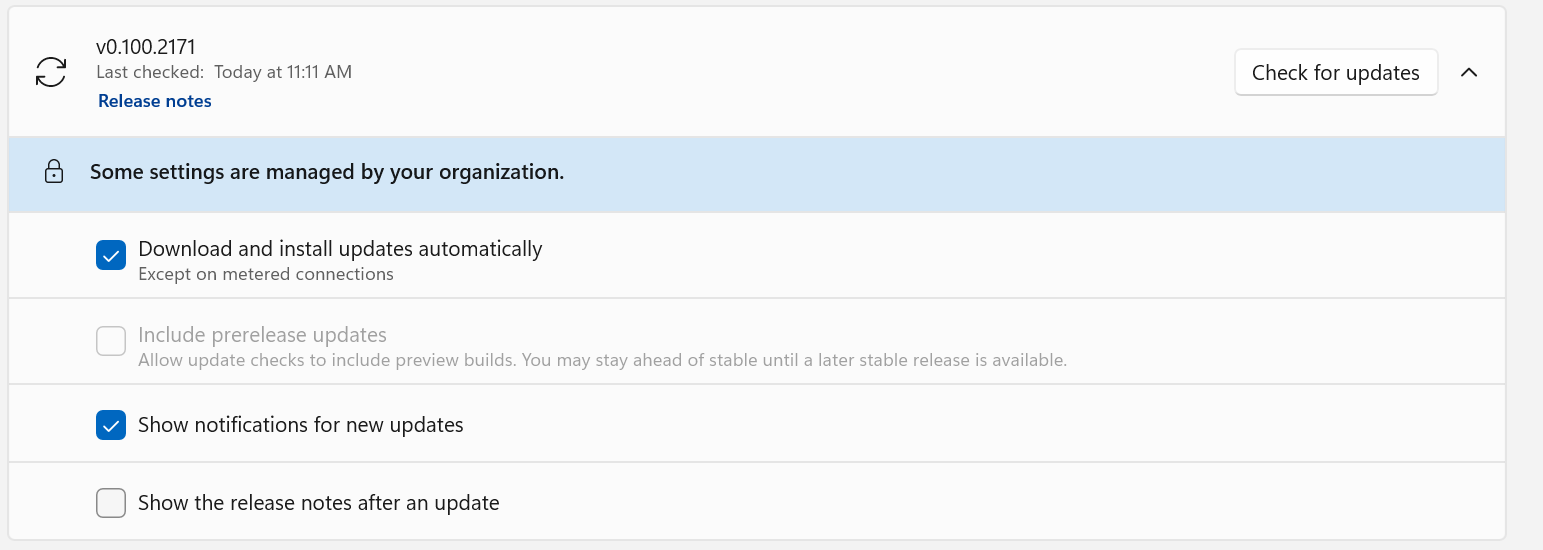 ### Policy removed: the user preference is preserved After removing `PreviewUpdatesDisabled` and restarting PowerToys, the previously selected preview-update preference is restored and editable. The policy suppresses the preference without overwriting it. 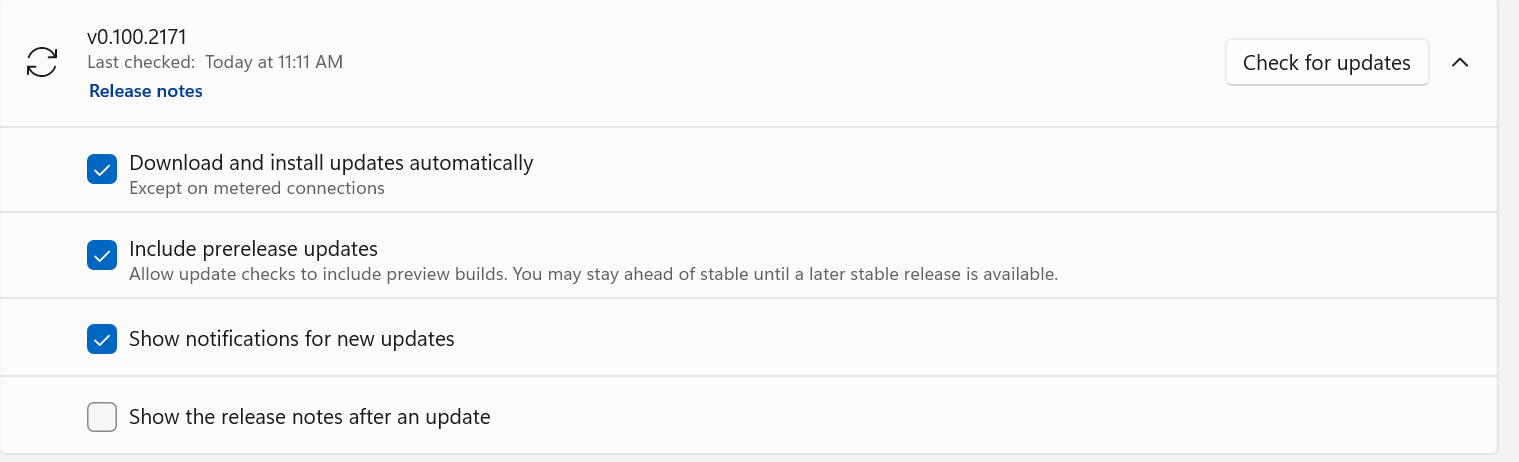 ### Group Policy Editor After importing the updated ADMX/ADML templates, **Disable preview build updates** appears under **Microsoft PowerToys > Installer and Updates**. The policy dialog documents that **Enabled** blocks preview updates, while **Disabled** or **Not Configured** leaves the choice available to the user. 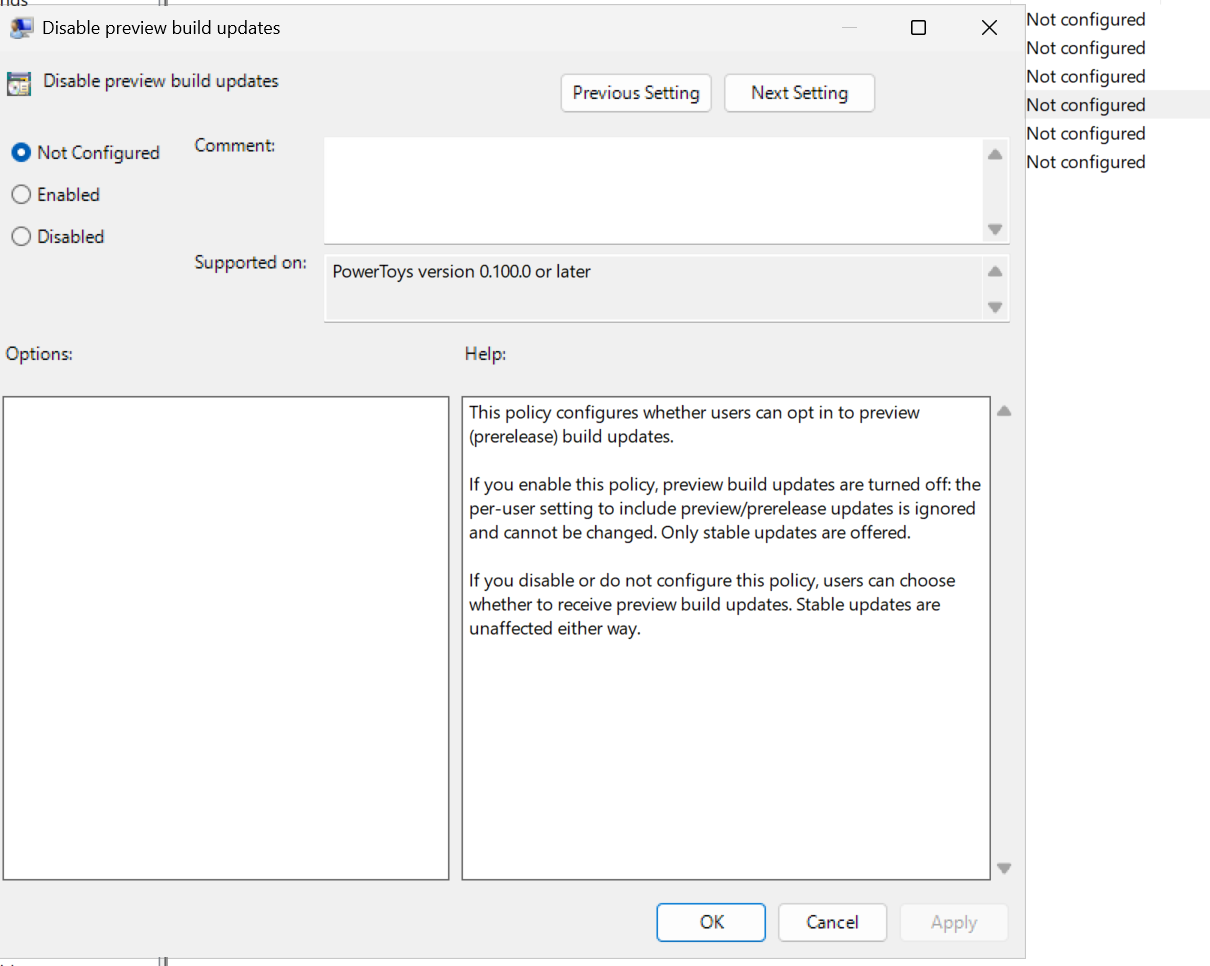 --------- Co-authored-by: Copilot <223556219+Copilot@users.noreply.github.com> Copilot-Session: ad8b7909-0472-4464-bdee-deaeca726f94 Copilot-Session: 8e04a72e-3b0f-4ac4-8156-d04ea9b8bb85 |
||
|
Copilot
|
0126a1aff0 |
Add Desktop Peek to Shortcut Guide Windows shortcuts (#49638)
<!-- Enter a brief description/summary of your PR here. What does it fix/what does it change/how was it tested (even manually, if necessary)? --> ## Summary of the Pull Request Shortcut Guide was missing the Windows desktop peek shortcut (`Win + ,`) from the Windows shell shortcuts it displays. This update adds the missing entry and pins it with a focused manifest test. <!-- Please review the items on the PR checklist before submitting--> ## PR Checklist - [ ] **Communication:** I've discussed this with core contributors already. If the work hasn't been agreed, this work might be rejected - [ ] **Tests:** Added/updated and all pass - [ ] **Localization:** All end-user-facing strings can be localized - [ ] **Dev docs:** Added/updated - [ ] **New binaries:** Added on the required places - [ ] [JSON for signing](https://github.com/microsoft/PowerToys/blob/main/.pipelines/ESRPSigning_core.json) for new binaries - [ ] [WXS for installer](https://github.com/microsoft/PowerToys/blob/main/installer/PowerToysSetup/Product.wxs) for new binaries and localization folder - [ ] [YML for CI pipeline](https://github.com/microsoft/PowerToys/blob/main/.pipelines/ci/templates/build-powertoys-steps.yml) for new test projects - [ ] [YML for signed pipeline](https://github.com/microsoft/PowerToys/blob/main/.pipelines/release.yml) - [ ] **Documentation updated:** If checked, please file a pull request on [our docs repo](https://github.com/MicrosoftDocs/windows-uwp/tree/docs/hub/powertoys) and link it here: #xxx <!-- Provide a more detailed description of the PR, other things fixed, or any additional comments/features here --> ## Detailed Description of the Pull Request / Additional comments - **Shortcut manifest** - Adds `Peek at desktop temporarily` to the Windows shell manifest in the `Windows key` section. - Models the shortcut as `Win + ,`, matching the OS behavior Shortcut Guide should surface. - **Regression coverage** - Adds a focused unit test that deserializes `+WindowsNT.Shell.en-US.yml` and asserts the Desktop Peek entry is present with the expected shortcut payload. ```yml - Name: Peek at desktop temporarily Shortcut: - Win: true Ctrl: false Shift: false Alt: false Keys: - "," ``` <!-- Describe how you validated the behavior. Add automated tests wherever possible, but list manual validation steps taken as well --> ## Validation Steps Performed - Parsed the updated `+WindowsNT.Shell.en-US.yml` manifest and verified the new entry is present in the `Windows key` section. - Added a manifest-focused unit test covering the new shortcut entry. <!-- START COPILOT CODING AGENT SUFFIX --> - Fixes #49458 --------- Co-authored-by: copilot-swe-agent[bot] <198982749+Copilot@users.noreply.github.com> |
||
|
Niels Laute
|
581be30101 |
[Mouse Utilities] Clarify Gliding Cursor description (#49691)
## Summary - replace the misleading Gliding Cursor description in PowerToys Settings - clarify that the feature positions the cursor and clicks using only a keyboard shortcut ## Validation - parsed `Resources.resw` as XML - `git diff --check` - Settings UI dependency restore completed; the build could not finish because the D: drive ran out of space Addresses #45598. Copilot-Session: a53b4a7f-26bc-41e1-963a-c80ec33a4b1c |
||
|
Niels Laute
|
286d6e767a |
[Settings] Make attribution links localizable (#49690)
## Summary of the Pull Request Moves Settings attribution link text into localized resources so Turkish and other locales can translate grammatical wording while preserving contributor and product names. Also makes the technical term "Stereolithography" translatable. ## PR Checklist - [x] Closes: #35272 - [x] **Communication:** Requested in #35272 - [x] **Tests:** Resource/XAML-only change; the ARM64 Debug Settings UI build passes - [x] **Localization:** All end-user-facing strings can be localized - [x] **Dev docs:** Not applicable - [x] **New binaries:** Not applicable - [x] **Documentation updated:** Not applicable ## Detailed Description of the Pull Request / Additional comments The affected attribution labels were hard-coded in XAML, preventing the localization pipeline from translating text such as "and other original contributors." Each label now uses an `x:Uid` resource, with translator comments that explicitly identify contributor, product, and file-format names that must remain unchanged. Links containing only a person or product name remain hard-coded. The locked `Stereolithography` resource is also unlocked because it is a translatable technical term rather than a name. ## Validation Steps Performed - Restored and built PowerToys build essentials for ARM64 Debug - Built `src/settings-ui/PowerToys.Settings.slnf` for ARM64 Debug - Validated all attribution `x:Uid` values resolve to unique `.Text` resources Co-authored-by: Copilot App <223556219+Copilot@users.noreply.github.com> Copilot-Session: 98217841-f046-4fe3-a6e0-72046ed9a720 |
||
|
Aryan gupta
|
6fcbde5484 |
[Keyboard Manager] Fix shortcut modifier display order in the new editor (#49707)
<!-- Enter a brief description/summary of your PR here. What does it fix/what does it change/how was it tested (even manually, if necessary)? --> ## Summary of the Pull Request Fix shortcut key display order in the new Keyboard Manager editor (C# WinUI). When recording a shortcut, modifier keys are now always displayed in the standard canonical order (Win → Ctrl → Alt → Shift → Action key), regardless of the order the user physically pressed them. This matches the existing behavior of the old C++ editor's `GetKeyVector` function. <!-- Please review the items on the PR checklist before submitting--> ## PR Checklist - [x] Closes: #48943 - [ ] **Communication:** I've discussed this with core contributors already. If the work hasn't been agreed, this work might be rejected - [x] **Tests:** Added/updated and all pass - [ ] **Localization:** All end-user-facing strings can be localized - [ ] **Dev docs:** Added/updated - [ ] **New binaries:** Added on the required places - [ ] [JSON for signing](https://github.com/microsoft/PowerToys/blob/main/.pipelines/ESRPSigning_core.json) for new binaries - [ ] [WXS for installer](https://github.com/microsoft/PowerToys/blob/main/installer/PowerToysSetup/Product.wxs) for new binaries and localization folder - [ ] [YML for CI pipeline](https://github.com/microsoft/PowerToys/blob/main/.pipelines/ci/templates/build-powertoys-steps.yml) for new test projects - [ ] [YML for signed pipeline](https://github.com/microsoft/PowerToys/blob/main/.pipelines/release.yml) - [ ] **Documentation updated:** If checked, please file a pull request on [our docs repo](https://github.com/MicrosoftDocs/windows-uwp/tree/docs/hub/powertoys) and link it here: #xxx <!-- Provide a more detailed description of the PR, other things fixed, or any additional comments/features here --> ## Detailed Description of the Pull Request / Additional comments **Bug:** In the new C# KBM editor (`KeyboardManagerEditorUI`), the `GetFormattedKeyList()` method in `KeyboardHookHelper.cs` displayed modifier keys in the order the user pressed them rather than the standard display order. For example, pressing Shift before Win would show `Shift + Win + S` instead of `Win + Shift + S`. **Root cause:** The `modifierKeys` list was populated by iterating `_keyPressOrder` (which preserves temporal press order), and was then rendered directly without sorting. **Fix:** Added a sort step before the display loop that sorts modifier keys using the existing `KeyboardManagerInterop.GetKeyType()` P/Invoke, which returns the `KeyType` enum value (Win=0, Ctrl=1, Alt=2, Shift=3). This enforces the canonical order **Win → Ctrl → Alt → Shift → Action key**, matching the old C++ `EditorHelpers::GetKeyVector()` behavior. **Scope:** Single-line change in `KeyboardHookHelper.GetFormattedKeyList()`. This is a display-only fix — it does not affect the internal key tracking (`_keyPressOrder`), save/load logic, or hook behavior. **Changed file:** - `src/modules/keyboardmanager/KeyboardManagerEditorUI/Helpers/KeyboardHookHelper.cs` <!-- Describe how you validated the behavior. Add automated tests wherever possible, but list manual validation steps taken as well --> ## Validation Steps Performed 1. Open the new Keyboard Manager editor 2. Click the shortcut trigger button to start recording 3. Press modifier keys in non-standard order (e.g., press Shift first, then Win, then S) 4. **Before fix:** UI shows `Shift + Win + S` 5. **After fix:** UI shows `Win + Shift + S` (correct canonical order) 6. Verified standard-order input (e.g., Win → Shift → S) still displays correctly 7. Verified single modifier + action key shortcuts (e.g., Ctrl+C) display correctly 8. Verified all four modifiers (Win+Ctrl+Alt+Shift+Key) display in correct order regardless of press sequence 9. Verified saving and loading remappings is unaffected by the display change ```` |
||
|
Mike Griese
|
30d070be85 |
CmdPal: fix alt+f4 handling (#49708)
As I threw in https://github.com/microsoft/PowerToys/issues/49572#issuecomment-5195807441: Our alt+f4 handling is wack. We shouldn't close the dock when you press alt+f4 on it, just like you can't close the taskbar with alt+f4. But also some folks want alt+f4 to quit cmdpal, and some folks don't. So there's a setting for what happens when you alt+f4 cmdpal. Closes #38333 Closes #40277 Closes #49572 |
||
|
Niels Laute
|
2c1a14b9b8 |
[Settings] Align File Explorer navigation title (#49692)
## Summary - keep the `File Explorer Add-ons` source string in the navigation view - use the same title on the File Explorer Add-ons settings page through `FileExplorerPreview.ModuleTitle` - add translator guidance to keep the navigation and page-title values consistent ## Validation - parsed `Resources.resw` as XML - ran `git diff --check` - verified both resource values resolve to `File Explorer Add-ons` Fixes #24414. --------- Co-authored-by: Copilot App <223556219+Copilot@users.noreply.github.com> Copilot-Session: a53b4a7f-26bc-41e1-963a-c80ec33a4b1c Copilot-Session: 75064a4f-2237-4c2b-97de-c983de9e9ecd |
||
|
Niels Laute
|
16baa2d676 |
[Image Resizer] Clarify preset size descriptions (#49694)
## Summary of the Pull Request Updates Image Resizer preset descriptions in both the resize dialog and the Settings page from sentence fragments such as `Fits within 1920 × 1080 pixels` to CRUTKAS's proposed `Fit - 1920 × 1080 pixels` format. The UI reuses existing localized mode labels and removes the obsolete third-person resources. ## Screenshots ### Resize dialog 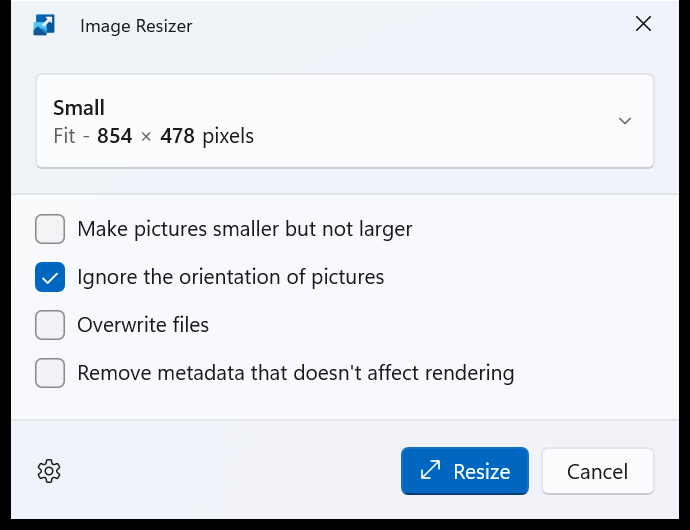 ### Settings page 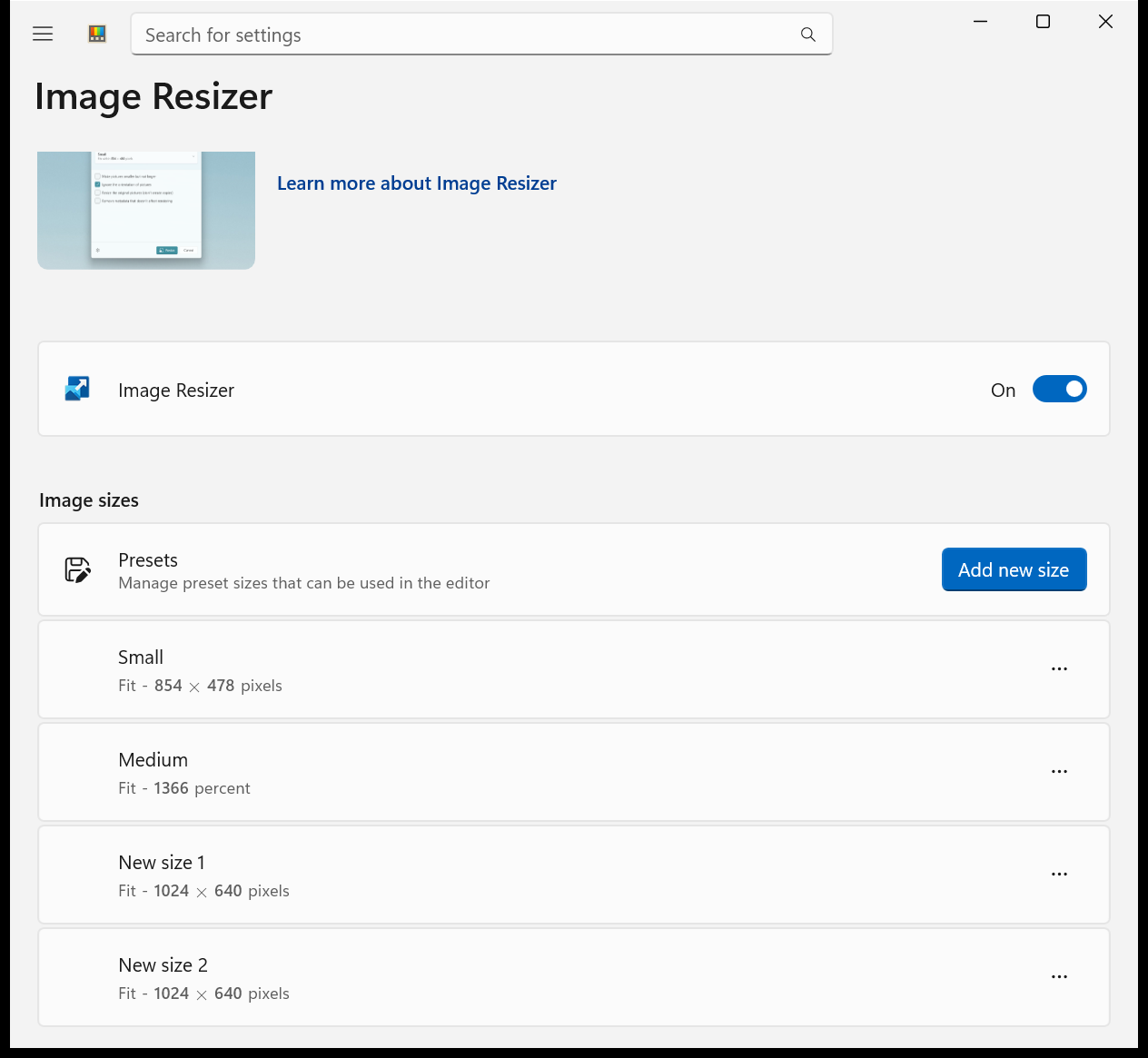 ## PR Checklist - [x] Closes: #16790 - [x] **Communication:** Implements the pattern proposed and accepted by core contributors in #16790 - [x] **Tests:** Existing Image Resizer tests pass; the Image Resizer and Settings UI projects build successfully - [x] **Localization:** Reuses existing localized mode and unit strings; no new translatable text - [x] **Dev docs:** Not applicable - [x] **New binaries:** Not applicable - [x] **Documentation updated:** Not applicable ## Detailed Description of the Pull Request / Additional comments Preset details now use the infinitive resize mode followed by a neutral dash and the dimensions on both Image Resizer surfaces. This avoids requiring translators to make a sentence fragment agree grammatically with the dimensions. Accessible Settings descriptions use the same wording, and the obsolete third-person mode resources are removed from both resource sets. ## Validation Steps Performed - Built `ImageResizerUI.csproj` for x64 Debug - Built `ImageResizer.UnitTests.csproj` for x64 Debug - Ran all 149 Image Resizer unit tests successfully - Built `Settings.UI.csproj` for x64 Debug - Ran the PR-built resize dialog and Settings page and verified the new text in both surfaces --------- Co-authored-by: Copilot App <223556219+Copilot@users.noreply.github.com> Copilot-Session: f058c3d9-38d8-4a35-8c5e-69100b2b673c |
||
|
Noraa Junker
|
2bb28899d7 |
[Shortcut Guide] Make Shortcut Guide AOT-ready (#49673)
<!-- Enter a brief description/summary of your PR here. What does it fix/what does it change/how was it tested (even manually, if necessary)? --> ## Summary of the Pull Request Makes changes so Shoertcut Guide could be compiled ahead of time <!-- Please review the items on the PR checklist before submitting--> ## PR Checklist - [ ] Closes: #xxx <!-- - [ ] Closes: #yyy (add separate lines for additional resolved issues) --> - [ ] **Communication:** I've discussed this with core contributors already. If the work hasn't been agreed, this work might be rejected - [ ] **Tests:** Added/updated and all pass - [ ] **Localization:** All end-user-facing strings can be localized - [ ] **Dev docs:** Added/updated - [ ] **New binaries:** Added on the required places - [ ] [JSON for signing](https://github.com/microsoft/PowerToys/blob/main/.pipelines/ESRPSigning_core.json) for new binaries - [ ] [WXS for installer](https://github.com/microsoft/PowerToys/blob/main/installer/PowerToysSetup/Product.wxs) for new binaries and localization folder - [ ] [YML for CI pipeline](https://github.com/microsoft/PowerToys/blob/main/.pipelines/ci/templates/build-powertoys-steps.yml) for new test projects - [ ] [YML for signed pipeline](https://github.com/microsoft/PowerToys/blob/main/.pipelines/release.yml) - [ ] **Documentation updated:** If checked, please file a pull request on [our docs repo](https://github.com/MicrosoftDocs/windows-uwp/tree/docs/hub/powertoys) and link it here: #xxx <!-- Provide a more detailed description of the PR, other things fixed, or any additional comments/features here --> ## Detailed Description of the Pull Request / Additional comments <!-- Describe how you validated the behavior. Add automated tests wherever possible, but list manual validation steps taken as well --> ## Validation Steps Performed --------- Co-authored-by: Copilot Autofix powered by AI <175728472+Copilot@users.noreply.github.com> |
||
|
moooyo
|
bd33911dd8 |
[Mouse Utilities] Fix Chinese Ctrl translation (#49693)
## Summary of the Pull Request Adds Simplified and Traditional Chinese translator guidance for both Find My Mouse double-Control activation options so the localized UI keeps the familiar `Ctrl` key label instead of using `控制键` or `控制鍵`. ## PR Checklist - [x] Closes: #46223 - [x] **Communication:** I've discussed this with core contributors already. If the work hasn't been agreed, this work might be rejected - [ ] **Tests:** Added/updated and all pass - [x] **Localization:** All end-user-facing strings can be localized - [ ] **Dev docs:** Added/updated - [ ] **New binaries:** Added on the required places - [ ] [JSON for signing](https://github.com/microsoft/PowerToys/blob/main/.pipelines/ESRPSigning_core.json) for new binaries - [ ] [WXS for installer](https://github.com/microsoft/PowerToys/blob/main/installer/PowerToysSetup/Product.wxs) for new binaries and localization folder - [ ] [YML for CI pipeline](https://github.com/microsoft/PowerToys/blob/main/.pipelines/ci/templates/build-powertoys-steps.yml) for new test projects - [ ] [YML for signed pipeline](https://github.com/microsoft/PowerToys/blob/main/.pipelines/release.yml) - [ ] **Documentation updated:** If checked, please file a pull request on [our docs repo](https://github.com/MicrosoftDocs/windows-uwp/tree/docs/hub/powertoys) and link it here: #xxx ## Detailed Description of the Pull Request / Additional comments As discussed in [#46223](https://github.com/microsoft/PowerToys/issues/46223#issuecomment-5189066402), Chinese users commonly identify this physical keyboard key by its `Ctrl` label. Translating it as `控制键` in Simplified Chinese or `控制鍵` in Traditional Chinese makes the Find My Mouse activation options harder to understand. PowerToys localized resources are generated through the CDPX localization pipeline, so this PR expands the translator comments for both the left and right Control activation strings. The English values, resource keys, settings schema, UI tests, and runtime behavior remain unchanged. ## Validation Steps Performed - Parsed the modified `Resources.resw` successfully as XML. - Verified both affected Find My Mouse entries contain Simplified and Traditional Chinese guidance. - Confirmed the diff changes translator comments only and passes `git diff --check`. - No build or automated tests were run because this is a comment-only localization guidance change with no runtime impact. --------- Co-authored-by: Yu Leng (from Dev Box) <yuleng@microsoft.com> |
||
|
Dave Rayment
|
3079a3c546 |
[EnvironmentVariables] Validation fixes, centralised validation, error message improvements (#46837)
## Summary of the Pull Request This fixes several critical validation issues with the Environment Variables utility, centralises the validation, guards registry writes, and improves error messages for validation failures. <!-- Please review the items on the PR checklist before submitting--> ## PR Checklist - [x] Closes: #46763 <!-- - [ ] Closes: #yyy (add separate lines for additional resolved issues) --> - [ ] **Communication:** I've discussed this with core contributors already. If the work hasn't been agreed, this work might be rejected - [x] **Tests:** Added/updated and all pass - [ ] **Localization:** All end-user-facing strings can be localized - [ ] **Dev docs:** Added/updated - [ ] **New binaries:** Added on the required places - [ ] [JSON for signing](https://github.com/microsoft/PowerToys/blob/main/.pipelines/ESRPSigning_core.json) for new binaries - [ ] [WXS for installer](https://github.com/microsoft/PowerToys/blob/main/installer/PowerToysSetup/Product.wxs) for new binaries and localization folder - [ ] [YML for CI pipeline](https://github.com/microsoft/PowerToys/blob/main/.pipelines/ci/templates/build-powertoys-steps.yml) for new test projects - [ ] [YML for signed pipeline](https://github.com/microsoft/PowerToys/blob/main/.pipelines/release.yml) - [ ] **Documentation updated:** If checked, please file a pull request on [our docs repo](https://github.com/MicrosoftDocs/windows-uwp/tree/docs/hub/powertoys) and link it here: #xxx <!-- Provide a more detailed description of the PR, other things fixed, or any additional comments/features here --> ## Detailed Description of the Pull Request / Additional comments This PR fixes a reported critical vulnerability (#46763) where creating an environment variable with an equals sign in the name reportedly caused Windows to crash and enter a boot loop upon restarting. During the investigation of the issue, several other environment variable constraints were identified as missing, including there being no prevention of leading or trailing spaces in names (meaning variables could not be typed on the command line), no combined length checks and so on. This PR introduces a centralised, robust validation pipeline for UI and registry writes to prevent entering states which could corrupt the Windows environment block. ## Changes ### Centralised validation logic - All environment validation is now inside EnvironmentVariablesHelper.cs, rather than split between this code and the UI. - Both the UI (via model validate bindings) and backend registry writes now strictly evaluate against the same unified ruleset before applying changes or enabling/disabling controls. - Existing methods have been updated to report back their success or failure, to enable errors to be tracked more effectively. ### Blocked OS-breaking characters - In response to the user report, the equals character is now blocked from both Variable and Profile names. `=` being disallowed is [explicitly mentioned](https://learn.microsoft.com/en-us/windows/win32/procthread/environment-variables) in the Environment Variables Win32 documentation, so it's a surprise it wasn't caught previously. - All control characters (including `\0`, `\r` and `\n`) are also disallowed, both to protect the integrity of the environment block and the rendering of the strings in the UI. - Leading and trailing whitespace is rejected to prevent orphaned variables. ### Enforced Windows length constraints - Variable Names and Profile Names are restricted to 259 characters, to match the 260-character null-terminated string length limit in the Windows Environment Variables Editor (via sysdm.cpl) and RegEdit. To be clear: profile names may technically be longer, but we should choose to abide by this authoring tool limit to maintain compatibility with other editors. There was previously a 255-character limit on names in the code, and a comment indicating this was a registry limit, but that was incorrect and has been removed. The new limit constant is `MaxEnvironmentVariableNameAuthoringLength`. - In the prior code, there was no limit on the length of system variable names. This was incorrect. The limit for both System and User name fields is now the identical at 259 characters. - There is a length limit on the full environment variable entry `[VariableName]=[VariableValue]\0`, which is 32766 characters plus the null-terminator. This is now enforced and the constant is `MaxTotalEnvironmentVariableLength`. (There's no imposed limit on the number of environment variables.) ### Fixed User Profile backup "overflows" - Fixed a bug where a user could create a valid Profile Name and a valid environment variable name, but applying them would silently fail to apply the profile because the generated backup variable name `[VariableName]_PowerToys_[ProfileName]` exceeded the previous authoring limit of 255 characters. - Backup variables are excluded from the 259-character limit, as they are internal to the application, but the combined `[VariableName]=[VariableVavlue]\0` length is still strictly constrained to the 32767 environment variable length limit. There are now separate paths through the code to deal with backup variable persistence and validation. ### UI - If an applied user profile's name is now rejected because of the new rules (e.g. it contains `=`), the UI now shows a specific "Profile name is invalid" warning rather than the generic "not applicable" message from before, allowing the user to identify and fix the problem. - Fixed a small issue in the Add New Variable dialog where a vertical scrollbar was always present. There are other cases where this occurs, too, but I've left them for a future PR. <!-- Describe how you validated the behavior. Add automated tests wherever possible, but list manual validation steps taken as well --> ## Validation Steps Performed New unit tests project added with coverage of the new validation functionality. Also, manual testing... Manual validation of each dialog: - Add variable - Edit variable - Add variable via Profile Edit dialog Test against: - `=` being in either the Variable Name or the Profile Name - A control character being present in the Variable Name or Profile Name - Either the Variable Name or Profile Name containing one or more trailing or leading whitespace characters - The length of the Variable Name being longer than 259 characters - The combined length of name + `=` + value being longer than 32766 characters The dialog tests can be confirmed by checking to see if the Save button is enabled: <img width="1099" height="843" alt="image" src="https://github.com/user-attachments/assets/685e561a-bd8d-4926-b9b2-a61dea4cc96a" /> Also confirm: - An invalid Profile Name is caught. This can be confirmed by: Editing the JSON file and adding an `=` character in the name: <img width="497" height="197" alt="image" src="https://github.com/user-attachments/assets/c6aa5d62-0672-499a-aac4-c639e8158b61" /> Then opening the application and trying to enable the profile: <img width="1117" height="371" alt="image" src="https://github.com/user-attachments/assets/bd887a44-5e65-4750-9c6f-9bf1b82a5ad6" /> Also confirm that in the Edit profile dialog, you can enable the profile, but the Save button is disabled: <img width="688" height="603" alt="image" src="https://github.com/user-attachments/assets/10d186d9-17a0-4210-93e3-23b1e2723f5f" /> - Confirm that control characters cannot be part of the Variable Name: First, run this from PowerShell, which adds a string containing the newline character to the clipboard: ```pwsh Set-Clipboard -Value "MyVar`nName" ``` Open the Add or Edit variable dialog and paste the value into the Name field. Confirm that the character is not pasted and the string truncates before it: <img width="1424" height="732" alt="image" src="https://github.com/user-attachments/assets/260ff728-57a2-438f-bb66-08d32a327b64" /> (For the null character specifically, use `Set-Clipboard -Value ("MyVar" + [char]0 + "Name")`.) - The initial dialog button state. Re-open the Add New variable dialog multiple times and confirm the Save button is disabled each time before making any input. - In the Add/Edit Variable dialogs, enter a valid variable name and then clear it, confirming that the Save button enables and disables correctly. ## Still outstanding There are some flaws I've found which I'm choosing to leave for now, mainly for expedience so the above issues can be prioritised: - Handling duplicate profile names - there is the potential there for duplicate variable names under identically-named profiles to conflict. - Profile JSON import is still not sanitised. These should be added in a future PR. |
||
|
Gavin 北稱
|
1703e7ac09 |
[Build] Fix UTF-8 and output paths for local C++ builds (#49575)
## Summary of the Pull Request Fixes two local C++ build reliability problems: - Compiles all PowerToys C++ projects as UTF-8 through `Cpp.Build.props`, so builds do not depend on the active Windows code page. On code page 936, UTF-8 punctuation in BOM-less source files otherwise triggers C4819 and fails the build because warnings are treated as errors. - Uses `$(RepoRoot)` for Keyboard Manager repository paths and standardizes native/test output directories. This makes direct project builds find the resource conversion script and headers, places the Editor wrapper beside the WinUI app, and keeps the Engine test DLL under the repository test output directory. No runtime logic, end-user strings, dependencies, or binaries are added. ## PR Checklist - [x] Closes: #49573 - [x] Closes: #49574 - [x] **Communication:** Discussed the shared UTF-8 policy with a PowerToys collaborator in this PR - [x] **Tests:** Existing Keyboard Manager Engine tests pass; no new tests are needed for project-only changes - [x] **Localization:** No end-user-facing strings are changed - [x] **Dev docs:** No documentation changes are required for project configuration fixes - [x] **New binaries:** No new binaries are added - [x] **Documentation updated:** No user documentation changes are required ## Detailed Description of the Pull Request / Additional comments `Directory.Build.props` imports `Cpp.Build.props` for C++ projects. Defining `/utf-8 %(AdditionalOptions)` in its shared `ClCompile` settings makes source decoding deterministic across the native codebase and prevents future BOM-less UTF-8 source files from reintroducing the same locale-dependent failure. `/utf-8` explicitly sets both the source and execution character sets instead of suppressing C4819 or replacing valid Unicode text. `$(SolutionDir)` is only reliable when MSBuild is invoked through a solution. The repository's local build script builds `.vcxproj` files directly from their project directories, where `$(RepoRoot)` is the stable repository root property. The wrapper output now follows the existing `$(RepoRoot)$(Platform)\$(Configuration)\WinUI3Apps\` pattern used by other native WinUI dependencies. ## Validation Steps Performed All successful builds used the repository build scripts with `-Platform x64 -Configuration Debug`. - Ran `tools/build/build-essentials.cmd`: solution restore, Runner, and Settings all succeeded with empty errors logs. - Built `FancyZonesLib` successfully after it had failed with a resource-related CL exit during a full parallel build. - Built `WorkspacesModuleInterface` successfully, validating that existing UTF-16 BOM headers remain compatible with the shared option. - Built `ZoomItBreak` and `ZoomIt` successfully. - Built `KeyboardManagerEngineTest` successfully. - Built `KeyboardManagerEditor` and `KeyboardManagerEditorUI` successfully after the documented essentials prerequisite. - Confirmed the successful native build logs contain `/utf-8` compiler invocations and all corresponding `build.debug.x64.errors.log` files are empty. - Ran `vstest.console.exe` against the Keyboard Manager Engine test assembly: 103/103 passed. - Confirmed `PowerToys.KeyboardManagerEditorLibraryWrapper.dll` is emitted to `x64/Debug/WinUI3Apps`. - Confirmed `KeyboardManager.Engine.UnitTests.dll` is emitted to `x64/Debug/tests/KeyboardManagerEngine`. - Previously manually verified the x64 Debug PowerToys build can open Keyboard Manager Editor without 0x8007007E. A full `PowerToys.slnx` x64 Debug build was attempted twice. The first attempt exhausted the remaining 62 MB of disk space. After clearing 52.46 GB of ignored build outputs, the second attempt still exceeded the machine's temporary disk/commit limits (`CL.exe` exit `0xC000012D` and an out-of-space cppwinrt write). Before that resource failure, the log contained 4,642 `/utf-8` command entries and no character-set diagnostics. The full configuration matrix is left to PR CI rather than bypassing normal build settings locally. --------- Co-authored-by: Yu Leng (from Dev Box) <yuleng@microsoft.com> |
||
|
Niels Laute
|
6bb16d014b |
[Settings][Image Resizer] Edit/add presets in a ContentDialog instead of a Flyout (#49161)
## Summary of the Pull Request Replaces the inline preset-edit **Flyout** on the Image Resizer settings page with a **ContentDialog**, matching the add/edit pattern already used on the **Color Picker** page. This aligns the experience with the Windows 11 / Fluent paradigm and fixes preset settings being saved on every intermediate change. Editing now happens on a **working copy** of the preset (`ImageSize.Clone()`), which is committed only when the user presses **Save/Update**. As a side effect, the intermediate width/height spinner changes no longer persist `settings.json` / `sizes.json` on every value change — resolving #36938. The per-row **delete** action moves from an inline trash button into a **"..." (More options)** `MenuFlyout`, again matching the Color Picker page. Historically this editing was a Flyout rather than a ContentDialog due to known `ContentDialog` / `XamlRoot` issues back when Settings was a UWP app. Now that Settings is on WinUI 3 / Windows App SDK, `ContentDialog` works reliably (as Color Picker's `ColorFormatDialog` demonstrates), so the original constraint no longer applies. https://github.com/user-attachments/assets/bf71b0a9-c3f8-4078-95c7-c7ee9dc7b24b ## PR Checklist - [x] Closes: #49157 - [x] Closes: #36938 - [ ] **Communication:** I've discussed this with core contributors already. If the work hasn't been agreed, this work might be rejected - [ ] **Tests:** Added/updated and all pass - [x] **Localization:** All end-user-facing strings can be localized (added to `Resources.resw`; reused existing keys for the delete menu) - [ ] **Dev docs:** Added/updated - [x] **New binaries:** None added ## Detailed Description of the Pull Request / Additional comments - **Dialog:** Clicking a preset card (or **Add new size**) opens an `EditSizeDialog` `ContentDialog`. Fields are bound with compiled `{x:Bind}` against a working-copy `EditingSize`. The dimensions field header is dynamic — **"Width"** when height is used, **"Size"** for aspect-ratio-preserving percentage scaling — so the label isn't misleading. The dialog is widened for a less cramped layout. - **Save semantics:** - `ImageSize.Clone()` — builds the editable working copy. - `ImageResizerViewModel.CreateNewImageSizeModel()` — builds a default-valued model for the add dialog without adding it to `Sizes`. - `ImageResizerViewModel.AddImageSize(ImageSize)` — commits a new preset with the next unique ID. - `ImageResizerViewModel.UpdateImageSize(original, updated)` — applies edited values back onto the original, temporarily detaching the per-item `PropertyChanged` save handler so it persists **once** instead of on every property. This is what fixes the "saved too often" behavior in #36938. - **Delete:** per-row `Button` → `MenuFlyout` with a Delete `MenuFlyoutItem`; the `ImageSize` is passed via `CommandParameter="{x:Bind}"` (robust inside a flyout popup) and the Yes/No confirmation dialog is preserved. ## Validation Steps Performed - Built `PowerToys.Settings` (x64/Debug) — clean (exit 0). - Ran the runner from this build and manually validated in Settings → Image Resizer: - **Add new size** opens the dialog pre-filled; Save adds the preset; Cancel discards. - **Editing** a preset in the dialog and pressing Cancel leaves the original untouched (working-copy clone). - Selecting **Percent** shows the **Size** header (not a misleading "Width"). - Spinning width/height inside the dialog no longer writes settings files on each change; a single save occurs on Update (#36938). - The **"..."** menu shows **Delete**, with the confirmation dialog intact. --------- Co-authored-by: Copilot App <223556219+Copilot@users.noreply.github.com> |
||
|
Mike Griese
|
d04ebff5e7 |
CmdPal: Use RepoRoot instead of SolutionDir (#49643)
As it turns out, the robots are unbelievably stupid. When they build our projects to verify their changes, they will often just build the .csproj that they changed rather than building it in the context of the solution. On the surface, this feels like a good idea. Only build the thing that changed. However, because they're not building it in the context of a solution, the MSBuild variable `$(SolutionDir)` doesn't get expanded to the actual directory of the solution. Instead, it just gets treated as the *path to the project*. This creates terrible recursive loops where the output of a project gets dumped relative to the project itself, and then that gets taken as input to the project's package outputs, and eventually you're gonna end up with a max path overrun. The very easy solution here is to just replace `$(SolutionDir)` with `$(RepoRoot)`. If we use that variable, then the dumb robots will still get the correct value for that variable when they build just a project. And for all the actual humans, everything will work exactly as it did before. |
||
|
moooyo
|
10236ee8c7 |
[Quick Accent] Fix the accent bar's blank first frame and its under-measured width (#49633)
## Summary of the Pull Request Two defects in the WinUI 3 Quick Accent selector. They look unrelated but share a root: the overlay owns no layout of its own, so `MainWindow` sizes and shows it by hand — and both halves of that hand-rolled logic rest on an assumption that does not hold. * **#49489** — the bar appears blank, too wide and clipped on the right for a few frames, then snaps into place. A hidden WinUI 3 window renders nothing, so `ShowWindow(SW_SHOWNA)` puts the HWND on screen before the freshly rebuilt accent list has ever been laid out. * **#49488** — the window is sized narrower than its own content whenever a glyph is wider than the 48 DIP cell, so the list silently scrolls inside it and the trailing accents are pushed against the right edge. test result: https://github.com/user-attachments/assets/80d57aa8-5030-46c3-9ec8-6ed05ed00f03 ## PR Checklist - [x] Closes: #49489 - [x] Closes: #49488 - [x] **Communication:** bug fixes for two open, triaged issues in an existing module; no new feature surface - [x] **Tests:** added — 11 cases in `PowerAccent.Core.UnitTests` covering the new `Calculation.GetToolbarWidth`; the existing positioning/DPI suites are unaffected - [x] **Localization:** no new end-user-facing strings - [ ] **Dev docs:** N/A — the *Toolbar Sizing and Reveal* section was dropped from this PR; the reasoning lives in the code comments and in the commit messages instead - [x] **New binaries:** none — no new projects or outputs, so no `ESRPSigning_core.json`, `Product.wxs`, CI or release YML changes are needed - [ ] **Documentation updated:** N/A — internal rendering/layout fix with no user-facing behavior change beyond the bugs going away ## Detailed Description of the Pull Request / Additional comments ### #49489 — the blank, over-wide, clipped first frame The window is never actually repositioned or resized. Measuring the two frames in the issue shows the same HWND rect in both: identical left edge, and the bad frame's hard right cut sits exactly where the good frame's rounded corner plus its 24 DIP margin ends. What changes is the **content** — it is composed once from a stale layout, then re-laid-out. Two ordering problems produced that stale composition: 1. `TransientSurface` is `Collapsed` while hidden and is only flipped to `Visible` from the `Showing` event, which `TransparentWindow.RaiseShow` raises **after** `ShowWindow(SW_SHOWNA)`. The accent bar's subtree therefore provably has not been measured or arranged at the moment the HWND becomes visible. 2. The hide path called `ViewModel.Characters.Clear()` synchronously right after `Hide()` — but `Hide()` only *queues* the dismissal, so the still-visible window rendered an empty bar at the old width. That empty card is exactly what the next summon put back on screen. The fix mirrors what the WPF implementation did for the same symptom in #46593 (render off screen, then `SetWindowPos` into view), adapted to WinUI 3 where a hidden window does not render at all: * Show the bar with `Selector.Opacity = 0`, lay it out, and unveil it once `CompositionTarget.Rendering` confirms a couple of frames have elapsed. `Opacity = 0` still renders (unlike `Visibility.Collapsed`), which is exactly what is needed here. A 150 ms timeout backs it up — not because frames stop arriving (attaching a `Rendering` handler forces the UI thread to run every frame) but because the tick cadence carries no guarantee and can stop for a locked or fully occluded session; on that path the bar simply appears the way it used to, so it can never get stuck invisible. * Size the bar **twice** per summon: once before `Show`, and again after the first real layout pass. The first measurement runs while the surface is still `Collapsed` and, on the first summon of the process, before its template has ever been applied, so it can report less than the items need. The correction happens while the bar is still transparent, so it is never seen as a resize. * Leave the characters in the list on hide. The next summon clears and refills them anyway, and not clearing them removes the blank-bar frame at the source. * A generation counter drops a pending reveal when the summon is dismissed or superseded before its frame lands, and arming a new summon detaches the previous one's per-frame handler so it cannot unveil the new bar ahead of its own layout pass. ### #49488 — width derived from the item count instead of measured `MainWindow` computed the window width as `Characters.Count * 48`, while the XAML cell is `MinWidth="48"` — a *minimum*, not a fixed width. `ListViewItem` → `Grid MinWidth=48` with a `ContentPresenter Margin=12`, so a cell is `max(48, glyphWidth + 24)`: any glyph wider than 24 DIP (₹, ‰, ﷼, ៛, CJK fallbacks) grows its cell. With **All languages** selected, R and P each carry ~20 characters and the accumulated error is enough for the real content to overflow the window. The ListView's `ScrollViewer` (`HorizontalScrollMode="Enabled"`, `HorizontalScrollBarVisibility="Hidden"`) then absorbs the overflow invisibly, and `ScrollIntoView` starts scrolling a bar that should not scroll at all. The pre-migration WPF window used `SizeToContent="WidthAndHeight"` and only set `MaxWidth`, so the layout system measured the same item template and the window simply grew — which is why this never showed up before. `AppWindow` has no `SizeToContent` equivalent, and the migration replaced it with a constant model. Now: * `SelectorControl.MeasureContentWidthDip()` measures the list against an unbounded width and returns what the items actually need. Measuring explicitly, rather than reading a stale `DesiredSize`, addresses the concern recorded in the original comment: the bar is rebuilt on every summon while the window is still hidden, so no layout pass has run for the new items yet. * `Calculation.GetToolbarWidth()` — a pure function, hence the unit tests — floors that measurement at `itemCount * minItemWidth` (every cell is at least the minimum, so a list that could not be measured reports 0 and safely falls back to the old estimate instead of collapsing the bar), applies the description row's minimum width, and clamps to the display's usable width so long character sets still scroll on purpose. * The clamp's lower bound is `minItemWidth + chromeWidth` — one cell plus the space around it, the narrowest bar that can still draw a glyph — and its upper bound is `Math.Max(minItemWidth + chromeWidth, maxWidth)`, because a display narrower than that floor would otherwise invert the bounds and make `Math.Clamp` throw. `DescriptionMinWidthDip = 648` masked this bug whenever the Unicode description row was on and the character set short, which is likely why #49402 (description-row width) did not surface it. ## Validation Steps Performed * `PowerAccent.Core`, `PowerAccent.UI` and `PowerAccent.Core.UnitTests` build clean (Debug|x64). * `PowerAccent.Core.UnitTests`: 32/32 pass, including the 11 `GetToolbarWidth` cases — narrow glyphs hug the item count, wide glyphs win over the count estimate (the #49488 regression guard), the measurement winning by a single DIP, a partly realized list keeping the item-count floor, an unmeasured list falling back to the estimate, over-long content clamping to the display maximum, the description row widening a short bar but not a long one, the description minimum losing to a narrower display, and both ends of the clamp. The lower clamp bound was verified by mutation: rewriting it to `Math.Clamp(width, 0, ...)` fails only `GetToolbarWidth_EmptyList_FallsBackToOneCellPlusChrome`. --------- Co-authored-by: Yu Leng (from Dev Box) <yuleng@microsoft.com> Co-authored-by: Claude Opus 5 (1M context) <noreply@anthropic.com> |
||
|
A. G. Soto
|
e542b82a2a |
[PowerAccent] Forward key-up after false activation (#49644)
## Summary of the Pull Request Quick Accent passes the owner letter's key-down to the rest of the low-level keyboard hook chain. When activation is canceled before the configured threshold, trigger-key modes currently swallow the matching key-up. This leaves downstream keyboard state reporting the letter as held and causes Keyboard Manager's shortcut-to-shortcut safety check to reject later remaps. This change forwards the owner letter's key-up on that false-start path, balancing the event pair for downstream hooks and applications. Successful Quick Accent activation behavior is unchanged. Partial fix: #38089 ## PR Checklist - [ ] Closes - [ ] **Communication:** Root cause, deterministic reproduction, and validation were posted on #38089; awaiting core-contributor review - [ ] **Tests:** No automated low-level keyboard-hook test seam is available; extensive manual validation is documented below - [x] **Localization:** No end-user-facing strings changed - [x] **Dev docs:** No developer documentation changes are required for this targeted bug fix - [x] **New binaries:** No new binaries were added - [ ] **Documentation updated:** No user-facing documentation change is required ## Detailed Description of the Pull Request / Additional comments The false-start path runs when the owner letter is released before Quick Accent's activation threshold. Its key-down was already allowed through by `OnKeyDown`, but `OnKeyUp` returned `true` for the Space/arrow activation modes. Returning `true` from the low-level hook prevents later hooks and the target application from receiving the release. Keyboard Manager intentionally checks that no unrelated key is held before applying a shortcut-to-shortcut remap. The missing release therefore makes several remaps stop together while both PowerToys processes remain responsive. It also explains why locking and unlocking the Windows session restores them: the stale keyboard state is reset. The fix is intentionally in Quick Accent rather than relaxing Keyboard Manager's safety check, which must continue to reject remaps when unrelated keys are genuinely held. Full captured evidence and source analysis: https://github.com/microsoft/PowerToys/issues/38089#issuecomment-5171089872 ## Validation Steps Performed - Built `PowerAccentKeyboardService` from current `main` in Release x64: 0 warnings, 0 errors. Spectre mitigation was disabled for the local build because the corresponding Visual Studio libraries were not installed. - Built and installed the same change against PowerToys 0.100.2 so the test DLL matched the installed release ABI. - Repeated dozens of false activations with E/N/O/Y by pressing Space and releasing the owner letter before the 500 ms threshold. - Interleaved successful Quick Accent selections to verify normal activation still worked. - Captured `GetAsyncKeyState` transitions and confirmed both the letter and Space changed from down to up; all sampled keys remained up after testing. - Continuously tested a Left Shift+O -> Left Alt+Tab Keyboard Manager remap; it remained functional throughout. - Completed an additional user soak test without recurrence; locking/unlocking was no longer required. |
||
|
Michael Jolley
|
e141d172c8 |
Modify PR branch filters in CI configuration (#49646)
Commented out branch filters for PRs to allow CI on stacked PRs. |
||
|
Mike Griese
|
e5c63b2ea4 |
Dock: Remove our last 1px gap once and for all (#49641)
I guess if you set ExtendsContentIntoTitleBar, well, WinUI will offset your island by x,y=0,1. That's what happens if you don't actually set any titlebar content. * https://github.com/microsoft/microsoft-ui-xaml/blob/main/dxaml/xcp/components/WindowChrome/CWindowChrome.cpp#L202 * https://github.com/microsoft/microsoft-ui-xaml/blob/main/dxaml/xcp/components/WindowChrome/CWindowChrome.cpp#L171 * https://github.com/microsoft/microsoft-ui-xaml/blob/main/dxaml/xcp/components/WindowChrome/inc/CWindowChrome.h#L23 cause like, of course it does. I'm sure there are previous threads to xlink this too |
||
|
Korb
|
97aeab4e96 |
[Shortcut Guide] Add support for Greenshot (#49407)
## Summary of the Pull Request Adds a Shortcut Guide manifest for **Greenshot**. - **New manifest:** `src/modules/ShortcutGuide/ShortcutGuide.Ui/Assets/ShortcutGuide/Manifests/Greenshot.Greenshot.en-US.yml`: 32 shortcuts for `Greenshot.exe`, grouped into five sections: * **Capture:** Capture region, Capture last region, Capture window, Capture fullscreen, Capture Internet Explorer tab * **While selecting a region:** switch region/window mode, select a child window element, toggle magnifier, confirm selection, cancel capture * **Editor - draw:** rectangle/ellipse/line/arrow/freehand/highlight/obfuscate/crop/text/selection tools, enlarge screenshot, crop to visible elements, paste image from clipboard * **Editor - text:** insert line break, delete previous word, select all text, finish editing * **Editor - export:** save, save as, copy image to clipboard, print, e-mail - **No code changes.** The manifest is auto-included via the existing `Manifests/*.yml` glob in `ShortcutGuide.Ui.csproj`. - `BackgroundProcess: true`, matching the bundled PowerToys-itself manifest, since Greenshot's core value is its global capture hotkeys, which work regardless of the currently focused window. - Introduces a `<PrtScn>` token for the Print Screen key (not previously needed by any bundled manifest, since Greenshot's capture shortcuts are all built around it) alongside the existing `<Space>`, `<Enter>`, `<Esc>`, `<Backspace>`, `<PageDown>` named-key tokens. ## PR Checklist - [ ] **Closes:** #ISSUE_NUMBER - [ ] **Communication:** discussed in the linked issue - [ ] **Tests:** N/A for data; relies on the existing manifest deserialization path - [x] **Localization:** all end-user-facing strings can be localized - [ ] **Dev docs:** N/A, no schema changes - [ ] **New binaries:** N/A - [ ] **Documentation updated:** N/A - [x] **Local run:** see issue screenshot ## Detailed Description of the Pull Request / Additional comments The Shortcut Guide displays per-app shortcuts from YAML manifests, matched to the foreground window (or shown continuously for background processes) via `WindowFilter`/`BackgroundProcess`. Adding support for an app is purely additive: drop a `<PackageName>.<locale>.yml` file in the `Manifests` folder and it's picked up by the existing build glob and index generator. - `PackageName: Greenshot.Greenshot` is the WinGet package identifier; `WindowFilter: "Greenshot.exe"` is the process name (confirmed against a signed 1.3.315 build). - `Name: Greenshot` is the display name shown in the Shortcut Guide app picker. - Shortcut names follow the repo's sentence-case convention (capitalize only the first word plus proper nouns/product names). - Five shortcuts are marked `Recommended`: Capture region, Capture last region, Capture window, Save, Copy image to clipboard — the capture and export actions used most often. - Shortcut source: Greenshot's official help page (https://getgreenshot.org/help/), cross-checked against the unofficial `defkey.com` reference. ## Validation Steps Performed - **Source fidelity:** every shortcut and modifier combination matches the official Greenshot help page one-to-one; no unofficial-source shortcuts were added without confirming them against the official page. --- Closes #49406 --------- Co-authored-by: Korb <korwin+git@pm.me> Co-authored-by: Copilot Autofix powered by AI <175728472+Copilot@users.noreply.github.com> Co-authored-by: Muyuan Li <116717757+MuyuanMS@users.noreply.github.com> |
||
|
Boliang Zhang
|
1980ca5ece |
[Runner][Interop] Authenticate Settings/Quick Access named-pipe clients before dispatch (CWE-732/CWE-862) (#49527)
## Summary of the Pull Request

The Runner is the **server** for the two-way named pipes it uses to talk
to `PowerToys.Settings.exe` and the Quick Access host, and it dispatched
privileged JSON commands (`killrunner`, `restart_elevation`,
`module_status`, `powertoys`, `language`, ...) **without authenticating
the caller**. When PowerToys runs elevated ("Run as administrator"), the
pipe DACL grants the shared **Logon SID**, so **any same-user Medium-IL
process could connect and inject commands** — a local privilege
escalation (CWE-732 / CWE-862). The pipe DACL cannot distinguish the
legitimate Medium-IL Settings child from a same-user attacker (identical
user SID, integrity level, and logon session), so this PR authenticates
the connecting process's **binary identity** before any dispatch.

## PR Checklist

- [x] **Tests:** Added/updated and all pass (native gate tests + C#
regression)
- [x] **Localization:** No new end-user-facing strings (only a
diagnostic runner log line)
- [x] **New binaries:** None — the new code compiles into the existing
`PowerToys.Interop` and `runner` binaries; tests were added to the
existing `Common.Utils.UnitTests` project

## Detailed Description of the Pull Request / Additional comments

New `src/common/interop/pipe_caller_auth.{h,cpp}` adds
`interop_auth::AuthenticateClient`, invoked from
`TwoWayPipeMessageIPC::handle_pipe_connection` **before** a message is
queued (fail-closed). A connecting client is accepted only if it is:

- under the **Runner-relative install directory**
(`get_module_folderpath()\WinUI3Apps`, so it adapts to installed and
dev-build layouts),
- an **allow-listed basename** (`PowerToys.Settings.exe` /
`PowerToys.QuickAccess.exe`),
- the Runner's **exact file version** (anti-downgrade), and
- **Microsoft Authenticode-signed**.

The signature is anchored to the **LOCAL MACHINE root store**
(`HCCE_LOCAL_MACHINE` +
`CertVerifyCertificateChainPolicy(AUTHENTICODE)`) rather than
`WinVerifyTrust`'s default user+machine union: the Runner runs as the
same user as a potential attacker and would otherwise trust a forged
signer added to `CurrentUser\Root`. Verdicts are cached per `(pid,
process-creation-time, policy)` with a short TTL so the check isn't
re-run on every message (each `send` opens a new connection). Rejections
are logged.

The gate is added via an **additive** `start(HANDLE, CallerPolicy)`
overload; the managed `start(nullptr)` path is unchanged (gate
disabled), so there is **no ABI break** to `PowerToys.Interop`.
`PIPE_REJECT_REMOTE_CLIENTS` is also set. In **Debug** builds only the
signature check is relaxed (directory/basename/version stay enforced) so
local unsigned builds still connect; the relaxation is compiled out of
Release.

**Scope:** this PR covers the two elevated Runner-server pipes (Settings
+ Quick Access), which are the actual EoP surface. The reverse
Runner->Settings response direction, the duplicated Workspaces
transport, and the AdvancedPaste/PowerDisplay module pipes are
intentionally out of scope and can be handled as follow-ups.

## Validation Steps Performed

**Automated**
- **Native unit tests** (`Common.Utils.UnitTests`,
`PipeCallerAuthTests`): legitimate self-caller accepted; wrong
basename/directory rejected with the reject-log callback firing; version
reading. 6/6 pass.
- **C# regression** (`Microsoft.Interop.Tests.TestSend`): managed
gate-disabled round-trip still works.
- **Builds:** runner Debug + Release, `PowerToys.Interop` Debug +
Release, and the test project all build/link clean.

**Official signed build (validates the Release-only signature path that
local Debug builds skip)**
- Queued the internal "PowerToys Signed YAML Release Build" for this
branch — **green** (`result: succeeded`). The produced installers are
Authenticode `Valid`, signer `Microsoft Corporation`.

**Manual testing on the signed installer (elevated Runner) — passed**
- Installed the signed build and ran the Runner **as administrator**.
Settings and Quick Access open and are fully functional; settings apply,
module toggles work, and the hotkey-conflict request/response
round-trips.
- **No** `Rejected unauthenticated ...` lines during legitimate use →
the genuine signed `PowerToys.Settings.exe` is accepted by the
machine-root signature + version + directory checks (verified in
`RunnerLogs\runner-log_*.log`, requests dispatched normally).
- **Security (negative) check:** a non-elevated `powershell.exe`
discovered the runner pipe via the pipe namespace and attempted
`{"killrunner":true}`; the write failed ("Pipe is broken") because the
Runner rejected the caller and disconnected before dispatch.
`PowerToys.exe` stayed running and logged: `Rejected unauthenticated
Settings pipe client: pid=... image='...\powershell.exe'
reason=bad-directory`.

---------

Co-authored-by: Copilot <223556219+Copilot@users.noreply.github.com>
Copilot-Session: 1d8f85ec-aaee-468a-9348-ba79b059cbaf
|
||
|
moooyo
|
ba2e89c428 |
PowerDisplay: Fall back to persisted VCP values when a monitor read fails (#49445)
## Summary of the Pull Request On a monitor whose DDC/CI engine answers intermittently, every discovery pass starts from nothing. A panel that reported its brightness a minute ago can lose that control — or drop out of the flyout entirely — because one pass happened to fail. This persists every range-valid VCP value read off a monitor, keyed by its canonical DevicePath. In Maximum compatibility mode a later discovery falls back to that value when the hardware will not answer. Scope is intermittent failure, not permanent failure: the cache can only replay a value the hardware answered at least once, so a panel that never reads a code successfully sees no change. This partially addresses #49342. ## PR Checklist - [x] Closes: #49342 - [ ] **Communication:** I've discussed this with core contributors already. If the work hasn't been agreed, this work might be rejected - [x] **Tests:** Added/updated and all pass - [x] **Localization:** All end-user-facing strings can be localized — this PR adds none - [ ] **Dev docs:** Added/updated - [x] **New binaries:** Added on the required places — none added, so no signing JSON, installer WXS or CI YML change is required - [ ] **Documentation updated** ## Detailed Description of the Pull Request / Additional comments ### What is stored `MonitorStateManager` implements `IKnownGoodVcpStore`, so the cache rides in the existing `monitor_state.json` next to the user's saved brightness rather than in a new file. Each entry is a `KnownGoodVcpFeature`: code, current, maximum, and when it was last read. Only range-valid observations are stored, so the common `current=0 / max=0` garbage reply never enters — it fails `VcpFeatureValue.IsValid`. Writes are not gated on Maximum compatibility mode, only reads are. A monitor that reads cleanly today can start failing after a cable or dock change, and a lazily populated cache would be empty on exactly the first pass that needs it. ### How a cached value is used `VcpDiscoveryEvidence.Reconcile` gains the cache as a third source alongside the parsed capabilities string and this pass's probe: | this pass | cache | result | | --- | --- | --- | | read succeeded | — | live value wins, cache refreshed | | replied, range unusable | hit | cached value applied, `MonitorReadFlags` left clear | | no reply | hit | cached value applied, `MonitorReadFlags` left clear | | code never probed (caps parsed) | hit | value applied only after one live read is attempted | The last row matters: on the caps-parsed path nothing has confirmed the cached value this pass, so the hardware is asked first. On the probe path it has already been asked, and re-reading would be pure I2C noise. `MonitorReadFlags` stays clear for anything the hardware did not answer, so a cached value never masquerades as an observation — which #49577 depends on, since it made the restore path write whenever the flag is unset. One consequence is worth naming: the flyout draws a slider at the cached position while `powerdisplay get` reports that setting as unknown, because `MonitorDtoProjector` gates on `supported && read`. ### Keeping the cache current `RefreshKnownGoodAfterWrite` restamps an entry after a successful `SetVCPFeature`, so a slider move cannot leave the cache holding the pre-write value. It refreshes only an entry a real read established, and only when the value was scaled against the maximum that entry holds — a monitor whose discovery read failed still carries a placeholder max, and writing that back would mis-scale every later write. `RemoveKnownGoodFeatures` clears the cache for monitors a settings reconciliation observably dropped, leaving the user's saved values alone. Cleanup is driven by an observed drop, never by absence from the rebuilt list: a missing or corrupt `settings.json` yields a defaults object indistinguishable from a real one, and pruning by absence would wipe every monitor not connected at that instant. A re-observation that changes nothing refreshes the in-memory timestamp but does not mark the file dirty, so a discovery pass no longer rewrites `monitor_state.json` for a moved timestamp alone. ## Validation Steps Performed - `PowerDisplay.Lib`, `PowerDisplay.Lib.UnitTests` and `PowerDisplay` built for x64 Debug with VS MSBuild — 0 errors, 0 warnings; `PowerDisplay.Lib.UnitTests.dll` under `vstest.console.exe`: **301 passed, 0 failed** - **Affected-hardware validation on the AOC Q27G3XMN is still pending.** That monitor, or an equivalent controllable DDC/CI setup, was not available locally. The paths this PR changes are reachable only on hardware whose capabilities string is unusable or whose VCP reads fail intermittently, so this is the main outstanding risk. --------- Co-authored-by: Yu Leng <yuleng@microsoft.com> Co-authored-by: Copilot <223556219+Copilot@users.noreply.github.com> Co-authored-by: Claude Opus 5 (1M context) <noreply@anthropic.com> Copilot-Session: 6ea38c04-6f68-4c42-91d9-8a03b49bdd81 |
||
|
Muyuan Li
|
37d8729ac3 |
FancyZones: apply edited custom layout spacing/sensitivity/zone count to active work areas immediately (#49433)
## Summary of the Pull Request When a **custom layout** is edited in the FancyZones editor while windows are already snapped to it, changes to the layout's *scalar* properties — **spacing between zones**, **highlight/activation sensitivity radius**, and **zone count** (for canvas layouts) — were **not applied to already-active work areas** until PowerToys (or FancyZones) was restarted. Only the grid **shape/edges** refreshed live. This PR makes those scalar edits take effect immediately on existing work areas, resolving the remaining gap in issue 44058. ## PR Checklist - [x] Closes: #44058 - [x] **Communication:** This addresses the behavior tracked in the linked issue. - [x] **Tests:** Added `EditedCustomLayoutSpacingRefreshesExistingWorkArea` regression test; existing FancyZones unit tests pass. - [x] **Localization:** No new end-user-facing strings. - [x] **Dev docs:** N/A (no public API or doc surface change). - [x] **New binaries:** None added. ## Detailed Description of the Pull Request / Additional comments ### Root cause For a **Custom**-type layout, `WorkArea::CalculateZoneSet` builds its `Layout` from `AppliedLayouts::GetDeviceLayout()`, which returns a snapshot from `applied-layouts.json`. The zone **shape** is read live from the `CustomLayouts` store, but the scalar properties (`spacing`, `sensitivityRadius`, and `zoneCount`) were taken from that **stale applied-layouts snapshot**. So when the editor updated the custom layout and fired `WM_PRIV_CUSTOM_LAYOUTS_FILE_UPDATE`, the existing work areas re-laid-out their grid geometry but kept the *old* spacing/sensitivity/zone count. ### The fix In `WorkArea::CalculateZoneSet`, for Custom-type layouts, re-derive the scalar properties from the **live** `CustomLayouts` store instead of the stale snapshot: ```cpp if (const auto refreshed = CustomLayouts::instance().GetLayout(appliedLayout->uuid)) { appliedLayout = refreshed; } ``` `CustomLayouts::GetLayout` returns the canonical `LayoutData` used by the apply path (it derives grid zone count from `zoneCount()` and canvas zone count from `zones.size()`), so the refreshed values exactly match what a fresh apply would produce. **Why this is low-risk:** - Scoped strictly to **Custom** layouts; templated layouts (Grid/Columns/etc.) are untouched. - At initial apply-time, the live store and the applied-layouts snapshot are equal, so behavior is unchanged for the common case — only a genuine *edit* of an already-applied custom layout changes the outcome (which is the intended fix). This complements the editor-side `RefreshLayouts()` call (which refreshes zone shape) so that **all** properties of an edited custom layout now apply live. ## Validation Steps Performed **Automated:** Added `EditedCustomLayoutSpacingRefreshesExistingWorkArea` in `FancyZonesTests/UnitTests/WorkArea.Spec.cpp`. It creates a work area on a grid custom layout, asserts adjacent zones are flush, then edits the custom layout's spacing, re-initializes the layout via `InitLayout()`, and asserts the new spacing gap is present on the existing zones. Built the FancyZones unit tests and ran the `WorkArea` suite — all pass. **Manual (end-to-end):** 1. Create a **grid custom layout** in the FancyZones editor and apply it. 2. Snap a window into one of its zones. 3. Re-open the editor, edit the layout: change the **edge position** *and* the **space between zones** (and optionally sensitivity), then **Save**. 4. **Before this fix:** the zone edges move, but the spacing between snapped windows keeps the *old* gap until PowerToys is restarted. 5. **After this fix:** the new spacing (and sensitivity) are applied to the already-snapped/active work area immediately, with no restart. Co-authored-by: Copilot <223556219+Copilot@users.noreply.github.com> Copilot-Session: 19f7171d-0ca4-48dc-95ef-e50f505a9097 |
||
|
moooyo
|
f4b3dcde03 |
PowerDisplay: Funnel both monitor-state saves through one locked write (#49629)
## Summary of the Pull Request

`MonitorStateManager` wrote `monitor_state.json` from two independent
paths: the debounced save used `File.WriteAllTextAsync`, `Dispose` used
`File.WriteAllText`. Both open the path with `FileShare.Read`, so
disposing while a debounced save had already passed its delay left the
two racing for the same handle — the loser was denied at `CreateFile`
and its payload was dropped whole, into a catch that only logged.

Both paths now go through one method that serializes and writes under a
single lock, and the file is published by rename instead of being
written in place.

## PR Checklist

- [ ] Closes: #xxx
- [ ] **Communication:** I've discussed this with core contributors
already. If the work hasn't been agreed, this work might be rejected
- [x] **Tests:** Added/updated and all pass
- [x] **Localization:** All end-user-facing strings can be localized —
this PR adds none
- [ ] **Dev docs:** Added/updated
- [x] **New binaries:** Added on the required places — none added, so no
signing JSON, installer WXS or CI YML change is required
- [ ] **Documentation updated**

## Detailed Description of the Pull Request / Additional comments

### The collision

`Dispose` disposes the debouncer before flushing, which cancels a
pending `Task.Delay` but cannot reach a save that has already passed it
and stopped observing the token. That save is inside
`File.WriteAllTextAsync` when `Dispose` reaches its own
`File.WriteAllText`. Both open with `FileMode.Create, FileAccess.Write,
FileShare.Read`, and Windows checks sharing in both directions, so the
second open fails with `ERROR_SHARING_VIOLATION`. The loser never gets a
handle and writes zero bytes — a torn or interleaved file was never
reachable, only a dropped write.

### Why the flush could actually be lost

A bare collision costs only a redundant write: both paths serialize the
same live `_states`, and `UpdateMonitorParameter` mutates it
synchronously before arming the debounce, so whichever writer wins
already has the user's latest value.

The case that loses data is narrower. The debounced save built its JSON
*before* the `await`, so:

1. the debounced save snapshots `{brightness: 60}` and opens the file;
2. the user moves a slider to 70 — `_states` is updated, a new debounce
is armed;
3. the user quits; `Dispose` snapshots `{brightness: 70}` and is denied
at `CreateFile`;
4. the async write completes, publishing 60.

70 is gone. The window is the few hundred microseconds the async write
holds the handle, but it is exactly the window in which the user is
quitting.

### The fix

Both paths call `WriteStateFile`, which takes `_writeLock` and does the
serialize-and-write inside it. `BuildStateJson` runs under the lock too,
so the last snapshot built is the one that lands — a writer that queues
behind another re-snapshots rather than replaying a stale payload.

The write is synchronous on both paths. `Dispose` has to flush without
awaiting, the file is a few hundred bytes, and the async API was the
only reason there were two write paths to collide in the first place.
That is also why the guard is a plain `lock` rather than a
`SemaphoreSlim`: with neither caller async there is no
blocking-on-an-async-method concern left to design around.

`Dispose` keeps its ordering — dispose the debouncer so nothing new is
scheduled, then flush if the state was dirty.

### Publishing by rename

The bytes go to a temp file and are renamed in, matching
`CrashDetectionScope` and `ProfileStore` in the same module. An in-place
write truncates at `CreateFile` before it writes anything, and two exit
paths never reach `Dispose` at all — `App.OnLaunched` registers
`TerminatePowerDisplayEvent` and the runner-exit watchdog, and both call
`Environment.Exit(0)` outright. An interrupted write there would leave a
zero-byte file, which `LoadStateFromDisk`'s catch turns into "no saved
state for *any* monitor" — total loss rather than the last change.

There is deliberately no `Flush(flushToDisk: true)` to go with it. The
threat here is process death, which the page cache survives, not power
loss; and this flush runs on the UI thread at shutdown, where a
`FlushFileBuffers` on a busy disk is the one change in this area a user
could actually feel.

### The dirty flag

`SaveStateToDisk` cleared `_isDirty` *after* the write. A change landing
between the snapshot and that assignment set the bit and had it
immediately cleared; `Dispose` then read `wasDirty == false`, cancelled
the debounce that change had scheduled, and skipped the flush — losing
exactly the last change this path exists to preserve. It is now cleared
before the snapshot and re-marked if the write throws, so a change that
lands mid-write either rides along in the snapshot or stays dirty.

### Testability

`MonitorStateManager` gains an internal constructor taking a state file
path, so tests can drive it against a temp directory instead of the real
LocalAppData location.

## Validation Steps Performed

- `PowerDisplay.Lib` and `PowerDisplay.Lib.UnitTests` built for x64
Debug with VS MSBuild; `PowerDisplay.Lib.UnitTests.dll` under
`vstest.console.exe`: **273 passed, 0 failed** (4 of them in
`MonitorStateSaveTests`)
- Removing `lock (_writeLock)` fails
`ConcurrentWrites_DoNotCollideOnTheStateFile` with the same "used by
another process" `IOException` the collision produces, so the test pins
the guard rather than the shape of the code
- `FailedWrite_LeavesTheExistingStateFileIntact` occupies the temp path
with a directory so the write fails at exactly the point an in-place
`File.WriteAllText` would already have truncated the published file;
against the previous in-place write the same test fails, since that
write would succeed and replace the file
- No end-to-end manual check was performed. The window is a few hundred
microseconds wide and only opens when a debounced save is mid-write at
the exact moment `Dispose` runs, so reproducing it by hand is unreliable
— the concurrency test drives the same contention deterministically
instead

### Known gap, not addressed here

`TerminatePowerDisplayEvent` and the runner-exit watchdog call
`Environment.Exit(0)` without ever running `Dispose`, so on those paths
up to a full `SaveDebounceMs` (2 s) of changes is dropped
unconditionally — no race required. That is a larger loss surface than
the one this PR closes, and the module already has the machinery to fix
it (`CrashDetectionScope` subscribes to `AppDomain.ProcessExit` through
an `IProcessExitHook` seam for precisely these paths). Left out to keep
this PR to one logical change; happy to open a follow-up issue.

Co-authored-by: Yu Leng (from Dev Box) <yuleng@microsoft.com>
|
||
|
chakrik73
|
d2c53bf386 |
[ZoomIt] Add DemoMirror feature (#49607)
Mirror the screen, a selected region (Shift), or the window under the cursor (Alt) onto a second monitor - including the mouse pointer - so a demo can be shown on a presentation display without leaving the current view. Adds the native MirrorWindow implementation, a DemoMirror options tab (Ctrl+9 default, plus Track window region), and the corresponding Settings UI (ZoomIt page group, view model, properties, and resources). ## Summary of the Pull Request Adds a **DemoMirror** feature to ZoomIt. It mirrors the screen, a selected region (Shift), or the window under the cursor (Alt) onto a second monitor — including the mouse pointer — so a demo can be shown on a presentation display without leaving the current view. This introduces the native `MirrorWindow` implementation, a new DemoMirror options tab (default hotkey **Ctrl+9**, plus a **Track window region** option), and the corresponding Settings UI wiring (ZoomIt page group, view model, properties, and localized resources). ## PR Checklist - **Communication:** I've discussed this with core contributors already. - **Tests:** Added/updated and all pass - [x] **Localization:** All end-user-facing strings can be localized - [ ] **Dev docs:** Added/updated - [ ] **New binaries:** Added on the required places - [ ] [JSON for signing](https://github.com/microsoft/PowerToys/blob/main/.pipelines/ESRPSigning_core.json) for new binaries - [ ] [WXS for installer](https://github.com/microsoft/PowerToys/blob/main/installer/PowerToysSetup/Product.wxs) for new binaries and localization folder - [ ] [YML for CI pipeline](https://github.com/microsoft/PowerToys/blob/main/.pipelines/ci/templates/build-powertoys-steps.yml) for new test projects - [ ] [YML for signed pipeline](https://github.com/microsoft/PowerToys/blob/main/.pipelines/release.yml) - [ ] **Documentation updated:** If checked, please file a pull request on [our docs repo] ## Detailed Description of the Pull Request / Additional comments DemoMirror lets a presenter keep working on their primary display while a second monitor shows a live mirror of a chosen source. Three capture modes are supported via the DemoMirror hotkey (default **Ctrl+9**): - **Full screen** — `Ctrl+9`: mirrors the entire source screen. - **Region** — `Ctrl+Shift+9`: mirrors a user-selected rectangular region. - **Window** — `Ctrl+Alt+9`: mirrors the window currently under the cursor. With the **Track window region** option enabled, the mirror follows the window as it moves/resizes. The mirror includes the mouse pointer so pointer movement and clicks are visible on the presentation display. **Native (C++ / `PowerToys.ZoomIt.exe`)** - New `MirrorWindow.cpp` / `MirrorWindow.h` implementing the mirror capture/render window. Mirror windows use `WS_EX_NOACTIVATE | WS_EX_TRANSPARENT` so they never steal focus from the source. - `Zoomit.cpp`: registers the DemoMirror hotkeys and wires the start/stop handlers; the stop path checks `g_MirrorWindow.IsActive()` and stops unconditionally (cursor-independent). - `ZoomItSettings.h`: new `MirrorToggleKey` (default `Ctrl+9`) and `MirrorTrackWindow` settings, added to the `RegSettings[]` table. Record default kept distinct at `Ctrl+5`. - `resource.h` / `ZoomIt.rc`: new DemoMirror options tab and controls (`IDC_MIRROR_HOTKEY`, `IDC_MIRROR_TRACK_WINDOW`). - `CaptureFrameWait.*` and `SelectRectangle.*` updated to support the mirror capture/selection flow. - `ZoomItSettingsInterop/ZoomItSettings.cpp`: exposes the new settings across the interop bridge. **Settings UI (WinUI 3)** - New DemoMirror group on the ZoomIt page (`ZoomItPage.xaml`), backed by `ZoomItViewModel.cs` and `ZoomItProperties.cs`. - Localizable strings added to `Resources.resw`. **Conflict resolution notes** (rebased on top of upstream `main`): - Control-ID collision resolved by assigning distinct IDs (`IDC_MIRROR_HOTKEY`, `IDC_MIRROR_TRACK_WINDOW`). - `SelectRectangle` border-color: kept upstream `m_borderColor = borderColor;`. - `WM_USER` message-ID collision resolved by using `WM_USER_MIRROR_STOP = WM_USER + 113`. ## Validation Steps Performed Manually validated on a real dual-display setup (Surface laptop extended to an external monitor): - **Full screen** (`Ctrl+9`): source screen mirrored to the second monitor, including the mouse pointer. - **Region** (`Ctrl+Shift+9`): selected region mirrored correctly. - **Window** (`Ctrl+Alt+9`): window under the cursor mirrored; with **Track window region** enabled, the mirror follows the window. - **Stop/cancel**: DemoMirror stops reliably regardless of cursor position; mirror windows never take focus (`WS_EX_NOACTIVATE | WS_EX_TRANSPARENT`). - **Hotkey defaults**: confirmed Record (`Ctrl+5`) and DemoMirror (`Ctrl+9`) defaults are distinct and read independently from their own registry/settings values (no cross-contamination). - **Settings UI**: DemoMirror hotkey and Track window region options round-trip correctly through the Settings UI and the interop bridge. |
||
|
Gordon Lam
|
a64c400b7e |
[MouseWithoutBorders] Increase PBKDF2 key derivation iterations to 100,000 (#49600)
## Summary Increases the PBKDF2 iteration count used to derive the Mouse Without Borders AES-256 session key from 50,000 to 100,000, strengthening the derived key against brute-force attempts. ## Changes - `Encryption.cs`: `KeyDerivationIterations` 50,000 -> 100,000 (used by `GenLegalKey` via `Rfc2898DeriveBytes.Pbkdf2`). The unrelated SHA-512 stretch loop in `Get24BitHash` is deliberately left unchanged - it is not a `Rfc2898DeriveBytes` key derivation and drives the connection framing/identity value. ## Compatibility This changes the derived key, so all paired machines must run this version. Mouse Without Borders already requires the same version on every machine (it surfaces *"make sure you run the same version in all machines"* on a key/handshake mismatch), consistent with the per-connection salt/IV change in #48742. The existing key and settings are preserved and the key is derived fresh per connection, so **no re-pairing is needed once every machine is updated** - only a transient, self-healing failure during a mixed-version window. ## Validation - Built `MouseWithoutBorders` (Release | x64) - clean, exit 0. Co-authored-by: Copilot <223556219+Copilot@users.noreply.github.com> Copilot-Session: 9e47bf2c-ee54-4de6-8ce0-9b8dd67d4128 |
||
|
moooyo
|
160492abcf |
docs(skills): recommend WindowEx for WinUI 3 migrations (#49303)
## Summary of the Pull Request Updates the WPF-to-WinUI 3 migration skill to make the established PowerToys windowing pattern explicit: - Default WinUI 3 top-level windows to `WinUIEx.WindowEx` or an existing PowerToys base derived from it, such as `TransparentWindow` for transient overlays. - Keep supported size, presenter, title bar, topmost, backdrop, and persistence behavior declarative in XAML instead of manual `AppWindow` / `OverlappedPresenter` code-behind. - Document the centrally managed `<PackageReference Include="WinUIEx" />`, WPF-to-`WindowEx` property mappings, and existing repository examples. - Add a value-converter decision guide that prefers `VisualStateManager`, direct `x:Bind` conversion, WinUI theme resources, and `CommunityToolkit.WinUI.Converters` over mechanically porting WPF converters. This follows the migration-skill feedback from @niels9001 in [PR #49174](https://github.com/microsoft/PowerToys/pull/49174#discussion_r3535181101). ## PR Checklist - [x] **Communication:** This change follows review feedback from a core contributor in PR #49174. - [x] **Tests:** The updated guidance passed 5/5 fresh agent migration scenarios. - [x] **Dev docs:** Added/updated. ## Detailed Description of the Pull Request / Additional comments `SKILL.md` now states the default PowerToys pattern and limits raw `AppWindow` / presenter code to behavior that `WindowEx` does not expose. The package mapping reference records the exact centrally managed dependency. The windowing reference adds a complete XAML example, a WPF-to-`WindowEx` mapping table, regular-window examples, and the `TransparentWindow` overlay exception. The XAML migration reference now also documents converter selection and reuse: control state belongs in `VisualState`s, count visibility can share one Toolkit `DoubleToVisibilityConverter` with `ConverterParameter=True`, and corner-radius converter resources come from `XamlControlsResources`. This is an atomic documentation-only change; no product code or dependencies are modified. ## Validation Steps Performed - Verified the documented `WindowEx` APIs and `TransparentWindow` inheritance against the repository and compiled WinUIEx assembly. - Verified all cited repository paths, the Markdown anchor, and central package management entry. - Ran five fresh current-branch agent scenarios; all selected `<PackageReference Include="WinUIEx" />` without a version, `WindowEx`, XAML-declared properties, and `CenterOnScreen()` only where required. - Ran a focused converter migration scenario before and after the guidance update; the updated skill selected `VisualState`s, one reusable Toolkit numeric converter, and existing WinUI corner-radius resources without custom converters. - Ran `git diff --check` with no errors. - Completed an independent read-only review with no findings. - Product builds and unit tests were not run because this change only updates agent guidance. --------- Co-authored-by: Yu Leng (from Dev Box) <yuleng@microsoft.com> Co-authored-by: Copilot <223556219+Copilot@users.noreply.github.com> Copilot-Session: fe9b24eb-99f0-43e8-aaa4-839f4579f6f9 Copilot-Session: d5afc36b-3356-46af-b8cb-071b87a64532 |
||
|
moooyo
|
8f63402400 |
PowerDisplay: Adjust brightness by scrolling over the tray icon (#49446)
## Summary of the Pull Request Scrolling the mouse wheel over the Power Display tray icon adjusts brightness, without opening the flyout. - New **Tray icon mouse wheel** setting: `Off` / `Primary display` / `All displays`, defaulting to **`Off`**. It is scoped to the tray icon — the flyout sliders accept wheel input regardless, as they always have. The existing **Mouse wheel increment** setting supplies the per-notch step. - **Off by default.** The gesture consumes a wheel notch that would otherwise reach the window under the pointer, and acting on it installs a system-wide `WH_MOUSE_LL` hook. Neither is something an existing installation should acquire silently on upgrade. With the setting `Off` no hook is ever installed and no notch is ever consumed, so this PR changes no existing behaviour until the user opts in: 1958 insertions, 2 deletions, and both deletions are refactors of lines this feature reuses. - **No feedback UI.** Brightness is self-evidencing — you scroll and the screen changes — so the display itself is the feedback. The notification icon is untouched: same tooltip, same text, same legacy notification-icon protocol. ## PR Checklist - [x] Closes: #49410 - [ ] **Communication:** I've discussed this with core contributors already. If the work hasn't been agreed, this work might be rejected - [x] **Tests:** Added/updated and all pass - [x] **Localization:** All end-user-facing strings can be localized - [x] **Dev docs:** Added/updated - [ ] **New binaries:** Added on the required places - [ ] [JSON for signing](https://github.com/microsoft/PowerToys/blob/main/.pipelines/ESRPSigning_core.json) for new binaries - [ ] [WXS for installer](https://github.com/microsoft/PowerToys/blob/main/installer/PowerToysSetup/Product.wxs) for new binaries and localization folder - [ ] [YML for CI pipeline](https://github.com/microsoft/PowerToys/blob/main/.pipelines/ci/templates/build-powertoys-steps.yml) for new test projects - [ ] [YML for signed pipeline](https://github.com/microsoft/PowerToys/blob/main/.pipelines/release.yml) - [ ] **Documentation updated:** If checked, please file a pull request on [our docs repo](https://github.com/MicrosoftDocs/windows-uwp/tree/docs/hub/powertoys) and link it here: #xxx No new binaries or projects — everything lands in existing assemblies. Communication is unchecked because #49410 is still Needs-Triage. ## Detailed Description of the Pull Request / Additional comments ### Why a low-level hook The Shell does not forward `WM_MOUSEWHEEL` to a notification icon's callback window under any `NOTIFYICON_VERSION`, and a click-through overlay placed over the icon cannot receive wheel input either. `TrayIconMouseWheelListener` therefore installs a `WH_MOUSE_LL` hook — but only transiently, and only when it will act on the result: - Nothing is installed at all while the setting is `Off`, which is the default. - Installed in `EnsureHook()` when the UI thread confirms the pointer is inside the rectangle from `Shell_NotifyIconGetRect` **and** `CanAdjustBrightnessFromTrayWheel` says some monitor can accept a brightness write. - Removed in `DisarmCore()` as soon as either condition stops holding, the pointer leaves the rectangle, or the mode changes. - A notch is consumed (the hook proc returns non-zero) only while armed and only for points inside the armed rectangle, so a wheel event Power Display will not act on still reaches the window under the cursor. The hook runs on a dedicated background thread with its own message loop; the proc itself only enqueues a sample and posts a drain request. Deltas are marshalled to the UI thread in batches, and `WheelDeltaAccumulator` folds high-resolution deltas (precision wheels, touchpads) into whole notches. Each sample carries the hover generation it was captured under, so samples from a hover the UI thread has already retired are discarded rather than applied late. ### Hover detection The Shell sends `WM_MOUSEMOVE` to the icon's callback window while the pointer is over it. `TrayIconService.HandleTrayMouseMove` resolves the rectangle with `Shell_NotifyIconGetRect` and caches it for a second, because that message repeats for every pixel of travel. `TrayIconService` gains nothing else: no protocol change, no new hover UI, no polling. The rest of the file — and `MainWindow.xaml` — is untouched. ### Linked brightness While linked brightness is on, a notch has to move the whole group, so it goes through `MainViewModel.LinkedBrightness` rather than the individual monitor setters. The new master value is taken from the planner's value for the monitor the wheel named, **not** from the current master. The master is positional only — `SeedInitialLinkedBrightness` takes it from the lowest-numbered linked monitor and never writes hardware, and every monitor-list rebuild re-seeds it — so it can sit arbitrarily far from the monitor the wheel is aimed at. Stepping it relative to itself would apply a wrong-sized or wrong-signed change, and a master already clamped at 0/100 would swallow the notch while writing nothing at all. The setting description calls out that linked brightness widens the scope, so `Primary display` is not literally a single display while it is on. ### What is deliberately not here An earlier revision of this PR showed the target and percentage in a custom overlay as you scrolled. Doing that meant the standard Shell tooltip would not do (it cannot be shown on demand), which meant an own window, which meant suppressing the Shell tooltip so the two did not collide, which meant `NOTIFYICON_VERSION_4`, which changed the callback packing and made the app responsible for all hover text — including for keyboard and touch users, who never reach a cursor-anchored overlay and would have been left with no visible tooltip at all. That chain was about half the diff, for a readout that adds little on top of watching the screen change. It is gone. If a readout is wanted later it can be argued on its own merits, separately from this feature. The same revision also gated the flyout sliders on this setting. That bundled two unrelated things behind one switch — turning off tray scrolling would also have stopped the contrast and volume sliders responding to the wheel — so the setting is now scoped to the tray icon and named accordingly. An earlier revision also routed the tray **Exit** action through `Shutdown()`. That fixes a pre-existing teardown leak which has nothing to do with this feature, so it now lives in #49580 and is out of scope here. This branch does not depend on it: the hook thread is a background thread and the process is ending either way. ## Validation Steps Performed - Unit tests: `PowerDisplay.Lib.UnitTests` 215 passed, `Settings.UI.UnitTests` 165 passed. - Builds: `PowerDisplay` and Settings UI, x64 Debug, no warnings. - Automated coverage is in `PowerDisplay.Lib.UnitTests`: target selection per mode, wheel accumulation including negative deltas, partial notches and direction reversal, half-open rectangle containment, and settings serialization and round-trip for the new mode, including that a settings file predating the feature loads as `Off`. `Settings.UI.UnitTests` covers the view-model index mapping and pins the enum values to the ComboBox item order. - The Win32 glue in `TrayIconService` and `TrayIconMouseWheelListener` is not unit tested. Manual passes performed: scrolling over the icon in both modes, the icon parked in the notification overflow, high-resolution wheel input, brightness boundaries, live monitor refresh while hovering, tray icon hidden and re-enabled, Explorer restart, the context menu and left-click, `Off` stopping tray scrolling while the flyout sliders keep working, and confirming a notch that Power Display will not act on still reaches the window under the cursor. Not verified, needing hardware this branch has not been run on: - Multiple taskbars, where the tray icon is on a secondary display and `Primary display` mode adjusts a monitor the user may not be looking at. - Mixed-DPI setups, for the `Shell_NotifyIconGetRect` rectangle and the hook's physical-pixel hit test. --------- Co-authored-by: Yu Leng <yuleng@microsoft.com> Co-authored-by: Copilot <223556219+Copilot@users.noreply.github.com> Co-authored-by: Claude Opus 5 (1M context) <noreply@anthropic.com> Copilot-Session: 5d7f36fe-d175-4aa9-a3c7-b370d952d1d3 |
||
|
moooyo
|
3cb3bdcd34 |
PowerDisplay: Reuse the values the max-compatibility probe already read (#49596)
## Summary of the Pull Request In Maximum compatibility mode, when a monitor's capabilities string is unusable, discovery probes each continuous VCP code directly to find out which ones the panel implements — and then **throws the values away**. `BuildMonitorFromPhysical` immediately re-reads every one of those codes. That doubles the I2C traffic on exactly the hardware that cannot take it, and the re-read is the one whose result the user actually sees: a panel that answered the probe a moment ago but fails the re-read shows its brightness slider parked at the never-read default instead of where the panel really is. This makes the probe's values survive into the build stage. Extracted from #49445, which bundles it with a persisted discovery cache it does not depend on. ## PR Checklist - [ ] Closes: #xxx — partially addresses #49342; the remaining cause is in #49445 - [ ] **Communication:** I've discussed this with core contributors already. If the work hasn't been agreed, this work might be rejected - [x] **Tests:** Added/updated and all pass - [x] **Localization:** All end-user-facing strings can be localized — this PR adds none - [ ] **Dev docs:** Added/updated - [x] **New binaries:** Added on the required places — none added; no new project, so no signing JSON, installer WXS or CI YML change is required - [ ] **Documentation updated** ## Detailed Description of the Pull Request / Additional comments ### What the re-read costs Worth being precise about, because it is not the slider's *existence*: | decided by | set from | affected by a failed re-read | | --- | --- | --- | | slider visible (`MonitorViewModel.ShowBrightness`) | `Monitor.Capabilities`, via `UpdateMonitorCapabilitiesFromVcp` before the initializer runs | no | | slider position (`Monitor.CurrentBrightness`) | the read | yes — stays at the never-read default | | `powerdisplay get` reporting a live reading (`Monitor.ReadValues`) | the read | yes — reported as unknown | | relative `powerdisplay adjust` (`AdjustCommandExecutor`) | `Monitor.ReadValues` | yes — no before-value to adjust from | So the flyout keeps the control either way; what the second read decides is whether it is pointed anywhere real, and whether the CLI will admit to a value. Halving the transactions on a bus that is both slow and, on this hardware, unreliable is the other half of the win. ### The seam `FetchCapabilitiesWithFallbackAsync` used to return `(string capsString, VcpCapabilities? caps)` — capabilities only, no values. It now returns a `VcpDiscoveryEvidence`, which carries the same two things plus the values the probe already read and a flag for a handle that died mid-probe. `VcpDiscoveryEvidence.Reconcile` folds the probe observations into the parsed capabilities in one place: | observation | capabilities | value carried | | --- | --- | --- | | read succeeded | code marked supported | yes | | device replied, range unusable (e.g. `max=0`) | code marked supported | no — the initializer still owes it a read | | no reply | unchanged | no | | handle-class failure | everything discarded | — | The second row is why membership keys off `Replied` rather than the value being usable: an unimplemented code fails with `DDCCI_VCP_NOT_SUPPORTED` and never sets the flag, so a reply proves the opcode exists even when the reported range cannot scale a percentage. That is the same rule `BuildCapabilitiesFromProbe` used before this PR; it just moves next to the value handling. Like that method, `Reconcile` iterates the observations rather than `NativeConstants.ContinuousVcpCodes`, which `VcpFeatureProbeService` only takes as the default for its constructor-injected sweep list. That keeps a widened sweep from silently dropping a code that answered, but it is not sufficient on its own: the carried value is consumed only for codes `ContinuousVcpInitializer` walks, so widening the sweep still needs a matching edit there. The comment and `Reconcile_ProbedCodeOutsideTheDefaultSweepIsStillHonoured` both say so rather than claiming the seam alone covers it. On the normal path nothing changes: the probe only runs when the caps string is unusable, so `live` is empty and `Reconcile` is a pass-through. `Reconcile_ParsedCapabilitiesSurviveWhenNoProbeRan` pins that. ### Continuous-VCP initialization moves out of the controller `DdcCiController` carried six near-identical `Initialize*` methods. The three percent-scaled ones become **`ContinuousVcpInitializer`** — brightness, contrast, volume. It skips any code the evidence already has a value for, and returns `false` when a read fails with a handle-class error, because `Monitor.Handle` is captured once per discovery pass and never refreshed: a monitor kept alive on a dead handle would send every later read and write into the void. It reads through the `IVcpFeatureReader` seam introduced in #49579, so it is testable without hardware. The three discrete-enum ones — color preset, input source, power mode — stay in `DdcCiController`, unchanged. The probe sweeps only `NativeConstants.ContinuousVcpCodes`, so no discrete value is ever carried across the seam and extracting them would be a refactor this change does not need; see *What is deliberately left out*. Only the continuous stage discards the monitor. That is a policy choice, not a property of the stage: losing a whole display because `0xD6` answered badly is worse than showing it without a power control. `DdcCiController.TryGetVcpFeature` therefore still has three discovery callers plus `GetVcpFeatureAsync`, the runtime refresh path. ### Behaviour change outside Maximum compatibility mode **A handle-class error during continuous VCP initialization now discards the monitor.** Before, the failure was logged, the read flag left unset, and the monitor kept — so its handle reached `PhysicalMonitorHandleManager` and every later operation went to a handle already known to be dead. The cost is that the monitor stays out of the flyout until a rediscovery: `DisplayChangeWatcher` schedules one for device-arrival/removal and console-display-state notifications, and the flyout's Refresh button forces one on demand. Note this check is not on every path. A caps string that parses but advertises none of `0x10`/`0x12`/`0x62` leaves `ContinuousVcpInitializer` nothing to read and suppresses the probe, so such a monitor is still published with a handle no VCP read has exercised — and its first VCP read then happens in the discrete stage, which never discards. ### What is deliberately left out **Extracting the discrete-VCP initialization.** The probe sweeps only the continuous codes, so no discrete value is ever reused and moving `0x14`/`0x60`/`0xD6` out of the controller would be a drive-by refactor with no bearing on this change. It is worth doing on its own, where the added test coverage can be reviewed for what it is. **Remembering a probe value across discoveries.** A probe value is only useful for the pass that produced it. Carrying one forward — so a later failing pass can still show the control — is the persisted known-good cache in #49445, a much larger change with an open design question attached. This PR is complete without it. ## Validation Steps Performed - built `PowerDisplay.Lib.UnitTests` and `PowerDisplay` for x64 Debug with VS MSBuild — 0 errors, 0 warnings - ran `PowerDisplay.Lib.UnitTests.dll` with `vstest.console.exe`: **240 passed, 0 failed** — 16 of those cases are added here (8 in `ContinuousVcpInitializerTests`, 7 in `VcpDiscoveryEvidenceTests`, 1 in `DdcErrorClassifierTests`) - `VcpDiscoveryEvidenceTests` pins each row of the table above, plus that a probed code outside the default sweep is still honoured - `ContinuousVcpInitializerTests` pins that a probed code is never re-read (the reader is primed with a failure it must not reach), that a handle-class error stops the remaining codes, and that a feature-level refusal does not. `Initialize_EveryContinuousCodeIsReadAndApplied` walks the whole `ContinuousVcpCodes` array with a distinct range and percentage per feature, so a code added to that array without an arm in both `IsSupported` and `ApplyValue` fails rather than being silently skipped or silently discarded — checked by mutation: removing either volume switch arm fails that test and `Initialize_ProbedVolumeIsAppliedWithoutReadingAgain` - not covered by tests: the `DdcCiController` side of the contract — that `evidence.IsPhysicalMonitorUnavailable` skips the monitor and releases the physical, and that a `false` from `ContinuousVcpInitializer` does the same. That layer takes no injectable dependencies today - no hardware validation performed: this path is reachable only on a panel whose capabilities string is unusable, which needs an incomplete or unreliable DDC/CI implementation --------- Co-authored-by: Yu Leng (from Dev Box) <yuleng@microsoft.com> |
||
|
Clint Rutkas
|
bb99c30edc |
New module: AltWindowCycle (#48281)
## Summary of the Pull Request Introduces a new utility: AltWindowCycle to quickly switch between windows from the same process using Alt + `. In release notes give @wzhudev coauthor credits as he also had an earlier PR It works like Alt + Tab, but scoped to the app you’re already in. Perfect for juggling multiple browser windows, terminals, or editor instances. https://github.com/user-attachments/assets/cd42f6af-fa5d-4f08-8f68-3c4e75c16d94 <img width="1835" height="971" alt="image" src="https://github.com/user-attachments/assets/adea59cb-6c8d-4b44-87e2-0a792c4c0b4f" /> ## PR Checklist - [x] Closes: https://github.com/microsoft/PowerToys/issues/278 - [ ] **Communication:** I've discussed this with core contributors already. If the work hasn't been agreed, this work might be rejected - [ ] **Tests:** Added/updated and all pass - [ ] **Localization:** All end-user-facing strings can be localized - [ ] **Dev docs:** Added/updated - [ ] **New binaries:** Added on the required places - [ ] [JSON for signing](https://github.com/microsoft/PowerToys/blob/main/.pipelines/ESRPSigning_core.json) for new binaries - [ ] [WXS for installer](https://github.com/microsoft/PowerToys/blob/main/installer/PowerToysSetup/Product.wxs) for new binaries and localization folder - [ ] [YML for CI pipeline](https://github.com/microsoft/PowerToys/blob/main/.pipelines/ci/templates/build-powertoys-steps.yml) for new test projects - [ ] [YML for signed pipeline](https://github.com/microsoft/PowerToys/blob/main/.pipelines/release.yml) - [ ] **Documentation updated:** If checked, please file a pull request on [our docs repo](https://github.com/MicrosoftDocs/windows-uwp/tree/docs/hub/powertoys) and link it here: #xxx ## Detailed Description of the Pull Request / Additional comments This PR adds AltWindowCycle (in-proc module + Settings integration), then addresses follow-up check-spelling feedback without changing runtime behavior: - allow-list update for `ROOTOWNER` - comment text adjustment for forbidden-pattern compliance - local identifier rename (`wpx` → `whitePx`) for spelling compliance ## Validation Steps Performed - Verified `ROOTOWNER` is present in `.github/actions/spell-check/allow/code.txt` - Verified `wpx` is removed and updated occurrences in `src/modules/AltWindowCycle/AltWindowCycle.cpp` - Ran targeted diff/verification for both updated files - Ran final validation (code review + CodeQL trivial-change path) - Ran secret scan for changed files --------- Co-authored-by: Copilot <223556219+Copilot@users.noreply.github.com> Co-authored-by: copilot-swe-agent[bot] <198982749+Copilot@users.noreply.github.com> Co-authored-by: Niels Laute <niels.laute@live.nl> Co-authored-by: Copilot Autofix powered by AI <175728472+Copilot@users.noreply.github.com> Co-authored-by: Clint Rutkas <crutkas@users.noreply.github.com> Copilot-Session: dd5080ea-5001-4efb-87f8-1e7218e10a4e |
||
|
Mike Griese
|
331f88a1a0 |
CmdPal: bump to 0.12 (#49586)
title |
||
|
Clint Rutkas
|
ffc839afea |
[PowerAccent] Fix injection hygiene and reset state on hide (#48572)
## Summary Keeps Quick Accent-injected keys from retriggering centralized shortcuts and clears native keyboard-listener state whenever the toolbar closes. ## What this changes - Tags backspace, Unicode, and arrow `SendInput` events with `dwExtraInfo = 0x110`, mirroring `CENTRALIZED_KEYBOARD_HOOK_DONT_TRIGGER_FLAG`. - Uses the existing `SendArrowKey(bool)` implementation as the single arrow-injection path, preserving `KEYEVENTF_EXTENDEDKEY` on key-down and key-up. - Checks the number of events sent by every `SendInput` call and logs incomplete sends. - Adds `ForceReset()` to the keyboard service WinRT API and invokes it from the core hide path immediately before `OnChangeDisplay(false)`. - Keeps listener state non-atomic because the low-level hook is installed on the WinUI thread and its callbacks execute on that same thread, as documented by `MainWindow.RunOnUiThread`. ## Testing - Built `PowerAccent.Core.csproj` in Release x64, including `PowerAccentKeyboardService`. --------- Co-authored-by: Copilot <223556219+Copilot@users.noreply.github.com> Copilot-Session: 122a9176-ce18-437c-8af4-c39f83fb2fa6 |
||
|
Mike Griese
|
70e0fc2295 |
CmdPal: when expanding compact mode, don't be too tall (#49532)
If you open command palette on one display and resize its expanded size to be very tall, then you move command palette to a monitor that is not that tall and expand it, we will still expand our control to fit the full size of our HWND, which is taller than this new monitor. This PR fixes that by making sure to measure the size that's available on the current monitor and limit the max height of our control when we're expanding it, so that the bottom of the control always fits on the current monitor. Closes: not filed I don't think |
||
|
chakrik73
|
7d1dde7aa5 |
[ZoomIt] Port recording/editing features from Mac ZoomIt (trim editor, snip-to-clipboard, recording border) and fix video trim reliability (#49553)
## Summary of the Pull Request Ports several recording and editing features from the Sysinternals **Mac ZoomIt** into the Windows PowerToys ZoomIt module, and hardens the video **trim/save** pipeline against a sporadic "Failed to trim the video" failure. Highlights: - **Video trim editor — interior "Delete Region" editing.** In the post-recording trim dialog you can now select and delete interior segments (not just trim the head/tail). Includes red timeline overlays with drag grips, right-drag to select, `Delete` to remove, `Ctrl+Z` to undo, and `Esc` to cancel a pending selection. - **Reliable trim/render.** Fixed a sporadic *"Failed to trim the video"* error. The live capture pipeline produces **fragmented** MP4s (moof/mdat) that play in preview but fail `MediaComposition` render/seek with `0xC00DA7FC`. The render path now (a) sources resolution from the clip's encoding properties first, (b) retries transient failures (0×0 dimensions from a fragmented-MP4 metadata race, `!CanTranscode()`, post-remux render failure), and (c) remuxes fragmented MP4s to a standard seekable MP4 via `MediaTranscoder` before rendering. - **Snip → Copy to clipboard.** New ZoomIt setting to copy a snip directly to the clipboard. - **Recording border color.** The screen-recording selection border now uses a distinct color, and turns orange while recording is active. - **GIF recording robustness.** First-frame timeout so GIF capture doesn't hang when no frames arrive. - **Audio hardening.** Stereo downmix handling and defensive guards in the audio sample generator. - **Opt-in diagnostics.** Recording diagnostics (`[RecDiag]`) are gated behind a registry DWORD `HKCU\Software\Sysinternals\ZoomIt\EnableDebugTrace` (off by default), and all module debug output is prefixed with `[ZoomIt]` for easy filtering in DebugView. - **Fix:** GDI bitmap leak in the snip-to-clipboard path when `SetClipboardData` fails. ## PR Checklist - [ ] **Tests:** ZoomIt is native Win32/WinRT with no unit-test harness; validated manually (see Validation Steps) - [ ] - [x] **Localization:** All end-user-facing strings can be localized <!-- new strings added to Settings.UI en-us Resources.resw --> - [ ] **Dev docs:** Added/updated - [ ] **New binaries:** N/A: no new binaries/projects - [ ] JSON for signing — N/A - [ ] WXS for installer — N/A - [ ] YML for CI pipeline — N/A - [ ] YML for signed pipeline — N/A - [ ] **Documentation updated:** N/A ## Detailed Description of the Pull Request / Additional comments Files changed (17): **ZoomIt module (native)** - `VideoRecordingSession.cpp/.h` — interior delete-region trim editor; render/trim reliability (resolution from clip encoding properties, retry loop, fragmented-MP4 → seekable remux); registry-gated `[RecDiag]` diagnostics. - `GifRecordingSession.cpp` — first-frame timeout / no-frames handling. - `AudioSampleGenerator.cpp` — stereo downmix + defensive guards. - `SelectRectangle.cpp/.h`, `PanoramaCapture.cpp` — recording border color parameter. - `Zoomit.cpp` — snip → clipboard workflow; GDI bitmap leak fix on `SetClipboardData` failure. - `ZoomItSettings.h`, `ZoomIt.h`, `ZoomIt.rc`, `resource.h` — new setting + "Delete Region" button + message id. - `pch.h` — `[ZoomIt]` debug-output prefix wrapper. **Settings UI** - `ZoomItProperties.cs`, `ZoomItViewModel.cs`, `ZoomItPage.xaml`, `Resources.resw` — "Copy snip to clipboard" setting and localized strings. Note: ZoomIt is a Sysinternals port kept in its upstream code style, so it is intentionally exempt from the repo `.clang-format` (changed lines follow the surrounding Sysinternals convention). ## Validation Steps Performed Manual validation (no automated ZoomIt harness): - **Trim reliability:** Recorded multiple clips and used Trim → Save repeatedly (including 3-clip compositions produced by Delete Region); render now succeeds consistently (previously failed sporadically with "Failed to trim the video"). - **Delete Region editor:** Right-drag to select an interior segment, `Delete` to remove, `Ctrl+Z` to undo, `Esc` to cancel; saved output reflects the removed segments. - **Snip → clipboard:** Enabled the new setting; snip is placed on the clipboard and pastes correctly. Verified no GDI handle leak when clipboard set fails. - **Recording border:** Verified border color and the orange active-recording state (full-monitor and region). - **GIF:** Confirmed capture no longer hangs when no frames arrive. - **Diagnostics:** With `EnableDebugTrace` unset, no `%TEMP%\ZoomIt_RecDiag.log` and no `[RecDiag]` output; with it set to `1`, `[ZoomIt] [RecDiag ...]` traces appear. - **Style checks:** XamlStyler (clean), StyleCop via building `Settings.UI.Library` and `PowerToys.Settings` (no `SA####` warnings), ZoomIt x64 Release builds with exit code 0. |




