mirror of
https://github.com/microsoft/PowerToys.git
synced 2026-08-29 01:59:34 +02:00
main
450 Commits
| Author | SHA1 | Message | Date | |
|---|---|---|---|---|
 Rafli Surya Wijaya
|
885459a2f4 |
docs(devdocs): update docs.microsoft.com to learn.microsoft.com (#50102)
<!-- Enter a brief description/summary of your PR here. What does it fix/what does it change/how was it tested (even manually)? --> ## Summary of the Pull Request Updates documentation links in `doc/devdocs/readme.md` from `docs.microsoft.com` to `learn.microsoft.com`. |
||
|
Gleb Khmyznikov
|
bea1b8e247 |
[UITests][PowerRename] Migrate to new .Next and add more UI tests (#50096)
## Summary of the Pull Request Adds a `PowerRename.UITests.Next` suite powered by winappcli and automates all 18 scenarios from #40663. The suite covers PowerRename settings, search and replace behavior, regular expressions, formatting and filtering options, file-list interactions, and both classic and Windows 11 context-menu workflows. The PR also stabilizes shared `UITestAutomation.Next` runner lifetimes and settings restoration, adds automation IDs for the original and renamed counters, and prepares unsigned CI builds for PowerRename shell testing. CI now signs the sparse context-menu MSIX and the runner/Settings IPC companions with a disposable machine-trusted test identity. ## PR Checklist - [x] Closes: #40663 - [x] **Communication:** I've discussed this with core contributors already. If the work hasn't been agreed, this work might be rejected - [x] **Tests:** Added/updated and all pass - [x] **Localization:** All end-user-facing strings can be localized - [x] **Dev docs:** Added/updated - [x] **New binaries:** Not applicable; no new shipped product binaries are added - [x] JSON for signing: Not applicable - [x] WXS for installer: Not applicable - [x] YML for CI pipeline: The new UI-test project is discovered through the existing `*UITest*.csproj` pipeline flow and is registered in `PowerToys.slnx` - [x] YML for signed pipeline: Not applicable - [x] **Documentation updated:** Not applicable; there are no user-facing behavior or documentation changes ## Detailed Description of the Pull Request / Additional comments ### PowerRename UI tests - Adds a 25-case `PowerRename.UITests.Next` executable covering all 18 checklist items from #40663. - Exercises classic context-menu registration on Windows 10 and Windows 11. - Exercises the signed Windows 11 tier-1 context menu, including icon visibility and real invocation with an Explorer selection. - Covers search/replace preview and application, text formatting, file/folder/subfolder inclusion, filename/extension scope, enumeration, case sensitivity, match-all behavior, regular expressions, file timestamps, Boost syntax, MRU autocomplete, persisted values, and file-list selection/filtering. - Preserves the existing legacy tests. ### Test reliability and automation hooks - Reuses one runner/Settings lifetime across the complete PowerRename suite to avoid repeated cold launches on constrained agents. - Retains and restores global settings for the full class lifetime and verifies that both Settings and the runner remain healthy. - Propagates scope and PowerRename cleanup failures instead of silently leaking process or profile state. - Adds `OriginalCount` and `RenamedCount` automation IDs. These are automation-only metadata and do not change the visible UI. - Uses stable preview samples, exact count targeting, authoritative Explorer selection, readable classic-menu inventories, and live UIA visibility for popup items. ### Unsigned CI build support - Extends the existing sparse-package test signer with required Authenticode companion files. - PowerRename jobs sign `PowerToys.exe` and `PowerToys.Settings.exe` with the same disposable machine-trusted test identity used for sparse MSIX packages. - This preserves Release IPC authentication while allowing Settings module-toggle commands to work on unsigned PR builds. - Windows 11 and ARM64 PowerRename jobs require a validly signed `PowerRenameContextMenuPackage.msix` before tests start. ## Validation Steps Performed ### Builds and discovery - `PowerRename.UITests.Next` Debug x64 build: passed - `PowerRename.UITests.Next` Debug ARM64 cross-build: passed - `PowerRenameUI` Release x64 build: passed - `UITestAutomation.Next.UnitTests` Debug x64 build: passed - `UITestAutomation.Next.UnitTests`: 16/16 passed - Microsoft.Testing.Platform discovery: 25 unique PowerRename test cases ### Local VM matrix All runs used the complete unfiltered `TestCategory=PowerRename` suite and restored the standard user's settings file byte-for-byte. | Guest | Profile | Result | |---|---|---:| | Windows 10 x64 | Default, 4 vCPU / 8 GB | 25/25 | | Windows 10 x64 | Constrained, 1 vCPU / 4 GB | 25/25 | | Windows 11 x64 | Default, 4 vCPU / 8 GB | 25/25 | | Windows 11 x64 | Constrained, 1 vCPU / 4 GB | 25/25 | ### Azure DevOps UI Test Automation - Final build: [155646235 / 20260824.1](https://dev.azure.com/microsoft/Dart/_build/results?buildId=155646235) - Source revision: `4496683104aea622b30179909bd6e95a17d5500f` - ARM64: 25/25 passed - Windows 10 x64: 25/25 passed - Windows 11 x64: 25/25 passed - Total: 75/75 passed, with zero failed, skipped, not-executed, or unanalyzed results - ARM64 and x64 Release product builds succeeded and published their normal artifacts - Signing steps verified the PowerRename sparse MSIX where applicable and both IPC companion executables on every PowerRename test job <img width="372" height="314" alt="image" src="https://github.com/user-attachments/assets/bc303673-0325-4f85-8d70-ef93110baf5b" /> |
||
|
Niels Laute
|
a3944b99eb |
Update README for PowerToys 0.101 (#50101)
## Summary of the Pull Request Updates the README for the PowerToys 0.101 release by: - Adding Window Hopper to the utilities list with its icon and documentation link - Replacing the What's new banner with the 0.101 release artwork ## PR Checklist - [ ] Closes: #xxx - [x] **Communication:** I've discussed this with core contributors already. If the work hasn't been agreed, this work might be rejected - [ ] **Tests:** Added/updated and all pass - [ ] **Localization:** All end-user-facing strings can be localized - [ ] **Dev docs:** Added/updated - [ ] **New binaries:** Added on the required places - [ ] [JSON for signing](https://github.com/microsoft/PowerToys/blob/main/.pipelines/ESRPSigning_core.json) for new binaries - [ ] [WXS for installer](https://github.com/microsoft/PowerToys/blob/main/installer/PowerToysSetup/Product.wxs) for new binaries and localization folder - [ ] [YML for CI pipeline](https://github.com/microsoft/PowerToys/blob/main/.pipelines/ci/templates/build-powertoys-steps.yml) for new test projects - [ ] [YML for signed pipeline](https://github.com/microsoft/PowerToys/blob/main/.pipelines/release.yml) - [ ] **Documentation updated:** If checked, please file a pull request on [our docs repo](https://github.com/MicrosoftDocs/windows-uwp/tree/docs/hub/powertoys) and link it here: #xxx ## Detailed Description of the Pull Request / Additional comments The utilities table now includes Window Hopper in alphabetical order and links to `https://aka.ms/PowerToysOverview_WindowHopper`. The existing release banner asset is replaced with the supplied 1200×252 PowerToys 0.101 artwork. ## Validation Steps Performed - Confirmed the Window Hopper icon exists and its documentation alias resolves successfully - Confirmed the replacement banner exactly matches the supplied image and retains the existing 1200×252 dimensions - Confirmed the README diff has no whitespace errors Documentation and image-only change; automated tests are not applicable. --------- Copilot-Session: b9216327-0d3a-4bd0-be95-798efc896ca1 Copilot-Session: 6b6a57da-3890-46e4-aefa-369c9e1e9603 |
||
|
李柏汉
|
7aa5dab2f4 |
Add PoetSearch to third-party Run plugins list (#49946)
## Add PoetSearch 📜 Add [PoetSearch](https://github.com/Greyaircraft/PowerToysRun-PoetSearch) to the third-party PowerToys Run plugins list. ### Features - Search **78,581 classical Chinese poems** (全唐诗 + 全宋词) directly from PowerToys Run - Search by title, author, or content: `poet 静夜思`, `poet 李白`, `poet 床前明月光` - `poet 随机` / `poet random` — random poem - **Enter** copies the full poem to the clipboard - Dark/light theme aware icons ### Install Extract the release ZIP to `%LOCALAPPDATA%\Microsoft\PowerToys\PowerToys Run\Plugins\PoetSearch`. ### Note This is a docs-only change to `doc/thirdPartyRunPlugins.md`. |
||
|
jan-jaros
|
3487113068 |
Add DevDocs plugin to third-party plugins list (#49697)
Adds a row for the DevDocs plugin, per @niels9001's suggestion in #49592 to publish it as a standalone third-party plugin instead of built-in. |
||
|
Niels Laute
|
446bb9f241 |
[Shortcut Guide] Add page-local search (#49639)
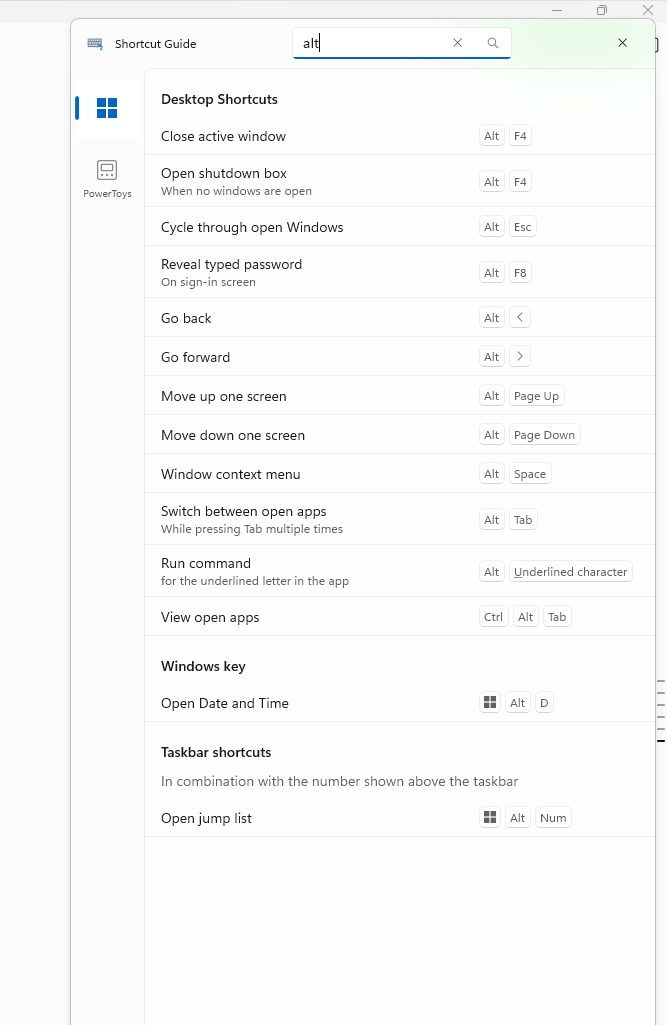
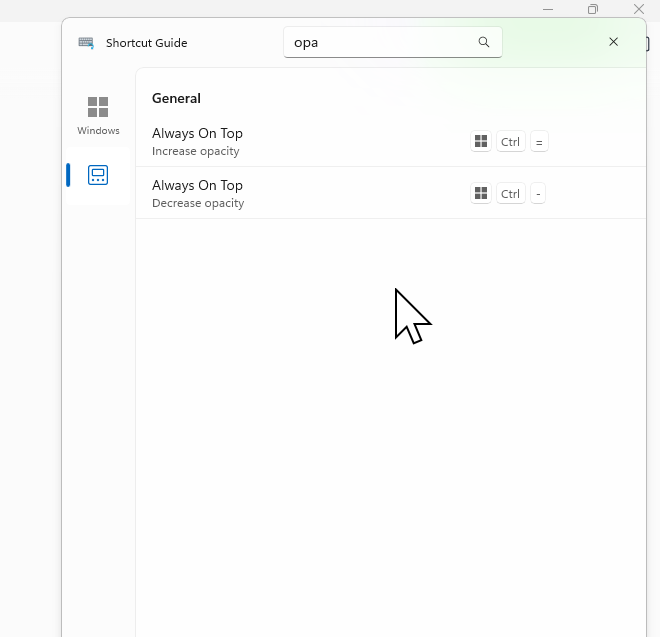
## Summary of the Pull Request Adds an accessible search box to the Shortcut Guide title bar that filters shortcuts on the currently selected application page. The query matches shortcut names, descriptions, modifier names, and displayed key labels while preserving the existing pinned, recommended, category, and taskbar grouping. ## PR Checklist - [x] Closes: #48791 - [x] **Communication:** The UX and behavior were discussed before implementation - [x] **Tests:** Added/updated and all pass - [x] **Localization:** All end-user-facing strings can be localized - [x] **Dev docs:** Added/updated - [ ] **New binaries:** Not applicable - [ ] **Documentation updated:** Not applicable ## Detailed Description of the Pull Request / Additional comments - Adds a localized title-bar `AutoSuggestBox` with a find icon and UI Automation identity. - Filters only the selected app page using case-insensitive matching across names, descriptions, modifiers, virtual-key display names, and rendered special-key aliases. - Keeps only sections containing matches and shows a polite live-region no-results state with correct pane spacing. - Preserves the query when switching app pages, but clears it when Shortcut Guide closes. - Adds `Ctrl+F` to focus search; the first `Escape` clears a query and the next closes the overlay. - Keeps query text local to the UI with no logging or telemetry. Related issues: #48860 requests several broader navigation/readability changes; #49459 requests direct physical-key interception rather than text search. ## Screenshots ### Filter Windows shortcuts by displayed key label <img src="https://raw.githubusercontent.com/niels9001/PowerToys/pr-assets-shortcut-guide-search/.github/pr-assets/shortcut-guide-search/windows-alt-filter.png" width="667" alt="Shortcut Guide Windows page filtered by Alt" /> ### Keep the query while switching to the PowerToys page <img src="https://raw.githubusercontent.com/niels9001/PowerToys/pr-assets-shortcut-guide-search/.github/pr-assets/shortcut-guide-search/powertoys-opa-filter.png" width="660" alt="Shortcut Guide PowerToys page filtered by opa" /> ## Validation Steps Performed - Built `ShortcutGuide.Ui` for ARM64 Debug with the repository build scripts. - Built `ShortcutGuide.UnitTests` for ARM64 Debug and passed all 23 tests (16 search cases plus 7 existing tests) with `vstest.console.exe`. - Verified via UIA and guarded keyboard input that name/key-label filtering updates immediately, empty sections disappear, and no matches show the localized live-region state. - Verified the query persists when switching Windows to PowerToys, `Ctrl+F` focuses search, first `Escape` clears, second `Escape` closes, and reopening starts with an empty query. - Rebuilt after the final no-results accessibility and 16px top-margin adjustment. --------- Co-authored-by: Copilot App <223556219+Copilot@users.noreply.github.com> Copilot-Session: b8ffa76b-3cf0-4a67-9adb-a13c5dd9f125 Copilot-Session: 4a96c2c2-6954-4784-8257-e0de0fac15a7 Copilot-Session: 1f00def4-e790-4071-96c6-a81c9c2adba5 Copilot-Session: 76e284a6-9a03-4105-bae6-4ed7fc92042d |
||
|
Niels Laute
|
57b01a1c4e |
Add issue triage actions (#49828)
## Summary of the Pull Request Replaces the retired GitHub Models-based automatic issue triage and deduplication flows with the GitHub Agentic Workflow proven in the `niels9001/powertoys-ai-triage-sandbox`. This PR also: - aligns `Needs-Author-Feedback` closure to 7 days for issues and PRs; - removes the automatic GitHub Models issue/PR labeler; - removes the automatic GitHub Models new-issue deduplicator; - removes the Azure Pipelines XAML Styler verification step while retaining the local styling script. This is a draft because production rollout still requires the appropriate privacy and Responsible AI reviews. ## Issue triage rules ### Triggers and refresh behavior - Runs when an issue is opened, edited, or reopened. - Runs when the issue author attaches a `PowerToysReport_*.zip` in a comment. - Maintainers can force regeneration with `/triage refresh`. - Ignores unrelated comments, unchanged issue edits, PR comments, and bot-initiated reopens. - Uses per-issue concurrency so a newer run supersedes an older run. - Maintains one canonical triage comment instead of adding repeated bot comments. ### Comment format - Separates **For the issue author** from **For the PowerToys team**. - Mentions the author once and lists each requested action as a bullet. - Distinguishes blocking **Needed** actions from non-blocking **Recommended** actions. - Shows the product, issue kind, reported PowerToys version, concise summary, diagnostic findings, possible duplicates, and collapsed investigation checks. - Ends with a short disclosure that triage is AI-assisted and maintainers make final decisions. ### Classification and labels - Detects PowerToys bug-template issues deterministically. - Reads the selected product area and adds a matching primary `Product-*` label. - Handles production aliases such as FancyZones Editor and File Explorer preview/thumbnail areas. - Product labeling is additive: existing product and maintainer labels are never removed. - Normalizes the reported PowerToys version and adds a matching version label when one exists. - Applies `Needs-Author-Feedback` only when blocking information or an English translation is required. - Removes `Needs-Author-Feedback` when the issue becomes actionable. ### PowerToys version rule - Compares the reported version with the latest stable PowerToys GitHub release. - Older versions receive a recommended update-and-retest action. - Current versions, newer preview/dev versions, missing versions, and release lookup failures are not flagged as outdated. - Updating is advisory and does not block triage by itself. ### Reproduction rule - Concrete actions plus an observed result are sufficient. - Concise steps can use the separate Actual Behavior section as the observed result. - Passive or intermittent failures are sufficient when the timing/trigger and observed failure are clear. - Vague statements without an actionable scenario remain insufficient. - Clearly non-English steps are not treated as missing; reproduction is reassessed after the author translates the issue. ### Language rule - Classifies author-written prose as English, non-English, or uncertain. - Ignores template headings, code, logs, filenames, URLs, hidden comments, and quoted text. - Clearly non-English issues ask the author to translate the title and description to English. - Short, mixed, code-heavy, or uncertain text is not flagged. ### Diagnostic report rule - A report is **required** for diagnostic-heavy failures: crashes, hangs, startup/load failures, installation/update failures, performance failures, and service/driver/shell-integration failures. - A report is **optional** for clear reproducible UI/visual defects. - A report is **recommended**, but not blocking, for other actionable bugs. - Missing or rejected reports block only when the deterministic requirement is `REQUIRED`. ### Diagnostic report privacy and safety - Accepts only PowerToys report attachment URLs matching the expected pattern. - Enforces archive size, decompressed size, file-count, per-file, path traversal, and encryption limits. - Selects only bounded relevant metadata and product-log evidence. - Redacts email addresses, IP addresses, user paths, URLs, GUIDs, SIDs, identity fields, tokens, secrets, and passwords. - Sends only the sanitized evidence to Copilot. - Never sends the raw ZIP or extracted files to Copilot, logs, artifacts, or repository storage. - Deletes the temporary archive after processing. ### Duplicate rule - Searches only older issues using focused product, title/body, and exact technical-signal queries. - Ranks candidates deterministically before Copilot runs. - Copilot judges only the supplied candidates and returns at most five high-confidence matches. - Similar product area alone is not enough; the underlying request or failure must match. - The model never closes an issue directly. - The workflow submits the strongest match as a native GitHub duplicate-close suggestion. - **When a maintainer accepts the suggestion, GitHub automatically closes the issue as a duplicate and links it to the selected canonical issue.** - Declining the suggestion leaves the issue open. - A defensive safeguard reopens the issue and fails the run if GitHub applies the close without holding it for review. ### AI cost and permission controls - Uses the `small` model alias. - Maximum 5 turns and 10 AI credits per run. - Maximum 300 AI credits per day. - Maximum 5 runs per user per 60-minute window. - Content hashing skips unchanged work before inference. - The agent receives only `contents: read`, `issues: read`, and `copilot-requests: write`. - A separate validated safe-output job receives `issues: write`. ## Seven-day author-feedback lifecycle The existing Microsoft GitHub Policy Service configuration remains responsible for stale closure: - Open issues with `Needs-Author-Feedback` and no activity for 7 days are closed with an explanatory comment. - Open PRs with `Needs-Author-Feedback` and no activity for 7 days are closed with an explanatory comment. - An author comment removes `Needs-Author-Feedback` and returns the issue/PR to team triage. - An author push removes `Needs-Author-Feedback` from a PR. - Manually removing the label immediately makes the issue or PR ineligible for scheduled closure. ## Deprecated automation - Deletes `.github/workflows/automatic-issue-deduplication.yml`. - Deletes `.github/workflows/auto-labeler.yml`. - Automatic PR product labeling from the old Models workflow is intentionally not replaced in this PR; a production PR ownership/path map should be agreed separately. - Keeps the manual batch deduplication workflow unchanged. - Removes the passive XAML Styler verification step from `.pipelines/v2/templates/job-build-project.yml`. - Keeps `.pipelines/applyXamlStyling.ps1` available for local developer use. ## Validation Steps Performed - Compiled `.github/workflows/issue-triage.md` with `gh aw compile`. - Ran 32 focused Python tests for issue parsing, duplicate retrieval, version checks, reproduction rules, language signals, archive validation, report selection, redaction, and output privacy. - Parsed the changed workflow and resource-management YAML. - Verified the required production labels exist. - Tested the workflow against the latest 20 PowerToys issues in the sandbox; all 20 produced one canonical comment. - Verified live variants for outdated versions, intermittent/passive reproduction, non-English issues, rejected and analyzed reports, optional UI reports, and title-only issues. ## PR Checklist - [ ] **Communication:** Discussed with core contributors. - [x] **Tests:** Added/updated and all focused tests pass. - [ ] **Privacy / Responsible AI:** Complete required production reviews before enabling. - [x] **Localization:** No product UI strings are added. - [x] **Dev docs:** Updated repository automation documentation. - [x] **New binaries:** None. --------- Co-authored-by: Copilot <223556219+Copilot@users.noreply.github.com> Copilot-Session: 18a9b8ad-fd7e-4b9d-a06c-5e350bcde9d7 Copilot-Session: fd512b9b-db6f-4004-a65b-aa49404d568d |
||
|
moooyo
|
ae416c045a |
Add native CLI shims for PowerToys command-line tools (#48631)
## Summary of the Pull Request Adds a native C++ multi-call shim that exposes existing PowerToys CLIs through `PATH`. The shims are installed under the PowerToys `bin` subfolder and follow the `PowerToys.<ModuleName>.CLI.exe` naming convention. The launcher preserves the raw argument tail, shares the caller's console, and returns the target process exit code. | PATH-visible command | Target executable | | --- | --- | | `PowerToys.FancyZones.CLI.exe` | `FancyZonesCLI.exe` | | `PowerToys.ImageResizer.CLI.exe` | `WinUI3Apps/PowerToys.ImageResizerCLI.exe` | | `PowerToys.FileLocksmith.CLI.exe` | `FileLocksmithCLI.exe` | | `PowerToys.PowerDisplay.CLI.exe` | `WinUI3Apps/PowerToys.PowerDisplay.Cli.exe` | proof of this work: <img width="1044" height="294" alt="image" src="https://github.com/user-attachments/assets/b659c552-5c08-4430-85c3-eba48f286eb0" /> <img width="1137" height="244" alt="image" src="https://github.com/user-attachments/assets/5fed493f-dc30-428d-a618-bf612ccf3635" /> <img width="1727" height="868" alt="image" src="https://github.com/user-attachments/assets/5c32fd2e-4a3a-4138-b968-fb5434eebec3" /> ## PR Checklist - [x] Closes: #48634 - [x] **Communication:** Discussed with core contributors in this PR - [x] **Tests:** Added/updated and all pass - [ ] **Localization:** CLI diagnostic messages are not localized - [x] **Dev docs:** Updated CLI naming and installation conventions - [x] **New binaries:** Added on the required places - [x] Signing JSON - [x] WiX installer entries - [x] CI builds through `PowerToys.slnx`; no dedicated YML step is required - [x] The existing release pipeline covers the solution and installer - [x] **Documentation updated:** `doc/devdocs/cli-conventions.md` ## Detailed Description of the Pull Request / Additional comments - Uses one native launcher binary for all commands and resolves the target from the invoked shim filename. - Installs PATH-visible shims under `PowerToys\bin`. - Keeps the existing module CLI binaries and their deployment locations unchanged. - Rejects the previous unsuffixed and `*cli` command aliases. ## Validation Steps Performed - Built `tools/CliShim.UnitTests/CliShim.UnitTests.vcxproj` in `Release|x64`: 0 warnings, 0 errors. - Ran `CliShim.UnitTests.dll` with `vstest.console.exe`: 5/5 tests passed. - Verified the CLI manifest, WiX command names, and `bin` installation directory are synchronized. - Ran `git diff --check`. --------- Co-authored-by: Yu Leng <yuleng@microsoft.com> Co-authored-by: Claude Opus 4.8 (1M context) <noreply@anthropic.com> Co-authored-by: Copilot <223556219+Copilot@users.noreply.github.com> Copilot-Session: d11c4221-248f-44a9-85fb-7017ed43f4ce |
||
|
Noraa Junker
|
6c9fb8ce52 |
[Shortcut Guide] Add Windows key hold activation options (#49661)
## Summary of the Pull Request Adds configurable Windows-key hold activation to Shortcut Guide while keeping the regular activation shortcut independent. Users can choose to disable Windows-key activation, show taskbar indicators, or open the full Shortcut Guide. Full-guide mode also supports a configurable hold duration and optional close-on-release behavior. <img width="1099" height="611" alt="image" src="https://github.com/user-attachments/assets/e0fe4c0f-3bef-43f8-a526-d22caf9e484e" /> ## PR Checklist - [ ] Closes: N/A - [x] **Communication:** The UX and behavior were discussed before implementation - [x] **Tests:** Added/updated and all pass - [x] **Localization:** All end-user-facing strings can be localized - [x] **Dev docs:** Added/updated - [ ] **New binaries:** Not applicable - [ ] **Documentation updated:** Not applicable ## Detailed Description of the Pull Request / Additional comments - Adds Off, taskbar-indicator, and full-guide Windows-key actions to Settings. - Adds a 100–5,000 ms hold-duration setting and a full-guide close-on-release option. - Handles left and right Windows keys and suppresses Start after an activated hold. - Routes Windows-key holds through a dedicated event so custom activation shortcuts remain independent. - Clears previous pressed-key registrations before refreshing them to prevent duplicate long-press callbacks. - Preserves compatibility with the existing `press_time` setting and documents the new options. ## Validation Steps Performed - Built the affected ARM64 Debug Settings, Runner, Shortcut Guide module-interface, and Shortcut Guide UI projects. - `ShortcutGuide.UnitTests`: 7/7 passed. - Targeted Settings tests: 12/12 passed. - Manually verified Off, taskbar-indicator, full-guide close-on-release, and full-guide persistent modes. - Verified configured hold thresholds, both Windows keys, Start suppression, and regular-shortcut independence. - Validated the final Settings XAML layout in the running Settings app. --------- Co-authored-by: Copilot Autofix powered by AI <175728472+Copilot@users.noreply.github.com> Co-authored-by: copilot-swe-agent[bot] <198982749+Copilot@users.noreply.github.com> Co-authored-by: Muyuan Li (from Dev Box) <muyuanli@microsoft.com> Co-authored-by: Copilot <223556219+Copilot@users.noreply.github.com> Copilot-Session: 2b3acca3-e49b-4936-8fb9-6f669bd449db |
||
|
Niels Laute
|
b7891108fa |
[Mouse Highlighter] Update default click colors (#49833)
## Summary of the Pull Request Updates Mouse Highlighter's default click colors to the recommended palette colors: - Left click: green (`#BFFF00`) - Right click: blue (`#00BFFF`) Keeps the Settings UI, native module fallback, and DSC reference aligned while preserving the existing 65% opacity. Existing saved preferences are unchanged. ## PR Checklist - [ ] Closes: N/A - [x] **Communication:** Requested by a core contributor - [x] **Tests:** Added/updated and all pass - [x] **Localization:** No end-user-facing strings changed - [x] **Dev docs:** Updated the Mouse Highlighter DSC reference - [ ] **New binaries:** No new binaries - [ ] JSON for signing - [ ] WXS for installer - [ ] YML for CI pipeline - [ ] YML for signed pipeline - [ ] **Documentation updated:** No external documentation update required ## Detailed Description of the Pull Request / Additional comments Adds shared managed constants for the two click-color defaults so serialized settings and Settings UI fallback behavior cannot drift. The native Mouse Highlighter fallback uses the same RGB values, and a focused unit test locks down the defaults. ## Validation Steps Performed - Built `MouseHighlighter.vcxproj` for x64 Debug - Built `Settings.UI.UnitTests.csproj` for x64 Debug - Passed `MouseHighlighterSettingsTests.Defaults_ShouldUseRecommendedClickColors` Co-authored-by: Copilot App <223556219+Copilot@users.noreply.github.com> |
||
|
Lucas Martins
|
29471231dd |
Add FancyZones monitor window rotation (#48772)
# Summary Adds an opt-in FancyZones feature to rotate processable windows across connected monitors. The feature lets users hold the configured monitor rotation hotkey, preview the current monitor content order, and rotate windows left or right across monitor work areas using the arrow keys. The overlay keeps content numbers visually consistent while windows move between monitors. This change was prototyped and implemented with assistance from Codex. # Demo  # Details - Adds FancyZones settings for monitor rotation and its activation hotkey. - Adds Settings UI controls under FancyZones > Windows. - Extends the FancyZones keyboard hook to forward keyup events. - Adds window snapshot, monitor mapping, and work-area-relative rotation logic. - Adds a dark visual overlay with monitor-content numbering and directional transition hints. - Updates FancyZones settings parsing coverage. # Validation - Built `FancyZonesLib.vcxproj` successfully. - Built `FancyZones.vcxproj` successfully. - Built Settings UI projects successfully. - Built Runner successfully. - Ran focused FancyZones settings parse tests successfully. - Manual validation performed on a multi-monitor setup. # Notes The feature is disabled by default and must be enabled from FancyZones settings. --------- Co-authored-by: Muyuan Li (from Dev Box) <muyuanli@microsoft.com> Co-authored-by: Copilot <223556219+Copilot@users.noreply.github.com> Copilot-Session: 2b3acca3-e49b-4936-8fb9-6f669bd449db |
||
|
Gleb Khmyznikov
|
e48152c52d |
[UITests] Add UITest.Next suites (Image Resizer, Peek, File Explorer add‑ons, File Locksmith) + local‑VM tooling and CI test‑signing (#49671)
## Summary Adds end‑to‑end UI tests on the `Microsoft.PowerToys.UITest.Next` (winappcli) framework for three modules, grows the shared `.Next` test framework with the helpers those suites needed, and adds the CI plumbing that lets shell‑extension tests exercise the **real** Windows 11 modern context menu. Also ships two agent skills that document how to write and run these tests. Product runtime behavior is **unchanged** — the only product edits are test‑observability hooks in Peek and a unit‑test project exclude. Closes: https://github.com/microsoft/PowerToys/issues/40660 https://github.com/microsoft/PowerToys/issues/49424 https://github.com/microsoft/PowerToys/issues/40661 ## What's added ### New UI test suites - **Image Resizer** — `src/modules/imageresizer/tests/ImageResizer.UITests`: context‑menu enable/disable tracking, the resize dialog, custom presets, every fit mode, every unit, filename format, keep‑date, shrink‑only, replace‑in‑place, and orientation. - **Peek** — `src/modules/peek/Peek.UITests.Next`: file‑preview coverage across image/text/archive/ markdown types with per‑arch visual baselines. - **File Explorer add‑ons** — `src/modules/previewpane/PreviewPane.UITests`: Preview Pane handlers and thumbnail providers. ### `UITestAutomation.Next` framework - New helpers: `ExplorerShell` (Shell selection/view‑mode interop), `WaitHelper` (structured stable waits), `WindowControl` (foreground/context‑menu/process control), `VisualAssert` (image compare), `WindowHelper`. - Updates to `Session`, `UITestBase`, `SettingsConfigHelper`, `WinappCli`. - New `UITestAutomation.Next.UnitTests` project covering the new wait/settings/CLI helpers. ### CI — sign sparse MSIX so the modern menu registers - **`.pipelines/signSparsePackages.ps1`** — self‑signs each sparse context‑menu MSIX with a publisher‑matching test certificate and force‑trusts it (machine stores), so `AddPackageByUriAsync` succeeds on otherwise‑unsigned PR builds. Robust `signtool` discovery with a NuGet fallback; test‑only trust that asserts no security. - Wired into **`.pipelines/v2/templates/job-test-project.yml`** as a best‑effort step covering the run‑in‑place, machine‑install, and per‑user‑install locations. Signs nothing it can't (skips already‑signed packages) and never fails the job. ### Product changes (test observability only) - **Peek `FilePreview.xaml` / `.xaml.cs`** — a named `LoadingIndicator` and a hidden automation peer that exposes the current preview state as text, so tests can read load state deterministically. No runtime behavior change. - **`ImageResizer.UnitTests.csproj`** — exclude the sibling `ImageResizer.UITests\**` folder from the unit‑test compilation. ### Agent skills & docs - **New `ui-tests-local-vm` skill** — run `.Next` suites in persistent dockur/windows VMs: setup, agentic loop, image customization, troubleshooting, the shell‑extension **signing** reference, plus controller/guest scripts and VM templates. - **Updated `ui-tests-migration` skill** — WinAppDriver/Selenium → `.Next` porting guidance (CI stability, Explorer/shell‑extension test design, patterns & pitfalls). - **`doc/devdocs/development/ui-tests.md`** — updated for the `.Next` workflow. ## Testing - All three suites pass locally and in CI across **x64 Win10**, **x64 Win11**, and **arm64** (machine and per‑user install legs). ## Reviewer notes - No product runtime behavior changes; product edits are limited to the Peek test hooks above. - The CI signing step is a **test‑only** trust anchor (self‑signed, scoped to the agent) and is best‑effort, so it can only add modern‑menu coverage and never regress the job. |
||
|
Gleb Khmyznikov
|
a87f5b07a9 |
Advanced Paste additional customizations and PhiSilica provider (#46727)
## Summary Adds an on-device **Phi Silica (Windows AI) paste provider** to Advanced Paste and richer per-action customization, plus the **package-identity plumbing** that lets the unpackaged Advanced Paste app use Windows AI APIs. > Note: this supersedes the earlier "self-contained MSIX package installed/registered by the > WiX installer" approach. Advanced Paste is **not** packaged or installed as a standalone > MSIX. It keeps shipping as the existing unpackaged, self-contained WinUI 3 executable in > `WinUI3Apps/` and acquires **package identity at runtime from the existing PowerToys sparse > package** — there are no installer or ESRP MSIX repack changes. ## Advanced Paste features - **New Phi Silica paste provider** (`CustomActions/PhiSilicaPasteProvider.cs`): an on-device AI provider backed by the Windows AI Phi Silica language model — no cloud endpoint or API key required. Registered as a new `AIServiceType` via `PasteAIProviderFactory` / `AIServiceTypeRegistry`. - **Additional custom actions** (`AdvancedPasteAdditionalAction`): user-defined actions with their own prompt, system prompt, AI provider, and shortcut — plus an optional "coaching" prompt/system-prompt/provider/shortcut and shortcut-conflict detection. - **Built-in default prompts** (`AdvancedPasteDefaultPrompts`) and updates to `AdvancedPasteCustomAction`, `PasteFormat(s)`, `OptionsViewModel`, and `PasteFormatExecutor` to support per-action provider selection and system prompts. - **Settings UI** (`AdvancedPastePage.xaml`/`.xaml.cs`, `Resources.resw`): configure the Phi Silica provider, choose a provider per action, edit system/coaching prompts, and a Phi Silica availability/readiness experience — Settings queries the Advanced Paste executable via `--check-phi-silica`, and a **"Download model"** action triggers `--prepare-phi-silica` to fetch the model and then re-probes. ## Package identity for Windows AI (replaces the MSIX-install approach) - Phi Silica is a **Limited Access Feature (LAF)** that can only be unlocked by a process with a registered **package identity**. Advanced Paste runs unpackaged, so it obtains identity from the existing **`Microsoft.PowerToys.SparseApp`** sparse package (`src/PackageIdentity/`): a new `<Application Id="PowerToys.AdvancedPasteUI">` entry in `AppxManifest.xml` maps it to `PowerToys.AdvancedPaste.exe`, with matching updates to `BuildSparsePackage.ps1`. - **LAF unlock** at runtime via `PhiSilicaLafHelper.cs`. The token/attestation are baked at build time by the `GeneratePhiSilicaLafCredentials` MSBuild target into `PhiSilicaLafCredentials.g.cs` — local **dev defaults** live in `src/PhiSilicaLaf.props` (imported from `Directory.Build.props`) and the **production secret** is injected via `/p:` in the release pipeline. - New **`AdvancedPaste.dev.manifest` / `AdvancedPaste.prod.manifest`** application manifests (selected by `CIBuild`) declaring full-trust and the system AI models capability. ## Build & pipeline - **Windows App SDK** moved to the coherent **stable `2.2.0`** line and **added `Microsoft.WindowsAppSDK.AI` `2.2.3`** (the Phi Silica APIs). Foundation `2.1.0` carries the sparse-identity PRI fix, and the stable AI build matches the OS Windows AI runtime. - **Independent versioning** for Advanced Paste (`src/modules/AdvancedPaste/custom.props`, XES one-store versioning, `AdvancedPasteVersion`). A `steps-setup-versioning.yml` step is added for Advanced Paste in `job-build-project.yml`, ordered **before** CmdPal to avoid a version-collision installer failure (WIX0103). - `release.yml` passes `PhiSilicaLafToken`/`PhiSilicaLafAttestation` into the main build; spell-check allow-list/patterns updated. - Removed now-unneeded dependencies: the `Microsoft.Windows.Compatibility` reference and the `Common.UI` "force matching DLL versions" hack. <img width="1073" height="716" alt="image" src="https://github.com/user-attachments/assets/9364d86a-c0d1-4a08-a669-d98cbcb4b140" /> <img width="1038" height="308" alt="image" src="https://github.com/user-attachments/assets/00eef1dd-b407-4841-bd64-f54f8a145c46" /> <img width="194" height="405" alt="image" src="https://github.com/user-attachments/assets/d2f9c5bb-2507-4112-b3e0-56da681f88ea" /> <img width="489" height="453" alt="image" src="https://github.com/user-attachments/assets/811d1afd-9993-48be-824e-82bb56c5ceca" /> [Video clip internal](https://onedrive.cloud.microsoft/✌️/a@9n6nl3fp/S/cQpvAHrL5M9ZR6eUawztyfyBEgUCwCF-aKg9TbKyyGWP4c0KMA) [Build internal](https://microsoft.visualstudio.com/Dart/_build/results?buildId=149920754&view=artifacts&pathAsName=false&type=publishedArtifacts) --------- Co-authored-by: Niels Laute <niels.laute@live.nl> Co-authored-by: Copilot App <223556219+Copilot@users.noreply.github.com> |
||
|
moooyo
|
8f63402400 |
PowerDisplay: Adjust brightness by scrolling over the tray icon (#49446)
## Summary of the Pull Request Scrolling the mouse wheel over the Power Display tray icon adjusts brightness, without opening the flyout. - New **Tray icon mouse wheel** setting: `Off` / `Primary display` / `All displays`, defaulting to **`Off`**. It is scoped to the tray icon — the flyout sliders accept wheel input regardless, as they always have. The existing **Mouse wheel increment** setting supplies the per-notch step. - **Off by default.** The gesture consumes a wheel notch that would otherwise reach the window under the pointer, and acting on it installs a system-wide `WH_MOUSE_LL` hook. Neither is something an existing installation should acquire silently on upgrade. With the setting `Off` no hook is ever installed and no notch is ever consumed, so this PR changes no existing behaviour until the user opts in: 1958 insertions, 2 deletions, and both deletions are refactors of lines this feature reuses. - **No feedback UI.** Brightness is self-evidencing — you scroll and the screen changes — so the display itself is the feedback. The notification icon is untouched: same tooltip, same text, same legacy notification-icon protocol. ## PR Checklist - [x] Closes: #49410 - [ ] **Communication:** I've discussed this with core contributors already. If the work hasn't been agreed, this work might be rejected - [x] **Tests:** Added/updated and all pass - [x] **Localization:** All end-user-facing strings can be localized - [x] **Dev docs:** Added/updated - [ ] **New binaries:** Added on the required places - [ ] [JSON for signing](https://github.com/microsoft/PowerToys/blob/main/.pipelines/ESRPSigning_core.json) for new binaries - [ ] [WXS for installer](https://github.com/microsoft/PowerToys/blob/main/installer/PowerToysSetup/Product.wxs) for new binaries and localization folder - [ ] [YML for CI pipeline](https://github.com/microsoft/PowerToys/blob/main/.pipelines/ci/templates/build-powertoys-steps.yml) for new test projects - [ ] [YML for signed pipeline](https://github.com/microsoft/PowerToys/blob/main/.pipelines/release.yml) - [ ] **Documentation updated:** If checked, please file a pull request on [our docs repo](https://github.com/MicrosoftDocs/windows-uwp/tree/docs/hub/powertoys) and link it here: #xxx No new binaries or projects — everything lands in existing assemblies. Communication is unchecked because #49410 is still Needs-Triage. ## Detailed Description of the Pull Request / Additional comments ### Why a low-level hook The Shell does not forward `WM_MOUSEWHEEL` to a notification icon's callback window under any `NOTIFYICON_VERSION`, and a click-through overlay placed over the icon cannot receive wheel input either. `TrayIconMouseWheelListener` therefore installs a `WH_MOUSE_LL` hook — but only transiently, and only when it will act on the result: - Nothing is installed at all while the setting is `Off`, which is the default. - Installed in `EnsureHook()` when the UI thread confirms the pointer is inside the rectangle from `Shell_NotifyIconGetRect` **and** `CanAdjustBrightnessFromTrayWheel` says some monitor can accept a brightness write. - Removed in `DisarmCore()` as soon as either condition stops holding, the pointer leaves the rectangle, or the mode changes. - A notch is consumed (the hook proc returns non-zero) only while armed and only for points inside the armed rectangle, so a wheel event Power Display will not act on still reaches the window under the cursor. The hook runs on a dedicated background thread with its own message loop; the proc itself only enqueues a sample and posts a drain request. Deltas are marshalled to the UI thread in batches, and `WheelDeltaAccumulator` folds high-resolution deltas (precision wheels, touchpads) into whole notches. Each sample carries the hover generation it was captured under, so samples from a hover the UI thread has already retired are discarded rather than applied late. ### Hover detection The Shell sends `WM_MOUSEMOVE` to the icon's callback window while the pointer is over it. `TrayIconService.HandleTrayMouseMove` resolves the rectangle with `Shell_NotifyIconGetRect` and caches it for a second, because that message repeats for every pixel of travel. `TrayIconService` gains nothing else: no protocol change, no new hover UI, no polling. The rest of the file — and `MainWindow.xaml` — is untouched. ### Linked brightness While linked brightness is on, a notch has to move the whole group, so it goes through `MainViewModel.LinkedBrightness` rather than the individual monitor setters. The new master value is taken from the planner's value for the monitor the wheel named, **not** from the current master. The master is positional only — `SeedInitialLinkedBrightness` takes it from the lowest-numbered linked monitor and never writes hardware, and every monitor-list rebuild re-seeds it — so it can sit arbitrarily far from the monitor the wheel is aimed at. Stepping it relative to itself would apply a wrong-sized or wrong-signed change, and a master already clamped at 0/100 would swallow the notch while writing nothing at all. The setting description calls out that linked brightness widens the scope, so `Primary display` is not literally a single display while it is on. ### What is deliberately not here An earlier revision of this PR showed the target and percentage in a custom overlay as you scrolled. Doing that meant the standard Shell tooltip would not do (it cannot be shown on demand), which meant an own window, which meant suppressing the Shell tooltip so the two did not collide, which meant `NOTIFYICON_VERSION_4`, which changed the callback packing and made the app responsible for all hover text — including for keyboard and touch users, who never reach a cursor-anchored overlay and would have been left with no visible tooltip at all. That chain was about half the diff, for a readout that adds little on top of watching the screen change. It is gone. If a readout is wanted later it can be argued on its own merits, separately from this feature. The same revision also gated the flyout sliders on this setting. That bundled two unrelated things behind one switch — turning off tray scrolling would also have stopped the contrast and volume sliders responding to the wheel — so the setting is now scoped to the tray icon and named accordingly. An earlier revision also routed the tray **Exit** action through `Shutdown()`. That fixes a pre-existing teardown leak which has nothing to do with this feature, so it now lives in #49580 and is out of scope here. This branch does not depend on it: the hook thread is a background thread and the process is ending either way. ## Validation Steps Performed - Unit tests: `PowerDisplay.Lib.UnitTests` 215 passed, `Settings.UI.UnitTests` 165 passed. - Builds: `PowerDisplay` and Settings UI, x64 Debug, no warnings. - Automated coverage is in `PowerDisplay.Lib.UnitTests`: target selection per mode, wheel accumulation including negative deltas, partial notches and direction reversal, half-open rectangle containment, and settings serialization and round-trip for the new mode, including that a settings file predating the feature loads as `Off`. `Settings.UI.UnitTests` covers the view-model index mapping and pins the enum values to the ComboBox item order. - The Win32 glue in `TrayIconService` and `TrayIconMouseWheelListener` is not unit tested. Manual passes performed: scrolling over the icon in both modes, the icon parked in the notification overflow, high-resolution wheel input, brightness boundaries, live monitor refresh while hovering, tray icon hidden and re-enabled, Explorer restart, the context menu and left-click, `Off` stopping tray scrolling while the flyout sliders keep working, and confirming a notch that Power Display will not act on still reaches the window under the cursor. Not verified, needing hardware this branch has not been run on: - Multiple taskbars, where the tray icon is on a secondary display and `Primary display` mode adjusts a monitor the user may not be looking at. - Mixed-DPI setups, for the `Shell_NotifyIconGetRect` rectangle and the hook's physical-pixel hit test. --------- Co-authored-by: Yu Leng <yuleng@microsoft.com> Co-authored-by: Copilot <223556219+Copilot@users.noreply.github.com> Co-authored-by: Claude Opus 5 (1M context) <noreply@anthropic.com> Copilot-Session: 5d7f36fe-d175-4aa9-a3c7-b370d952d1d3 |
||
|
Clint Rutkas
|
bb99c30edc |
New module: AltWindowCycle (#48281)
## Summary of the Pull Request Introduces a new utility: AltWindowCycle to quickly switch between windows from the same process using Alt + `. In release notes give @wzhudev coauthor credits as he also had an earlier PR It works like Alt + Tab, but scoped to the app you’re already in. Perfect for juggling multiple browser windows, terminals, or editor instances. https://github.com/user-attachments/assets/cd42f6af-fa5d-4f08-8f68-3c4e75c16d94 <img width="1835" height="971" alt="image" src="https://github.com/user-attachments/assets/adea59cb-6c8d-4b44-87e2-0a792c4c0b4f" /> ## PR Checklist - [x] Closes: https://github.com/microsoft/PowerToys/issues/278 - [ ] **Communication:** I've discussed this with core contributors already. If the work hasn't been agreed, this work might be rejected - [ ] **Tests:** Added/updated and all pass - [ ] **Localization:** All end-user-facing strings can be localized - [ ] **Dev docs:** Added/updated - [ ] **New binaries:** Added on the required places - [ ] [JSON for signing](https://github.com/microsoft/PowerToys/blob/main/.pipelines/ESRPSigning_core.json) for new binaries - [ ] [WXS for installer](https://github.com/microsoft/PowerToys/blob/main/installer/PowerToysSetup/Product.wxs) for new binaries and localization folder - [ ] [YML for CI pipeline](https://github.com/microsoft/PowerToys/blob/main/.pipelines/ci/templates/build-powertoys-steps.yml) for new test projects - [ ] [YML for signed pipeline](https://github.com/microsoft/PowerToys/blob/main/.pipelines/release.yml) - [ ] **Documentation updated:** If checked, please file a pull request on [our docs repo](https://github.com/MicrosoftDocs/windows-uwp/tree/docs/hub/powertoys) and link it here: #xxx ## Detailed Description of the Pull Request / Additional comments This PR adds AltWindowCycle (in-proc module + Settings integration), then addresses follow-up check-spelling feedback without changing runtime behavior: - allow-list update for `ROOTOWNER` - comment text adjustment for forbidden-pattern compliance - local identifier rename (`wpx` → `whitePx`) for spelling compliance ## Validation Steps Performed - Verified `ROOTOWNER` is present in `.github/actions/spell-check/allow/code.txt` - Verified `wpx` is removed and updated occurrences in `src/modules/AltWindowCycle/AltWindowCycle.cpp` - Ran targeted diff/verification for both updated files - Ran final validation (code review + CodeQL trivial-change path) - Ran secret scan for changed files --------- Co-authored-by: Copilot <223556219+Copilot@users.noreply.github.com> Co-authored-by: copilot-swe-agent[bot] <198982749+Copilot@users.noreply.github.com> Co-authored-by: Niels Laute <niels.laute@live.nl> Co-authored-by: Copilot Autofix powered by AI <175728472+Copilot@users.noreply.github.com> Co-authored-by: Clint Rutkas <crutkas@users.noreply.github.com> Copilot-Session: dd5080ea-5001-4efb-87f8-1e7218e10a4e |
||
|
Noraa Junker
|
135291d456 |
[Shortcut Guide] Add Less Than and greater than characters and fix crash if key is empty or invalid (#49562)
<!-- Enter a brief description/summary of your PR here. What does it fix/what does it change/how was it tested (even manually, if necessary)? --> ## Summary of the Pull Request <!-- Please review the items on the PR checklist before submitting--> ## PR Checklist - [x] Closes: #49558 <!-- - [ ] Closes: #yyy (add separate lines for additional resolved issues) --> - [ ] **Communication:** I've discussed this with core contributors already. If the work hasn't been agreed, this work might be rejected - [ ] **Tests:** Added/updated and all pass - [ ] **Localization:** All end-user-facing strings can be localized - [x] **Dev docs:** Added/updated - [ ] **New binaries:** Added on the required places - [ ] [JSON for signing](https://github.com/microsoft/PowerToys/blob/main/.pipelines/ESRPSigning_core.json) for new binaries - [ ] [WXS for installer](https://github.com/microsoft/PowerToys/blob/main/installer/PowerToysSetup/Product.wxs) for new binaries and localization folder - [ ] [YML for CI pipeline](https://github.com/microsoft/PowerToys/blob/main/.pipelines/ci/templates/build-powertoys-steps.yml) for new test projects - [ ] [YML for signed pipeline](https://github.com/microsoft/PowerToys/blob/main/.pipelines/release.yml) - [ ] **Documentation updated:** If checked, please file a pull request on [our docs repo](https://github.com/MicrosoftDocs/windows-uwp/tree/docs/hub/powertoys) and link it here: #xxx <!-- Provide a more detailed description of the PR, other things fixed, or any additional comments/features here --> ## Detailed Description of the Pull Request / Additional comments <!-- Describe how you validated the behavior. Add automated tests wherever possible, but list manual validation steps taken as well --> ## Validation Steps Performed |
||
|
Anthony Thompson
|
e6bbf4428e |
docs: add Quick Shell to third-party Run plugins (#49567)
## Summary Adds [Quick Shell](https://github.com/tonythethompson/QuickShell) to the community PowerToys Run plugins list. - **Plugin:** Quick Shell (`qs` keyword) - **Author:** [tonythethompson](https://github.com/tonythethompson) - **Description:** Open saved project folders in any terminal; shared shortcuts with the Quick Shell Command Palette extension ## Install - WinGet (bundled CmdPal + Run): `winget install tonythethompson.QuickShell` - Run-only ZIP: [`QuickShell.Run-x64.zip`](https://github.com/tonythethompson/QuickShell/releases/latest) / [`QuickShell.Run-ARM64.zip`](https://github.com/tonythethompson/QuickShell/releases/latest) - Run-only EXE: `QuickShellforRun-Setup-*-x64.exe` / `*-arm64.exe` from the same release Docs: https://github.com/tonythethompson/QuickShell/blob/master/docs/powertoys-run-plugin.md ## Validation - [x] Listed under General plugins - [x] Links to GitHub repo and author profile - [x] Release assets include Run plugin ZIP and installer Made with [Cursor](https://cursor.com) Co-authored-by: Anthony Thompson <> |
||
|
Rishabh Jain
|
ccb647b2f0 |
Spec: Power Display ambient-light (ALS) adaptive brightness for external monitors (#49199)
## Summary Design spec for **ambient-light (ALS) adaptive brightness for external monitors** in Power Display, as discussed and agreed in #49038. The feature continuously maps the device''s ambient light sensor reading (the same ALS **Light Switch** already reads) to each external monitor''s brightness over **DDC/CI** (the path **Power Display** already uses) — i.e. auto-brightness for external monitors, the continuous/sensor-driven counterpart to the schedule-based #47480. This PR adds only the spec doc (`doc/specs/power-display-adaptive-brightness.md`), per the repo''s spec-first process (`doc/specs/readme.md`). No code. ## What the spec covers - **Core model** — a single per-monitor formula: `target = clamp(curve(lux) + offset, min, max)`. - **Per-monitor calibration curve** — the mechanism that keeps differently-behaving panels visually matched across the whole ambient range. - **Per-monitor offset** — live, phone-style personalization; manual/CLI nudges become an offset (default) with an optional `pause` behaviour. - **Live slider UX** — when adaptive is on, the slider reflects the computed value and dragging it sets the offset. - **Sensor trust & lifecycle** — lid-closed / clamshell detection (`GUID_LIDSWITCH_STATE_CHANGE` + `QueryDisplayConfig`), hold-last-good instead of dimming to black, and honest fallbacks. - Smoothing/hysteresis/rate-limiting for flicker- and wear-safe DDC/CI writes, settings persistence, telemetry, a11y/localization, risks, and phased delivery. ## Discussion / sign-off Behaviour was reviewed with @moooyo on #49038 (configurability, CLI/manual +/- while adaptive, slider behaviour) — agreed to proceed. Closes nothing yet; tracks #49038. Related: #47480, #42566, #35564. --------- Co-authored-by: Rishabh Jain <14334305+MrRishabhJain@users.noreply.github.com> Co-authored-by: Copilot <223556219+Copilot@users.noreply.github.com> |
||
|
Moli
|
85d0c890de |
Docs: Fix broken links and incorrect source file references (#49294)
## Description Fixes #49285 This PR fixes three documentation files with broken links or incorrect source file references: ### 1. `doc/devdocs/modules/fileexploreraddons.md` — broken source code link The "Source code folder" link pointed to `src/modules/fileexplorerpreview`, which does not exist in the repository. Changed to `src/modules/previewpane` (the actual directory). ### 2. `doc/devdocs/modules/launcher/plugins/calculator.md` — broken unit test links (10 occurrences) All 10 links in the "Unit Tests" section pointed to `Microsoft.PowerToys.Run.Plugin.Calculator.UnitTests` (plural), but the actual test project directory is `Microsoft.PowerToys.Run.Plugin.Calculator.UnitTest` (singular). All link references have been corrected. ### 3. `doc/devdocs/core/runner.md` — incorrect file reference The "Centralized Keyboard Hook" section referenced `centralized_keyboard_hook.cpp`, but the actual file is `centralized_kb_hook.cpp` (at `src/runner/centralized_kb_hook.cpp`). ## Validation Each fix was verified against the actual repository structure: | Fix | Verified path exists | |-----|---------------------| | `fileexploreraddons.md` | `src/modules/previewpane/` (contains `powerpreview/` subproject) | | `calculator.md` | `src/modules/launcher/Plugins/Microsoft.PowerToys.Run.Plugin.Calculator.UnitTest/` (contains `BracketHelperTests.cs`, `ExtendedCalculatorParserTests.cs`, `NumberTranslatorTests.cs`, `QueryTests.cs`) | | `runner.md` | `src/runner/centralized_kb_hook.cpp` | ## PR Checklist - [x] Docs-only change — no code or tests affected - [x] Links verified against actual repository structure |
||
|
moooyo
|
2b8e6247fc |
[PowerDisplay] Add stable profile IDs (#49175)
## Summary of the Pull Request Gives every saved PowerDisplay profile a stable, auto-incrementing integer ID and makes the app address profiles by that ID instead of by name. Duplicate profile names are allowed, renames preserve identity, and LightSwitch stores stable profile references. > Split out of the PowerDisplay CLI branch (#48632). CLI-specific contracts and commands remain in that stacked PR. ## PR Checklist - [x] **Closes:** N/A - split from #48632. - [x] **Communication:** Discussed with core contributors. - [x] **Tests:** Added and passing in `PowerDisplay.Lib.UnitTests`. - [x] **Localization:** The composed profile label uses a shared localized format resource. - [x] **New binaries:** None. - [x] **Documentation updated:** `doc/devdocs/modules/powerdisplay/design.md`. ## Implementation ### Profile model and persistence - `PowerDisplayProfile.Id` is the stable JSON `id`; `0` means unassigned. - `PowerDisplayProfiles.NextId` is monotonic and IDs are never reused. - `SetProfile` assigns IDs to new profiles and replaces existing profiles by ID. - Duplicate names are supported; name lookup remains only for migration of legacy references. - `ProfileStore` serializes cross-process load/modify/save operations with a named mutex and atomically replaces `profiles.json`. - Production callers use asynchronous `ProfileHelper` APIs. ### Migration and application - Initial PowerDisplay discovery assigns missing profile IDs and migrates legacy monitor IDs. - LightSwitch legacy name references are reconciled to IDs and written back to the current typed settings schema. - Native LightSwitch publishes pure light/dark theme events; PowerDisplay exclusively validates profile enablement and stable IDs. - Settings UI and Named Pipe ApplyProfile actions send invariant positive profile IDs. - PowerDisplay validates the ID, loads the current profile, and applies its monitor settings. ### Settings UI - Create, edit, apply, and delete operations use stable IDs. - LightSwitch selectors store profile IDs and keep legacy name fields only for migration. - Profile lists use a localized name-and-ID label so duplicate names remain distinguishable. ## Accepted Trade-offs - Profile ID migration remains dependent on the initial monitor discovery; a failed or delayed discovery can temporarily hide legacy ID-less profiles. - The one-time PowerDisplay LightSwitch migration rewrites the complete current typed settings object and does not add a new cross-process settings transaction. ## Validation - Built the affected x64 Debug projects with the repository build scripts. - `PowerDisplay.Lib.UnitTests`: 186 passed, 0 failed. --------- Co-authored-by: Yu Leng (from Dev Box) <yuleng@microsoft.com> Co-authored-by: Copilot <223556219+Copilot@users.noreply.github.com> |
||
|
David Gardiner
|
3fd6a03ed4 |
Make PowerShell script invocation more reliable (#46729)
## Summary of the Pull Request - Protect against issues caused by loading PowerShell profile scripts - Ignore any warnings that may be generated by auto-loaded PowerShell modules. Warnings are written to stderr which the Exec then interprets as an error <!-- Please review the items on the PR checklist before submitting--> ## PR Checklist - [x] Closes: #46618 <!-- - [ ] Closes: #yyy (add separate lines for additional resolved issues) --> - [x] **Communication:** I've discussed this with core contributors already. If the work hasn't been agreed, this work might be rejected - [ ] **Tests:** Added/updated and all pass - [ ] **Localization:** All end-user-facing strings can be localized - [x] **Dev docs:** Added/updated - [ ] **New binaries:** Added on the required places - [ ] [JSON for signing](https://github.com/microsoft/PowerToys/blob/main/.pipelines/ESRPSigning_core.json) for new binaries - [ ] [WXS for installer](https://github.com/microsoft/PowerToys/blob/main/installer/PowerToysSetup/Product.wxs) for new binaries and localization folder - [ ] [YML for CI pipeline](https://github.com/microsoft/PowerToys/blob/main/.pipelines/ci/templates/build-powertoys-steps.yml) for new test projects - [ ] [YML for signed pipeline](https://github.com/microsoft/PowerToys/blob/main/.pipelines/release.yml) - [ ] **Documentation updated:** If checked, please file a pull request on [our docs repo](https://github.com/MicrosoftDocs/windows-uwp/tree/docs/hub/powertoys) and link it here: #xxx <!-- Provide a more detailed description of the PR, other things fixed, or any additional comments/features here --> ## Detailed Description of the Pull Request / Additional comments The build contains PowerShell invocations. The issue with these prior to this change is that they are vulnerable to what ever may be in the current user's PowerShell profile script. They are also vulnerable to any auto-loaded PowerShell modules that may generate warnings, as the warning output is interpreted as an error by the MSBuild `Exec` task. <!-- Describe how you validated the behavior. Add automated tests wherever possible, but list manual validation steps taken as well --> ## Validation Steps Performed 1. Built successfully from command line and in Visual Studio 2. Tested locally and also tested MouseWithoutBorders against second machine. |
||
|
Niels Laute
|
bd025098c6 |
Move wiki triage queries into the repo (#48744)
Consolidates the **Triage-queries** and **Common-Triage-Issue** wiki pages into a single \doc/devdocs/triage-queries.md\ file so the content lives in the repository instead of the wiki. - Merged both pages into one document - Dropped empty sections (Advanced Paste, New+, Workspaces) - Minor formatting cleanup --------- Co-authored-by: Copilot <223556219+Copilot@users.noreply.github.com> |
||
|
Niels Laute
|
15cb76f9b8 |
Fix dev setup .vsconfig component IDs for Visual Studio 2026 (#48824)
## Summary Fixes #48778 — the automated developer setup (`winget configure .config\configuration.winget`) provisions **Visual Studio 2026** but feeds it a `.vsconfig` containing **Visual Studio 2022-era component IDs** that were renamed or removed in VS 2026. The `VSComponents` DSC resource silently skips the invalid IDs, so the **Windows 11 SDK (26100)** and **WindowsAppSDK C# support** never install — breaking the build with cppwinrt (exit code 3) and WindowsAppSDK target failures, exactly as reported. ## Root cause PR #45534 bumped `.config/configuration.winget` from VS 2022 → VS 2026 (`Microsoft.VisualStudio.Community`, `channelId: VisualStudio.18.Release`) but left `.vsconfig` untouched. Five component IDs in `.vsconfig` are invalid in the VS 2026 (Dev18) catalog: | `.vsconfig` (old, VS 2022) | VS 2026 reality | |---|---| | `Component.Windows10SDK.22621` | renamed → `Component.Windows11SDK.22621` | | `Component.Windows10SDK.26100` | renamed → `Component.Windows11SDK.26100` (the build's target SDK) | | `ComponentGroup.WindowsAppSDK.Cs` | renamed → `WindowsAppSdkSupport.CSharp` | | `Component.Windows10SDK.19041` | removed from VS 2026 (only a `WindowsTargetPlatformMinVersion` floor — never a real install requirement) | | `Component.Windows10SDK.20348` | removed from VS 2026 (not referenced by the build) | A single `.vsconfig` is the source of truth for all three winget variants (`configuration.winget`, `configuration.vsProfessional.winget`, `configuration.vsEnterprise.winget`), which reference it via `${WinGetConfigRoot}\..\.vsconfig`, so this one edit fixes every automated path. ## Changes - `Windows10SDK.22621/26100` → `Windows11SDK.22621/26100` - `ComponentGroup.WindowsAppSDK.Cs` → `WindowsAppSdkSupport.CSharp`, and added `WindowsAppSdkSupport.Cpp` (PowerToys' C++/WinRT projects need it) - Removed `Windows10SDK.19041` and `Windows10SDK.20348` - `doc/devdocs/readme.md`: corrected the `10.0.22621.0` SDK label from "Windows 10 SDK" to "Windows 11 SDK" ## Validation - All 18 resulting component IDs validated against a live VS 2026 (18.7.0) installation via `vswhere -include packages` — all present/valid. - `.vsconfig` parses as valid JSON. - Build target requirements confirmed from `Cpp.Build.props` (`WindowsTargetPlatformVersion = 10.0.26100.0`, min `10.0.19041.0`) and `Common.Dotnet.CsWinRT.props`. ## Notes The docs still list "VS 2022 17.4+" as an alternative; this `.vsconfig` is aligned to the recommended/automated VS 2026 path. The VS Installer treats any unrecognized component IDs in `.vsconfig` gracefully (shown as unavailable, non-blocking) for VS 2022 users. Co-authored-by: Copilot <223556219+Copilot@users.noreply.github.com> |
||
|
Gleb Khmyznikov
|
74e6c3ad79 |
[UITests] New framework around WinApp CLI, no WinAppDriver or Selenium. (#48467)
# Add winappcli-based UI test harness (no WinAppDriver / Selenium) ## Summary Introduces a new UI test harness — `Microsoft.PowerToys.UITest.Next` — that drives PowerToys modules through Microsoft's [winappcli](https://github.com/microsoft/WinAppCli) (UI Automation CLI) instead of WinAppDriver + Selenium. Engine is a single executable shelled out from C#; no third-party NuGet packages, no driver process, no Appium server. Adds two real consumers: a full ColorPicker end-to-end scenario and a Settings shell navigation smoke test. This is opt-in and additive — the existing `UITestAutomation` library and the WinAppDriver-based test projects are untouched. Both can coexist while we evaluate the new harness. Inspired in part by [#48414](https://github.com/microsoft/PowerToys/pull/48414), which lands the same architectural bet (winappcli, AutomationId selectors, no WinAppDriver) at a smaller scope. This PR generalizes it into a reusable library. ## Why WinAppDriver + Selenium is a legacy pre-agentic solution that is no longer actively maintained. It's unreliable, heavyweight, and slow. To achieve 100% UI test coverage, we should leverage modern, reliable solutions, and WinApp CLI is a strong candidate. ## What's in this PR ### Harness library — [`src/common/UITestAutomation.Next/`](src/common/UITestAutomation.Next/) | File | Purpose | |---|---| | [`WinappCli.cs`](src/common/UITestAutomation.Next/WinappCli.cs) | Process wrapper around `winapp.exe`. `Invoke` / `InvokeAssertSuccess` / `InvokeJson` / `IsAvailable` / `TryResolveExecutable`. `Result` carries the args and emits `DescribeFailure()` like `winapp ui invoke X -w 12345 -> exit 1; stderr: ...` | | [`Session.cs`](src/common/UITestAutomation.Next/Session.cs) | Test session, scoped by either HWND (`-w`) or process (`-a`) via `TargetScope`. `Find<T>` / `FindAll<T>` / `Inspect` / `Screenshot` / `SendKeys`. `Session.FromProcess(...)` factory for the single-window-per-process case | | [`SessionHelper.cs`](src/common/UITestAutomation.Next/SessionHelper.cs) | Owns the launch + window-readiness flow. Static `EnsureRunning(scope, timeout)` returns whether the call had to launch (so cleanup only kills what we started). Uses `UseShellExecute=true` so child handles don't keep MSTest hanging | | [`UITestBase.cs`](src/common/UITestAutomation.Next/UITestBase.cs) | MSTest base class. Pre-flights `WinappCli.IsAvailable()` once per process and fails fast with the install hint if `winapp.exe` isn't on PATH | | [`Element/*.cs`](src/common/UITestAutomation.Next/Element/) | `Element`, `Button`, `ToggleSwitch`, `TextBox`, `NavigationViewItem`, `Window`. `Click` / `MouseClick` / `Focus` / `GetProperty` / `GetValue` / `HelpText` / `WaitForProperty` / `WaitForGone` plus coords (`X`/`Y`/`Width`/`Height`) | | [`By.cs`](src/common/UITestAutomation.Next/By.cs) | `By.Name` / `By.AccessibilityId` / `By.Id` / `By.Slug` | | [`Windows.cs`](src/common/UITestAutomation.Next/Windows.cs) | `WindowsFinder.ListAll` / `ListByApp` / `WaitForWindowByApp` / `WaitForWindowByProcess`. Notes the winappcli bug where unfiltered `list-windows` drops untitled windows | | [`WindowControl.cs`](src/common/UITestAutomation.Next/WindowControl.cs) | Tolerant Win32 helpers — `TryCloseByApp` / `TryFocusByApp` / `SafeCloseAndFocus` / `TryKillProcess` — for `finally` blocks | | [`KeyboardHelper.cs`](src/common/UITestAutomation.Next/KeyboardHelper.cs) | Hybrid `keybd_event` + `SendKeys.SendWait` chord sender — required for global PowerToys hotkeys | | [`MouseHelper.cs`](src/common/UITestAutomation.Next/MouseHelper.cs) | `MoveTo` / `LeftClick` / `RightClick` / `LeftClickAt` Win32 wrappers | | [`ClipboardHelper.cs`](src/common/UITestAutomation.Next/ClipboardHelper.cs) | STA-thread `Clipboard` access with `WaitForText` | | [`ModuleConfigData.cs`](src/common/UITestAutomation.Next/ModuleConfigData.cs) | `PowerToysModule` enum + path/process-name resolution | ### Tests **[`src/modules/colorPicker/ColorPicker.UITests/`](src/modules/colorPicker/ColorPicker.UITests/)** — replaces the previous empty `UITest-ColorPicker` stub. One test, [`ColorPickerEndToEndTests.NavigateReadShortcutActivateAndCapture`](src/modules/colorPicker/ColorPicker.UITests/ColorPickerEndToEndTests.cs), drives the full E2E: 1. Navigate to the Color Picker page via the dashboard utilities stack 2. Toggle the module OFF, verify `PowerToys.ColorPickerUI` exits; toggle ON, verify it respawns 3. Read the activation shortcut from the page's `ShortcutControl` (`EditButton.HelpText`) 4. Clear clipboard, park cursor, send the chord 5. Wait for the picker overlay window 6. Read the displayed HEX from a hidden XAML automation peer (see below) 7. Left-click to capture; assert the clipboard value matches the peer's HEX 8. Wait for the editor window and assert the captured color appears in its tree **[`src/settings-ui/Settings.UITests/`](src/settings-ui/Settings.UITests/)** — `SettingsNavigationSmokeTests.NavigationItem_NavigatesWithoutCrashing` is one `[TestMethod]` parameterized with `[DynamicData]`, producing 31 discrete results — one per `NavigationViewItem` in [`ShellPage.xaml`](src/settings-ui/Settings.UI/SettingsXAML/Views/ShellPage.xaml). For each item: navigate, settle 250ms, assert `PowerToys.Settings` is still alive. Catches FailFast regressions in `ShellViewModel.Frame_NavigationFailed` that pure-logic unit tests can't reach (the failure path needs a `NavigationFailedEventArgs` which is a sealed WinRT projection). ### Product change **[`src/modules/colorPicker/ColorPickerUI/Views/MainView.xaml`](src/modules/colorPicker/ColorPickerUI/Views/MainView.xaml)** — adds a hidden `TextBlock` automation peer: ```xml <TextBlock x:Name="ColorHexAutomationPeer" AutomationProperties.AutomationId="ColorHexAutomationPeer" IsHitTestVisible="False" Opacity="0" Text="{Binding ColorText}" /> ``` The visible `ColorTextBlock` has `AutomationProperties.Name="{Binding ColorName}"`, which masks the HEX value in the UIA tree (you see "White" instead of `#FFFFFF`). This zero-impact peer mirrors `ColorText` so tests can read the actually-displayed HEX. `Opacity=0` + `IsHitTestVisible=False` keep it out of the visual layout and out of accessibility focus. ### Project wiring - [`PowerToys.slnx`](PowerToys.slnx) — registers `UITestAutomation.Next` under `/common/`, `ColorPicker.UITests` under `/modules/colorpicker/Tests/`, and `Settings.UITests` under `/settings-ui/Tests/`. Original `UITest-ColorPicker` stub csproj removed. - [`.github/actions/spell-check/expect.txt`](.github/actions/spell-check/expect.txt) — adds `winapp` / `winappcli`. ### Not in this PR - No pipeline changes. `winapp.exe` is expected to be pre-staged on the test agent image. If it's missing, `UITestBase` fails the first test with the install hint (`winget install Microsoft.winappcli`) rather than producing 30 opaque per-test errors. - No changes to the legacy `UITestAutomation` library or any of the existing `*.UITests` projects. ## Validation - All three projects build clean on `x64|Debug` (empty `build.<config>.<plat>.errors.log`): - `src/common/UITestAutomation.Next/` - `src/modules/colorPicker/ColorPicker.UITests/` - `src/settings-ui/Settings.UITests/` - Both tests run in Test Explorer / `dotnet test` via Microsoft.Testing.Platform (already enabled repo-wide in `Directory.Build.props`). - Local runs: ColorPicker E2E green; Settings smoke green across all 31 nav items. - `winapp 0.3.2` from `winget install Microsoft.winappcli`. ## Notes for reviewers - **`UseShellExecute = true`** in `SessionHelper.EnsureRunning` is intentional — `false` makes child processes inherit the test host's stdin/stdout/stderr handles, which keeps MTP/Test Explorer marking the run as "in progress" until the spawned PowerToys exits. - **Process-scope (`-a`) targeting** in the Settings smoke test handles single-instance handoff: the EXE you launch may exit with code 0 immediately after signalling an existing owner, so the alive check uses `Process.GetProcessesByName` rather than the launcher PID. - **AutomationId-only selectors** in the Settings smoke list keep the test localization-independent. Parent groups have `SelectsOnInvoked="False"` and only expand on click — `Element.Click` tries `InvokePattern → TogglePattern → SelectionItemPattern → ExpandCollapsePattern` so the same call works for both leaves and groups. - **Untitled-window discovery**: filtered `winapp ui list-windows -a <name>` returns windows that the unfiltered call drops (e.g. ColorPicker editor). `WindowsFinder.ListByApp` uses the filtered form. Reported upstream. ## Before Merge - Add the `winappcli` install step to the UI-test pipeline. |
||
|
PsychodelEKS
|
fb656bf040 |
Add Launchy to third-party Run plugins (#49080)
## Summary of the Pull Request Adds Launchy to the third-party PowerToys Run plugins list. Launchy is a community PowerToys Run plugin that indexes and launches files from user-configured folders with per-folder extension, recursion depth, and folder inclusion rules. ## PR Checklist - [ ] Closes: #xxx - [ ] **Communication:** I've discussed this with core contributors already. If the work hasn't been agreed, this work might be rejected - [ ] **Tests:** Added/updated and all pass - [ ] **Localization:** All end-user-facing strings can be localized - [x] **Dev docs:** Added/updated - [ ] **New binaries:** Added on the required places - [ ] [JSON for signing](https://github.com/microsoft/PowerToys/blob/main/.pipelines/ESRPSigning_core.json) for new binaries - [ ] [WXS for installer](https://github.com/microsoft/PowerToys/blob/main/installer/PowerToysSetup/Product.wxs) for new binaries and localization folder - [ ] [YML for CI pipeline](https://github.com/microsoft/PowerToys/blob/main/.pipelines/ci/templates/build-powertoys-steps.yml) for new test projects - [ ] [YML for signed pipeline](https://github.com/microsoft/PowerToys/blob/main/.pipelines/release.yml) - [ ] **Documentation updated:** If checked, please file a pull request on [our docs repo](https://github.com/MicrosoftDocs/windows-uwp/tree/docs/hub/powertoys) and link it here: #xxx ## Detailed Description of the Pull Request / Additional comments This updates the existing third-party PowerToys Run plugins list with a link to the Launchy plugin repository. No product code is changed. ## Validation Steps Performed - Verified the Launchy repository is public. - Verified the plugin README includes installation, usage, settings, screenshots, and release assets. - Verified this PR only changes doc/thirdPartyRunPlugins.md. --------- Co-authored-by: PsychodelEKS <konstantin.efremov@clickio.com> |
||
|
Bryce Cindrich
|
03e5f3e837 |
feat(shortcut-guide): add 1Password manifest (#48793)
## Summary of the Pull Request Adds a Shortcut Guide manifest for the **1Password** desktop app. - **New manifest:** `src/modules/ShortcutGuide/ShortcutGuide.Ui/Assets/ShortcutGuide/Manifests/AgileBits.1Password.en-US.yml`: 26 shortcuts for `1Password.exe`, grouped into the same four sections 1Password uses in its in-app Keyboard Shortcuts reference: - **Basics:** View keyboard shortcuts, Show Quick Access, Lock 1Password - **Navigation:** Find, Switch to all accounts, Switch accounts & collections, Back, Forward, Focus next/previous row, Focus right/left section - **Selected item:** Copy primary field / password / one-time password, Open & fill in web browser, Open item in new window, Edit item, Save item, Reveal concealed fields, Archive item, Delete item - **View:** Show/hide sidebar, Zoom in, Zoom out, Actual size - **No code changes.** The manifest is auto-included via the existing `Manifests/*.yml` glob in `ShortcutGuide.Ui.csproj`, exactly like the existing Postman, Slack, Discord, and browser manifests. - The two literal-digit shortcuts (`Ctrl+1` switch to all accounts, `Ctrl+0` actual size) use the `<N>` token (`<1>` / `<0>`) per the manifest spec, and the "Switch accounts & collections" range renders as `2 - 9`. - **Documentation:** Added a note in `doc/specs/WinGet Manifest Keyboard Shortcuts schema.md` documenting the existing **sentence-case** naming convention for `Name` and `SectionName` (capitalize only the first word plus proper nouns / product feature names), so future contributors do not copy an application's title-case shortcut-list styling. The 1Password names in this PR follow that convention, keeping only feature/product names capitalized (Show Quick Access, Lock 1Password). ## PR Checklist - [x] Closes: #48792 - [ ] **Communication:** I've discussed this with core contributors already. <!-- Filed #48792; the v0.100 announcement invites app-shortcut contributions via PR. Follows the precedent set by #48461 (Postman). --> - [ ] **Tests:** Added/updated and all pass <!-- N/A: data-only change, no new code paths. The manifest was validated by deserializing it with YamlDotNet (the same `Deserializer` used by `ManifestInterpreter`), confirming all 26 entries and key tokens parse into `ShortcutFile`. --> - [x] **Localization:** All end-user-facing strings can be localized <!-- Shortcut names live in the per-language manifest (`*.en-US.yml`); other locales fall back to en-US, consistent with every existing manifest. --> - [x] **Dev docs:** Added/updated <!-- Documented the sentence-case naming convention for Name / SectionName in doc/specs/WinGet Manifest Keyboard Shortcuts schema.md. --> - [ ] **New binaries:** Added on the required places <!-- N/A: the new manifest is a data asset under an already-shipped, globbed folder. No new binaries or test projects. --> - [ ] **Documentation updated:** <!-- N/A: user-facing docs unchanged. --> - [x] **Local run:** Built the Shortcut Guide projects and ran the Debug build with 1Password focused (`Win+Shift+/`); screenshot of the rendered guide is attached below. ## Detailed Description of the Pull Request / Additional comments The Shortcut Guide displays per-app shortcuts from YAML manifests, matched to the foreground window via `WindowFilter`. Adding support for an app is purely additive: drop a `<PackageName>.<locale>.yml` file in the `Manifests` folder and it is picked up by the existing build glob and the index generator. - `PackageName: AgileBits.1Password` (the WinGet package identifier) and `WindowFilter: "1Password.exe"` (the desktop app process). - `Name: 1Password` is the display name shown in the Shortcut Guide app picker. - Shortcut names follow the repo's sentence-case convention (now documented in the schema spec). Recommended is set on the five highest-frequency / signature actions: Show Quick Access, Lock 1Password, Copy primary field, Copy password, Copy one-time password. ## Validation Steps Performed - **Schema/parse:** Deserialized the manifest with `YamlDotNet.Serialization.Deserializer` (the same path `ManifestInterpreter.YamlToShortcutList` uses). All four sections and 26 entries parse, with 5 marked Recommended. No parse errors. - **Key rendering:** Verified every key token against `KeyVisual` and `ShortcutDescriptionToKeysConverter`: `<Space>`/`<Delete>` strip to their labels, `<Left>`/`<Right>`/`<Up>`/`<Down>` map to arrow glyphs, `<1>`/`<0>` strip to the literal digit (matching the merged Postman `<9>`/`<0>` handling), `2 - 9` renders verbatim, and `+` / `-` render as the literal symbols (as in the bundled Windows Explorer and Shell manifests). - **Source fidelity:** The section grouping and every shortcut/modifier combination match 1Password's in-app Keyboard Shortcuts reference one-to-one. 🤖 Generated with [Claude Code](https://claude.com/claude-code) <img width="1462" height="2260" alt="image" src="https://github.com/user-attachments/assets/e7824a38-cb56-4242-9a6a-31c7a93c03c9" /> --------- Co-authored-by: Claude Opus 4.8 (1M context) <noreply@anthropic.com> |
||
|
moooyo
|
9039451e2f |
[Quick Accent] Migrate UI to WinUI 3 (#48891)
## Summary of the Pull Request Migrates the **Quick Accent (PowerAccent)** module's UI from WPF (`System.Windows.*`) to **WinUI 3 (Windows App SDK)**, following the pattern used by other migrated modules (ImageResizer, PowerDisplay). The accent selector is now a self-contained WinUI 3 app (`PowerToys.PowerAccent.exe`) shipped under `WinUI3Apps`, and `PowerAccent.Core` is UI-framework-agnostic. demo: https://github.com/user-attachments/assets/400c33ee-0fc0-491e-841b-a546438edf91 ## PR Checklist - [x] Closes: #48889 - [x] **Communication:** Tracked task (#48889) agreed with core contributors - [x] **Tests:** Added/updated and all pass — new `PowerAccent.Core.UnitTests` (21 tests for the positioning / DPI math); existing `PowerAccent.Common.UnitTests` unaffected - [x] **Localization:** No new localizable end-user strings — new accessibility metadata uses non-localized `AutomationProperties.AutomationId`, and the window title is the brand name `"Quick Accent"` (literal, matching ColorPicker) - [x] **Dev docs:** Updated `doc/devdocs/modules/quickaccent.md` - [x] **New binaries:** Added on the required places - [x] [JSON for signing](https://github.com/microsoft/PowerToys/blob/main/.pipelines/ESRPSigning_core.json): the `WinUI3Apps\` PowerAccent payloads are listed in `ESRPSigning_core.json` - [x] [WXS for installer](https://github.com/microsoft/PowerToys/blob/main/installer/PowerToysSetup/Product.wxs): no manual `Product.wxs` entry — the self-contained `WinUI3Apps` output (exe + `.pri` + Windows App SDK runtime) is harvested by the `WinUI3ApplicationsFiles` glob (same as ImageResizer) - [x] [YML for CI pipeline](https://github.com/microsoft/PowerToys/blob/main/.pipelines/ci/templates/build-powertoys-steps.yml): no change needed — `PowerAccent.Core.UnitTests` is discovered by the existing `**\*UnitTest*.dll` VSTest glob - [x] [YML for signed pipeline](https://github.com/microsoft/PowerToys/blob/main/.pipelines/release.yml): covered by `ESRPSigning_core.json`; no `release.yml` change needed - [ ] **Documentation updated:** N/A — internal UI-framework migration with no user-facing behavior change ## Detailed Description of the Pull Request / Additional comments The migration spans three areas (tracked in #48889): **UI (WPF → WinUI 3)** - `PowerAccent.UI` is now a WinUI 3 app shell (custom `Program.Main`, `WindowsPackageType=None`, `WindowsAppSDKSelfContained=true`). - The accent selector is a non-activating `TransparentWindow` overlay shown with `SW_SHOWNA` (never steals focus). It is made always-on-top only while shown — the WinUIEx `WindowEx.IsAlwaysOnTop` property is toggled `true` on show / `false` on hide in `OnChangeDisplay` (matching the WPF original's `Topmost = isActive`), so the dormant, never-destroyed overlay does not pin a discrete GPU awake on hybrid-graphics laptops (issue #34849 / PR #41044). - The accent "pill" selection visual is reproduced with `VisualStateManager` (WinUI 3 has no `Style.Triggers`). - **WinUI 3 gotcha:** x:Bind on a Window-rooted XAML initializes only on `Window.Activated`, which never fires for this `SW_SHOWNA` overlay — so the selector calls `Bindings.Update()` after `InitializeComponent()`; without it the `ListView` renders empty. - **Theme:** the long-lived, never-activated process follows the system app theme automatically — `App.xaml` leaves `Application.RequestedTheme` unset, so WinUI re-resolves the `{ThemeResource}` brushes (and retints the acrylic) on a live light/dark switch with no manual `ThemeListener` needed. - **Layout parity with the WPF original:** the bar width hugs its content (`itemCount × 48`, clamped to the monitor width — computed, not measured, to avoid a racy `ListView` measure), and each cell pins `MinWidth=48` (WinUI's `ListViewItem` defaults to 88, which would otherwise leave wide gaps). - **Accessibility:** UIA window name + `AutomationId`s on the character list and description. **Dependency** - `PowerAccent.Core` no longer depends on WPF — it raises events and takes an injected UI-thread marshaller. - WinForms `SendKeys` → `SendInput` (CsWin32 P/Invoke); WPF-UI (Lepo) removed; language data moved to the UI-/WinRT-agnostic `PowerAccent.Common`. - MVVM via CommunityToolkit.Mvvm with `[ObservableProperty]` **partial properties** (WinRT-correct, clears MVVMTK0045). **CI / Build / Installer** - Signing config, WinUI3Apps glob harvest, and the new unit-test project — see the checklist above. ## Validation Steps Performed - **Build:** `x64 Debug` builds with **0 warnings / 0 errors**. - **Unit tests:** `PowerAccent.Core.UnitTests` — **21/21 pass** (9 anchor positions × DPI 1.0/1.5/2.0, the offset and negative-origin monitors, caret centering + edge clamping + flip-below). - **XamlStyler:** `PowerAccentXAML/MainWindow.xaml` passes the passive format check (CI mode). - **Manual (single monitor, Top-center, light theme):** - Accent popup appears with the full accent list rendered. - Bar hugs the characters and is centered; cell spacing matches the WPF original. - Switching the system theme (light/dark) is followed live by the popup. - With `show_description` enabled, the description row is wide (≥600px) and readable, with the accent bar centered above it. - **Remaining manual validation** (tracked in #48889): multi-monitor, per-monitor DPI, all 9 `toolbar_position` values, and high-contrast theme. --------- Co-authored-by: Yu Leng <yuleng@microsoft.com> Co-authored-by: Claude Opus 4.8 (1M context) <noreply@anthropic.com> Co-authored-by: Niels Laute <niels.laute@live.nl> Co-authored-by: Copilot <223556219+Copilot@users.noreply.github.com> |
||
|
Clint Rutkas
|
af45c3ec7c |
Add press-and-hold activation mode to Quick Accent (#48937)
## Summary of the Pull Request Adds an opt-in **press-and-hold** activation mode to Quick Accent, like iOS / macOS: hold an accent-capable letter (e.g. `a`) and after a short, configurable delay the accent picker opens automatically — no separate trigger key (Space/arrows) required. This is purely additive. The existing trigger-key modes (`Left/Right arrow`, `Space`, `Both`) and all serialized settings values are unchanged. https://github.com/user-attachments/assets/faec298c-e42c-4fd1-84bd-6e74d1b481a0 ### What it does - Holding a letter types the base letter immediately, then arms the picker. After the **Hold duration** (default **500 ms**) the toolbar appears. - Navigate the options with the arrow keys / Space, then **release the letter** to insert the selected accent (it replaces the base letter). - A quick tap types just the letter. Holding and releasing without selecting leaves the base letter as-is. - `Ctrl` / `Alt` / `AltGr` / `Win` + letter combinations are left untouched, so shortcuts like `Ctrl+A` still work. ## PR Checklist - [ ] **Closes:** N/A — feature enhancement (happy to link a tracking issue if one is preferred) - [x] **Communication:** Discussed direction with maintainers; coordinated with #48891 (see below) - [ ] **Tests:** No automated tests added — the activation decision lives in the C++ low-level keyboard hook and isn't reachable from the existing managed unit-test project. Validated manually (steps below). Open to guidance on the preferred test surface. - [x] **Localization:** All new end-user strings are in `Settings.UI/Strings/en-us/Resources.resw` with translator comments. - [x] **Dev docs:** `doc/devdocs/modules/quickaccent.md` updated with the new mode. - [x] **New binaries:** None. - [x] **Documentation updated:** Dev docs updated; public Learn docs can follow once shipped. ## Detailed Description of the Pull Request / Additional comments - **`PowerAccentKeyboardService` (C++ hook):** - Append `PressAndHold` to the internal `PowerAccentActivationKey` enum (value `3`, appended to preserve serialized `0/1/2`). - Add a `holdDuration` setting and `UpdateHoldDuration(Int32)` to the WinRT projection (`.idl`). - In `OnKeyDown`, arm the picker on the held letter itself; the base letter still types on first press and auto-repeat is swallowed (reuses the existing `m_toolbarVisible` repeat guard from #36853). - In `OnKeyUp`, use the hold duration as the minimum-hold release threshold for this mode (trigger modes keep using `inputTime`). - Modifier guard: Ctrl/Alt/AltGr/Win do not arm the mode. - **Settings model (`Settings.UI.Library`):** append `PressAndHold` to `PowerAccentActivationKey`; add `hold_duration_ms` (`IntProperty`, default 500). Existing `settings.json` without the field falls back to the 500 ms default. - **`PowerAccent.Core`:** read and forward the hold duration to the hook, and use it as the popup delay when `PressAndHold` is active. - **Settings UI:** add the **"Press and hold the letter"** activation option and a **"Hold duration (ms)"** control that is shown only when that mode is selected. ### Enum sync note `PowerAccentActivationKey` exists in both the C++ hook and the managed settings library and is kept in sync by integer value. `PressAndHold` was **appended** (never reordered) so existing serialized settings (`0/1/2`) keep their meaning. ### Coordination with #48891 (Quick Accent WinUI migration) This lands as its own atomic change on `main`. The overlap with the in-progress WinUI migration (#48891) is tiny: only `PowerAccent.cs`'s mode-aware popup delay (a single `Task.Delay` line). The C++ hook, settings enum/model, and Settings UI are not touched by #48891, so it can rebase onto this with minimal effort. ## Validation Steps Performed - Built the full chain in `Debug|x64`: - `PowerAccent.UI.csproj` → rebuilds the C++ `PowerAccentKeyboardService` projection (incl. `UpdateHoldDuration`) + `PowerAccent.Core` + `Settings.UI.Library`. **0 errors.** - `PowerToys.Settings.csproj` → Settings UI XAML / ViewModel / `.resw` (XamlIndexBuilder search index regenerated). **0 errors.** - Manual trial of the running module (`PowerToys.PowerAccent.exe`) with `activation_key = 3`: - Hold `a` → base letter types immediately; picker opens after ~500 ms; arrows/Space navigate; releasing inserts the accent (replacing the base letter). - Quick tap → base letter only. Hold + release without selecting → base letter remains. - `Ctrl+A` / `Alt`+letter unaffected. --------- Co-authored-by: Copilot <223556219+Copilot@users.noreply.github.com> |
||
|
Noraa Junker
|
56fabda79c |
[Chore] Remove outdated clean up tool (#48992)
<!-- Enter a brief description/summary of your PR here. What does it fix/what does it change/how was it tested (even manually, if necessary)? --> ## Summary of the Pull Request Remove outdated clean up tool and script <!-- Please review the items on the PR checklist before submitting--> ## PR Checklist - [x] Closes: #48991 <!-- - [ ] Closes: #yyy (add separate lines for additional resolved issues) --> - [ ] **Communication:** I've discussed this with core contributors already. If the work hasn't been agreed, this work might be rejected - [x] **Dev docs:** Added/updated - [ ] **New binaries:** Added on the required places - [ ] [JSON for signing](https://github.com/microsoft/PowerToys/blob/main/.pipelines/ESRPSigning_core.json) for new binaries - [ ] [WXS for installer](https://github.com/microsoft/PowerToys/blob/main/installer/PowerToysSetup/Product.wxs) for new binaries and localization folder - [ ] [YML for CI pipeline](https://github.com/microsoft/PowerToys/blob/main/.pipelines/ci/templates/build-powertoys-steps.yml) for new test projects - [ ] [YML for signed pipeline](https://github.com/microsoft/PowerToys/blob/main/.pipelines/release.yml) - [ ] **Documentation updated:** If checked, please file a pull request on [our docs repo](https://github.com/MicrosoftDocs/windows-uwp/tree/docs/hub/powertoys) and link it here: #xxx |
||
|
Niels Laute
|
c3bec3935a |
Docs cleanup (#48813)
## Summary Removes outdated/unused documentation and asset files: - **`doc/unofficialInstallMethods.md`** — removed. - **`doc/planning/`** — removed entire folder (`awake.md`, `FancyZonesBacklog.md`, `PowerToysBacklog.md`, `ShortcutGuideBacklog.md`). - **`doc/images/icons/Video Conference Mute.png`** — removed (unused module icon, not referenced anywhere in the repo). Verified there are no remaining references to any of the removed files across tracked sources (checked literal and `%20`-encoded paths). Co-authored-by: Copilot <223556219+Copilot@users.noreply.github.com> Co-authored-by: Copilot <223556219+Copilot@users.noreply.github.com> |
||
|
Bryce Cindrich
|
a0e53de825 |
feat(shortcut-guide): add Postman manifest and fix numbered-key display (#48461)
## Summary of the Pull Request Adds a Shortcut Guide manifest for **Postman** and fixes a rendering bug where single-digit keys in manifests displayed incorrectly. - **Fix numbered-key rendering** — `src/modules/ShortcutGuide/ShortcutGuide.Ui/Converters/ShortcutDescriptionToKeysConverter.cs`: a single digit (`0`–`9`) in a manifest's `Keys` was treated as a Windows virtual-key code instead of the literal digit. Since VK `1` is the left mouse button, VK `9` is Tab, and VK `0` is undefined, shortcuts such as `Ctrl+0` (reset zoom) and `Ctrl+9` (last tab) rendered as blank/incorrect glyphs. Single digits are now rendered as the literal character. - **Add Postman shortcuts** — `src/modules/ShortcutGuide/ShortcutGuide.Ui/Assets/ShortcutGuide/Manifests/Postman.Postman.en-US.yml`: new manifest for `Postman.exe` covering Tabs, Sidebar, Request, Interface, Window and modals, and Console. Auto-included via the existing `Manifests/*.yml` glob in `ShortcutGuide.Ui.csproj`. - **Show tab-number ranges** — Edge, Chrome, Firefox, and Postman manifests: the "switch to a specific tab" entry used the literal key `1`, which (after the fix above) read as `Ctrl + 1`. It now uses a `1 - 8` range so the keycap conveys "any tab number 1 through 8". The separate "last tab" (`9`) and "reset zoom" (`0`) entries remain literal single keys. - **Add unit tests** — new `ShortcutGuide.UnitTests` (MSTest) project covering `ShortcutDescriptionToKeysConverter.GetKeysList`, including the single-digit regression. ## PR Checklist - [x] Closes: #48460 - [ ] **Communication:** I've discussed this with core contributors already. <!-- Filed #48460; the v0.100 announcement invites app-shortcut contributions via PR. --> - [x] **Tests:** Added/updated and all pass <!-- New ShortcutGuide.UnitTests (MSTest); 8 tests pass locally via vstest.console. --> - [x] **Localization:** All end-user-facing strings can be localized <!-- Shortcut names live in per-language manifest files (`*.en-US.yml`); other locales fall back to en-US, consistent with existing manifests. --> - [ ] **Dev docs:** Added/updated <!-- N/A: no behavior requiring dev-doc changes. --> - [ ] **New binaries:** Added on the required places <!-- N/A: the new manifest is a data asset under an already-shipped, globbed folder. The new test project is auto-discovered by the existing `**\*UnitTest*.dll` VSTest glob, so no CI pipeline change is required. --> - [ ] **Documentation updated:** <!-- N/A --> ## Detailed Description of the Pull Request / Additional comments The Shortcut Guide displays per-app shortcuts from YAML manifests, matched to the foreground window via `WindowFilter`. Keys are converted to keycaps by `ShortcutDescriptionToKeysConverter`. Numeric key strings were unconditionally parsed as virtual-key codes, so literal-digit shortcuts rendered wrong. The fix adds a `>= 0 and <= 9` case that emits the digit character as-is; non-digit numeric codes (arrows, etc.) are unchanged. The new Postman manifest exercises this with `Ctrl+0` / `Ctrl+9`. The browser/Postman "specific tab" entries were updated from the literal `1` to the `1 - 8` range string, rendered verbatim by `KeyVisual` (the same path used by the existing `Number (1-9)` key in the Windows Explorer manifest). A new `ShortcutGuide.UnitTests` (MSTest) project covers the converter: single digits render literally (regression test), modifier ordering, non-numeric passthrough (e.g. `1 - 8`), and arrow-key VK mapping. ## Validation Steps Performed Built and ran locally (x64 Debug): - Built `ShortcutGuideModuleInterface`, `ShortcutGuide.Ui`, and `ShortcutGuide.IndexYmlGenerator`; launched the Debug `PowerToys.exe`. - Triggered Shortcut Guide (`Win+Shift+/`) with **Postman** focused: the Postman section renders with all categories, and `Ctrl+1` / `Ctrl+9` / `Ctrl+0` display correctly (previously blank/incorrect). - Verified the "specific tab" entry renders as `Ctrl + 1 - 8` in **Edge**, **Chrome**, **Firefox**, and **Postman**. - Built `ShortcutGuide.UnitTests` and ran via `vstest.console.exe`: **8/8 tests pass**. <img width="845" height="1432" alt="PowerToys Shortcut Guide Running Postman" src="https://github.com/user-attachments/assets/6359617e-3e2c-48b0-8005-b3684594ec94" /> Co-Authored-By: Claude Opus 4.8 --------- Co-authored-by: Claude Opus 4.8 <noreply@anthropic.com> |
||
|
Gleb Khmyznikov
|
e3a1ee2e5b |
[DOCS] docmd links to source files normalization (#48754)
This pull request adds a custom `docmd` plugin to improve how documentation links to source files are handled, ensuring that repo-root-relative links work both when editing locally and on the published site. The main changes include introducing the new plugin, updating configuration to use it, and documenting its behavior. **Plugin integration and configuration:** * Added a new local plugin `github-source-links` in `docmd-plugins/`, which rewrites repo-root-relative links (e.g., `/src/.../Foo.cpp`) in Markdown files to absolute GitHub blob URLs during the documentation build process, ensuring links remain functional on the published site. [[1]](diffhunk://#diff-c2c746e6974a6cfdd229031c2977f2bb0dca37c6d5f598ed45dc0d9f0b74c7caR1-R52) [[2]](diffhunk://#diff-a97f3ce59c97313aacd716b9874b445d162c45ee2e6ef9fd2db59fe17235e1cfR1-R8) * Updated `docmd.config.json` to register the new plugin under the `plugins` key, enabling it for documentation builds. * Updated `package.json` to include the plugin as a dependency, referencing the local plugin directory. **Documentation updates:** * Updated `README.md` to document the new `docmd-plugins/` folder, explain the purpose of repo-root-relative links, and describe how the plugin rewrites these links for the published site. |
||
|
Gleb Khmyznikov
|
d2aa24786d |
[DOCS] Add auto-generated github page for dev docs (#48752)
This pull request introduces a new, automated workflow for building and publishing the developer documentation website using [docmd](https://docmd.io/). The static site is now generated from `doc/devdocs`, built in the `doc/devdocs-website` folder, and deployed to GitHub Pages via a GitHub Actions workflow. The build output is not committed to the repository but is instead published as an artifact. Supporting configuration files, documentation, and `.gitignore` entries are also added to streamline local development and CI/CD. **Automated build and deployment:** * Added `.github/workflows/regenerate-devdocs-website.yml` to build the static site with docmd and deploy it to GitHub Pages automatically on changes to `doc/devdocs` or `doc/devdocs-website`, or via manual trigger. **Project setup and configuration:** * Added `doc/devdocs-website/package.json` to define the Node.js project, pin the docmd version, and provide scripts for local development and builds. * Added `doc/devdocs-website/docmd.config.json` to configure docmd (site title, source, output directory, base path). * Added `doc/devdocs-website/.npmrc` to disable lockfile generation, ensuring fresh dependency installs each build. **Documentation and housekeeping:** * Added `doc/devdocs-website/README.md` with instructions for editing, building, and publishing the docs website. * Added `doc/devdocs-website/.gitignore` to exclude the generated `site/` output from version control. |
||
|
Anton Kesy
|
f87b14d5b9 |
Fix grammar and typos (#47539)
<!-- Enter a brief description/summary of your PR here. What does it fix/what does it change/how was it tested (even manually, if necessary)? --> ## Summary of the Pull Request Fixes some typos and grammar mistakes inside docs, strings, and comments. <!-- Please review the items on the PR checklist before submitting--> ## PR Checklist - [ ] Closes: #xxx <!-- - [ ] Closes: #yyy (add separate lines for additional resolved issues) --> - [ ] **Communication:** I've discussed this with core contributors already. If the work hasn't been agreed, this work might be rejected - [ ] **Tests:** Added/updated and all pass - [ ] **Localization:** All end-user-facing strings can be localized - [ ] **Dev docs:** Added/updated - [ ] **New binaries:** Added on the required places - [ ] [JSON for signing](https://github.com/microsoft/PowerToys/blob/main/.pipelines/ESRPSigning_core.json) for new binaries - [ ] [WXS for installer](https://github.com/microsoft/PowerToys/blob/main/installer/PowerToysSetup/Product.wxs) for new binaries and localization folder - [ ] [YML for CI pipeline](https://github.com/microsoft/PowerToys/blob/main/.pipelines/ci/templates/build-powertoys-steps.yml) for new test projects - [ ] [YML for signed pipeline](https://github.com/microsoft/PowerToys/blob/main/.pipelines/release.yml) - [ ] **Documentation updated:** If checked, please file a pull request on [our docs repo](https://github.com/MicrosoftDocs/windows-uwp/tree/docs/hub/powertoys) and link it here: #xxx <!-- Provide a more detailed description of the PR, other things fixed, or any additional comments/features here --> ## Detailed Description of the Pull Request / Additional comments <!-- Describe how you validated the behavior. Add automated tests wherever possible, but list manual validation steps taken as well --> ## Validation Steps Performed None --------- Co-authored-by: Niels Laute <niels.laute@live.nl> Co-authored-by: Copilot <175728472+Copilot@users.noreply.github.com> |
||
|
thetsaw
|
99ee955dfb |
Fix DiskAnalyzer plugin link and author (#48618)
Updated the DiskAnalyzer plugin link and author information to point to the ValleySoft organization repository instead of my personal account. ## Summary of the Pull Request Documentation-only change. Updates the DiskAnalyzer entry in `thirdPartyRunPlugins.md`: - Plugin URL: `thetsaw/PowerToys.Plugin` → `valley-soft/powertoys-diskanalyzer` - Author: `thetsaw` → `ValleySoft` ## PR Checklist - [ ] Closes: N/A - [x] **Communication:** This is a minor doc-only update to correct a repo link — no prior discussion needed - [x] **Tests:** N/A — documentation change only - [x] **Localization:** N/A — no user-facing strings changed - [x] **Dev docs:** Updated `doc/thirdPartyRunPlugins.md` - [ ] **New binaries:** N/A ## Detailed Description of the Pull Request / Additional comments The DiskAnalyzer PowerToys Run plugin was originally submitted under my personal GitHub account (`thetsaw`). The project has since been moved to the official **ValleySoft** organization at: https://github.com/valley-soft/powertoys-diskanalyzer ## Validation Steps Performed Verified all URLs are live and resolve correctly: - https://github.com/valley-soft/powertoys-diskanalyzer ✅ - https://github.com/valley-soft ✅ |
||
|
Niels Laute
|
7884f4217a |
Update readme (#48392)
<!-- Enter a brief description/summary of your PR here. What does it fix/what does it change/how was it tested (even manually, if necessary)? --> ## Summary of the Pull Request <!-- Please review the items on the PR checklist before submitting--> ## PR Checklist - [ ] Closes: #xxx <!-- - [ ] Closes: #yyy (add separate lines for additional resolved issues) --> - [ ] **Communication:** I've discussed this with core contributors already. If the work hasn't been agreed, this work might be rejected - [ ] **Tests:** Added/updated and all pass - [ ] **Localization:** All end-user-facing strings can be localized - [ ] **Dev docs:** Added/updated - [ ] **New binaries:** Added on the required places - [ ] [JSON for signing](https://github.com/microsoft/PowerToys/blob/main/.pipelines/ESRPSigning_core.json) for new binaries - [ ] [WXS for installer](https://github.com/microsoft/PowerToys/blob/main/installer/PowerToysSetup/Product.wxs) for new binaries and localization folder - [ ] [YML for CI pipeline](https://github.com/microsoft/PowerToys/blob/main/.pipelines/ci/templates/build-powertoys-steps.yml) for new test projects - [ ] [YML for signed pipeline](https://github.com/microsoft/PowerToys/blob/main/.pipelines/release.yml) - [ ] **Documentation updated:** If checked, please file a pull request on [our docs repo](https://github.com/MicrosoftDocs/windows-uwp/tree/docs/hub/powertoys) and link it here: #xxx <!-- Provide a more detailed description of the PR, other things fixed, or any additional comments/features here --> ## Detailed Description of the Pull Request / Additional comments <!-- Describe how you validated the behavior. Add automated tests wherever possible, but list manual validation steps taken as well --> ## Validation Steps Performed |
||
|
Niels Laute
|
b712fa4d85 |
Reword Shortcut Guide module and OOBE descriptions (#48248)
## Summary of the Pull Request Reword the Shortcut Guide module description and OOBE description so they describe the feature without referring to `your apps`. The module description now reads as a single sentence covering Windows and the active app; the OOBE description is shortened to one paragraph and refers to `various applications` instead of enumerating the bundled apps. ## PR Checklist - [ ] Closes: #xxx - [x] **Communication:** I've discussed this with core contributors already. If the work hasn't been agreed, this work might be rejected - [x] **Tests:** Added/updated and all pass - [x] **Localization:** All end-user-facing strings can be localized - [ ] **Dev docs:** Added/updated - [ ] **New binaries:** Added on the required places ## Detailed Description of the Pull Request / Additional comments Two strings in `src/settings-ui/Settings.UI/Strings/en-us/Resources.resw` changed: - `ShortcutGuide.ModuleDescription` — now: `Shows an on-screen overlay of keyboard shortcuts for Windows and the active application.` - `Oobe_ShortcutGuide.Description` — collapsed to one sentence describing Windows + various applications, no longer enumerating bundled apps or mentioning future additions. No code or behavioral changes. ## Validation Steps Performed - Built Settings.UI (Debug arm64) – clean. - Verified the Shortcut Guide module card in Settings UI shows the new description and the OOBE Shortcut Guide page shows the new paragraph. --------- Co-authored-by: Copilot <223556219+Copilot@users.noreply.github.com> Co-authored-by: Copilot Autofix powered by AI <175728472+Copilot@users.noreply.github.com> |
||
|
thetsaw
|
9a55209d13 |
Add DiskAnalyzer to third-party Run plugins list (#48106)
## Summary of the Pull Request Adds **DiskAnalyzer** to the General plugins table in `doc/thirdPartyRunPlugins.md`. - **Plugin:** [Community.PowerToys.Run.Plugin.DiskAnalyzer](https://github.com/thetsaw/PowerToys.Plugin) - - **Author:** thetsaw - - **Keyword:** `ds` - - **License:** MIT - - **Platforms:** x64 and ARM64 ### What it does Scan any folder or drive to find the largest files and subfolders, view drive usage with visual progress bars, and navigate your filesystem all from PowerToys Run. ## PR Checklist - [x] Plugin has been publicly available - [ ] - [x] MIT licensed - [ ] - [x] Releases include x64 and ARM64 zips - [ ] - [x] plugin.json is correctly formatted - [ ] - [x] README includes install instructions ## Detailed Description This is a documentation-only change adding one row to the third-party plugins table. No source code, binaries, or build files are modified. |
||
|
Mike Griese
|
65112a7b05 |
Move CmdPal API spec back to cmdpal/ directory (#48160)
Reverts
|
||
|
Marcello Morena
|
cb174210cb |
Add CmdPal debugging information (#48108)
## Summary of the Pull Request Adding information about using the Command Palette Visual Studio solution filter based on https://github.com/microsoft/PowerToys/issues/47997#issuecomment-4524045763. ## PR Checklist - [ ] Closes: #47997 ## Detailed Description of the Pull Request / Additional comments I found this really useful and couldn't see a reference to it anywhere else in the devdocs. Not sure if this is the best way to describe the process, but I think adding this information somewhere in the debugging doc would really help newcomers to CmdPal development! |
||
|
Noraa Junker
|
fed9e81fdc |
[Shortcut Guide V2] Fixes (#48043)
<!-- Enter a brief description/summary of your PR here. What does it fix/what does it change/how was it tested (even manually, if necessary)? --> ## Summary of the Pull Request * Fix wrong Shortcut for Shortcut Guide V2 (previously always showed default) * Fix outdated OOBE description * Fix process not stopping when exiting via ESC or close button * Fixed some missing modules * Removed regex capability and was able to improve the start up time through this <!-- Please review the items on the PR checklist before submitting--> ## PR Checklist - [ ] Closes: #xxx <!-- - [ ] Closes: #yyy (add separate lines for additional resolved issues) --> - [x] **Communication:** I've discussed this with core contributors already. If the work hasn't been agreed, this work might be rejected - [ ] **Tests:** Added/updated and all pass - [ ] **Localization:** All end-user-facing strings can be localized - [ ] **Dev docs:** Added/updated - [ ] **New binaries:** Added on the required places - [ ] [JSON for signing](https://github.com/microsoft/PowerToys/blob/main/.pipelines/ESRPSigning_core.json) for new binaries - [ ] [WXS for installer](https://github.com/microsoft/PowerToys/blob/main/installer/PowerToysSetup/Product.wxs) for new binaries and localization folder - [ ] [YML for CI pipeline](https://github.com/microsoft/PowerToys/blob/main/.pipelines/ci/templates/build-powertoys-steps.yml) for new test projects - [ ] [YML for signed pipeline](https://github.com/microsoft/PowerToys/blob/main/.pipelines/release.yml) - [ ] **Documentation updated:** If checked, please file a pull request on [our docs repo](https://github.com/MicrosoftDocs/windows-uwp/tree/docs/hub/powertoys) and link it here: #xxx <!-- Provide a more detailed description of the PR, other things fixed, or any additional comments/features here --> ## Detailed Description of the Pull Request / Additional comments <!-- Describe how you validated the behavior. Add automated tests wherever possible, but list manual validation steps taken as well --> ## Validation Steps Performed --------- Co-authored-by: Copilot Autofix powered by AI <175728472+Copilot@users.noreply.github.com> Co-authored-by: copilot-swe-agent[bot] <198982749+Copilot@users.noreply.github.com> |
||
|
Noraa Junker
|
9699d8a802 |
Shortcut Guide V2 (#40834)
## Summary of the Pull Request https://github.com/user-attachments/assets/f4afdaf8-2830-4993-82ea-1ee9a6978e4c <!-- Please review the items on the PR checklist before submitting--> ## PR Checklist - [x] Closes: Status: #890 #15405 #179 #129 #22419 #31289 #47297 #47464 #44816 - [x] **Communication:** I've discussed this with core contributors already. If the work hasn't been agreed, this work might be rejected - [ ] **Tests:** Added/updated and all pass - [x] **Localization:** All end-user-facing strings can be localized - [x] **Dev docs:** Added/updated - [x] **New binaries:** Added on the required places - [x] [JSON for signing](https://github.com/microsoft/PowerToys/blob/main/.pipelines/ESRPSigning_core.json) for new binaries - [x] [WXS for installer](https://github.com/microsoft/PowerToys/blob/main/installer/PowerToysSetup/Product.wxs) for new binaries and localization folder - [ ] [YML for CI pipeline](https://github.com/microsoft/PowerToys/blob/main/.pipelines/ci/templates/build-powertoys-steps.yml) for new test projects - [ ] [YML for signed pipeline](https://github.com/microsoft/PowerToys/blob/main/.pipelines/release.yml) - [x] **Documentation updated:** If checked, please file a pull request on [our docs repo](https://github.com/MicrosoftDocs/windows-uwp/tree/docs/hub/powertoys) and link it here: https://github.com/MicrosoftDocs/windows-dev-docs/pull/5717 <!-- Provide a more detailed description of the PR, other things fixed, or any additional comments/features here --> ## Detailed Description of the Pull Request / Additional comments Work for future PRs: - [ ] Localization of built-in shortcut files - [ ] Further customization (we can wait on user feedback for that) - [ ] Reimplement holding windows key - [ ] Search bar <details> <summary>Images</summary> https://github.com/user-attachments/assets/f923daa4-d713-463b-ba33-ede72b986c12 <img width="726" height="1388" alt="image" src="https://github.com/user-attachments/assets/781eff9a-2863-44be-bbe2-25371ef8838e" /> <img width="624" height="351" alt="image" src="https://github.com/user-attachments/assets/ec8a44db-afbc-4e28-8285-ba2a9e345fb9" /> <img width="712" height="1086" alt="image" src="https://github.com/user-attachments/assets/5a3775fc-36e9-4971-8d3f-491e8f8da45a" /> <img width="726" height="134" alt="image" src="https://github.com/user-attachments/assets/7d0a8b1f-d10e-4466-820c-b3efdc5f3c84" /> </details> <!-- Describe how you validated the behavior. Add automated tests wherever possible, but list manual validation steps taken as well --> ## Validation Steps Performed --------- Co-authored-by: Gordon Lam (SH) <yeelam@microsoft.com> Co-authored-by: Niels Laute <niels.laute@live.nl> Co-authored-by: copilot-swe-agent[bot] <198982749+Copilot@users.noreply.github.com> Co-authored-by: Copilot <223556219+Copilot@users.noreply.github.com> Co-authored-by: Muyuan Li <116717757+MuyuanMS@users.noreply.github.com> Co-authored-by: Muyuan Li (from Dev Box) <muyuanli@microsoft.com> |
||
|
Mike Griese
|
42902eeba5 |
CmdPal: Add support for pages with parameters (redux) (#47826)
(this PR is an updated version of #43784) This PR adds a new type of page to Command Palette: The `ParametersPage`. This allows extensions to create commands that require a set of parameters before invoking the command. Previously, extensions could create commands with a form page to use an adaptive card for parameter input, but that was a relatively heavyweight UX. Instead, the `ParametersPage` allows extensions to define a set of lightweight inputs, which allows for a more streamlined experience. The parameters page is made up of a set of "runs". Each run represents a single element in the search box. Runs can be either: * A label run: a static piece of text * An value run: some input for the user to provide a value. These fall into several categories: * String input * Command Input * `IInvokableCommand`s become buttons in the search box * `IListPage`s become a list input to pick from (**these will be added in a follow-up PR**) There are a ton of samples included. I also added all my draft notes in the drafts folder, to see how we got here. I'd skip reviewing those. Furthermore, I added the "dumb" token support, where an extension can opt in to having tokens in the search box, delimited by ZWSP characters. The XAML styling was fixed by Niels a few months back Closes #40948 --------- Co-authored-by: Niels Laute <niels.laute@live.nl> |
||
|
Jiří Polášek
|
c4ff073d01 |
CmdPal: Extension Gallery (#46636)
## Summary of the Pull Request Adds the **Extension Gallery** to Command Palette — a built-in page where users can discover, browse, and install community extensions without leaving the app. https://github.com/user-attachments/assets/e4565333-b970-4085-9e40-5cfd207e533b ## How it works ### 1. The extension author's side Extensions are listed in the external repo **[`microsoft/CmdPal-Extensions`](https://github.com/microsoft/CmdPal-Extensions)**. To get an extension into the in-app gallery, an author opens a PR there that adds a single entry to `extensions.json`. Nothing in PowerToys itself needs to change. A typical entry looks like: ```json { "id": "contoso.sample", "title": "Sample Extension", "description": "Short blurb shown in the list and detail view.", "author": { "name": "Contoso", "url": "https://github.com/contoso" }, "homepage": "https://github.com/contoso/sample", "iconUrl": "https://.../icon.png", "screenshotUrls": ["https://.../screenshot-1.png"], "tags": ["sample"], "installSources": [ { "type": "winget", "id": "Contoso.SampleExtension" }, { "type": "msstore", "id": "9P..." }, { "type": "url", "uri": "https://github.com/contoso/sample/releases/latest" } ], "detection": { "packageFamilyName": "Contoso.SampleExtension_8wekyb..." } } ``` - `id`, `title`, `description`, `author.name`, and at least one `installSources` entry are required; everything else is optional. - `installSources` can mix and match `winget` / `msstore` / `url`. The gallery shows an install button for the first source it can handle (WinGet preferred) and exposes any remaining sources as links. - `detection.packageFamilyName` lets CmdPal recognise an already-installed packaged extension before any WinGet lookup resolves, so the "Installed" badge appears instantly. Once the PR is merged into `CmdPal-Extensions`, every running copy of CmdPal picks the new entry up the next time its feed cache expires (within 4 hours) or when the user clicks **Refresh**. ### 2. What CmdPal does with it `ExtensionGalleryService` (in `Microsoft.CmdPal.Common`) owns the whole pipeline: 1. **Resolve the feed URL.** Default is `https://raw.githubusercontent.com/microsoft/CmdPal-Extensions/refs/heads/main/extensions.json`. A hidden setting (`GalleryFeedUrl`) lets developers point at a custom URL or a `file://` path for local testing. 2. **Fetch** the feed through `ExtensionGalleryHttpClient`, which wraps `HttpCachingClient` — a conditional-GET + on-disk cache layer built on `HttpClient` (ETag / `If-None-Match`, 30 s timeout, UA `PowerToys-CmdPal/1.0`). 3. **Parse** with the source-generated `GallerySerializationContext` into a strongly-typed `GalleryRemoteIndex` (`{ "extensions": [ ... ] }`). Entries without an `id` are dropped. 4. **Normalize** relative `iconUrl` / `screenshotUrls` against the feed URL (useful for local `file://` feeds). 5. **Localize icons.** Each HTTP icon URL is pulled through the same cache and rewritten to a local `file://` URI before the view model binds to it, so the list renders instantly on subsequent loads and works offline. 6. **Prune** cached resources that are no longer referenced, but only after a successful forced refresh. The gallery page itself is built on top of `ExtensionGalleryViewModel`, with `ExtensionGalleryItemViewModel` handling per-entry concerns — install/update/uninstall (via the shared WinGet service), installed-state detection, and joining in-flight install progress so the global `WinGetOperationsButton` in the top bar stays in sync. ### 3. Caching + offline behaviour The cache lives under `ApplicationData.Current.LocalCacheFolder\GalleryCache\` when CmdPal runs packaged, or `%LOCALAPPDATA%\Microsoft\PowerToys\Microsoft.CmdPal\Cache\GalleryCache\` when unpackaged. | Resource | TTL | |-----------------|----------| | `extensions.json` feed | 4 hours | | Icons (per URL) | 24 hours | Each fetch returns a `GalleryFetchResult` whose flags drive the UI: - `FromCache` — cache was still fresh, no network call was made. - `UsedFallbackCache` — network failed; the last-known-good cached copy was served instead. The page shows a "showing cached data" info bar. - `RateLimited` — origin returned `429` and no fallback was available. The page shows a rate-limit error. `RefreshAsync` (wired up to the gallery's refresh button) forces a fresh conditional GET, then prunes any cached files that the new feed no longer references. ### 4. WinGet install flow - `installSources[type=winget].id` is handed to the shared WinGet service for install/update/uninstall. - In-flight operations are surfaced by `WinGetOperationsButton` in the top bar with per-operation progress. - `detection.packageFamilyName` is consulted first so that the gallery can show "Installed" / "Update available" without waiting on WinGet metadata. ### Top-level command cleanup - Removed the separate "Find extensions from WinGet" and "Find extensions from the Store" top-level commands — the gallery replaces both. - Renamed the gallery command to **"Find and install Command Palette extensions"** and gave it the extensions puzzle-piece icon. ## PR Checklist - [ ] **Communication:** I've discussed this with core contributors already. If the work hasn't been agreed, this work might be rejected - [ ] **Tests:** Added/updated and all pass - [ ] **Localization:** All end-user-facing strings can be localized - [ ] **Dev docs:** Added/updated - [ ] **New binaries:** Added on the required places - [ ] [JSON for signing](https://github.com/microsoft/PowerToys/blob/main/.pipelines/ESRPSigning_core.json) for new binaries - [ ] [WXS for installer](https://github.com/microsoft/PowerToys/blob/main/installer/PowerToysSetup/Product.wxs) for new binaries and localization folder - [ ] [YML for CI pipeline](https://github.com/microsoft/PowerToys/blob/main/.pipelines/ci/templates/build-powertoys-steps.yml) for new test projects - [ ] [YML for signed pipeline](https://github.com/microsoft/PowerToys/blob/main/.pipelines/release.yml) - [ ] **Documentation updated:** If checked, please file a pull request on [our docs repo](https://github.com/MicrosoftDocs/windows-uwp/tree/docs/hub/powertoys) and link it here: #xxx ## New projects / areas | Area | What | |------|------| | Microsoft.CmdPal.Common | Gallery models, `ExtensionGalleryService` (fetch + cache), HTTP caching layer (`HttpCachingClient`, `FileSystemHttpResourceCacheStore`), WinGet service abstractions and implementations | | Microsoft.CmdPal.UI.ViewModels | `ExtensionGalleryViewModel`, `ExtensionGalleryItemViewModel`, WinGet operation view models, gallery sort options | | Microsoft.CmdPal.UI | `ExtensionGalleryPage.xaml`, `ExtensionGalleryItemPage.xaml`, `IconCarouselControl`, `WinGetOperationsButton`, service registrations | | Microsoft.CmdPal.Ext.WinGet | Streamlined — removed the two redundant "find extensions" top-level commands, kept the general WinGet search page | | Tests | Unit tests for gallery service, gallery view models, WinGet services | | Docs | [`doc/devdocs/modules/cmdpal/extension-gallery/extension-gallery.md`](https://github.com/microsoft/PowerToys/blob/dev/jpolasek/f/46628-cmdpal-extension-gallery/doc/devdocs/modules/cmdpal/extension-gallery/extension-gallery.md) — dev reference for the runtime, caching, and feed shape | ## Validation Steps Performed - Gallery loads and displays extensions from the remote index - Search, sort, and filtering work as expected - WinGet install/update/uninstall flow works end-to-end with progress tracking - Loading state correctly hides all content until data is fetched - Offline / cache-fallback path surfaces the info bar as expected - Spell-check CI workflow passes --------- Co-authored-by: Niels Laute <niels.laute@live.nl> Co-authored-by: niels9001 <9866362+niels9001@users.noreply.github.com> |
||
|
Jeremy Sinclair
|
05cd66c9bc |
[Dev][Build] .NET 10 Upgrade (#41280)
## Summary of the Pull Request .NET 10 Upgrade. Requires Visual Studio 2026. ## PR Checklist - [x] **Communication:** I've discussed this with core contributors already. If the work hasn't been agreed, this work might be rejected - [ ] **Tests:** Added/updated and all pass - [ ] **Localization:** All end-user-facing strings can be localized - [ ] **Dev docs:** Added/updated - [ ] **New binaries:** Added on the required places - [ ] [JSON for signing](https://github.com/microsoft/PowerToys/blob/main/.pipelines/ESRPSigning_core.json) for new binaries - [ ] [WXS for installer](https://github.com/microsoft/PowerToys/blob/main/installer/PowerToysSetup/Product.wxs) for new binaries and localization folder - [ ] [YML for CI pipeline](https://github.com/microsoft/PowerToys/blob/main/.pipelines/ci/templates/build-powertoys-steps.yml) for new test projects - [ ] [YML for signed pipeline](https://github.com/microsoft/PowerToys/blob/main/.pipelines/release.yml) - [ ] **Documentation updated:** If checked, please file a pull request on [our docs repo](https://github.com/MicrosoftDocs/windows-uwp/tree/docs/hub/powertoys) and link it here: #xxx ## Detailed Description of the Pull Request / Additional comments - Upgraded target framework from `net9.0` to `net10.0` across all projects - Removed redundant package references now included by default in .NET 10 - Updated package versions to .NET 10 releases - Modernized regex usage with source generators for better performance - Added `vbcscompiler` to the spell-check allowlist (`.github/actions/spell-check/expect.txt`) ## Validation Steps Performed <!-- START COPILOT CODING AGENT TIPS --> --- 🔒 GitHub Advanced Security automatically protects Copilot coding agent pull requests. You can protect all pull requests by enabling Advanced Security for your repositories. [Learn more about Advanced Security.](https://gh.io/cca-advanced-security) --------- Co-authored-by: Jeroen van Warmerdam <jeronevw@hotmail.com> Co-authored-by: Copilot <copilot@github.com> Co-authored-by: copilot-swe-agent[bot] <198982749+Copilot@users.noreply.github.com> |
||
|
Niels Laute
|
d10203b8ac |
Update README for PowerToys v0.99.0 release (#47227)
<!-- Enter a brief description/summary of your PR here. What does it fix/what does it change/how was it tested (even manually, if necessary)? --> ## Summary of the Pull Request <!-- Please review the items on the PR checklist before submitting--> ## PR Checklist - [ ] Closes: #xxx <!-- - [ ] Closes: #yyy (add separate lines for additional resolved issues) --> - [ ] **Communication:** I've discussed this with core contributors already. If the work hasn't been agreed, this work might be rejected - [ ] **Tests:** Added/updated and all pass - [ ] **Localization:** All end-user-facing strings can be localized - [ ] **Dev docs:** Added/updated - [ ] **New binaries:** Added on the required places - [ ] [JSON for signing](https://github.com/microsoft/PowerToys/blob/main/.pipelines/ESRPSigning_core.json) for new binaries - [ ] [WXS for installer](https://github.com/microsoft/PowerToys/blob/main/installer/PowerToysSetup/Product.wxs) for new binaries and localization folder - [ ] [YML for CI pipeline](https://github.com/microsoft/PowerToys/blob/main/.pipelines/ci/templates/build-powertoys-steps.yml) for new test projects - [ ] [YML for signed pipeline](https://github.com/microsoft/PowerToys/blob/main/.pipelines/release.yml) - [ ] **Documentation updated:** If checked, please file a pull request on [our docs repo](https://github.com/MicrosoftDocs/windows-uwp/tree/docs/hub/powertoys) and link it here: #xxx <!-- Provide a more detailed description of the PR, other things fixed, or any additional comments/features here --> ## Detailed Description of the Pull Request / Additional comments <!-- Describe how you validated the behavior. Add automated tests wherever possible, but list manual validation steps taken as well --> ## Validation Steps Performed |
||
|
Boliang Zhang
|
8536d7b1cd |
Fix MSIX sparse package DACL contamination breaking File Explorer preview handlers (#47177)
## Summary Moves the MSIX sparse package's `ExternalLocation` from the PowerToys root install folder to the `WinUI3Apps\` subfolder, isolating DACL contamination from preview handler DLLs. ## Problem On Windows 23H2/24H2/25H2, MSIX sparse package registration adds AppContainer SIDs (`S-1-15-2-*` / `S-1-15-3-*`) to the DACL of the `ExternalLocation` folder. Since `ExternalLocation` pointed to the PowerToys root install folder, this broke File Explorer preview handlers — `prevhost.exe` (running at LOW integrity) could no longer load preview handler DLLs (`.txt`, `.md`, `.pdf`, `.svg`, etc.). ## Fix - **`CustomAction.cpp`**: Changed `ExternalLocation` from `installFolderPath` → `installFolderPath + L"WinUI3Apps\\"` - **`AppxManifest.xml`**: Removed unused PowerOCR `<Application>` entry; stripped `WinUI3Apps\` prefix from `Executable` paths (now relative to new ExternalLocation) - **`CmdPal.Ext.PowerToys.csproj`**: Moved `OutputPath` to `WinUI3Apps\` so the AOT-compiled extension EXE resolves correctly under the new ExternalLocation - **WiX installer files**: Updated source/install paths for KBM assets, CmdPal satellite assemblies, and `CommandPalette.Extensions.winmd` that moved with the CmdPal output - **ESRP signing**: Updated CmdPal dll/exe paths to include `WinUI3Apps\` prefix ## Validation | Test | 25H2 | 23H2 | |------|------|------| | DACL isolation (no S-1-15-* on root) | ✅ | ✅ | | Preview handlers (.txt, .md, .pdf, .svg) | ✅ | ✅ | | Peek | ✅ | ✅ | | Context menus (PowerRename, FileLocksmith, ImageResizer, New+) | ✅ | ✅ | | Upgrade path (old → new) | ✅ | ✅ | ## Files changed (12) - `installer/PowerToysSetupCustomActionsVNext/CustomAction.cpp` — core fix - `src/PackageIdentity/AppxManifest.xml` — manifest cleanup - `src/modules/cmdpal/ext/Microsoft.CmdPal.Ext.PowerToys/Microsoft.CmdPal.Ext.PowerToys.csproj` — output path - `src/modules/cmdpal/ext/Microsoft.CmdPal.Ext.PowerToys/Helpers/PowerToysResourcesHelper.cs` — icon path - `installer/PowerToysSetupVNext/BaseApplications.wxs` — winmd source path - `installer/PowerToysSetupVNext/KeyboardManager.wxs` — KBM assets path - `installer/PowerToysSetupVNext/Resources.wxs` — CmdPal satellite paths - `installer/PowerToysSetupVNext/generateAllFileComponents.ps1` — scan path - `.pipelines/ESRPSigning_core.json` — signing paths - `src/PackageIdentity/BuildSparsePackage.ps1` — dev script hint - `src/PackageIdentity/readme.md` — docs - `doc/devdocs/modules/cmdpal/powertoys-extension-local-development.md` — docs --------- Co-authored-by: Copilot <223556219+Copilot@users.noreply.github.com> |
||
|
Boliang Zhang
|
234933f6fa |
Add installer diagnostics guide for triaging update issues (#47105)
Step-by-step guide for diagnosing old update installer accumulation, covering log files to check, UpdateState.json interpretation, and common root causes. <!-- Enter a brief description/summary of your PR here. What does it fix/what does it change/how was it tested (even manually, if necessary)? --> ## Summary of the Pull Request <!-- Please review the items on the PR checklist before submitting--> ## PR Checklist - [ ] Closes: #xxx <!-- - [ ] Closes: #yyy (add separate lines for additional resolved issues) --> - [ ] **Communication:** I've discussed this with core contributors already. If the work hasn't been agreed, this work might be rejected - [ ] **Tests:** Added/updated and all pass - [ ] **Localization:** All end-user-facing strings can be localized - [ ] **Dev docs:** Added/updated - [ ] **New binaries:** Added on the required places - [ ] [JSON for signing](https://github.com/microsoft/PowerToys/blob/main/.pipelines/ESRPSigning_core.json) for new binaries - [ ] [WXS for installer](https://github.com/microsoft/PowerToys/blob/main/installer/PowerToysSetup/Product.wxs) for new binaries and localization folder - [ ] [YML for CI pipeline](https://github.com/microsoft/PowerToys/blob/main/.pipelines/ci/templates/build-powertoys-steps.yml) for new test projects - [ ] [YML for signed pipeline](https://github.com/microsoft/PowerToys/blob/main/.pipelines/release.yml) - [ ] **Documentation updated:** If checked, please file a pull request on [our docs repo](https://github.com/MicrosoftDocs/windows-uwp/tree/docs/hub/powertoys) and link it here: #xxx <!-- Provide a more detailed description of the PR, other things fixed, or any additional comments/features here --> ## Detailed Description of the Pull Request / Additional comments <!-- Describe how you validated the behavior. Add automated tests wherever possible, but list manual validation steps taken as well --> ## Validation Steps Performed |
||
|
Josh Soref
|
2e5c7d2ee6 |
Refresh check-spelling 0.0.26 (#47119)
This is a refresh based on
|
||
|
Niels Laute
|
fcfbf83b55 |
Settings design tweaks + fixes (#47132)
This PR: - Fixed a UI regression on the ZoomIt page - Updates the CmdPal settings page to make sure it has the latest links and imagery - Updates the New+ assets so they fit inline with all other screenshots and assets - Adds missing screenshots to the `docs` folder Closes: #44521 |